
TinyFast
Effortlessly compress images, videos, and PDFs on your Mac while keeping your files private and secure with TinyFast.
Visit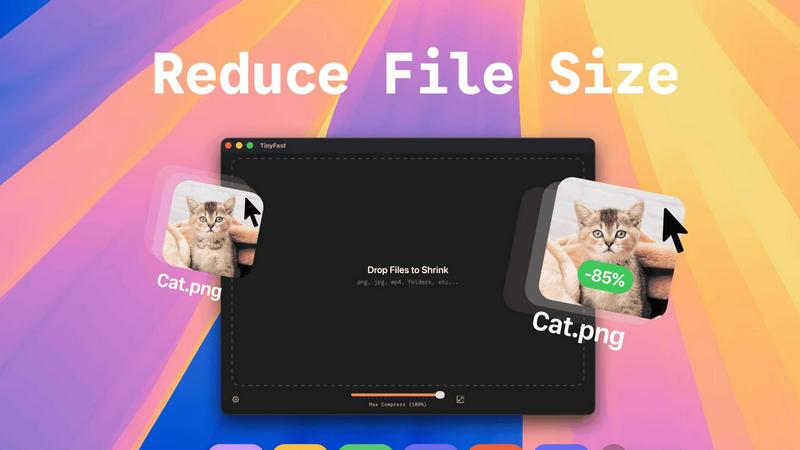
About TinyFast
TinyFast is a cutting-edge macOS application designed to facilitate the compression of various file types, ranging from images and videos to documents and audio files. It supports popular formats such as PNG, JPEG, MP4, MOV, PDF, SVG, WebP, MP3, and GIF, providing a comprehensive solution for file size reduction. Tailored specifically for developers, designers, and creative professionals, TinyFast prioritizes both speed and privacy, allowing users to compress files directly on their devices without the need for uploads to potentially insecure online servers. With its intuitive drag-and-drop interface, users can efficiently reduce file sizes while maintaining high quality, ensuring that sensitive assets remain protected. By streamlining the compression process, TinyFast not only enhances productivity but also empowers users to manage their files with confidence. Experience fast, local compression that aligns with the demands of modern workflows, while keeping your files safe and secure.
Features of TinyFast
Batch & Drag-Drop Shrink
TinyFast allows you to drop entire folders for compression, providing optimized output in mere seconds. This feature is invaluable for users with multiple files, saving time and effort by processing batches at once.
Blazing-Fast Compression
Experience the power of optimized native engines built for speed. TinyFast shrinks large files in seconds, eliminating the waiting times often associated with online compression tools. You can compress files instantly without having to wait for uploads or downloads.
Resize Resolution
This feature enables users to set automatic resizing for images and videos, allowing for precise control over the output dimensions. This is particularly useful for adapting files for specific platforms or uses, ensuring that you get the right size every time.
100% Local & Private
TinyFast is designed with user privacy in mind. All file compression is performed locally on your device, meaning your files never leave your machine. This guarantees total privacy by design, making it a reliable choice for handling confidential assets.
Use Cases of TinyFast
Graphic Designers
Graphic designers often work with high-resolution images that need to be optimized for web use. TinyFast allows them to compress multiple files quickly while retaining quality, making it easier to share work with clients without sacrificing performance.
Video Editors
For video editors, managing file sizes is crucial, especially when dealing with large projects. TinyFast enables rapid compression of video files, ensuring that editors can easily store and share their work without lengthy upload times.
Web Developers
Web developers benefit from TinyFast's ability to compress images and documents before uploading them to websites. This optimization enhances website performance and loading times, contributing to an overall better user experience.
Content Creators
Content creators can use TinyFast to compress audio and video files before publishing them on social media platforms. This ensures that their content remains high-quality while also adhering to file size restrictions imposed by various platforms.
Frequently Asked Questions
What file types does TinyFast support?
TinyFast supports a wide range of file types including images (PNG, JPG, TIFF, HEIC, WEBP, GIF, BMP, SVG), videos (MP4, MOV, M4V), documents (PDF, DOCX), code files (JS, CSS, JSON), and audio files (MP3).
Is my data safe with TinyFast?
Absolutely. TinyFast is designed to keep your files on your device. There are no uploads to cloud servers, ensuring that your data remains private and secure throughout the compression process.
How does the drag-and-drop feature work?
The drag-and-drop feature is simple and intuitive. Users can easily drag files or entire folders into the TinyFast interface and receive compressed versions almost instantly, streamlining their workflow significantly.
What is the pricing structure for TinyFast?
TinyFast offers a free tier that allows users to compress up to 5 files per day, as well as a lifetime plan for €17.99 and a monthly subscription for €2.99 after a 3-day trial. Each plan grants access to all features, ensuring flexibility for varying user needs.
Explore more in this category:
Similar to TinyFast

Panzoe
Panzoe is an all-in-one AI platform for personal productivity, business automation, AI assistants, content creation, and custom AI solutions.

AIPetGen
AIPetGen turns a photo of your dog, cat, or other pet, or a written description, into a new picture or a short animation.
Novastart
Novastart brings apps and files onto an infinite canvas where people and AI agents can work together.

MyPhotoAI
Turn your selfies into AI headshots and portraits. Get 3 photos for US$5 or every photo from one shoot for US$10. No subscription.

AUTOMATER.ai
A tray helper for every AI coding tool: sessions, alerts and usage in one place
Remove Image Background
Free background remover that runs entirely in your browser — zero uploads, full resolution, no watermark. Your photos never leave your device.

Sprite Sheet Maker
A free browser-based toolkit for creating, cutting, converting, and previewing sprite sheet animations.

Kody Tools
Free collection of online developer utilities, code formatters, and digital converters designed to streamline your daily workflow.