
SubtitlesFast
SubtitlesFast effortlessly adds stunning animated subtitles to your videos in minutes, making editing a breeze.
VisitPublished on:
August 30, 2025
Pricing:
About SubtitlesFast
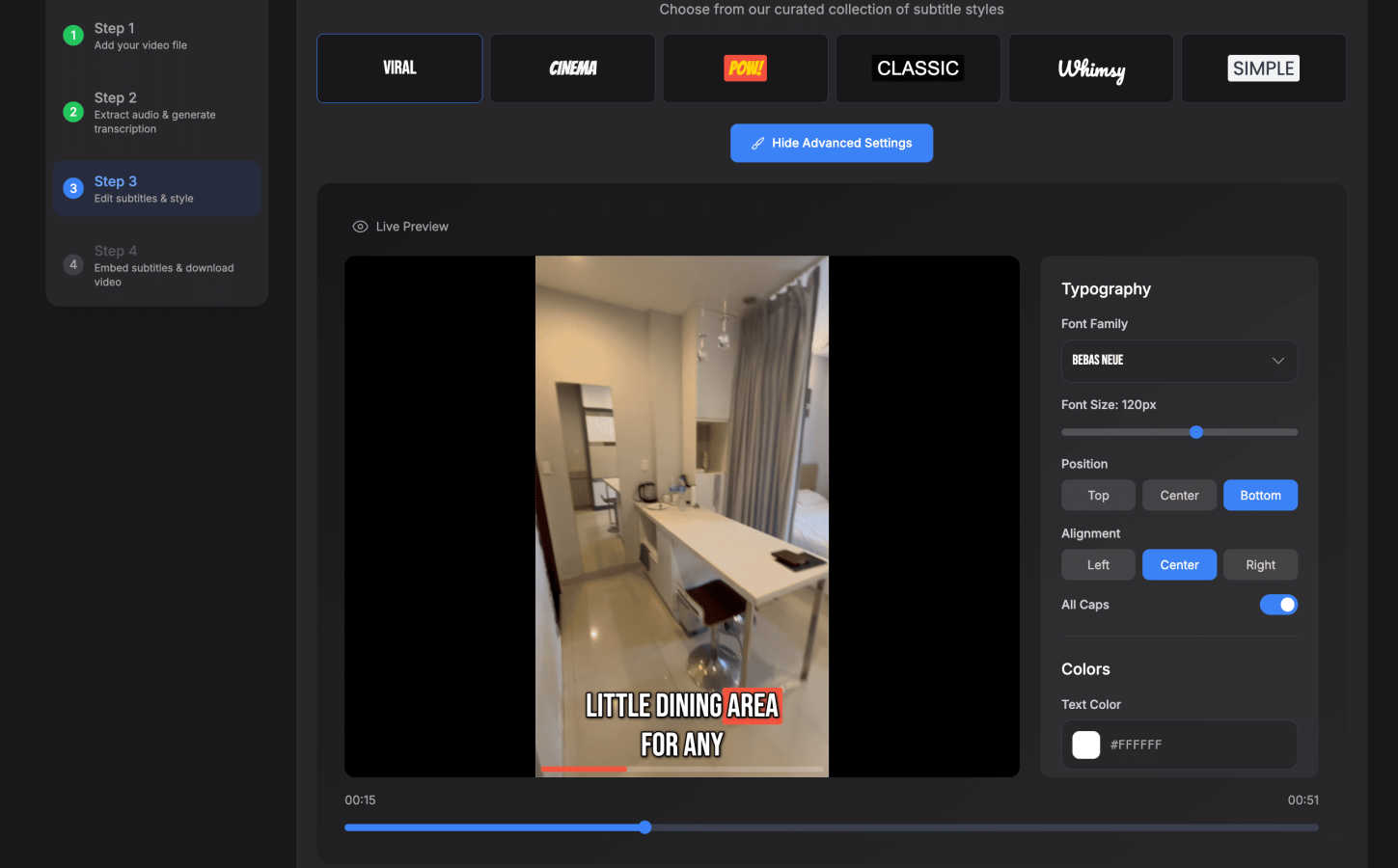
SubtitlesFast is a cutting-edge, browser-based application designed specifically for content creators who need to add professional and animated subtitles to their videos quickly and easily. This tool is ideal for daily content creators, marketers, and vloggers who want to enhance engagement and accessibility in their videos without the complexities often associated with traditional video editing software. SubtitlesFast streamlines the workflow by allowing users to upload their videos, utilize AI-driven transcription in over 50 languages, customize subtitles, and export finished projects in mere minutes—all from their phone or computer. Its simplicity, speed, and focus on essential features make it a valuable asset for anyone looking to produce polished, engaging content consistently, without the bloat and cost of other tools. With the promise of a faster, cleaner, and more private experience, SubtitlesFast empowers creators to publish compelling videos that stand out on social media platforms.
Features of SubtitlesFast
Auto-Transcription
SubtitlesFast employs advanced AI technology to provide fast and accurate auto-transcription in over 50 languages. This feature ensures that creators can easily generate subtitles without the need for manual input, saving valuable time and effort while enhancing video accessibility for diverse audiences.
Customization Options
Users can customize their subtitles according to their brand aesthetic, choosing from over 30 animated styles and various text formats. This level of customization allows creators to maintain their unique voice and style while ensuring that their subtitles enhance the visual appeal of their videos.
One-Click Export
With SubtitlesFast, exporting finished videos is a breeze. The one-click export feature allows users to download their subtitled videos ready for sharing on platforms like TikTok, YouTube, and Instagram, streamlining the publishing process and eliminating the need for additional editing software.
Simple User Interface
SubtitlesFast is designed with a user-friendly interface that requires no learning curve. Creators can easily navigate the app to upload videos, edit subtitles, and add music or images, making it accessible for users of all skill levels. This simplicity helps users focus on creating great content rather than getting bogged down by complicated tools.
Use Cases of SubtitlesFast
Daily Video Production
SubtitlesFast is perfect for creators who produce content on a daily basis, such as vloggers or marketers. The app allows them to quickly add subtitles to their videos, significantly reducing editing time and enabling them to post more frequently.
Social Media Engagement
Marketers and content creators can use SubtitlesFast to enhance the accessibility of their videos, making them more engaging for viewers. By adding animated subtitles, they can capture audience attention and increase viewer retention on social media platforms.
Multilingual Content Creation
Creators targeting global audiences can benefit from the multi-language support offered by SubtitlesFast. The ability to generate subtitles in over 50 languages allows them to reach and engage diverse audiences effectively, enhancing their content's impact.
Quick Turnaround for Events
For live events or webinars, SubtitlesFast provides a fast solution for adding subtitles to recorded sessions. This ensures that content remains accessible and professional, even when time constraints are a concern, making it an ideal tool for event organizers.
Frequently Asked Questions
How does SubtitlesFast ensure accuracy in transcription?
SubtitlesFast utilizes advanced AI technology to provide fast and precise transcription. The system is designed to handle various accents and dialects, ensuring that users receive high-quality subtitles that reflect the spoken content accurately.
Can I customize the appearance of my subtitles?
Yes, SubtitlesFast offers extensive customization options, including over 30 animated styles and the ability to edit text formats. This allows creators to tailor their subtitles to match their brand's aesthetic and enhance their videos' visual appeal.
Is there a limit to the length of videos I can upload?
SubtitlesFast supports a wide range of video lengths, making it suitable for both short clips and longer videos. However, for the best performance, it's recommended to check the platform's specific guidelines regarding file sizes and formats.
Is there a free trial available for new users?
Yes, SubtitlesFast offers a free trial without watermarks, allowing users to explore the app's features and capabilities before committing to a subscription. This enables new users to experience the efficiency and quality of the tool firsthand.
Similar to SubtitlesFast

Panzoe
Panzoe is an all-in-one AI platform for personal productivity, business automation, AI assistants, content creation, and custom AI solutions.
TryH3 - MiniMax H3 Video Generator
Try MiniMax Hailuo H3 video generation in the browser

AIPetGen
AIPetGen turns a photo of your dog, cat, or other pet, or a written description, into a new picture or a short animation.

CleanSmart
CleanSmart removes duplicates, fixes formatting, fills gaps, and flags anomalies in one automated pass. No code. No data engineers.
Novastart
Novastart brings apps and files onto an infinite canvas where people and AI agents can work together.

AdsTurbo
Turn winning ads and product links into new video ad variations with AI actors, then translate them into 35+ languages with lip sync.


AUTOMATER.ai
A tray helper for every AI coding tool: sessions, alerts and usage in one place