
Subclip
Subclip is an AI video editor that automates editing, captions, and dubbing to save creators time and enhance global reach.
Visit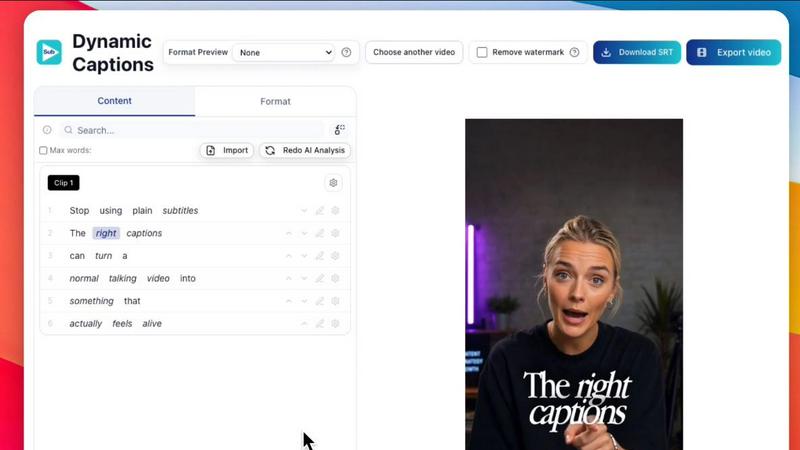
About Subclip
Subclip is an innovative AI-powered video editing platform designed for creators, marketers, educators, and anyone involved in video production. It revolutionizes the way users edit videos by allowing them to treat video transcripts just like a document. This seamless drag-and-drop interface enables users to edit videos with unprecedented ease, enhancing their storytelling ability while significantly reducing the time spent on editing. Subclip’s advanced features include voice cloning for re-recording segments, automatic removal of silences and filler words, and the generation of accurate subtitles in multiple languages. With a focus on efficiency, Subclip streamlines the entire video production process, making it ideal for YouTubers, podcasters, online educators, and content teams. By prioritizing simplicity and speed, this platform empowers users to create high-quality videos without the steep learning curve typically associated with traditional video editing tools. Subclip's freemium pricing model, which includes a free tier and affordable paid plans, makes it accessible for all creators.
Features of Subclip
AI Clipping
Subclip's AI Clipping feature automatically identifies high-energy segments, punchlines, and key emotional shifts in your video content. This means you can focus on the most engaging parts of your footage without tedious manual scrubbing, ultimately saving time and improving engagement.
Voice Cloning
With Subclip's Voice Cloning feature, users can effortlessly re-record parts of their videos using their own voice. This innovative technology allows for seamless dubbing and enhances the personalization of video content, making it more relatable and engaging for viewers.
Auto-Subtitles
The Auto-Subtitles feature generates dynamic, accurate captions for your videos with just one click. This not only enhances accessibility for viewers but also helps you reach a wider audience by making your content more inclusive.
Multi-Language Dubbing
Subclip offers Multi-Language Dubbing, enabling creators to translate and dub their videos into over 21 languages while maintaining the original tone and emotion. This feature allows content to resonate with diverse audiences globally, expanding reach and engagement.
Use Cases of Subclip
For Content Creators
Content creators can use Subclip to easily edit long-form videos into engaging snippets that capture audience attention. By leveraging AI Clipping, they can extract highlights with minimal effort, boosting viewership and engagement rates.
For Educators
Educators can take advantage of Subclip to dub their recorded lectures or courses into multiple languages, making their materials accessible to a broader audience. This feature is particularly useful for online courses aiming to reach international students.
For Agencies
Agencies can increase their output without additional editing hours using Subclip's collaborative features. The ability to share projects and receive feedback in real-time ensures efficient teamwork and timely content delivery.
For Podcasters
Podcasters can enhance their audio quality by utilizing Subclip's voice enhancement tools, which remove background noise and silences. This results in polished audio that elevates the overall listening experience for their audience.
Frequently Asked Questions
How does Subclip simplify video editing?
Subclip simplifies video editing by allowing users to edit transcripts like a document. This intuitive interface enables quick edits without the need for complex timelines, saving time and effort.
Can I collaborate with my team using Subclip?
Yes, Subclip features collaborative tools that let you share projects with your team, collect feedback, and work together seamlessly in a single workspace.
What types of videos can I create with Subclip?
Subclip is versatile and can be used to create a variety of video content, including YouTube videos, online courses, podcasts, promotional materials, and more.
Is there a free version of Subclip?
Yes, Subclip offers a freemium pricing model, which includes a free tier that allows users to explore its basic features, along with affordable paid plans for those needing advanced functionalities.
Similar to Subclip


Chronicle
Chronicle is your voice-based AI memory that captures your thoughts and retrieves them instantly when you need answers.

Elispeak
Elispeak is an AI English tutor that provides instant feedback and personalized practice for interviews, work, and real-life conversations.

Nonna.Digital
Nonna.Digital lets you instantly video call a loved one with a single tap, making connection effortless for everyone.

Hush Touch | Voice-to-Text for MacOS
Hush Touch is offline voice-to-text for Mac that learns your vocabulary for twenty dollars.

Glossa
Glossa provides real-time AI translation for sermons to connect multilingual congregations instantly.

Bantr: Offline & Unlimited TTS for Mac
Bantr is a private, unlimited text-to-speech app for Mac that works entirely offline.

KaiCalls
KaiCalls is your 24/7 AI voice agent that instantly answers calls, qualifies leads, and schedules appointments for your.