
About Refbox
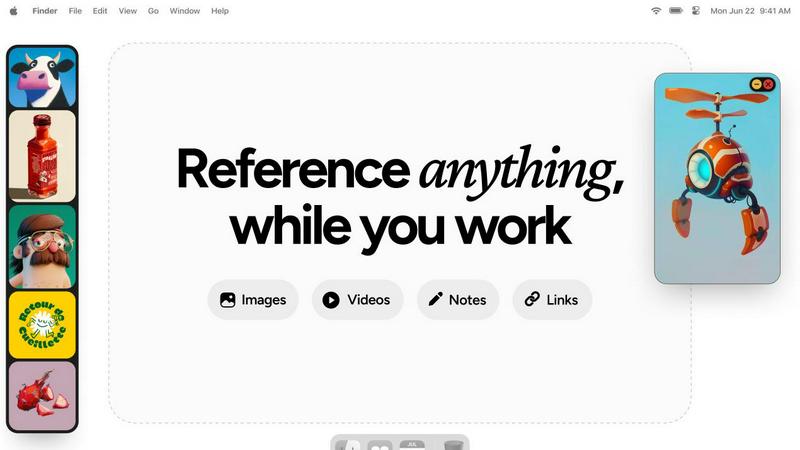
Refbox is the definitive floating reference manager for creative professionals. It is designed to eliminate the disruptive cycle of alt-tabbing between folders, browsers, and your primary work application. By allowing you to pin images, GIFs, videos, and notes in resizable, always-on-top frames directly over your workspace, Refbox keeps your inspiration and critical references perpetually in view. This tool is essential for artists, designers, animators, and content creators across disciplines like 3D art, illustration, UI/UX, motion graphics, and photography, who require instant visual access to maintain a deep state of creative flow. Its core value proposition is a seamless, distraction-free workflow where references are available the moment you need them, without digging or searching. With intelligent features like Masonry Mode for organized canvas viewing, instant collection swapping, and a suite of precision tools for media interaction, Refbox transforms a cluttered, multi-window process into a streamlined and visually intuitive experience. It is built for professionals who cannot afford distractions, prioritizing focused creation over administrative friction.
Features of Refbox
Always-on-Top Floating Frames
Refbox’s signature feature allows you to pin any reference—images, videos, GIFs, or notes—in a resizable window that floats above all other applications. This ensures your inspiration is always visible while you sketch, design, or animate. You can minimize frames to access apps behind them or lock them in place to work directly over the reference, creating a truly integrated and non-disruptive workspace that keeps you in your creative zone.
Masonry Mode & Infinite Canvas
Organize all your visual references on a single, expansive canvas. Masonry Mode automatically arranges your pinned items in a clean, organized grid, allowing you to see your entire collection of inspiration at a glance. This infinite canvas is perfect for moodboarding and comparing multiple references side-by-side, providing a holistic view of your project’s direction without the clutter of multiple windows or tabs.
Advanced Media Handling & Tools
Refbox goes beyond simple image display with a curated set of powerful tools for deep creative work. Step through GIFs frame-by-frame for detailed animation reference, use the built-in color picker on any media to sample and copy hex codes, and crop images to focus on specific details. It also supports SVG files and can generate website screenshots from pasted URLs, making it a versatile hub for all reference types.
Intuitive Shortcuts & Workflow Optimizations
Designed for speed, Refbox puts full control at your fingertips. Quickly swap between floating references using arrow keys, change entire collections with a single click, or auto-hide your Refbox to reveal it only when needed. These thoughtful shortcuts and customizable behaviors minimize manual interaction, saving you hours over a project and allowing you to maintain an uninterrupted state of creative flow.
Use Cases of Refbox
Digital Illustration & Concept Art
Illustrators and concept artists can pin character sketches, environment photos, and color palettes in floating frames directly over their canvas in Photoshop or Procreate. This allows for constant visual comparison and inspiration, enabling accurate translation of references into original artwork without breaking concentration to search through files or browser tabs.
3D Modeling & Animation
For 3D artists and animators, Refbox is indispensable for viewing orthographic reference sheets, texture inspiration, or motion study videos while working in complex software like Blender or Maya. The ability to lock a frame and work behind it, or step through a GIF frame-by-frame, provides precise control for modeling proportions and animating movements with high accuracy.
UI/UX & Web Design
Designers can streamline their workflow by floating website screenshots, component libraries, and style guides next to their design tool (Figma, Sketch, Adobe XD). The color picker tool allows instant sampling from any reference, and notes can hold project-specific copy or checklist requirements, keeping all critical project assets visible and accessible throughout the design process.
Motion Graphics & Video Editing
Motion designers and video editors can use Refbox to keep storyboards, style frames, and reference videos pinned on-screen while working in After Effects or Premiere Pro. This ensures visual consistency and creative direction are always top of mind, facilitating faster decision-making and a more cohesive final product without constant context switching.
Frequently Asked Questions
What types of files does Refbox support?
Refbox supports a wide range of media essential for creative work. You can directly pin images (JPG, PNG, SVG, etc.), video files, and GIFs. It also supports text notes with styling and checklist options. A unique feature is the ability to paste a website URL, and Refbox will automatically generate a screenshot for you to use as a visual reference.
How does Refbox help maintain focus?
Refbox is engineered to minimize workflow friction. By keeping references in always-on-top windows, it completely eliminates the disruptive need to switch applications or dig through folders. Features like auto-hide, keyboard shortcuts for swapping references, and the ability to minimize frames mean you interact with your references instantly, keeping you in a state of deep creative flow.
Can I organize my references into different projects?
Yes, Refbox allows you to create multiple, separate Collections. This lets you organize references by client, project, or theme. You can switch between these entire collections instantly with a single click, making it effortless to jump between different tasks while keeping all relevant references neatly organized and immediately accessible.
Is there a free trial or version available?
Refbox operates on a simple, one-time purchase model. This provides you with a lifetime license for the application, including all current features and future updates. This approach is favored by many professionals as it avoids ongoing subscription fees, offering long-term value and stability for your creative toolkit.
Pricing of Refbox
Refbox is available for a one-time purchase fee. This model provides a lifetime license for the application, granting you access to all current features and future updates without any recurring subscription costs. This straightforward pricing is designed to offer long-term value and simplicity for creative professionals.
Explore more in this category:
Similar to Refbox

Panzoe
Panzoe is an all-in-one AI platform for personal productivity, business automation, AI assistants, content creation, and custom AI solutions.
Novastart
Novastart brings apps and files onto an infinite canvas where people and AI agents can work together.

AUTOMATER.ai
A tray helper for every AI coding tool: sessions, alerts and usage in one place
Remove Image Background
Free background remover that runs entirely in your browser — zero uploads, full resolution, no watermark. Your photos never leave your device.

PixelMCP
Use every top AI image model (Nano Banana, GPT Image, FLUX and more) right inside ChatGPT, Claude, Gemini or any MCP client. One credit balance, no su
Kody Tools
Free collection of online developer utilities, code formatters, and digital converters designed to streamline your daily workflow.
MotionVault
MotionVault: Motion Graphics, Video Templates & Overlays for Editors

Pixolm
Create AI images from prompts and references, then refine them with an AI agent and editing tools in one workspace.