
QuickSigner
QuickSigner lets you eSign documents and collect legally binding signatures online in seconds, with simple powerful security and API integration.
Visit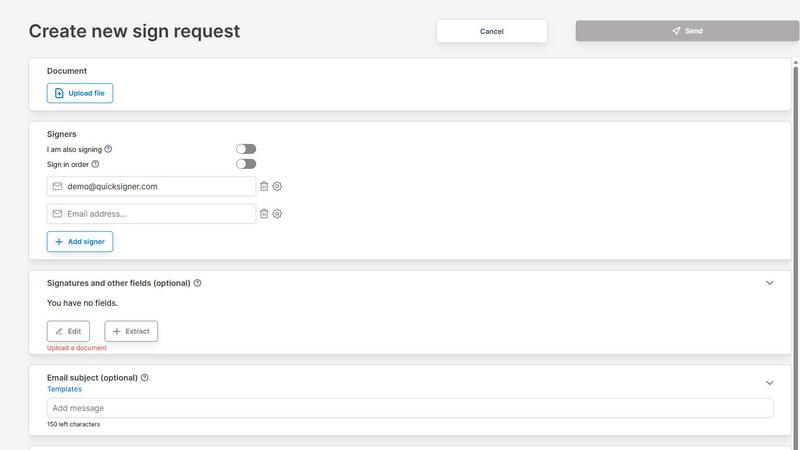
About QuickSigner
QuickSigner is a streamlined, end-to-end electronic signature platform designed to transform how businesses handle document signing and agreement workflows. It replaces the slow, cumbersome process of printing, scanning, and emailing documents with a secure, digital solution that finalizes agreements in minutes rather than days. Built for small to medium-sized teams, freelancers, and enterprises alike, QuickSigner offers a simple yet highly effective online application that requires no account creation or software installation for recipients. The platform supports a wide range of document types, including PDF and Word files, and allows users to upload, add signature fields, send, and track documents all from a single interface. Its core value proposition lies in its speed, simplicity, and legal validity. QuickSigner provides Adobe Approved Trust List (AATL) electronic signatures, ensuring that every signed document meets the highest standards of legal compliance and security. Additionally, the platform is ISO 27001 certified, demonstrating a rigorous commitment to information security management. Whether you are closing a sales deal, onboarding a new employee, or finalizing a partnership agreement, QuickSigner delivers a cost-effective alternative to more expensive competitors like DocuSign, offering powerful capabilities without unnecessary complexity. Trusted across industries from accounting to travel, QuickSigner helps teams achieve over 80% greater operational efficiency while saving significant budget resources.
Features of QuickSigner
AATL Electronic Signatures
QuickSigner uses Adobe Approved Trust List (AATL) electronic signatures, which are globally recognized as legally binding and compliant with the most stringent regulations. This feature ensures that every signature applied through the platform carries the same legal weight as a handwritten signature, giving users and their recipients complete confidence in the validity of their agreements. The AATL certification is embedded directly into the signature process, making it seamless for users to generate secure, tamper-evident signatures without additional steps or third-party verification. This is particularly critical for industries that require high levels of legal security, such as real estate, finance, and healthcare.
ISO 27001 Certified Security
Security is a cornerstone of QuickSigner, and the platform is ISO 27001 certified, meaning it adheres to an internationally recognized standard for information security management systems. This certification covers the entire lifecycle of document handling, from upload to storage and finalization. It ensures that all data is encrypted both in transit and at rest, access is strictly controlled, and regular audits are conducted to prevent breaches. For businesses that handle sensitive client information, such as contracts with personal identification details or financial terms, this certification provides peace of mind that their documents are protected against unauthorized access and cyber threats.
Real-Time Document Tracking and Management
QuickSigner offers a comprehensive dashboard that allows users to monitor the signing process in real time. You can see exactly when a recipient opens the document, views each field, and applies their signature. This visibility eliminates the guesswork of waiting for responses and enables proactive follow-ups. Additionally, the platform provides robust document management features, including the ability to create preset templates for frequently used agreements, track sending history, and organize completed documents. This streamlines workflows for teams, ensuring that nothing falls through the cracks and that all signed documents are easily retrievable.
Multi-Device and No-Account Signing
Recipients can sign documents from any device including desktops, tablets, or smartphones without needing to create an account or install any software. QuickSigner sends a secure link via email, and the recipient simply clicks, reviews, and signs. This frictionless experience dramatically increases completion rates, as there are no barriers to entry. The platform is fully responsive, ensuring that signature fields, date fields, and text fields display correctly on any screen size. This feature is especially valuable for businesses that work with external clients or partners who may not be tech-savvy or who prefer to sign on the go.
Use Cases of QuickSigner
Streamlining Sales Contract Approvals
Sales teams can use QuickSigner to accelerate the closing of deals by sending contracts for signature immediately after a verbal agreement is reached. Instead of waiting days for a PDF to be printed, signed, scanned, and emailed back, a sales representative can upload the contract, add the necessary fields, and send it to the client in under a minute. The client signs from their phone or computer, and the sales team receives the completed document instantly. This reduces the sales cycle from days to hours, improving cash flow and customer satisfaction. Companies like Authentic Adventures have reported cutting their agreement process time by 90% using this approach.
Efficient Employee Onboarding and HR Documentation
Human resources departments can leverage QuickSigner to digitize the entire onboarding process. Offer letters, employment contracts, non-disclosure agreements, and policy acknowledgments can all be uploaded as templates and sent to new hires in a single batch. The HR team can track who has signed and who has not, and automatically store completed documents in a secure repository. This eliminates the administrative burden of chasing paper forms and reduces the risk of lost documents. For small teams like those at Smooth Accounting, QuickSigner has replaced more expensive tools like DocuSign entirely, providing a cost-effective solution that handles all HR documentation needs.
Managing Vendor and Partnership Agreements
Businesses that work with multiple vendors, contractors, or partners can use QuickSigner to manage a high volume of agreements efficiently. For example, a travel agency like Authentic Adventures might need to sign agreements with hotels, tour operators, and transportation providers. QuickSigner allows them to send multiple agreements simultaneously, each with specific signature fields and terms. The real-time tracking feature ensures that the business knows exactly which agreements are pending and which are finalized. This use case highlights the platform's ability to handle complex workflows with multiple signers, up to 10 per sign request on the Business plan, making it ideal for supply chain management.
Simplifying Client Intake and Consent Forms
Service-based businesses such as accountants, lawyers, and consultants can use QuickSigner to streamline client intake processes. Instead of mailing or emailing PDF forms that clients must print and return, professionals can send digital intake forms, consent agreements, and engagement letters directly through the platform. Clients can review and sign on any device, and the professional receives the completed form instantly. This not only speeds up the onboarding process but also creates a clear, auditable trail of consent. Happy Kids, a customer in the childcare sector, reported that QuickSigner transformed their agreement process, making it 93% more effective and significantly improving operational efficiency.
Frequently Asked Questions
Are electronic signatures from QuickSigner legally binding?
Yes, QuickSigner uses Adobe Approved Trust List (AATL) electronic signatures, which are recognized as legally binding in most countries around the world, including the United States under the ESIGN Act and the European Union under eIDAS. The platform also complies with ISO 27001 standards for security, ensuring that the signature process is tamper-evident and auditable. This means that signed documents hold the same legal weight as handwritten signatures in court.
Do recipients need to create an account to sign a document?
No, recipients do not need to create an account or install any software to sign a document. QuickSigner sends a secure link via email, and the recipient can click the link to access the document from any device including desktop, tablet, or smartphone. They simply review the document, fill in any required fields, and apply their signature. This frictionless process significantly increases the likelihood of quick completion.
What types of documents does QuickSigner support?
QuickSigner supports PDF and Word documents, which covers the vast majority of business agreements, contracts, and forms. Users can upload files directly by dragging and dropping them into the platform. Additionally, the platform allows you to add multiple types of fields, including signature fields, date fields, text fields, and stamp fields. For larger documents, the Business plan supports up to 10 MB file sizes and up to 3 documents per sign request.
How does QuickSigner ensure the security of my documents?
QuickSigner is ISO 27001 certified, which means it follows a rigorous framework for information security management. All documents are encrypted both in transit (using TLS/SSL protocols) and at rest (using AES-256 encryption). Access to documents is strictly controlled, and the platform undergoes regular security audits and penetration testing. Additionally, every signature includes a digital certificate that verifies the signer's identity and ensures that the document has not been altered after signing.
Pricing of QuickSigner
QuickSigner offers two pricing tiers designed to accommodate different usage levels. The Personal plan is free and intended for occasional use, including 3 documents per month, up to 3 signers per sign request, 1 document per sign request, a 5 MB maximum document size, and support for PDF documents with signature and stamp fields. The Business plan is priced at $5 per month per user, with a 14-day free trial. It includes all features from the Free Plan, plus unlimited documents per month, up to 10 signers per sign request, up to 3 documents per sign request, and a 10 MB maximum document size. Users can save 20% by choosing yearly payment at $48 per user per year. Both plans are designed to provide everything you need to sign, with nothing extraneous.
Explore more in this category:
Similar to QuickSigner
LightScreen
Free light screen tool online. Turn any display into a flashlight, ambient light, or solid-color screen. No download or sign-up.
Screen Issues
Free Online Screen Test Tool - Instantly diagnose dead pixels, lines, color issues, and flickering. Multiple test modes, no download needed.
Context Board
Context Board brings your numbers, docs, clients, content and day into one workspace that Claude and Codex can read and update.
Zeptap
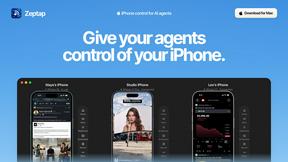
Zeptap lets AI use your real iPhone like you do: open apps, read the screen, tap, swipe and type. Reply to DMs, post Stories, book rides, test apps.

@fuck.it - email with attitude
Private email. Pure. Secure. Exclusive. No ads, no tracking, no data selling. GDPR compliant, EU-hosted.

FreeVideoGenerator
Free AI video generator: turn text prompts and photos into video clips with Sora 2, Veo 3.1, Wan and more. Free starter credits, no watermark download
sakuttoAI
A free suite of online tools for everyday tasks like PDF compression, image conversion, text diff and CSV to Excel.

Panzoe
Panzoe is an all-in-one AI platform for personal productivity, business automation, AI assistants, content creation, and custom AI solutions.