
Picture Enhancer
Picture Enhancer uses AI to deblur, upscale, and restore your photos directly in your browser with zero downloads needed.
Visit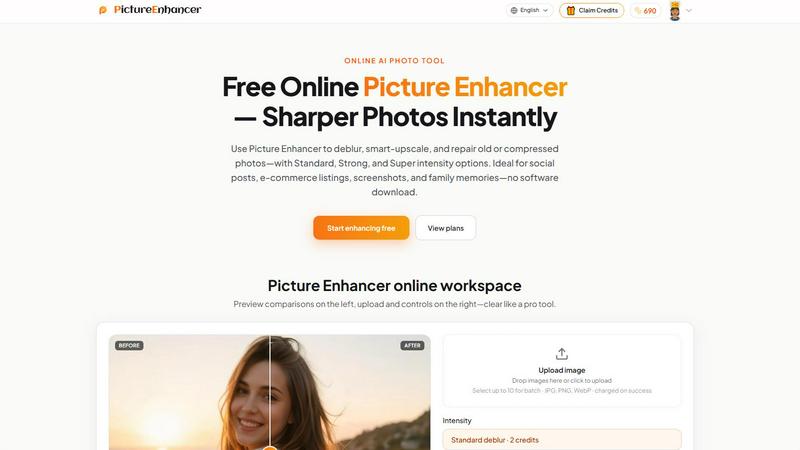
About Picture Enhancer
Picture Enhancer is a free online AI photo tool designed for creators, sellers, and everyday users who need sharper, clearer images without installing software or dealing with complex workflows. The product focuses on three core capabilities: deblurring, smart upscaling, and photo restoration. Users simply upload a JPG, PNG, or WebP image, select their desired mode and intensity level (Standard, Strong, or Super), and let the AI process the enhancement. A before-and-after preview slider allows for immediate quality comparison, and successful results are delivered watermark-free for download. The tool is built for speed, privacy, and accessibility. Guest users receive three free lifetime tries per IP with no signup required. For those who sign in, a credit-based system applies charges only on successful enhancements. Paid subscribers unlock Super intensity tiers and batch processing for up to ten images. Picture Enhancer serves a wide audience, from social media content creators and e-commerce sellers to families restoring old photographs and professionals cleaning up screenshots. The interface is clean and intuitive, making professional-grade image enhancement available to anyone.
Features of Picture Enhancer
AI Deblur
Picture Enhancer uses artificial intelligence to rebuild edges and texture lost due to camera shake, soft focus, or mild motion blur. Users can choose from Standard, Strong, or Super deblur intensity to match the severity of the blur. This feature is particularly effective at making faces, text, and fine details readable again, whether the source is a quick snapshot or a low-light capture.
Smart Upscale
The smart upscale feature enlarges images by 2x or 4x while adding realistic detail rather than simply stretching pixels. This allows users to transform small source files into usable assets for social media covers, product hero shots, or print previews. The AI analyzes the image content to fill in missing information, resulting in enlargements that maintain clarity and sharpness.
Old Photo and Damage Restore
This feature is designed to repair vintage or damaged images by reducing scratches, fading, compression artifacts, and other imperfections. Standard restore handles light wear, while Strong and Super restore tackle heavier damage on scanned family prints. The AI intelligently reconstructs missing or degraded areas, making old photos ready for sharing, printing, or archiving.
Batch Processing and Credit System
Paid users can enhance up to ten images in a single batch, saving significant time on larger projects. The credit system is transparent and fair: credits are deducted only on successful enhancements. Standard intensity costs 2 credits, Strong costs 4, and Super costs 6. New accounts receive starter credits, and guests enjoy three free lifetime tries per IP without any payment information required.
Use Cases of Picture Enhancer
Social Media Content Creation
Content creators can quickly sharpen blurry photos, upscale small images for profile covers, or restore compressed files before posting to platforms like Instagram, Facebook, or TikTok. The ability to preview before and after ensures the final output meets quality standards. With three free guest tries, creators can test the tool risk-free before committing to a plan.
E-Commerce Product Listings
Online sellers can enhance product photos to reduce compression noise, sharpen text on packaging, and upscale detail shots for a professional look. Clearer images help products stand out in crowded marketplaces and can improve conversion rates. The batch processing feature is especially valuable for sellers who need to enhance multiple product images efficiently.
Screenshot and UI Capture Enhancement
Professionals creating tutorials, support documentation, or software reviews can use Picture Enhancer to sharpen text edges and reduce artifacts in screenshots. This ensures that instructions, error messages, and interface elements are legible and professional. The deblur and upscale modes are particularly useful for cleaning up low-resolution captures.
Family Photo Restoration
Users can repair old, faded, or scratched family photographs by applying the restore mode with appropriate intensity. The AI reduces visible damage while preserving the original character of the image. Enhanced scans can be shared with family members, printed for albums, or archived digitally without the distraction of age-related imperfections.
Frequently Asked Questions
What is Picture Enhancer?
Picture Enhancer is a free online AI tool that improves image quality through deblurring, upscaling, and restoration. It is designed for creators, sellers, and everyday users who need sharper photos without downloading software. The tool supports JPG, PNG, and WebP formats and delivers watermark-free results on successful enhancements.
Can I try Picture Enhancer without signing in?
Yes, guest users receive three free lifetime tries per IP address with no signup required. This allows anyone to test the tool and evaluate its quality before creating an account. After using the three tries, signing in is necessary to continue using credits.
How does billing work after sign-in?
After signing in, users receive starter credits for free. Credits are charged only when an enhancement succeeds. Standard intensity costs 2 credits, Strong costs 4, and Super costs 6. Users can purchase monthly subscription plans that grant credits each cycle or buy permanent credit packs that never expire. Super tiers and batch processing are available only to paid users.
Are my photos safe?
Yes, Picture Enhancer uses private processing. Uploaded images are used only to complete the enhancement request and are not stored or shared beyond that purpose. The tool is designed with user privacy and data security as priorities, making it safe for personal and professional use.
Explore more in this category:
Similar to Picture Enhancer
ImageGenerator
Create and edit AI images online with multiple models, text-to-image, image-to-image, background removal, and upscaling.
AIPetGen
AIPetGen turns a photo of your dog, cat, or other pet, or a written description, into a new picture or a short animation.

MyPhotoAI
Turn your selfies into AI headshots and portraits. Get 3 photos for US$5 or every photo from one shoot for US$10. No subscription.

Raindance AI
Turn two authorized portraits into a seaside golden-hour video: a wooden dock, two people taking turns singing, and a slow pullback to the sunset. Pre

ImageGPT
ImageGPT is an all-in-one AI creative platform for generating, editing and transforming images and videos using AI.

AI Album Cover Maker
Create release-ready album covers from a prompt or photo. Generate, refine, and export art for singles, EPs, mixtapes, and playlists.

PixelMCP
Use every top AI image model (Nano Banana, GPT Image, FLUX and more) right inside ChatGPT, Claude, Gemini or any MCP client. One credit balance, no su
Sprite Sheet Maker
A free browser-based toolkit for creating, cutting, converting, and previewing sprite sheet animations.