
Photo3D
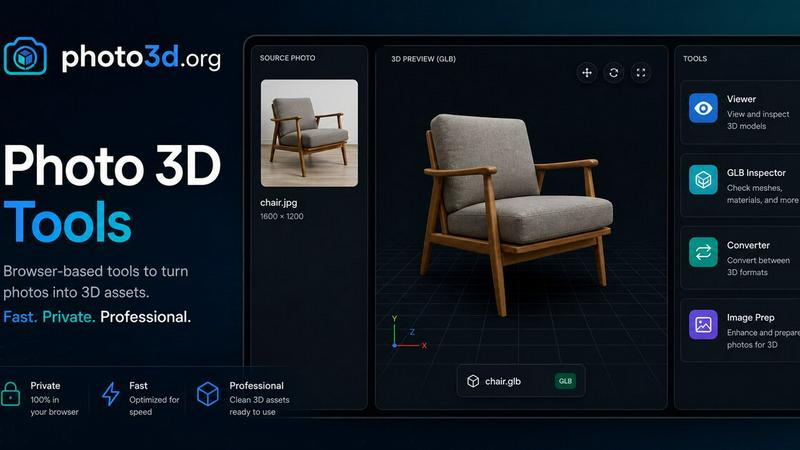
Photo3D turns images into GLB-ready 3D drafts for browser previews and practical file preparation.
VisitPublished on:
June 15, 2026
Pricing:
About Photo3D
Photo3D is a focused online workspace that transforms reference photos into reviewable 3D asset drafts. Designed for creators, developers, and product teams, it bridges the gap between a single image and a usable 3D model without requiring complex software setup or expensive hardware. The platform supports image-to-3D generation workflows using advanced AI models like Hunyuan3D-2.0, allowing users to upload a photo or paste a public image URL and receive a textured 3D asset in return. Beyond generation, Photo3D provides a complete toolchain for inspecting, comparing, and preparing 3D assets. Users can preview GLB models directly in the browser, inspect geometry and materials, compare different reconstruction passes, and convert between formats. The platform emphasizes quality over quantity by guiding users toward clean source images, appropriate model selection, and thorough asset inspection before handoff. With free browser-based tools for viewing, editing, converting, and checking textures, Photo3D reduces friction in the 3D asset pipeline. It is particularly valuable for teams that need quick, iterative drafts for product visualization, concept validation, or integration into larger 3D workflows. The public queue system allows testing without sign-up or credits, though GPU availability may vary.
Features of Photo3D
Image to 3D Generation
Upload a single reference photo or paste a public image URL to generate a textured 3D asset draft. The platform uses selected AI models like Hunyuan3D-2.0 to infer shape and texture from one clear subject. The public queue runs best effort without requiring sign-in or credits, making it accessible for quick tests and iterations. Supported image formats include JPG, PNG, WebP, GIF, and AVIF up to 10MB.
Browser-Based GLB Preview and Inspection
Review generated 3D models directly in the browser without downloading additional software. The GLB Inspector tool allows users to check model structure, scenes, meshes, materials, and animations. This immediate visual feedback helps teams validate geometry, scale, visibility, normals, and material coverage before sending the asset downstream for editing or publishing.
Model Comparison and Reconstruction Review
Compare different reconstruction passes, topology choices, and texture recovery results within the same workspace. Users can run the pixel-aligned lane for source fidelity, a second reconstruction pass for comparison, and a multi-view lane when front, side, or back references are available. This feature ensures teams select the best version of an asset before investing further time or credits.
Free Browser-Based 3D Tools
Access a suite of free tools that complement the generation workflow without leaving the browser. These include a 3D Model Viewer for inspecting GLB, OBJ, STL, and FBX files, a 3D Viewer and Editor for arranging and transforming models, a 3D Format Converter for local file conversion, a Texture Checker for verifying GPU memory, a Model Scale calculator, and image preparation tools like Image Compressor, Transparent PNG Maker, and WebP Converter.
Use Cases of Photo3D
Rapid Product Concept Visualization
Product teams can take a single product photo or concept reference and generate a 3D draft within minutes. This allows stakeholders to review geometry, scale, and material appearance early in the design process without waiting for full 3D modeling. The browser preview and comparison tools enable quick iterations and informed decisions before committing to production-ready assets.
Asset Preparation for E-Commerce and Marketing
E-commerce teams can convert product photos into 3D models for interactive product displays, augmented reality previews, or 360-degree spin views. The GLB handoff format is widely supported across web platforms and AR frameworks. Using the Texture Checker and Model Scale tools ensures assets meet platform requirements before upload, reducing rework and improving customer experience.
3D Asset Pipeline for Game Development and VR
Game developers and VR creators can use Photo3D to generate base mesh drafts from reference images, then inspect and compare topology options before importing into game engines. The format converter supports GLB, glTF, OBJ, PLY, and STL, ensuring compatibility with Unity, Unreal Engine, and other development environments. This streamlines the early prototyping phase of asset creation.
Educational and Research Prototyping
Researchers and educators can quickly generate 3D models from photographs for demonstration, analysis, or study purposes. The ability to compare different reconstruction passes and inspect model structure helps in understanding 3D generation techniques. The free tier and no-sign-up public queue make it accessible for classroom use or experimental projects without budget constraints.
Frequently Asked Questions
How do I start generating a 3D model from a photo?
Upload a JPG, PNG, WebP, GIF, or AVIF image up to 10MB, or paste a direct public image URL. Select a model like Hunyuan3D-2.0 from the available options, then click Start public queue. The system will process your request on a best-effort basis. You can check the result using the Check result button once processing completes. No sign-up or credits are required for public queue tests.
What file formats does Photo3D support for input and output?
Input images must be JPG, PNG, WebP, GIF, or AVIF formats up to 10MB. Generated 3D assets are delivered as GLB files by default. The free browser-based tools support conversion between 3MF, GLB, glTF, OBJ, PLY, and STL formats. The 3D Model Viewer can inspect GLB, OBJ, STL, and FBX files locally.
Can I use Photo3D without creating an account?
Yes, the public queue runs without requiring sign-in or credits. You can upload an image, start a generation job, and check results within the same browser session. However, queue IDs and returned model files remain visible only during that session. For persistent storage, credits, and advanced features, a paid account may be necessary.
What should I consider for the best 3D generation results?
Use a centered object with a simple background and a full silhouette to help the AI model infer shape accurately. One clear subject works better than a crowded scene. After generation, inspect the geometry, scale, normals, and material coverage using the GLB Inspector before handing the asset downstream. Compare different reconstruction passes if multiple options are available.
Similar to Photo3D

Agent Pets
Your Claude Code & Codex sessions as pets in Chrome. Approve, deny and reply to your coding agents from any tab.

Happy Horse AI Video
Use HappyVideo as a Happy Horse AI style AI video generator for text-to-video, image-to-video, native audio, and multi-shot video creation.

Design.com AI Image Generator
Turn text prompts into polished, copyright-safe visuals that plug directly into branded templates

Nano AI
Create and edit AI images, generate videos, and compare models in one creative workbench.
picttool
Create and edit images with a collection of easy-to-use AI tools
LightScreen
Free light screen tool online. Turn any display into a flashlight, ambient light, or solid-color screen. No download or sign-up.

Screen Issues
Free Online Screen Test Tool - Instantly diagnose dead pixels, lines, color issues, and flickering. Multiple test modes, no download needed.

Budgetpixel AI
Create and edit AI images, videos, music, and designs in one workspace, with multiple models, reusable characters, and API access.