
Easymotion - AI Motion Graphic Generator
Easymotion turns static images, data, or ideas into professional motion graphics and map animations in minutes.
VisitPublished on:
June 15, 2026
Pricing:
About Easymotion - AI Motion Graphic Generator
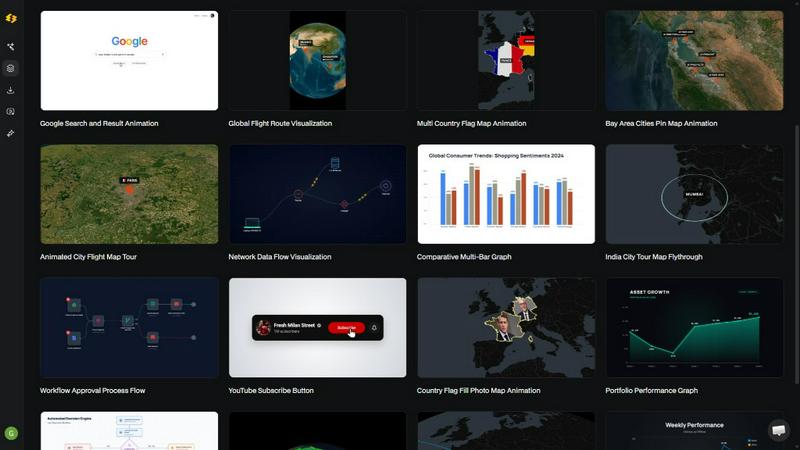
Easymotion is an AI-powered motion graphics generator and map animation platform designed for content creators, editors, marketers, founders, and data storytellers who need professional animated videos without the steep learning curve of traditional editing software. The platform transforms ideas, static images, spreadsheets, and PDFs into polished animated videos through a simple chat interface, eliminating the need for complex timeline editing or After Effects expertise. Users can generate a wide range of motion graphics including SaaS product promos, flowcharts, animated charts, UI explainers, quizzes, and map animations for flight routes, location pins, and geographic storytelling. After generating an animation, users can refine every detail by chatting with the AI to adjust colors, pacing, labels, layout, and visual style. Easymotion also offers a premium template library for starting from proven motion graphics layouts and customizing them for brand, campaign, or client content. The platform supports multiple export formats including MP4 and MOV with transparent backgrounds, and aspect ratios optimized for YouTube, TikTok, Instagram Reels, and social media posts. Built for speed and simplicity, Easymotion enables creators to produce videos in under five minutes and ship campaigns the same day, making professional motion graphics accessible to anyone with a browser.
Features of Easymotion - AI Motion Graphic Generator
Static Design into Animation
Upload any static image and let the AI bring it to life with stunning motion effects. This feature eliminates the need to manually animate each element, as the AI intelligently analyzes your image and applies smooth transitions, zooms, pans, and dynamic movements that make your visuals feel alive and engaging for your audience.
Map Animations Made Easy
Create professional map animations effortlessly and faster than ever before. Whether you need flight route visualizations, location pin drops, country flag fill highlights, or geographic storytelling sequences, Easymotion handles the complex animation curves and keyframes so you can produce polished map videos in minutes without any mapping or animation expertise.
Boring Sheets into Visuals
Upload a CSV or XLSX file and let the AI transform your raw data into beautiful animated charts and graphs. This feature automatically detects data patterns and generates visually compelling animations like bar charts, line graphs, and pie charts that stop the scroll and make your insights more engaging than static images ever could.
Perfect for Any Platform
Create videos in 16:9 for YouTube and landscape content, 9:16 for TikTok and Instagram Reels, 1:1 for square social posts, and 4:5 for feed-friendly vertical formats. Easymotion ensures your animations are optimized for every platform, so you can repurpose one project across multiple channels without manual resizing or reformatting.
Use Cases of Easymotion - AI Motion Graphic Generator
Social Media Video Creation
Marketers and content creators can quickly produce branded social media videos for platforms like TikTok, Instagram, and YouTube. By simply describing the desired video in plain English, users can generate promotional content, product teasers, and engaging visual stories that maintain brand consistency while dramatically reducing production time from hours to minutes.
Data Storytelling and Visualization
Data analysts and business professionals can turn spreadsheets and datasets into animated charts and graphs that communicate insights more effectively than static reports. This use case is ideal for presentations, social media posts, and client deliverables where animated data visualizations drive higher engagement and make complex information easier to understand at a glance.
Map Animation for Travel and Logistics
Travel bloggers, logistics companies, and content creators can build multi-stop travel route maps, flight path visualizations, and geographic storytelling sequences. This use case is perfect for travel reels, global business presentations, and educational content that requires showing movement across locations with professional polish and smooth animation transitions.
Product Marketing and SaaS Demos
Founders and startup teams can create professional product promos, UI explainers, and workflow animations without hiring freelance designers or learning complex editing software. This use case enables startups to build their social presence rapidly, iterate on campaign videos in real-time, and ship same-day marketing content that looks like it came from a professional studio.
Frequently Asked Questions
What is Easymotion?
Easymotion is an AI-powered motion graphics generator that lets you create professional videos simply by chatting. You can instantly generate map animations, animate static images, turn spreadsheets into data visualizations, and create social media videos without needing complex software like After Effects. It is built for creators, marketers, and businesses who need a faster way to produce polished video content directly in the browser.
How does AI motion graphics generation work?
It works in three simple steps. First, describe the animation you want in plain English. Second, refine the result using chat commands to adjust colors, timing, map styles, or assets. Finally, export your completed video as an MP4 or with transparent background. The AI handles all the keyframes and animation curves, so you never need to touch a timeline or learn complex editing techniques.
What types of videos can I create?
You can create a wide variety of motion graphics including SaaS product promos, flowcharts, animated charts, UI explainers, quizzes, and map animations for flight routes, location pins, and geographic storytelling. The platform also supports converting static images, spreadsheets, and PDFs into animation-ready scenes, making it versatile for social media, presentations, client deliverables, and educational content.
What export formats and aspect ratios are supported?
Easymotion supports export as MP4 or MOV, including videos with transparent backgrounds for editing workflows. Aspect ratio options include 16:9 for YouTube and landscape content, 9:16 for TikTok and Instagram Reels, 1:1 for square social posts, and 4:5 for feed-friendly vertical formats. This ensures your animations are ready to post everywhere without additional editing.
Pricing of Easymotion - AI Motion Graphic Generator
Pricing information is not available in the provided context.
Similar to Easymotion - AI Motion Graphic Generator

Design.com AI Image Generator
Turn text prompts into polished, copyright-safe visuals that plug directly into branded templates

Nano AI
Create and edit AI images, generate videos, and compare models in one creative workbench.
Influence
Connect AI-assisted social post preparation with review & scheduling

picttool
Create and edit images with a collection of easy-to-use AI tools

LightScreen
Free light screen tool online. Turn any display into a flashlight, ambient light, or solid-color screen. No download or sign-up.

GPT Image Hub
Curated image prompts, reusable templates, and multi-model AI generation in one workspace.

NanoBanana
Generate and edit AI images with six models, references, templates, and a visual workflow canvas.