
Rendery3D vs TinyFast
Side-by-side comparison to help you choose the right AI tool.

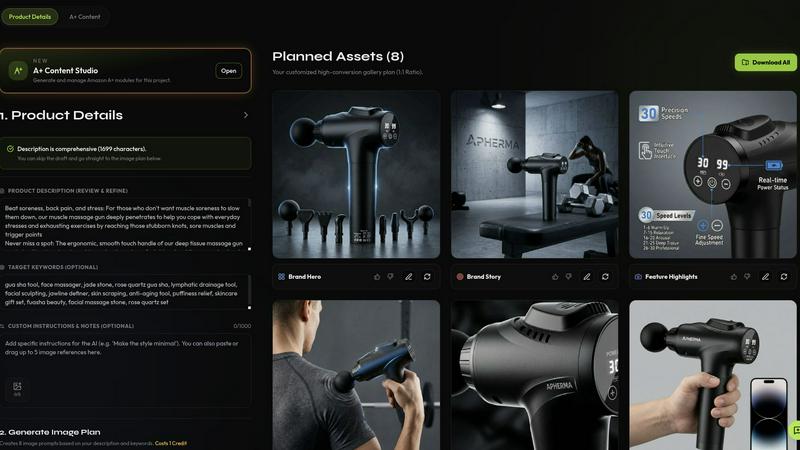
Rendery3D transforms product photos into stunning 3D-rendered images and optimized listings in minutes, elevating your ecommerce brand.
Last updated: April 13, 2026

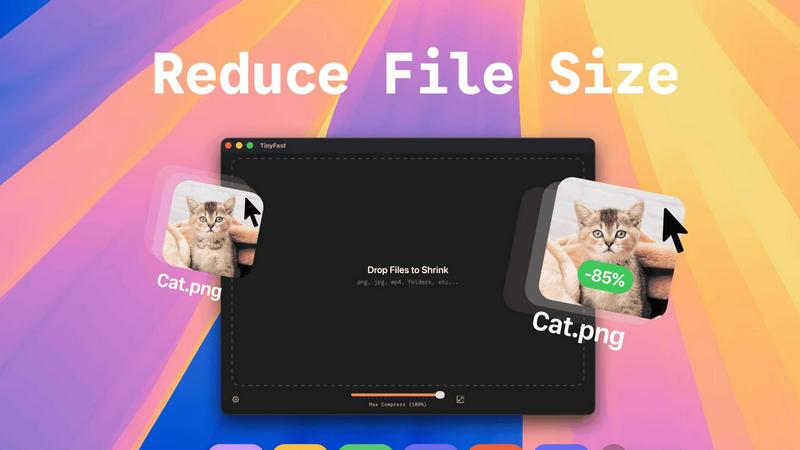
Effortlessly compress images, videos, and PDFs on your Mac while keeping your files private and secure with TinyFast.
Last updated: February 28, 2026
Visual Comparison
Rendery3D
TinyFast
Feature Comparison
Rendery3D
Scene Generation
Rendery3D allows users to place products within various scenes through simple text prompts. This feature ensures that every image maintains a polished, 3D-rendered aesthetic, driving higher click-through rates and making products stand out.
Smart Shot Planning
The platform intelligently analyzes your product to create an optimized 9-image shot plan, which includes hero shots, lifestyle images, infographics, and more. This systematic approach ensures no essential visuals are missed, enhancing the product's online presentation.
Listing Copy Generator
Rendery3D generates persuasive titles, bullet points, keywords, and HTML descriptions that are optimized for Amazon SEO. This feature helps sellers create engaging product listings that attract potential buyers and improve search visibility.
A+ Content Generator
With the A+ Content Generator, users can create premium Amazon content in minutes. It allows for the easy assembly of hero banners, comparison charts, and brand stories, all tailored to Amazon's specifications, resulting in enhanced product listings.
TinyFast
Batch & Drag-Drop Shrink
TinyFast allows you to drop entire folders for compression, providing optimized output in mere seconds. This feature is invaluable for users with multiple files, saving time and effort by processing batches at once.
Blazing-Fast Compression
Experience the power of optimized native engines built for speed. TinyFast shrinks large files in seconds, eliminating the waiting times often associated with online compression tools. You can compress files instantly without having to wait for uploads or downloads.
Resize Resolution
This feature enables users to set automatic resizing for images and videos, allowing for precise control over the output dimensions. This is particularly useful for adapting files for specific platforms or uses, ensuring that you get the right size every time.
100% Local & Private
TinyFast is designed with user privacy in mind. All file compression is performed locally on your device, meaning your files never leave your machine. This guarantees total privacy by design, making it a reliable choice for handling confidential assets.
Use Cases
Rendery3D
Amazon Product Launches
Sellers launching new products on Amazon can utilize Rendery3D to create visually striking and informative listings quickly. This accelerates the time-to-market and helps new products gain traction in competitive categories.
Catalog-Wide Creative Refreshes
Brands looking to revitalize their existing product listings can leverage Rendery3D for a comprehensive creative overhaul, ensuring all images align with current branding and quality standards, thus improving overall conversion rates.
Agency Client Workflows
Ecommerce agencies can streamline their workflows by using Rendery3D to generate high-quality images and listings for multiple clients simultaneously, enhancing productivity and ensuring consistency across various campaigns.
A/B Visual Testing
Rendery3D enables sellers to conduct A/B testing on different visual elements of their product listings. By generating variations of images and copy, users can determine which assets perform best, optimizing their listings for maximum conversion.
TinyFast
Graphic Designers
Graphic designers often work with high-resolution images that need to be optimized for web use. TinyFast allows them to compress multiple files quickly while retaining quality, making it easier to share work with clients without sacrificing performance.
Video Editors
For video editors, managing file sizes is crucial, especially when dealing with large projects. TinyFast enables rapid compression of video files, ensuring that editors can easily store and share their work without lengthy upload times.
Web Developers
Web developers benefit from TinyFast's ability to compress images and documents before uploading them to websites. This optimization enhances website performance and loading times, contributing to an overall better user experience.
Content Creators
Content creators can use TinyFast to compress audio and video files before publishing them on social media platforms. This ensures that their content remains high-quality while also adhering to file size restrictions imposed by various platforms.
Overview
About Rendery3D
Rendery3D is an innovative AI-powered platform designed specifically for Amazon sellers, DTC brands, and ecommerce agencies, revolutionizing the way product photography and listings are created. The platform transforms standard product images into a comprehensive suite of conversion-optimized visuals, including compliant hero shots, lifestyle scenes, infographics, scale comparisons, and carousel images. Unlike generic AI image generators, Rendery3D adheres to ecommerce quality standards, ensuring that every generated image meets the specific needs of online sellers. Its standout features, such as Auto Art Direction and an Automatic Feedback Loop (AFL), allow for seamless image generation without the need for extensive prompting, while also maintaining quality control. Additionally, Rendery3D goes beyond visuals by producing compelling listing copy—titles, bullet points, and descriptions—tailored to resonate with both the product’s visual narrative and keyword targets, making it an invaluable tool for those looking to enhance their online presence.
About TinyFast
TinyFast is a cutting-edge macOS application designed to facilitate the compression of various file types, ranging from images and videos to documents and audio files. It supports popular formats such as PNG, JPEG, MP4, MOV, PDF, SVG, WebP, MP3, and GIF, providing a comprehensive solution for file size reduction. Tailored specifically for developers, designers, and creative professionals, TinyFast prioritizes both speed and privacy, allowing users to compress files directly on their devices without the need for uploads to potentially insecure online servers. With its intuitive drag-and-drop interface, users can efficiently reduce file sizes while maintaining high quality, ensuring that sensitive assets remain protected. By streamlining the compression process, TinyFast not only enhances productivity but also empowers users to manage their files with confidence. Experience fast, local compression that aligns with the demands of modern workflows, while keeping your files safe and secure.
Frequently Asked Questions
Rendery3D FAQ
How does Rendery3D ensure image quality?
Rendery3D incorporates an Automatic Feedback Loop (AFL) that audits and corrects generated images before delivery. This process guarantees consistent quality and adherence to ecommerce standards.
Can I use my own product images?
Yes, Rendery3D allows users to upload their existing product photos, even basic smartphone images. The platform then transforms these into professional-quality listing images.
Is there a free trial available?
Yes, Rendery3D offers a free plan that allows users to create their first set of listing images at no cost, enabling them to experience the platform's capabilities before committing to a paid plan.
How long does it take to generate images?
Rendery3D is designed for speed, allowing users to generate a complete set of listing images in just 60 seconds or less, significantly reducing the time required for traditional photography setups.
TinyFast FAQ
What file types does TinyFast support?
TinyFast supports a wide range of file types including images (PNG, JPG, TIFF, HEIC, WEBP, GIF, BMP, SVG), videos (MP4, MOV, M4V), documents (PDF, DOCX), code files (JS, CSS, JSON), and audio files (MP3).
Is my data safe with TinyFast?
Absolutely. TinyFast is designed to keep your files on your device. There are no uploads to cloud servers, ensuring that your data remains private and secure throughout the compression process.
How does the drag-and-drop feature work?
The drag-and-drop feature is simple and intuitive. Users can easily drag files or entire folders into the TinyFast interface and receive compressed versions almost instantly, streamlining their workflow significantly.
What is the pricing structure for TinyFast?
TinyFast offers a free tier that allows users to compress up to 5 files per day, as well as a lifetime plan for €17.99 and a monthly subscription for €2.99 after a 3-day trial. Each plan grants access to all features, ensuring flexibility for varying user needs.
Alternatives
Rendery3D Alternatives
Rendery3D is a cutting-edge AI visual engine designed specifically for ecommerce brands, particularly those operating on platforms like Amazon. It excels in generating high-quality product photography and listing content, allowing users to create conversion-focused visuals and compelling copy in a matter of minutes. Despite its robust offerings, users may seek alternatives due to factors such as pricing, specific feature sets, or unique platform requirements that better align with their business needs. When searching for alternatives to Rendery3D, it’s essential to consider several aspects. Look for platforms that offer similar capabilities in terms of image generation quality, ease of use, and integration with ecommerce systems. Additionally, pay attention to pricing structures, customer support, and the overall versatility of the platform to ensure it meets your specific ecommerce goals.
TinyFast Alternatives
TinyFast is an innovative macOS application designed for the efficient compression of various file types, including images, videos, and PDFs. As a powerful tech tool, it enables users to manage their assets directly on their devices, ensuring both speed and privacy throughout the compression process. Users often seek alternatives due to factors such as pricing, specific feature sets, or compatibility with different platforms and operating systems. When looking for an alternative, it’s essential to consider the application's ease of use, the range of supported file formats, the speed of compression, and how well it aligns with your privacy needs. A good alternative should also enhance productivity and fit seamlessly into your existing workflow, offering features that cater to your specific requirements.