
Dubvid vs MaxArt.ai
Side-by-side comparison to help you choose the right AI tool.

Dubvid
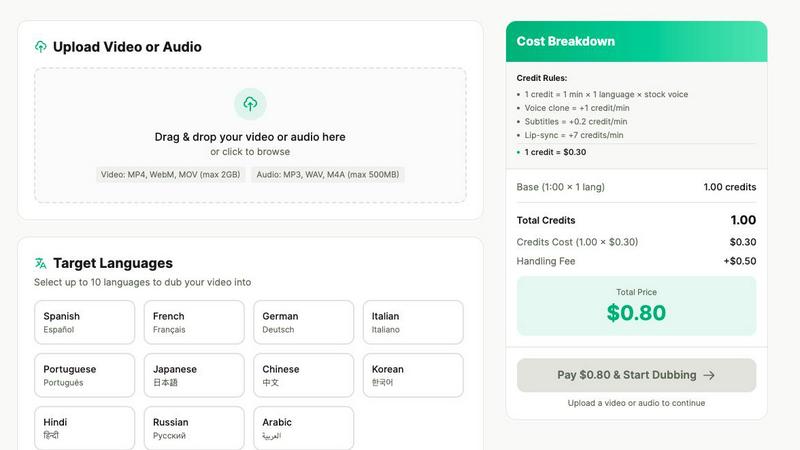
Dubvid quickly dubs your audio and video into multiple languages using natural voices and optional lip-sync features.
Last updated: February 27, 2026

MaxArt.ai instantly transforms your footage into stunning AI video effects using simple text prompts or reference images.
Last updated: April 4, 2026
Visual Comparison
Dubvid
MaxArt.ai
Feature Comparison
Dubvid
Seamless Language Selection
Dubvid allows users to choose from multiple target languages, facilitating the dubbing process. This feature empowers creators to effortlessly engage with international audiences by translating their content into languages that resonate with viewers, expanding their reach significantly.
Natural Voice Recreation
One of Dubvid's standout features is its ability to recreate voices naturally. Users can select from a variety of AI voices or even clone their own voice, ensuring that the dubbed content maintains the original tone and emotional resonance, enhancing viewer engagement and authenticity.
Quick and Easy Workflow
The workflow for dubbing content with Dubvid is streamlined into three straightforward steps: upload your video, select the desired language and voice, and download the localized version. This simplicity makes it accessible for anyone, regardless of technical expertise, saving time and resources.
Customizable Dubbing Options
Dubvid offers customizable options such as optional lip-sync and subtitles. Users can enhance their dubbed videos by making the audio match mouth movements for a more realistic experience or by adding subtitles for better comprehension, catering to a diverse audience.
MaxArt.ai
Sora 2 Pro Storyboard Model
This advanced feature utilizes OpenAI's premier AI video model for structured, professional video generation. It supports multi-scene sequencing, allowing creators to build cohesive narratives by adding and describing individual scenes with specific durations. The model excels at maintaining visual consistency across scenes and offers precise control over output length, enabling the creation of polished, story-driven videos up to 25 seconds long for sophisticated projects.
Text-to-Video and Image-to-Video Generation
MaxArt.ai provides two intuitive pathways for video creation. Users can describe their vision in a detailed text prompt, and the AI will generate a corresponding video from scratch. Alternatively, by uploading a reference image, the platform can animate and extend the visual into a dynamic video sequence. This dual-input flexibility caters to different creative workflows, from conceptual ideation to enhancing existing visual assets.
Pre-Built AI Video Effects Library
Beyond generation from scratch, the platform offers a curated collection of specialized, one-click AI video effects. This includes tools like the AI 360° Rotation Video Generator and the AI Smooth Transition Video Generator. These effects allow users to apply complex cinematic transformations to their existing footage instantly, adding professional polish and creative flair without any manual editing.
User-Centric Control Panel
The interface provides essential, non-overwhelming controls for a refined output. Users can easily adjust the total video duration, select from various aspect ratios (Landscape, Portrait, etc.), and manage project visibility. The clean design, coupled with a real-time status indicator and credit cost preview, ensures a transparent and efficient creation process from start to finish.
Use Cases
Dubvid
Content Creation for Social Media
Short-form creators can use Dubvid to dub their content, such as YouTube Shorts, Instagram Reels, and TikToks, into multiple languages. This capability enables them to multiply their audience reach and engagement on various social media platforms.
Educational Content Localization
Educators can quickly translate their lessons and tutorials using Dubvid, allowing them to share knowledge with learners around the globe. This use case is particularly beneficial for online courses and webinars, making education more accessible.
Customer Support Enhancement
Companies can utilize Dubvid to localize their product demos and support videos, reducing customer support tickets by providing clear walkthroughs in various languages. This ensures that customers receive tailored assistance relevant to their region.
Podcast Distribution
Podcasters can effortlessly release episodes in new languages using Dubvid. This feature allows them to reach a broader audience without the need for extensive production resources, making it easier to share their content with diverse listeners.
MaxArt.ai
Social Media Content Creation
Ideal for influencers and social media managers needing to produce a high volume of engaging, eye-catching content. Quickly generate unique video backgrounds, apply trending visual effects to clips, or create short narrative ads for platforms like Instagram Reels and TikTok, all tailored to the correct aspect ratio for maximum platform impact.
Brand Marketing and Advertising
Marketing teams can prototype and produce professional ad concepts rapidly. Use text prompts to visualize product demos, create brand story videos with consistent cinematic style, or apply sleek transitions to campaign footage, resulting in high-quality video assets suitable for paid social campaigns and website content.
Creative Storyboarding and Prototyping
Filmmakers, agencies, and content planners can use the multi-scene storyboard feature to visualize concepts before production. Quickly generate a sequence of scenes to pitch ideas, establish mood, and test visual narratives, saving significant time and resources in the pre-production phase.
Enhancing Existing Video Projects
Editors and creators can use MaxArt.ai as a powerful post-production tool. Upload existing footage to apply specific AI enhancements like smooth, professional transitions or dynamic 360-degree rotation effects, elevating the production value of vlogs, presentations, or personal projects without complex software.
Overview
About Dubvid
Dubvid is a groundbreaking AI-powered platform that revolutionizes the way video and audio content is dubbed, making it accessible and efficient for creators, businesses, and brands. By simply uploading your original video, users can select from a range of target languages, and Dubvid will automatically translate and recreate voices while preserving natural tone, pacing, and emotion. This innovative approach eliminates the need for traditional studios and voice actors, streamlining the dubbing process into a user-friendly experience. Whether you are a YouTuber looking to broaden your audience, an educator aiming to share knowledge globally, or a marketing team focused on quick localization, Dubvid enables you to scale your content across borders in mere minutes. With support for over 10 languages, it effectively bridges language barriers and allows for engagement with diverse audiences, making it an invaluable tool for modern content creators.
About MaxArt.ai
MaxArt.ai is a curated AI-powered platform designed to transform video creation for modern creators and marketers. It eliminates the complexity of traditional editing software by enabling users to generate stunning, professional-grade visual effects directly from simple text prompts or reference images. The platform is built for those who demand high-impact visual storytelling for social media content, advertisements, and brand narratives but lack the time or technical expertise for intricate post-production workflows. At its core, MaxArt.ai offers a selective, quality-first approach, leveraging cutting-edge AI models like OpenAI's Sora 2 Pro Storyboard to ensure visual consistency, cinematic styles, and smooth multi-scene sequencing. Its value proposition is clear: deliver instant, accessible, and broadcast-quality AI video effects, empowering users to focus on their creative vision rather than the technical process.
Frequently Asked Questions
Dubvid FAQ
How does Dubvid ensure natural voice quality?
Dubvid employs advanced AI technology to recreate voices that maintain the original tone, pacing, and emotion. Users can choose from various natural AI voices or clone their own to ensure high-quality dubbing.
What formats does Dubvid support for video uploads?
Dubvid supports a range of video formats including MP4, MOV, and WebM. This flexibility allows users to upload their content with ease, accommodating different types of media.
Is there a limit to the number of languages I can dub my video into?
While Dubvid supports over 10 languages, users can select multiple target languages for each project, allowing for extensive localization and audience expansion without any restrictions.
Can I try Dubvid without a subscription?
Yes, Dubvid offers a free trial that includes 2 credits, enabling you to dub up to 60 seconds of audio or video without requiring a credit card. This allows users to evaluate the service and quality before committing to any payment.
MaxArt.ai FAQ
What AI models power the effects on MaxArt.ai?
MaxArt.ai is powered by state-of-the-art generative AI models, including OpenAI's Sora 2 Pro for structured storyboard generation and other advanced systems like Veo 3.1 Premium. This curated selection of top-tier technology is chosen specifically to deliver the highest possible visual quality, consistency, and creative control for all generated video effects and transformations.
How long does it take to generate a video with AI effects?
The platform is engineered for speed. Typically, the AI processes your request and applies effects within 30 to 60 seconds. The generation time can vary slightly based on the complexity of the prompt, the selected video duration, and the specific effect or model being used, but the focus remains on delivering rapid, high-quality results.
Can I use the videos I create for commercial purposes?
Yes, absolutely. You retain full rights to the videos you generate and enhance using MaxArt.ai. The content you create is yours to use for any commercial purpose, including in advertising campaigns, social media marketing, client projects, and brand storytelling, without any licensing restrictions from the platform.
What video formats and aspect ratios are supported?
MaxArt.ai supports outputs in multiple industry-standard aspect ratios to fit any project need. This includes Landscape (16:9), Portrait (9:16), and Square (1:1) formats, making it perfect for YouTube, Instagram Stories/Reels, TikTok, and other social media platforms. All videos are generated in high-definition quality suitable for professional use.
Alternatives
Dubvid Alternatives
Dubvid is an advanced AI-driven platform that specializes in dubbing audio and video content into multiple languages with remarkable accuracy and natural-sounding voices. It caters to a broad spectrum of users, including content creators, educators, and marketing teams, all aiming to reach a global audience by overcoming language barriers. As users explore Dubvid, they may seek alternatives for various reasons, such as pricing considerations, additional features, or specific platform capabilities that better align with their unique needs. When choosing an alternative, it is essential to evaluate factors like ease of use, the quality of voice synthesis, language support, and integration with existing workflows to ensure the selected tool meets your dubbing requirements effectively.
MaxArt.ai Alternatives
MaxArt.ai is an AI-powered video creation platform in the content creation and design tools category. It enables users to generate cinematic video effects and text-to-video content instantly, simplifying complex editing workflows for creators and marketers. Users often explore alternatives for various reasons, such as specific budget constraints, the need for different feature sets, or compatibility with other platforms in their workflow. The search for the right tool is highly personal and depends on individual project requirements and creative goals. When evaluating other options, consider the core capabilities that matter most to you. Key factors include the quality and style of AI-generated visuals, ease of use, export formats and resolution, and how well the tool integrates into your existing content production process.