
Seedream AI Studio
Create stunning images with Seedream 5.0 and instantly animate your favorites into short videos in one seamless browser workflow.
VisitPublished on:
June 27, 2026
Pricing:
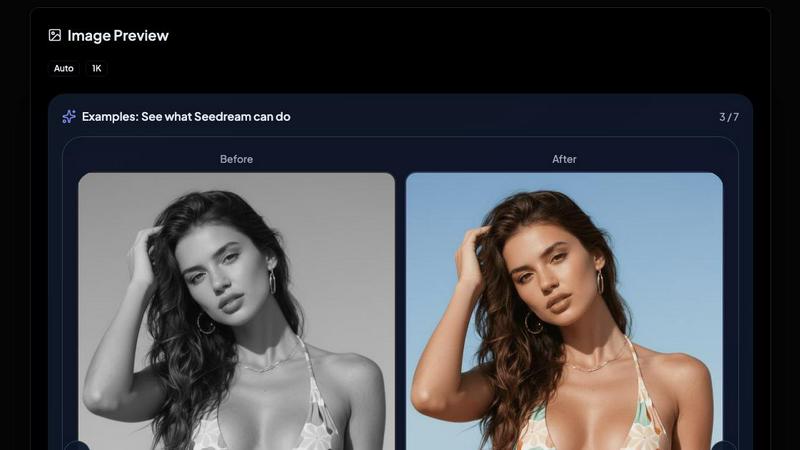
About Seedream AI Studio
Seedream AI Studio is an independent browser-based creative tool for generating images with current Seedream models, comparing outputs across versions, and turning selected images into short videos. It supports Seedream 5.0, 5.0 Lite, 4.5, and 4.0, offers a free tier, and gives creators one place to move from prompt to image to animation quickly. The platform is designed for e-commerce professionals, brand marketers, and digital creators who demand high-quality visual assets without complex workflows. By wrapping every current Seedream version into a single interface, Seedream AI Studio eliminates the need to juggle multiple tools or subscriptions. Users can draft fast on Seedream 5.0 Lite, balance quality and cost on Seedream 4.5, render hero shots on Seedream 5.0, or keep Seedream 4.0 for stylized art. The main value proposition is simplicity: three clicks from prompt to shareable video, never leaving the page. With best-in-class image generation from Seedream paired with state-of-the-art video animation from Kling 2.1, Hailuo, Veo, Luma, and Pixverse, Seedream AI Studio offers a curated selection of leading AI models. New accounts receive 20 welcome credits valid for 2 days, making it easy to explore the platform risk-free. The tool supports natural-language image editing, character consistency, and photo-realistic quality, making it a powerful asset for any visual content pipeline.
Features of Seedream AI Studio
Multi-Version Seedream Image Generation
Seedream AI Studio provides access to four distinct Seedream versions, each tuned for specific use cases. Seedream 5.0 delivers the highest fidelity for hero shots and premium visuals. Seedream 5.0 Lite offers the fastest generation at the lowest cost, ideal for rapid drafting. Seedream 4.5 serves as the balanced default, recommended for most production work with a generation time of approximately 20 seconds. Seedream 4.0 remains the favorite for stylized art and illustration work. Users can switch between versions instantly, re-run the same prompt across models to compare outputs, and select the best result for their needs. This multi-version approach ensures creators always have the right tool for the task without compromising quality or speed.
One-Click Image to Video Animation
Every generated image can be animated into a 5 to 15 second video using Kling 2.1, Hailuo, or other supported video models. After generating an image, users simply click the "ANIMATE THIS" button to auto-fill the image into the video card on the right. From there, they can add a motion prompt and generate the video with a single click. This seamless integration eliminates the need to export, upload, or switch between separate tools. The video animation supports prompt optimization, adjustable parameters like resolution and aspect ratio, and delivers results in seconds. Creators can iterate quickly, testing different motion prompts on the same image to achieve the perfect animation.
Prompt Comparison and Iteration Workflow
Seedream AI Studio is built for iterative experimentation. Users can start a draft on Seedream 5.0 Lite, then re-run the exact same prompt on Seedream 4.5 or Seedream 4.0 to compare results side by side. This workflow helps creators understand how each model interprets text differently and choose the best output for their project. The platform also supports image-to-image generation, allowing users to upload an existing image and modify it with natural-language prompts like "change the bikini to red." This feature is particularly useful for e-commerce product variations, brand asset adjustments, and creative exploration. The comparison workflow ensures quality control and creative flexibility in a single session.
Flexible Output Controls and Privacy Options
Seedream AI Studio offers granular control over image generation parameters. Users can select aspect ratios including 1:1, 16:9, 9:16, 3:2, 2:3, 5:4, 4:5, 4:3, and 3:4, ensuring compatibility with different platforms and formats. Resolution options include 1K, 2K, and 4K, though some models may default to 1K. Privacy settings allow users to choose between public and private visibility. Public images appear on the home page and showcases page, helping creators gain exposure, while private images stay hidden for sensitive work. These controls give professionals the flexibility to manage their creative assets according to project requirements and brand guidelines.
Use Cases of Seedream AI Studio
E-Commerce Product Photography and Variations
E-commerce professionals can use Seedream AI Studio to generate high-quality product images across multiple styles and versions. Using the image-to-image feature, they can upload a base product photo and prompt changes like "change the background to white" or "make the product red." The multi-version comparison allows them to test different Seedream models to find the most realistic or stylized representation. Once satisfied, they can animate the product image into a short video for social media or product pages. This workflow saves hours of manual photography and editing, enabling rapid iteration for seasonal campaigns, new product launches, and A/B testing of visual assets.
Brand and Marketing Visual Content Creation
Brand marketers can draft visual concepts quickly using Seedream 5.0 Lite, then refine the best ideas on Seedream 4.5 or 5.0 for final production. The platform supports consistent character generation, making it suitable for brand mascots or recurring visual themes. Creators can generate multiple variations of a single prompt to explore different artistic directions, then animate selected images into video ads or social media posts. The public visibility option allows teams to share drafts with stakeholders directly from the platform, streamlining feedback and approval workflows. Seedream AI Studio acts as a central hub for all visual content needs, from initial concept to final animated asset.
Creative Storyboarding and Concept Art
Illustrators and concept artists can leverage Seedream 4.0 for its stylized art capabilities, generating unique visual ideas for storyboards, game assets, or character designs. The ability to compare outputs across versions helps artists understand how different models interpret their prompts, inspiring new creative directions. The image-to-video animation feature allows them to bring static concepts to life, creating short animated sequences that convey motion, mood, or narrative. This is particularly valuable for pitching ideas to clients or directors, as animated storyboards are more engaging and easier to visualize than static images. The platform's speed and simplicity enable rapid exploration of multiple concepts in a single session.
Social Media Content Production for Creators
Content creators and influencers can generate eye-catching images and short videos for platforms like Instagram, TikTok, and YouTube Shorts using Seedream AI Studio. The fast generation times on Seedream 5.0 Lite allow for quick experimentation with different visual styles, while the animation feature produces ready-to-post video content. Creators can maintain a consistent aesthetic by using the same prompts and models across multiple posts, building a recognizable brand identity. The 20 free welcome credits provide a low-risk entry point for testing the platform's capabilities. With aspect ratio options tailored to social media formats (9:16 for stories, 1:1 for feeds), Seedream AI Studio simplifies the content creation pipeline from idea to published asset.
Frequently Asked Questions
What Seedream models are available in Seedream AI Studio?
Seedream AI Studio includes four current Seedream models: Seedream 5.0, Seedream 5.0 Lite, Seedream 4.5, and Seedream 4.0. Each model is tuned for different use cases. Seedream 5.0 offers the highest fidelity for hero shots and premium visuals. Seedream 5.0 Lite provides the fastest generation at the lowest cost, ideal for rapid drafting. Seedream 4.5 is the balanced default recommended for most production work. Seedream 4.0 is preferred for stylized art and illustration. Users can switch between these versions instantly and compare outputs from the same prompt across models.
How do I animate an image into a video?
After generating an image in Seedream AI Studio, click the "ANIMATE THIS" button that appears on the result. This automatically fills the image into the video card on the right side of the interface. From there, you can add a motion prompt describing the desired animation, adjust parameters like resolution and prompt optimization, and click "Generate Video." The video animation uses Kling 2.1 and other supported models to produce a 5 to 15 second video. The entire workflow from prompt to video happens on the same page without needing to switch tools.
Is there a free tier and how do credits work?
Yes, Seedream AI Studio offers a free tier. New accounts receive 20 welcome credits valid for 2 days after creation. Each image generation costs 2 credits, and video generation costs 15 credits. Credits are consumed per generation, and users can purchase additional credits through the platform. The free tier allows creators to test all Seedream versions and the animation feature before committing to a paid plan. Public visibility for generated images is available, and private images remain hidden from the community showcase.
Can I edit an existing image using natural language prompts?
Yes, Seedream AI Studio supports image-to-image generation with natural-language editing. You can upload an existing image and prompt changes such as "change the bikini to red" or "add a sunset background." The platform interprets your text instructions and modifies the image accordingly. This feature is available across all Seedream versions, allowing you to choose the model that best handles your specific edit. The image-to-image capability is particularly useful for e-commerce product variations, brand asset adjustments, and iterative creative refinement without starting from scratch.
Similar to Seedream AI Studio
MotionVault
MotionVault: Motion Graphics, Video Templates & Overlays for Editors
Pixolm
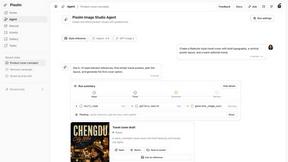
Create AI images from prompts and references, then refine them with an AI agent and editing tools in one workspace.
ViduAI
ViduAI creates consistent videos from text, images, references, and first or last frames with Vidu Q3.

AI STL Generator
The fastest AI STL generator to turn prompts and images into 3D printable STL files.
Tikdek
An AI video and AI image platform for creating visual content in the browser and scaling production with stable APIs.
Ideogram Studio
Ideogram 4 AI workflows for text-perfect logos, posters, ads, packaging, and ecommerce visuals.