
ProcessSpy
ProcessSpy is a powerful Mac process monitor that offers advanced filtering, real-time insights, and seamless system integration for optimal.
Visit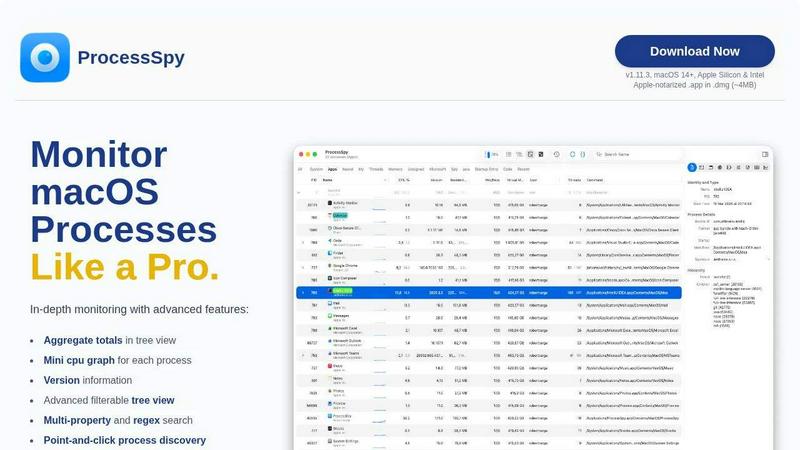
About ProcessSpy
ProcessSpy is an advanced process monitoring tool designed specifically for macOS users who require deeper insights into their system's operations. Unlike the standard Activity Monitor, ProcessSpy reveals critical information that is often hidden, enabling users to visualize process trees, inspect open files, and view environment variables with ease. It is particularly beneficial for developers and power users managing multiple applications, as it provides detailed command-line information and version details that help distinguish between similar processes. With its native macOS integration, ProcessSpy maintains a smooth performance, leveraging OS-specific features for an optimized user experience. Whether you are troubleshooting performance issues or simply curious about the processes running on your system, ProcessSpy equips you with the tools needed for comprehensive analysis and management of macOS processes.
Features of ProcessSpy
Advanced Tree View
ProcessSpy features a sophisticated tree view that allows users to visualize processes and their relationships. This view supports real-time filtering and search capabilities, including advanced JavaScript filters, enabling users to quickly identify and analyze system activities in a structured hierarchy.
Javascript Filters
With the ability to define filters using JavaScript, ProcessSpy allows users to create complex filtering conditions tailored to their specific needs. This feature enhances the search functionality, enabling intricate queries that can pinpoint processes based on multiple criteria.
Environment Variables (Paid Feature)
For users looking for in-depth information, ProcessSpy provides access to environment variables associated with each process. This feature, available with a paid license, allows users to understand how processes interact with their environments, which is crucial for debugging and optimization.
Process History Recording (Paid Feature)
ProcessSpy can record historical data for CPU, Memory, and Threads, offering valuable insights into resource usage over time. This feature enables users to track changes in application behavior, export findings to CSV, and make informed decisions based on historical performance.
Use Cases of ProcessSpy
Developer Tool for Application Management
Developers managing multiple applications can utilize ProcessSpy to distinguish between various instances of similar processes. By displaying full command-line information and version details, it aids in troubleshooting issues related to specific Java Development Kits or libraries.
Resource Optimization
System administrators can leverage ProcessSpy to monitor resource usage across applications. By visualizing CPU and memory consumption in real-time, they can identify resource hogs and optimize system performance effectively.
Security Monitoring
For users concerned about system security, ProcessSpy provides critical insights into processes running on their machines. By examining open files and connections, users can detect unauthorized processes or suspicious activities that may compromise system integrity.
Process Analysis and Reporting
Business analysts can use ProcessSpy to create detailed reports on process performance and system resource allocation. This tool's ability to export data in CSV format allows for streamlined reporting and data analysis, facilitating better decision-making within organizations.
Frequently Asked Questions
Is ProcessSpy safe to install on my Mac?
Yes, ProcessSpy is Apple-notarized and distributed as a signed application within a DMG file. It has been verified for safe use on both Intel and Apple Silicon Macs, ensuring a secure installation process.
Does ProcessSpy support older versions of macOS?
No, ProcessSpy is designed specifically for macOS 14 and newer versions. Users running older macOS versions will not be able to utilize this tool effectively.
What is the license model?
The license for ProcessSpy is valid for one user and can be used on unlimited devices. It includes lifetime updates and access to new features, ensuring users remain equipped with the latest tools for process monitoring.
Can I try ProcessSpy before purchasing?
While the provided content does not specify a trial version, interested users should check the official website for any potential trial options or demo versions available for testing before making a purchase decision.
Similar to ProcessSpy

WidgIq
Provide an AI-powered customer support widget for your website

Sprite Sheet Maker
A free browser-based toolkit for creating, cutting, converting, and previewing sprite sheet animations.


laya.tools
Free directory of 950+ projects built on Laya, the open-source model that turns text into typed decisions. Ports, SDKs, agents and demos.

Forms Plugin
The #1 Native Form Builder Plugin for Framer - No Code, No Embeds, No External Platforms.


JsonTranslate
A json translater for translating JSON, Markdown, and TXT files while preserving keys, nested paths, and project structure.