
HypeShare
HypeShare lets you send large files up to 10GB with end-to-end encryption, no signup required, and full control over transfers.
Visit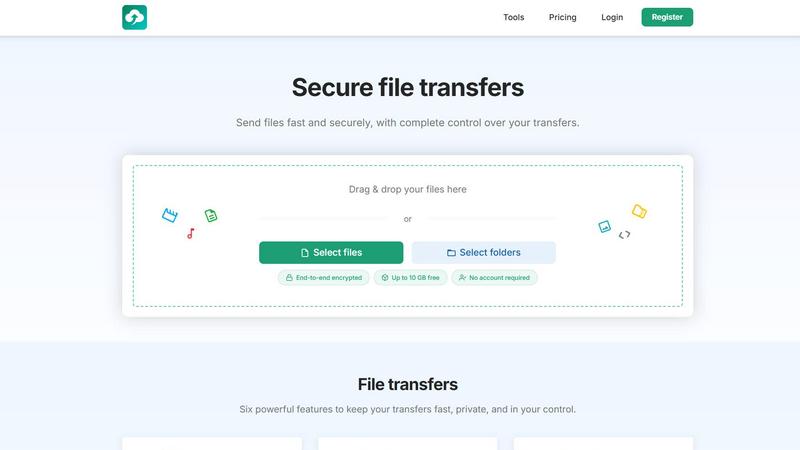
About HypeShare
HypeShare is a secure file transfer platform engineered for speed and privacy, designed to eliminate the friction and bloat of traditional file-sharing tools. It allows users to send large files up to 10GB without requiring an account, making it an ideal solution for quick, one-off transfers. For those who need more, a free account unlocks 20GB of storage and a suite of powerful features including end-to-end encrypted transfers, custom expiry links, and the ability to set download limits. A standout capability is the File Requests feature, which creates a personal upload page. You can share a custom link with anyone, and they can upload files directly to you without needing to log in themselves. This positions HypeShare as a versatile tool for freelancers, agencies, and teams who require a fast, no-friction alternative to bloated platforms like WeTransfer or Google Drive. The platform prioritizes user control, offering password protection, data retention settings, and transfer analytics for Pro users. With a clear focus on quality over quantity, HypeShare provides a curated set of essential features that streamline workflows and ensure data security, all while maintaining a clean, ad-free experience. Whether you are sending a single large file to a client or setting up a permanent upload portal for your team, HypeShare delivers a reliable and private solution.
Features of HypeShare
End-to-End Encryption
Every file transfer on HypeShare is protected with end-to-end encryption, ensuring that your data remains private from the moment it leaves your device until it is downloaded by the intended recipient. This means that no third party, including HypeShare, can access your files during transit. This feature provides a critical layer of security for sensitive documents, client deliverables, and personal data, giving you complete peace of mind that your transfers are shielded from unauthorized access and interception.
File Requests
HypeShare’s File Requests feature allows you to create a personalized upload page with a unique, shareable link. Anyone with this link can upload files directly to your HypeShare dashboard without needing to create an account or log in. This is ideal for collecting large files from clients, colleagues, or collaborators who may not have their own file-sharing setup. You can customize each request with an expiry date, accept any file type, and receive email notifications every time a new upload is received, giving you full control over the intake process.
Custom Expiry and Download Limits
You have complete control over the lifespan and accessibility of your transfers. With HypeShare, you can set an automatic expiration date for any link, after which it becomes inactive and the files are no longer available for download. Additionally, you can define a specific number of times a transfer can be downloaded. This granular control ensures that your files are only accessible for a limited time and by a limited audience, preventing unauthorized sharing and helping you manage data retention policies effectively.
Password Protection
Add an extra layer of security to your transfers by setting a unique password that recipients must enter before they can download your files. This feature is essential for sharing confidential information, such as legal documents, financial reports, or proprietary creative assets. By combining password protection with end-to-end encryption and expiry dates, HypeShare offers a robust, multi-layered security framework that ensures only authorized individuals can access your most sensitive data.
Use Cases of HypeShare
Freelancer Client Deliverables
Freelancers, such as graphic designers, videographers, and photographers, often need to send large, high-resolution files to clients. HypeShare allows them to send files up to 10GB for free, or use a Pro account for even larger transfers. The ability to set an expiry date and download limit ensures that client files are not accessible indefinitely. The File Requests feature is particularly useful for receiving raw assets from clients, who can upload directly without needing to sign up, streamlining the entire project workflow.
Team Collaboration on Large Assets
Agencies and remote teams frequently need to share large project files, such as marketing decks, video edits, or software builds. HypeShare provides a fast, no-friction way to distribute these files among team members. With features like custom expiry links and download notifications, team leads can track who has accessed what and ensure that outdated files are automatically removed. The platform’s speed and reliability make it a superior alternative to email attachments or slow cloud storage syncs for one-time or recurring large file transfers.
Secure Document Exchange for Legal and Finance
Professionals in legal and financial sectors require a secure method for exchanging sensitive documents like contracts, tax returns, and audit reports. HypeShare’s end-to-end encryption and password protection ensure that these confidential files are only seen by the intended recipient. The ability to set a strict expiry date and download limit further reduces the risk of data breaches. This provides a compliant and secure channel for client communication, replacing insecure email attachments or physical media.
Creating a Permanent Upload Portal for Your Business
Businesses can use HypeShare’s File Requests feature to create a permanent, branded upload portal for their customers or partners. For example, a printing company can set up a custom link for clients to upload design files, or a recruitment agency can use it for receiving resumes and portfolios. This eliminates the need for customers to have their own file-sharing accounts and provides a centralized, organized way for the business to receive incoming files, complete with email notifications for new uploads.
Frequently Asked Questions
Can I send files without creating an account?
Yes, you can send files up to 10GB per transfer without creating an account. This guest feature is perfect for one-off transfers and allows you to send up to 5 transfers per month. You will still benefit from end-to-end encryption and can set a password and expiry date. For more features like 20GB of storage and File Requests, you can sign up for a free account.
How does the File Requests feature work?
File Requests allows you to create a custom upload page with a unique link. You share this link with anyone, and they can upload files directly to your HypeShare dashboard without needing to log in. You can set an expiry date for the request, accept any file type, and receive email notifications whenever someone uploads a file. This is ideal for collecting assets from clients or team members who do not have a HypeShare account.
What security measures are in place for my transfers?
All transfers on HypeShare are protected with end-to-end encryption, meaning your files are encrypted on your device and only decrypted on the recipient’s device. No third party, including HypeShare, can access your files during transit. Additionally, you can add password protection to any transfer and set automatic expiry dates and download limits to further control access to your files.
What is the difference between the Free and Pro plans?
The Free plan offers 10 transfers per month, 20GB of storage, and transfers up to 10GB, along with features like encryption, password protection, and File Requests. The Pro plan, at $8.99 per month, removes all limits with unlimited transfers and files, provides 1000GB of storage, allows transfers up to 200GB, and includes unlimited download limits, 50 emails per transfer, custom domains, unlimited data retention, and priority support.
Pricing of HypeShare
HypeShare offers a transparent and flexible pricing structure designed to accommodate everyone from casual users to power professionals. You can start as a guest with no account, or register for a free account to unlock more features. When you are ready for more, the Pro plan provides unlimited capabilities.
Guest (No Account Required)
- 5 transfers / month
- 10 files / transfer
- No storage
- 10 GB / transfer
- 100 downloads / transfer
- 5 emails / transfer
- File encryption
- 7 days data retention
Free
- 10 transfers / month
- 10 files / transfer
- 20 GB storage
- 10 GB / transfer
- 100 downloads / transfer
- 5 emails / transfer
- File encryption
- 30 days data retention
- Download notifications
- File Requests
- No ads
Pro (Most Popular)
- $8.99 USD / month
- Unlimited transfers
- Unlimited files
- 1000 GB storage
- 200 GB / transfer
- Unlimited transfer downloads
- 50 emails / transfer
- File encryption
- Custom alias
- 5 domains
- Unlimited data retention
- Download notifications
- File Requests
- Transfer Analytics
- Branded downloads
- Priority support
Similar to HypeShare
MotionVault
MotionVault: Motion Graphics, Video Templates & Overlays for Editors
AI STL Generator
The fastest AI STL generator to turn prompts and images into 3D printable STL files.

Dairakar
Dairakar tracks scope creep and organizes project changes so freelancers and agencies stop doing unpaid work.

TheToolsVerse
TheToolsVerse is a curated directory of hand-verified AI tools to help professionals discover, compare, and choose the best ones for their workflow.

AI Business Name Generator
Instantly create unique and memorable business names tailored for startups and brands with our free AI Business Name Generator.

Whop Trends
Whop Trends identifies trending products daily, enabling you to maximize earnings with data-driven market insights.