
Budgeting App
Walleta is a free iOS budgeting app that simplifies expense tracking with AI receipt scanning and real-time budget management.
Visit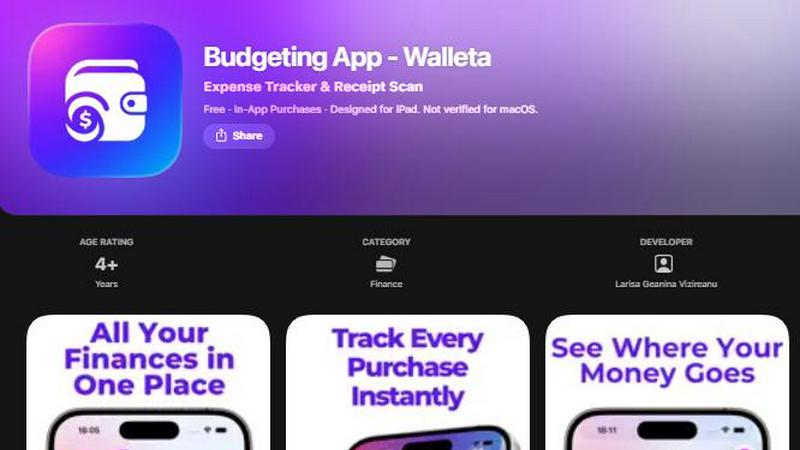
About Budgeting App
Budgeting App, also known as Walleta, is a free iOS budget planner and AI expense tracker designed for those who wish to manage their finances without the complexities of bank linking or account setups. This innovative app caters to users who seek a straightforward approach to tracking their spending, setting monthly limits, and capturing receipt details effortlessly. With Walleta, users can log their expenses on-device, ensuring maximum privacy and control over their financial data. The main value proposition lies in its ability to provide a comprehensive budgeting experience through features like receipt scanning, category analytics, and real-time budget tracking, making it perfect for travelers, students, expatriates, and anyone prioritizing financial transparency without the need for cloud storage or ad tracking.
Features of Budgeting App
AI Receipt Scanning
Walleta's AI receipt scanning feature allows users to capture and log their expenses by simply taking a photo of their receipts. The app's on-device AI technology extracts key details such as the merchant, total amount, date, and category. This eliminates the need for manual entry, making expense tracking quick and efficient. Free users can try this feature with three initial scans, while Walleta Pro subscribers gain access to unlimited scanning capabilities.
Monthly Budget Setting
With Walleta, users can define monthly spending limits tailored to their financial goals. The app provides real-time progress updates, alerting users when they approach or exceed these budgets. This proactive feature helps users maintain control over their finances and avoid overspending, promoting better financial habits in an easy-to-understand format.
Beautiful Analytics
The app offers visually appealing analytics that allow users to see their spending patterns through pie charts, bar graphs, and category summaries. Users can review their expenditures over different time frames—weekly, monthly, or yearly—enabling them to identify trends and adjust their budgets accordingly. This feature enhances financial awareness and supports informed decision-making.
Multi-Currency Support
Walleta is designed with travelers and expatriates in mind, featuring multi-currency support that automatically detects the user's local currency or allows for manual currency code entry. This flexibility ensures that users can track their expenses seamlessly, regardless of where they are in the world, making it an ideal budgeting tool for those navigating international finances.
Use Cases of Budgeting App
Personal Finance Management
Walleta is perfect for individuals looking to take control of their personal finances. By using the app, users can log daily expenses effortlessly, set monthly budgets, and monitor their financial health without the hassle of connecting their bank accounts.
Travel Budgeting
For frequent travelers, Walleta simplifies expense tracking across different currencies and locations. Users can capture receipts from various countries, ensuring they stay within their budget while exploring new destinations, all without the need for internet connectivity.
Student Budgeting
Students often face financial constraints, and Walleta serves as a valuable tool for managing limited resources. By setting monthly budgets and tracking expenses in categories relevant to student life, such as food, transport, and entertainment, users can develop responsible spending habits early on.
Expense Tracking for Expatriates
Expatriates can benefit from Walleta's multi-currency support and privacy-focused design. The app allows them to log expenses from various transactions in different currencies, all while keeping their financial data secure and offline. This makes it easier for expats to manage their finances as they adapt to a new environment.
Frequently Asked Questions
How does Walleta ensure my financial privacy?
Walleta prioritizes user privacy by keeping all financial data stored locally on the device. It does not require bank connections, email sign-ups, or cloud synchronization, ensuring that your data remains secure and confidential.
Can I use Walleta without an internet connection?
Yes, Walleta is designed to function entirely on-device, allowing users to log their expenses and manage their budgets without needing an internet connection. This feature is especially useful for travelers in areas with limited connectivity.
What happens if my receipt is faded or unclear?
While Walleta's AI receipt scanning feature works best with clear and legible receipts, users have the option to manually log their expenses if a receipt is unreadable. This ensures that all spending can still be recorded, even if some details cannot be captured automatically.
Is there a limit to how many expenses I can log?
While manual logging of expenses is unlimited and free, the AI receipt scanning feature allows free users to try three scans initially. For those who want unlimited AI scans, upgrading to Walleta Pro is necessary, unlocking additional capabilities for tracking expenses efficiently.
Similar to Budgeting App


Money Tracker App
Effortlessly track your income and expenses with our private iOS app, featuring AI receipt scanning and no bank links or signups required.
CalcFi
CalcFi provides over 500 free, cited financial calculators for instant, transparent answers to every money decision.

LowRiskTradeSmart
LowRiskTradeSmart provides free tools and low-risk strategies for smarter investing across global markets.

Redbark
Effortlessly sync your Australian bank and brokerage data to Google Sheets and YNAB for real-time financial tracking.

Ricco - Financial Literacy Game
Ricco is a fun financial literacy game that teaches budgeting, investing, and money management through real-life.
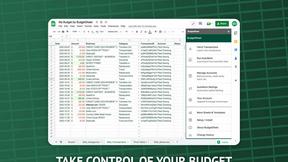
BudgetSheet
BudgetSheet automatically imports your live bank transactions directly into Google Sheets.