
AI Face CutoutImage GenerationDesign Too
Upload any photo and our AI isolates faces with hair-level detail in under 30 seconds.
Visit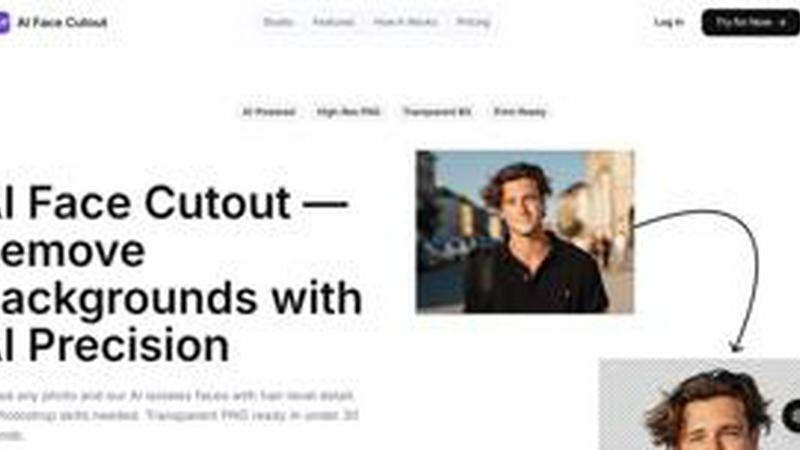
About AI Face CutoutImage GenerationDesign Too
AI Face Cutout is a specialized, AI-powered tool designed to remove backgrounds from face photos with hair-level precision. Unlike generic background removers that often struggle with fine details like hair strands and complex edges, this tool is built on a dedicated AI model trained specifically for face isolation. It delivers cleaner, more accurate cutouts that look natural and professional. The primary audience includes content creators, graphic designers, print professionals, event photographers, and anyone who needs fast, high-quality face cutouts for props, prints, social media graphics, or big head cutouts. The main value proposition is speed and ease of use: users can upload any portrait or group photo and receive a transparent PNG with a perfectly isolated face in under 30 seconds, with no Photoshop skills or professional training required. The tool supports batch processing for group photos, allowing multiple faces to be cut from a single upload. Output resolution reaches up to 2K at 300 DPI, making images print-ready for large-format prints at local shops. Privacy is a core feature: all photos are encrypted during transfer, processed securely, and automatically deleted after processing. The tool never stores originals or uses them for training. With a free tier available and a simple three-step workflow, AI Face Cutout democratizes professional-grade face isolation for everyone.
Features of AI Face CutoutImage GenerationDesign Too
Specialized AI Model for Face Isolation
Unlike general-purpose background removers that rely on broad object detection, AI Face Cutout uses a model trained on millions of faces. This specialized training allows the AI to understand facial structure, recognize individual hair strands, and accurately detect edge boundaries. The result is a clean, natural-looking cutout that preserves fine details like flyaway hairs and soft edges, eliminating the jagged or blocky artifacts common with generic tools.
Hair-Level Precision
The AI excels at handling complex hair textures, from wispy strands to thick curls. It traces edges at the pixel level, ensuring that no background remnants cling to the subject. This level of detail is comparable to manual Photoshop work by a skilled professional, but it is achieved automatically in seconds. Users get a cutout that looks organic and ready for compositing into any new background.
Batch Processing for Group Photos
Upload a single group photo and the AI can detect and cut out all faces simultaneously. This feature is a significant time-saver for event photographers, schools, and teams needing individual headshots from a group image. Instead of processing each face one by one, users get all cutouts from one upload, streamlining workflows for large projects.
High-Resolution Print-Ready Output
The tool exports transparent PNG files at up to 2K resolution with 300 DPI. This high resolution ensures that cutouts are suitable for large-format printing, such as posters, banners, and prop heads. The print-ready quality eliminates the need for upscaling or additional editing, making the output directly usable for professional print applications.
Use Cases of AI Face CutoutImage GenerationDesign Too
Creating Custom Props and Big Head Cutouts
Event planners, party organizers, and DIY enthusiasts can use AI Face Cutout to quickly isolate faces for custom props. Whether it is a life-sized cardboard cutout for a birthday party or a novelty photo booth prop, the tool delivers a clean face cutout that can be printed and mounted. The speed and precision make it ideal for last-minute projects.
Professional Headshot and Portrait Editing
Photographers and graphic designers can streamline their workflow by using AI Face Cutout to remove backgrounds from headshots and portraits. The hair-level precision ensures that the subject is perfectly isolated, ready to be placed on a new background, a company website, or a professional portfolio. This saves significant time compared to manual masking in Photoshop.
Social Media Content and E-Commerce
Content creators and social media managers can use the tool to create engaging visuals. Isolating a face allows for creative compositing into memes, custom avatars, or promotional graphics. For e-commerce, the tool can quickly generate product images featuring model faces on clean, white backgrounds, enhancing the professional look of listings.
School and Team Photo Processing
Schools, sports teams, and organizations often need individual headshots from group photos. AI Face Cutout's batch processing capability allows administrators to upload a single class or team photo and download all individual face cutouts in minutes. This eliminates the tedious manual work of cropping and editing each person separately.
Frequently Asked Questions
What is AI face cutout?
AI Face Cutout is a web-based tool that uses artificial intelligence to automatically remove backgrounds from photos, specifically isolating faces with high precision. It is designed to handle fine details like hair strands and complex edges, producing a transparent PNG file that is ready for use in design projects, printing, or compositing.
How does AI cut out faces accurately?
The tool uses a specialized AI model trained on millions of face images. This training allows the AI to recognize facial features, understand the boundaries between hair and background, and trace edges at the pixel level. It is not a generic background remover but a purpose-built model for face isolation, resulting in cleaner and more accurate cutouts.
Is AI face cutout better than Photoshop for big head cutouts?
For standard face cutouts and big head props, AI Face Cutout is often faster and more accessible. It requires no skill or training, and a cutout is produced in under 30 seconds. While Photoshop offers more control for complex composites, AI Face Cutout provides professional-quality results for the vast majority of face isolation tasks, with significantly less time and effort.
What resolution does the AI produce?
The tool exports transparent PNG files at up to 2K resolution with 300 DPI. This resolution is suitable for large-format printing, such as posters and prop heads. A free tier is available for low-resolution downloads, while the Pro plan unlocks the full 2K print-ready output.
Pricing of AI Face CutoutImage GenerationDesign Too
AI Face Cutout offers a free tier that allows users to try the tool with low-resolution downloads. For access to full 2K resolution, 300 DPI output, and unlimited usage, the Pro plan is available at a cost of $9 per month. This pricing model makes professional face isolation accessible to individuals and businesses without requiring a large upfront investment.
Similar to AI Face CutoutImage GenerationDesign Too
AIPetGen
AIPetGen turns a photo of your dog, cat, or other pet, or a written description, into a new picture or a short animation.

MyPhotoAI
Turn your selfies into AI headshots and portraits. Get 3 photos for US$5 or every photo from one shoot for US$10. No subscription.

ImageGPT
ImageGPT is an all-in-one AI creative platform for generating, editing and transforming images and videos using AI.
AI Album Cover Maker
Create release-ready album covers from a prompt or photo. Generate, refine, and export art for singles, EPs, mixtapes, and playlists.
Remove Image Background
Free background remover that runs entirely in your browser — zero uploads, full resolution, no watermark. Your photos never leave your device.

PixelMCP
Use every top AI image model (Nano Banana, GPT Image, FLUX and more) right inside ChatGPT, Claude, Gemini or any MCP client. One credit balance, no su
Sprite Sheet Maker
A free browser-based toolkit for creating, cutting, converting, and previewing sprite sheet animations.
MotionVault
MotionVault: Motion Graphics, Video Templates & Overlays for Editors