
AI Motion Control
AI Motion Control seamlessly transfers human movement to any character, capturing body motion and facial expressions with stunning precision.
Visit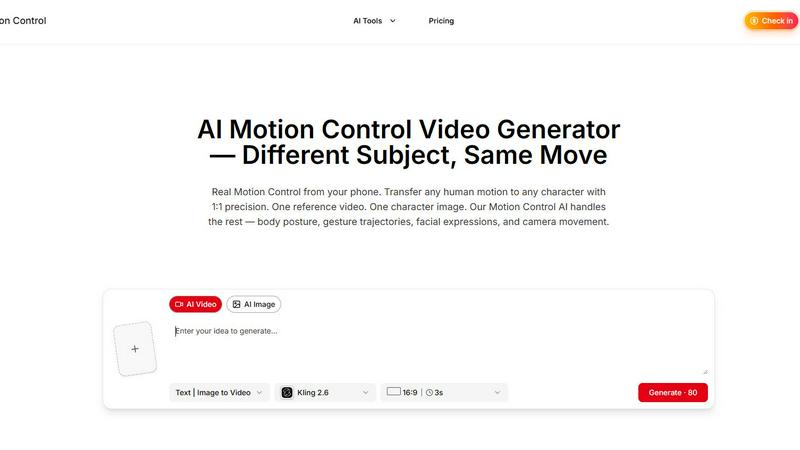
About AI Motion Control
AI Motion Control revolutionizes the field of animation and motion capture by providing a groundbreaking tool that allows users to transfer human motion to digital characters with unmatched precision. Designed for animators, game developers, filmmakers, and content creators alike, this AI-driven solution eliminates the need for expensive motion capture equipment. With just a reference video and a character image, users can achieve realistic body movements, facial expressions, and even nuanced lip-syncing. The primary value proposition lies in its ability to transform any human motion into stunning digital animations, all without requiring specialized hardware or complex setups. By harnessing advanced algorithms, AI Motion Control enables creativity to flourish, offering an accessible means to produce high-quality animations that resonate with audiences.
Features of AI Motion Control
Character Motion Transfer
This feature allows users to upload a portrait or full-body image alongside a reference video. The AI meticulously extracts movement details such as body posture, gesture trajectories, and action timing, ensuring that the character retains its unique appearance while performing the original motion accurately.
Facial Expression & Lip Sync
Beyond body movements, this capability captures intricate facial expressions and lip shapes from the reference video. The AI's advanced algorithms ensure that characters can convey subtle emotions and sync their speech to dialogue in over eight languages, enhancing the depth of the animated performance.
Dance & Choreography Replication
Perfect for fast-paced dance sequences and choreography, this feature preserves the original timing and spatial positioning of movements. Whether replicating K-pop routines or dynamic martial arts, users can expect frame-accurate Motion Control that guarantees no frame drops or motion blur, resulting in crystal-clear animations.
Scene-Aware Character Replacement
This innovative feature allows users to replace characters in existing footage seamlessly. The AI analyzes the original character's movements, lighting, and environmental context, enabling the new character to blend flawlessly into the scene. The result is a cohesive performance that appears as though it was filmed together from the start.
Use Cases of AI Motion Control
Animation for Video Games
Game developers can utilize AI Motion Control to create lifelike character animations that enhance gameplay experiences. By easily transferring human movements to digital avatars, developers can bring their characters to life without the need for extensive motion capture sessions.
Film and Television Production
Filmmakers can streamline the animation process by using AI Motion Control to create realistic character movements and expressions. This tool allows for greater creative flexibility, enabling directors to focus on storytelling while ensuring high-quality animations.
Social Media Content Creation
Content creators on platforms like TikTok or Instagram can leverage AI Motion Control to produce engaging animated videos. With quick access to motion transfer capabilities, creators can craft eye-catching content that stands out in crowded feeds.
Virtual Reality Experiences
In the realm of VR, realistic character animations are crucial for immersion. AI Motion Control can be employed to animate virtual characters in real-time, enhancing the user experience by providing lifelike interactions and movements within virtual environments.
Frequently Asked Questions
How does AI Motion Control work?
AI Motion Control works by analyzing a reference video to extract detailed motion data, which is then applied to a character image. This process captures body movements, facial expressions, and even lip-syncing, creating realistic animations without the need for specialized equipment.
Do I need any special equipment to use AI Motion Control?
No, AI Motion Control is designed to be accessible. All you need is a smartphone or any camera to record the reference video. The AI handles the rest, allowing users to create animations without expensive motion capture suits or studios.
Can I use AI Motion Control for different styles of animation?
Yes, AI Motion Control is versatile enough to cater to various animation styles, whether for traditional 2D animations, 3D character models, or even VR environments. Its adaptability allows creators to explore different creative avenues.
How many languages does the lip-sync feature support?
The lip-sync feature of AI Motion Control supports over eight languages, enabling characters to speak lines with precise synchronization, thus enhancing the emotional depth and relatability of animated performances.
Similar to AI Motion Control
ImageGPT
ImageGPT is an all-in-one AI creative platform for generating, editing and transforming images and videos using AI.

AI Album Cover Maker
Create release-ready album covers from a prompt or photo. Generate, refine, and export art for singles, EPs, mixtapes, and playlists.
GetYouTubeTranscript
Free YouTube transcripts on the web, a Chrome extension, and an API + MCP server so AI assistants can read YouTube.

Remove Image Background
Free background remover that runs entirely in your browser — zero uploads, full resolution, no watermark. Your photos never leave your device.

PixelMCP
Use every top AI image model (Nano Banana, GPT Image, FLUX and more) right inside ChatGPT, Claude, Gemini or any MCP client. One credit balance, no su
Sprite Sheet Maker
A free browser-based toolkit for creating, cutting, converting, and previewing sprite sheet animations.
MotionVault
MotionVault: Motion Graphics, Video Templates & Overlays for Editors