Add Person To Photo
Add someone to any photo with AI that perfectly matches lighting, shadow, and perspective for seamless, natural composites.
VisitPublished on:
May 25, 2026
Pricing:
About Add Person To Photo
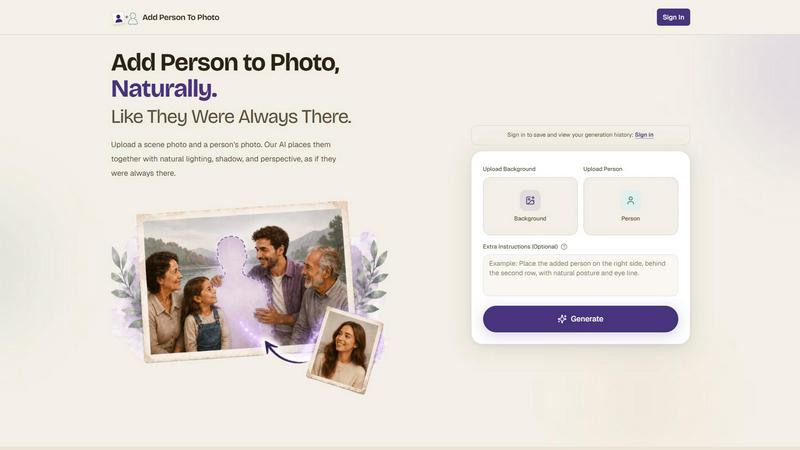
Add Person To Photo is a sophisticated AI-powered image editing platform that redefines how users approach group portraits and personal photography. Instead of requiring years of professional editing experience or expensive software, this tool leverages advanced machine learning algorithms to seamlessly insert missing individuals into existing photographs. The core value proposition is simplicity combined with precision: users upload a background scene and a separate portrait of the person they want to add, and the AI handles everything else, including lighting matching, shadow generation, perspective alignment, and skin tone harmonization. The tool is designed for anyone who has ever looked at a family photo and wished someone was there, from parents trying to complete a holiday portrait to professionals needing to fill out a team picture. It also serves creative users who want to experiment with composites for fun, such as inserting a friend into a Renaissance painting or adding a beloved pet to a family scene. The platform prioritizes natural results that preserve the integrity of the original image, ensuring no visible cuts, mismatched colors, or awkward proportions. With support for high-resolution uploads up to 4K and processing times under two minutes, Add Person To Photo democratizes high-quality image compositing, making it accessible to users with zero technical background. The interface is intentionally streamlined, focusing on quick uploads and automated processing, while optional extra instructions allow for fine-tuning placement and interactions. This tool is not just about editing; it is about completing memories, honoring loved ones, and creating keepsakes that feel authentic.
Features of Add Person To Photo
Natural Lighting and Shadow Matching
The AI engine analyzes the background scene to understand the direction, intensity, and color temperature of existing light sources. It then applies this lighting model to the inserted person, adjusting highlights and shadows on their face, clothing, and body to match the environment. Ground shadows are generated with realistic softness and angle so the added individual appears to stand naturally within the scene rather than floating or looking pasted on. This feature eliminates the most common telltale signs of photo compositing.
Intelligent Perspective and Proportion Scaling
When adding a person to a photo, the AI evaluates the depth cues in the background, such as relative object sizes, vanishing points, and focal length. It then scales the inserted person to match the correct proportions for their position in the frame, whether they are standing in the foreground, middle ground, or background. This ensures that a person placed near a doorway is appropriately sized compared to the door, and someone placed further back appears smaller with accurate spatial relationships.
Automated Skin Tone and Texture Harmonization
The platform reads the skin tone, undertones, and texture from both the inserted portrait and the existing people in the background scene. It then applies subtle color grading and texture blending to the added person so their skin matches the ambient lighting and overall color palette of the original photo. This prevents the common issue where a person looks like they belong to a different photograph due to mismatched warmth, saturation, or contrast.
Streamlined Three-Step Workflow
The entire process is condensed into three intuitive steps: upload the background scene, upload the person portrait, and click generate. The interface is designed for efficiency, with clear visual cues and drag-and-drop support for file uploads. Users can also add optional text instructions for specific placement or interactions, such as having the person placed on the left side or putting an arm around another subject. Results are delivered in under two minutes in HD quality, ready for printing or sharing.
Use Cases of Add Person To Photo
Reuniting Family Members in Group Portraits
Family reunions, holiday gatherings, and milestone celebrations often have one person missing due to travel, work, or other commitments. With Add Person To Photo, users can take an existing group photo and insert the absent family member as if they were present. The AI matches the lighting and perspective of the original setting, whether it is a golden-hour porch portrait or an indoor birthday party, creating a complete family memory that feels authentic and emotionally meaningful.
Honoring Loved Ones Who Have Passed Away
One of the most poignant applications is adding a late grandparent, parent, or other relative into a photo of a significant life event they never got to witness. Users can place a grandmother beside her grandchild in a three-generation portrait or insert a father into a wedding photo from which he was absent. The result is a cherished keepsake that helps families feel connected across time, preserving the emotional completeness of the moment.
Completing Team and Professional Group Photos
In professional settings, team photos often suffer from missing colleagues who were on calls, traveling, or joined the team after the photo was taken. Add Person To Photo allows HR departments, team leads, and event organizers to create a complete group shot without scheduling a retake. The tool ensures the added person matches the formal or casual dress code and lighting of the original scene, producing a polished result suitable for company websites, annual reports, or office displays.
Creative and Playful Image Experiments
Beyond practical fixes, the tool enables creative fun by inserting people into unexpected contexts. Users can add a friend to a Santorini sunset travel photo they missed, place themselves next to a favorite character in a painting, or bring a beloved dog into a family portrait. The AI handles the technical details, so users can focus on imagination, whether they want a whimsical Renaissance portrait or a composite that celebrates a shared travel memory.
Frequently Asked Questions
What file formats and resolutions are supported?
Add Person To Photo supports JPG, PNG, and HEIC file formats for both the background scene and the person portrait. The platform can handle uploads up to 4K resolution, ensuring high-quality output suitable for printing or digital sharing. For best results, use well-lit, front-facing portraits of the person to be added, and ensure the background scene has clear lighting and minimal motion blur.
How long does it take to generate a composite?
The AI processing typically completes in under two minutes, depending on the complexity of the scene and the resolution of the uploaded files. Most standard composites are ready within 60 to 90 seconds. Users can continue browsing or close the tab while processing, and results are saved to their account for later download if they are signed in.
Can I specify where the person should be placed in the scene?
Yes, the platform includes an optional Extra Instructions field where users can type specific placement guidance. For example, you can instruct the AI to place the person on the left side, in the foreground, or standing behind a specific individual. You can also request natural interactions, such as having the added person put an arm around another subject. These instructions help refine the output for photos with specific layouts or crowded compositions.
Do I need any photo editing experience to use this tool?
No, the entire process is designed for users with no technical or editing background. The interface guides you through three simple steps: upload the background, upload the person, and click generate. The AI handles all complex tasks including lighting matching, shadow generation, perspective scaling, and skin tone harmonization. Optional extra instructions are available for fine-tuning, but the default settings produce high-quality results automatically.
Similar to Add Person To Photo

ImageGPT
ImageGPT is an all-in-one AI creative platform for generating, editing and transforming images and videos using AI.
AI Album Cover Maker
Create release-ready album covers from a prompt or photo. Generate, refine, and export art for singles, EPs, mixtapes, and playlists.
Remove Image Background
Free background remover that runs entirely in your browser — zero uploads, full resolution, no watermark. Your photos never leave your device.

PixelMCP
Use every top AI image model (Nano Banana, GPT Image, FLUX and more) right inside ChatGPT, Claude, Gemini or any MCP client. One credit balance, no su
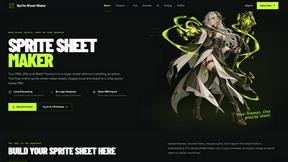
Sprite Sheet Maker
A free browser-based toolkit for creating, cutting, converting, and previewing sprite sheet animations.
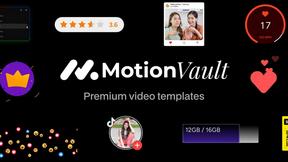
MotionVault
MotionVault: Motion Graphics, Video Templates & Overlays for Editors

Pixolm
Create AI images from prompts and references, then refine them with an AI agent and editing tools in one workspace.