
PhotoFuse vs Rendery3D
Side-by-side comparison to help you choose the right AI tool.

PhotoFuse
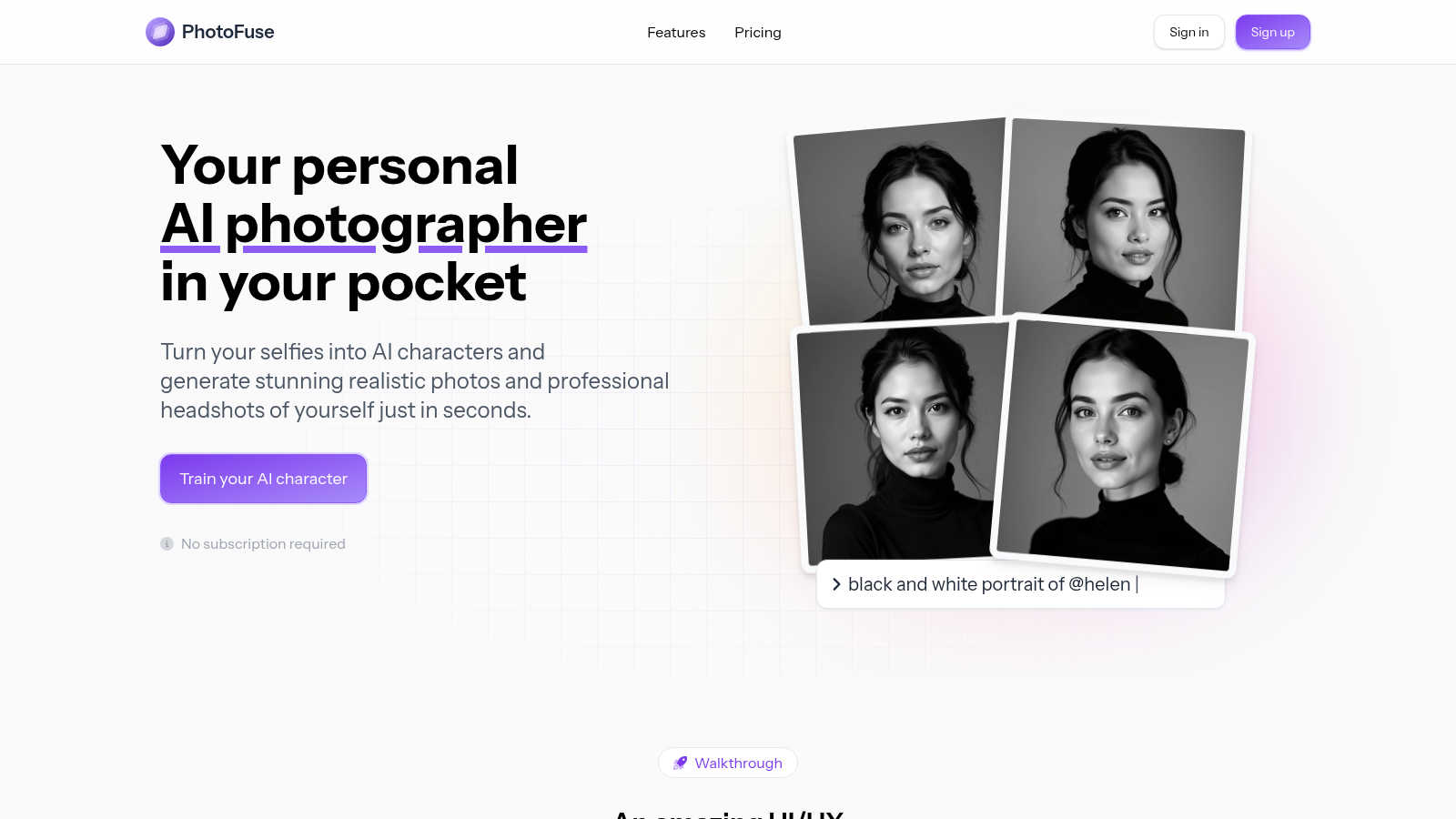
Easily transform selfies into stunning AI headshots and avatars, capturing your true essence in seconds.
Last updated: March 1, 2026

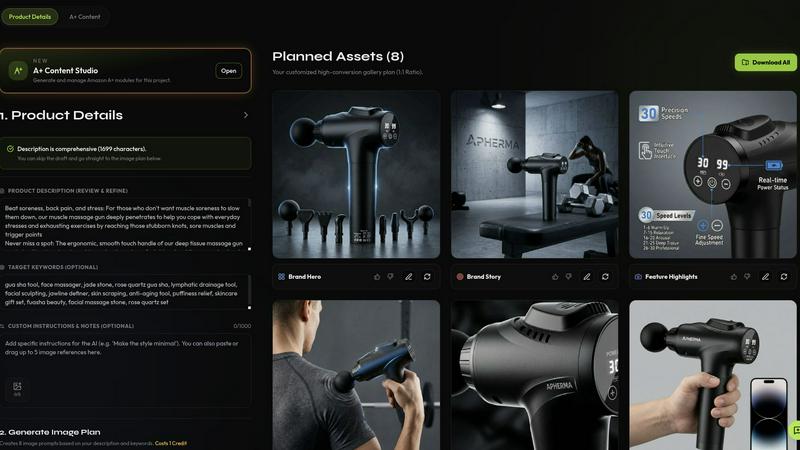
Rendery3D transforms product photos into stunning 3D-rendered images and optimized listings in minutes, elevating your ecommerce brand.
Last updated: April 13, 2026
Visual Comparison
PhotoFuse
Rendery3D
Feature Comparison
PhotoFuse
Easy Photo Upload
Users can easily upload 10 to 15 photos of their own, with clear guidance provided to ensure optimal results. This straightforward process simplifies the creation of personalized AI characters.
Customizable Templates
PhotoFuse offers a wide array of pre-made templates that users can choose from, or they can manually design their scenes using an intuitive interface. This flexibility allows for unique creations tailored to individual preferences.
Varied Expression and Hairstyle Options
With options to select from a range of expressions and hairstyles, users can craft images that reflect their personality and industry. This feature supports both casual and professional vibes, ensuring the headshots resonate with the intended audience.
High-Quality Headshots
The platform enables users to generate professional headshots that can be used on LinkedIn, resumes, or any professional webpage. Users can choose backgrounds, outfits, and accessories that align with their brand, ensuring a polished and on-brand appearance.
Rendery3D
Scene Generation
Rendery3D allows users to place products within various scenes through simple text prompts. This feature ensures that every image maintains a polished, 3D-rendered aesthetic, driving higher click-through rates and making products stand out.
Smart Shot Planning
The platform intelligently analyzes your product to create an optimized 9-image shot plan, which includes hero shots, lifestyle images, infographics, and more. This systematic approach ensures no essential visuals are missed, enhancing the product's online presentation.
Listing Copy Generator
Rendery3D generates persuasive titles, bullet points, keywords, and HTML descriptions that are optimized for Amazon SEO. This feature helps sellers create engaging product listings that attract potential buyers and improve search visibility.
A+ Content Generator
With the A+ Content Generator, users can create premium Amazon content in minutes. It allows for the easy assembly of hero banners, comparison charts, and brand stories, all tailored to Amazon's specifications, resulting in enhanced product listings.
Use Cases
PhotoFuse
Enhancing Social Media Profiles
PhotoFuse is ideal for individuals looking to elevate their social media presence. With stunning AI-generated images, users can differentiate themselves and create a memorable online identity.
Professional Headshots for Job Seekers
Job seekers can quickly prepare professional headshots for platforms like LinkedIn. With various customizable options, they can present themselves in the best light, making a strong first impression on potential employers.
Marketing and Branding Content
Businesses can leverage PhotoFuse to create high-quality visuals for marketing campaigns. By generating tailored images that align with brand aesthetics, companies can enhance their marketing materials and engage their audience effectively.
Creative Projects and Visual Storytelling
For content creators and artists, PhotoFuse serves as a powerful tool for generating unique visuals. Whether for blogs, websites, or creative portfolios, the AI-generated images can significantly enhance storytelling and artistic expression.
Rendery3D
Amazon Product Launches
Sellers launching new products on Amazon can utilize Rendery3D to create visually striking and informative listings quickly. This accelerates the time-to-market and helps new products gain traction in competitive categories.
Catalog-Wide Creative Refreshes
Brands looking to revitalize their existing product listings can leverage Rendery3D for a comprehensive creative overhaul, ensuring all images align with current branding and quality standards, thus improving overall conversion rates.
Agency Client Workflows
Ecommerce agencies can streamline their workflows by using Rendery3D to generate high-quality images and listings for multiple clients simultaneously, enhancing productivity and ensuring consistency across various campaigns.
A/B Visual Testing
Rendery3D enables sellers to conduct A/B testing on different visual elements of their product listings. By generating variations of images and copy, users can determine which assets perform best, optimizing their listings for maximum conversion.
Overview
About PhotoFuse
PhotoFuse is revolutionizing the way individuals approach personal photography by harnessing the power of innovative AI technology. This cutting-edge tool allows users to effortlessly transform their selfies into stunningly realistic AI characters or professional headshots within seconds. Whether you are a casual social media enthusiast or a professional seeking high-quality images, PhotoFuse is designed for everyone. Its user-friendly interface eliminates the need for technical expertise or complex prompts. Users simply need to upload 10 to 15 photos, select from a diverse range of templates, and let the AI work its magic. The result is tailored images featuring specific expressions, outfits, backgrounds, and accessories, making it perfect for enhancing online profiles, creating marketing visuals, or capturing unforgettable moments. With flexible pricing options, including freemium and pay-as-you-go plans, PhotoFuse also grants full commercial rights, ensuring it is an invaluable asset for anyone looking to elevate their visual presence.
About Rendery3D
Rendery3D is an innovative AI-powered platform designed specifically for Amazon sellers, DTC brands, and ecommerce agencies, revolutionizing the way product photography and listings are created. The platform transforms standard product images into a comprehensive suite of conversion-optimized visuals, including compliant hero shots, lifestyle scenes, infographics, scale comparisons, and carousel images. Unlike generic AI image generators, Rendery3D adheres to ecommerce quality standards, ensuring that every generated image meets the specific needs of online sellers. Its standout features, such as Auto Art Direction and an Automatic Feedback Loop (AFL), allow for seamless image generation without the need for extensive prompting, while also maintaining quality control. Additionally, Rendery3D goes beyond visuals by producing compelling listing copy—titles, bullet points, and descriptions—tailored to resonate with both the product’s visual narrative and keyword targets, making it an invaluable tool for those looking to enhance their online presence.
Frequently Asked Questions
PhotoFuse FAQ
How does PhotoFuse work?
PhotoFuse operates by allowing users to upload a selection of their photos. The AI then analyzes these images and generates new, customized visuals based on user-selected templates and preferences, all within seconds.
Do I need any technical skills to use PhotoFuse?
No, PhotoFuse is designed to be user-friendly and requires no technical skills. The interface is intuitive, making it accessible for everyone, regardless of their familiarity with technology.
What types of images can I create with PhotoFuse?
Users can create a variety of images ranging from hyper-realistic AI characters to professional headshots. The platform offers customizable options for expressions, outfits, and backgrounds to suit different needs.
Are there any subscription requirements?
PhotoFuse offers flexible pricing plans, including a freemium model and pay-as-you-go options. Users can choose the plan that best fits their needs without any mandatory subscription commitments.
Rendery3D FAQ
How does Rendery3D ensure image quality?
Rendery3D incorporates an Automatic Feedback Loop (AFL) that audits and corrects generated images before delivery. This process guarantees consistent quality and adherence to ecommerce standards.
Can I use my own product images?
Yes, Rendery3D allows users to upload their existing product photos, even basic smartphone images. The platform then transforms these into professional-quality listing images.
Is there a free trial available?
Yes, Rendery3D offers a free plan that allows users to create their first set of listing images at no cost, enabling them to experience the platform's capabilities before committing to a paid plan.
How long does it take to generate images?
Rendery3D is designed for speed, allowing users to generate a complete set of listing images in just 60 seconds or less, significantly reducing the time required for traditional photography setups.
Alternatives
PhotoFuse Alternatives
PhotoFuse is a cutting-edge tool that belongs to the generative art category, specializing in transforming selfies into stunning AI-generated headshots and avatars. With its innovative technology, it caters to a wide audience, from casual social media enthusiasts to professionals aiming for polished images. However, users often seek alternatives due to factors such as pricing structures, specific feature sets, or compatibility with different platforms and devices. When searching for an alternative, it's essential to consider the user interface, customization options, speed of image generation, and the variety of templates available. These features can significantly impact the overall user experience and the quality of the final images, making it crucial to choose a tool that aligns with your personal or professional needs.
Rendery3D Alternatives
Rendery3D is a cutting-edge AI visual engine designed specifically for ecommerce brands, particularly those operating on platforms like Amazon. It excels in generating high-quality product photography and listing content, allowing users to create conversion-focused visuals and compelling copy in a matter of minutes. Despite its robust offerings, users may seek alternatives due to factors such as pricing, specific feature sets, or unique platform requirements that better align with their business needs. When searching for alternatives to Rendery3D, it’s essential to consider several aspects. Look for platforms that offer similar capabilities in terms of image generation quality, ease of use, and integration with ecommerce systems. Additionally, pay attention to pricing structures, customer support, and the overall versatility of the platform to ensure it meets your specific ecommerce goals.