
dmaya vs Refbox
Side-by-side comparison to help you choose the right AI tool.

dmaya
dMaya is the AI design platform for agencies to generate client-ready UI and export to code.
Last updated: April 13, 2026

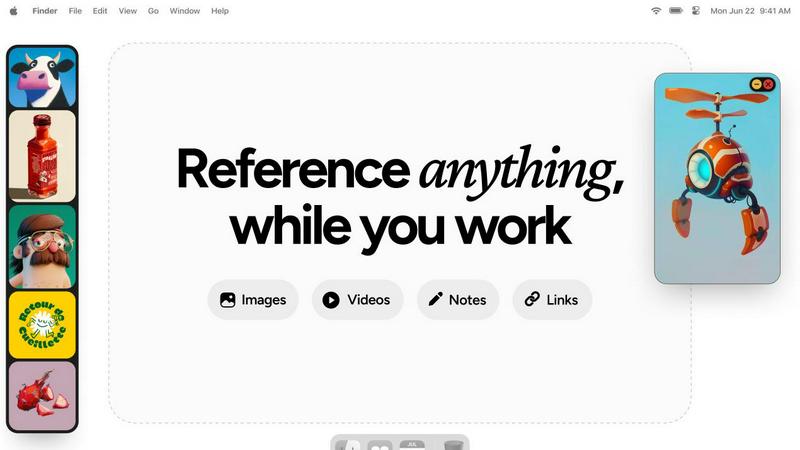
Refbox keeps your reference images and notes instantly visible above your workspace.
Last updated: February 28, 2026
Visual Comparison
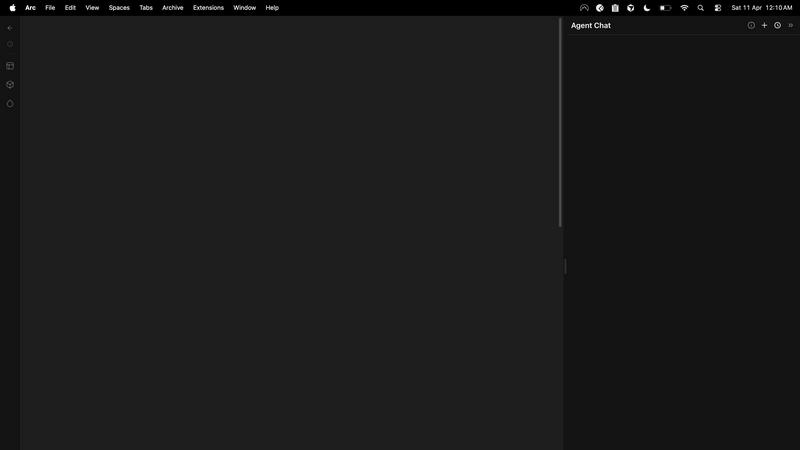
dmaya
Refbox
Feature Comparison
dmaya
Conversational AI Design Generation
Describe your vision for a SaaS dashboard, e-commerce flow, or mobile app in plain language. dMaya's AI agent interprets your text and generates complete, production-ready UI designs with coherent layouts, component systems, and responsive variants in seconds. This foundational feature transforms abstract ideas into tangible visual starting points instantly, eliminating the blank canvas problem.
Multi-Screen Infinite Canvas
Work across multiple desktop and mobile frames simultaneously on a flexible, infinite canvas. Organize, drag, and zoom through screens with a familiar Figma-like interface, but supercharged with AI. This allows for holistic project management, enabling you to design and view entire user flows and application states side-by-side for better context and consistency.
Client Presentation & Feedback Links
Share interactive, polished previews of your work with clients or stakeholders through a single, secure link. Recipients can review the designs directly in their browser without needing an account, leave clear feedback, and grant approval. This feature professionalizes the review process, making it seamless and rapid, turning a typically protracted cycle into a matter of minutes.
Design-to-Code Export
Once a design is client-approved, export it as clean, well-structured HTML, CSS, and JavaScript code. This output is specifically formatted to be easily ingested by AI coding agents like Claude Code or Cursor, which can then transform it into production-ready code for React, Next.js, Flutter, or any other framework your development team uses, ensuring a smooth handoff.
Refbox
Always-on-Top Floating Frames
Refbox’s signature feature allows you to pin any reference—images, videos, GIFs, or notes—in a resizable window that floats above all other applications. This ensures your inspiration is always visible while you sketch, design, or animate. You can minimize frames to access apps behind them or lock them in place to work directly over the reference, creating a truly integrated and non-disruptive workspace that keeps you in your creative zone.
Masonry Mode & Infinite Canvas
Organize all your visual references on a single, expansive canvas. Masonry Mode automatically arranges your pinned items in a clean, organized grid, allowing you to see your entire collection of inspiration at a glance. This infinite canvas is perfect for moodboarding and comparing multiple references side-by-side, providing a holistic view of your project’s direction without the clutter of multiple windows or tabs.
Advanced Media Handling & Tools
Refbox goes beyond simple image display with a curated set of powerful tools for deep creative work. Step through GIFs frame-by-frame for detailed animation reference, use the built-in color picker on any media to sample and copy hex codes, and crop images to focus on specific details. It also supports SVG files and can generate website screenshots from pasted URLs, making it a versatile hub for all reference types.
Intuitive Shortcuts & Workflow Optimizations
Designed for speed, Refbox puts full control at your fingertips. Quickly swap between floating references using arrow keys, change entire collections with a single click, or auto-hide your Refbox to reveal it only when needed. These thoughtful shortcuts and customizable behaviors minimize manual interaction, saving you hours over a project and allowing you to maintain an uninterrupted state of creative flow.
Use Cases
dmaya
Agency Pitch & Concept Development
Agencies can use dMaya to rapidly generate multiple high-fidelity design concepts during client discovery calls or pitch meetings. This ability to visualize ideas in real-time helps win more business by demonstrating capability instantly. Teams can then iterate based on initial client reactions and present refined directions for sign-off in hours, not weeks.
Product Team Ideation & Prototyping
Product managers and designers can explore diverse UI directions and create interactive prototypes before committing valuable engineering resources. dMaya facilitates collaboration across design, product, and engineering in a single workspace, allowing for rapid validation of concepts and a significant reduction in the gap between what is designed and what ultimately gets built.
Freelancer Project Delivery
Freelancers and independent designers can leverage dMaya to take on more client projects without increasing their working hours. The platform dramatically accelerates the design and revision process, enabling faster turnaround times. This efficiency allows freelancers to increase their capacity, improve client satisfaction with quick iterations, and potentially command higher rates for their streamlined service.
Design System & Consistency Scaling
Teams building complex applications can use dMaya to ensure visual consistency at scale. The platform's underlying design tokens automatically maintain typography, color, and spacing rules across all generated and iterated screens. This is crucial for maintaining brand integrity and a cohesive user experience as projects grow and evolve across multiple screens and states.
Refbox
Digital Illustration & Concept Art
Illustrators and concept artists can pin character sketches, environment photos, and color palettes in floating frames directly over their canvas in Photoshop or Procreate. This allows for constant visual comparison and inspiration, enabling accurate translation of references into original artwork without breaking concentration to search through files or browser tabs.
3D Modeling & Animation
For 3D artists and animators, Refbox is indispensable for viewing orthographic reference sheets, texture inspiration, or motion study videos while working in complex software like Blender or Maya. The ability to lock a frame and work behind it, or step through a GIF frame-by-frame, provides precise control for modeling proportions and animating movements with high accuracy.
UI/UX & Web Design
Designers can streamline their workflow by floating website screenshots, component libraries, and style guides next to their design tool (Figma, Sketch, Adobe XD). The color picker tool allows instant sampling from any reference, and notes can hold project-specific copy or checklist requirements, keeping all critical project assets visible and accessible throughout the design process.
Motion Graphics & Video Editing
Motion designers and video editors can use Refbox to keep storyboards, style frames, and reference videos pinned on-screen while working in After Effects or Premiere Pro. This ensures visual consistency and creative direction are always top of mind, facilitating faster decision-making and a more cohesive final product without constant context switching.
Overview
About dmaya
dMaya is the AI design platform purpose-built for professional workflows. It is a vibe design platform created for agencies, product teams, and freelancers who understand that intentional visual design must come before code. While other AI tools skip directly to development, dMaya reinstates the critical design phase, enabling teams to make strategic decisions, align stakeholders, and catch problems early. The core value proposition is speed and precision: describe a UI concept in plain text, and dMaya generates polished, professional screens in seconds. From there, you iterate conversationally with an AI agent, making instant changes to colors, layouts, and typography while design tokens ensure visual consistency. The platform streamlines client collaboration by allowing you to share a simple preview link for feedback and approval, collapsing review cycles from days to minutes. Finally, approved designs export as clean HTML, CSS, and JS, ready to be handed to coding agents like Cursor or Claude Code for implementation in any framework. dMaya is built for teams that prioritize presentation, client sign-off, and shipping with confidence.
About Refbox
Refbox is the definitive floating reference manager for creative professionals. It is designed to eliminate the disruptive cycle of alt-tabbing between folders, browsers, and your primary work application. By allowing you to pin images, GIFs, videos, and notes in resizable, always-on-top frames directly over your workspace, Refbox keeps your inspiration and critical references perpetually in view. This tool is essential for artists, designers, animators, and content creators across disciplines like 3D art, illustration, UI/UX, motion graphics, and photography, who require instant visual access to maintain a deep state of creative flow. Its core value proposition is a seamless, distraction-free workflow where references are available the moment you need them, without digging or searching. With intelligent features like Masonry Mode for organized canvas viewing, instant collection swapping, and a suite of precision tools for media interaction, Refbox transforms a cluttered, multi-window process into a streamlined and visually intuitive experience. It is built for professionals who cannot afford distractions, prioritizing focused creation over administrative friction.
Frequently Asked Questions
dmaya FAQ
Who is dMaya built for?
dMaya is purpose-built for professional design workflows used by digital agencies, in-house product teams, and freelance designers. It is specifically for those who need to create, present, and iterate on visual designs with clients and stakeholders before any development begins. It is not aimed at solo enthusiasts looking to immediately generate final code without a design phase.
How does the AI design iteration work?
You interact with dMaya through a chat interface. After the initial design is generated, you can instruct the AI using natural language. For example, you can ask to "change the primary color to navy blue," "swap the sidebar to the right," "increase the font size of the headers," or "add a testimonial section." The AI executes these changes precisely and instantly on your canvas.
What kind of code does dMaya export?
dMaya exports clean, semantic HTML, CSS, and vanilla JavaScript. This code is not framework-specific but is intentionally structured to be easily parsed and converted by modern AI coding assistants. You can hand this code to an agent like Cursor or Claude Code with instructions to rebuild the components in your chosen framework, such as React, Next.js, or Flutter.
How do clients review designs without an account?
You simply generate a shareable preview link from within your dMaya project. When you send this link to a client, they can open it in any modern web browser. They will see an interactive, high-fidelity version of your designs where they can click through flows, leave feedback comments directly on the design, and mark their approval, all without needing to sign up or log in.
Refbox FAQ
What types of files does Refbox support?
Refbox supports a wide range of media essential for creative work. You can directly pin images (JPG, PNG, SVG, etc.), video files, and GIFs. It also supports text notes with styling and checklist options. A unique feature is the ability to paste a website URL, and Refbox will automatically generate a screenshot for you to use as a visual reference.
How does Refbox help maintain focus?
Refbox is engineered to minimize workflow friction. By keeping references in always-on-top windows, it completely eliminates the disruptive need to switch applications or dig through folders. Features like auto-hide, keyboard shortcuts for swapping references, and the ability to minimize frames mean you interact with your references instantly, keeping you in a state of deep creative flow.
Can I organize my references into different projects?
Yes, Refbox allows you to create multiple, separate Collections. This lets you organize references by client, project, or theme. You can switch between these entire collections instantly with a single click, making it effortless to jump between different tasks while keeping all relevant references neatly organized and immediately accessible.
Is there a free trial or version available?
Refbox operates on a simple, one-time purchase model. This provides you with a lifetime license for the application, including all current features and future updates. This approach is favored by many professionals as it avoids ongoing subscription fees, offering long-term value and stability for your creative toolkit.
Alternatives
dmaya Alternatives
dMaya is an AI-powered vibe design platform that streamlines the early-stage visual design process for agencies, teams, and freelancers. It belongs to the category of AI design tools, specifically those that facilitate rapid UI prototyping and client collaboration before a single line of code is written. Users often explore alternatives to find a solution that best fits their specific workflow, budget constraints, or technical requirements. The search for a different tool can be driven by various factors, such as pricing models, the need for specific integrations, or a desire for different output formats. Some teams may prioritize granular design control, while others seek more advanced collaboration features or support for particular design systems. When evaluating options, it's crucial to consider your core needs. Key factors include the quality and speed of AI-generated designs, the intuitiveness of the iteration process, the effectiveness of client feedback tools, and the cleanliness and utility of the exported code. The ideal platform should reduce friction from concept to client approval to developer handoff.
Refbox Alternatives
Refbox is a specialized productivity tool designed to streamline creative workflows. It operates as a floating reference manager, allowing users to keep visual and textual inspiration pinned above their primary work applications. This eliminates disruptive window switching, making it a favorite among artists, designers, and digital creators. Users may seek alternatives for various reasons, including budget constraints, the need for different feature sets, or compatibility with other operating systems. Some may require more advanced organizational tools or prefer a solution integrated into a broader creative suite. Understanding your specific workflow needs is key to finding the right fit. When evaluating alternatives, consider core functionality like always-on-top windows, support for multiple media types, and organizational features. The ideal tool should feel intuitive and stay out of your way, enhancing focus rather than adding complexity to your creative process.