
Blueberry vs Shrinkpad
Side-by-side comparison to help you choose the right AI tool.

Blueberry
Blueberry is an AI-native Mac workspace that unites your editor, terminal, and browser for seamless product development.
Last updated: February 28, 2026

Shrinkpad
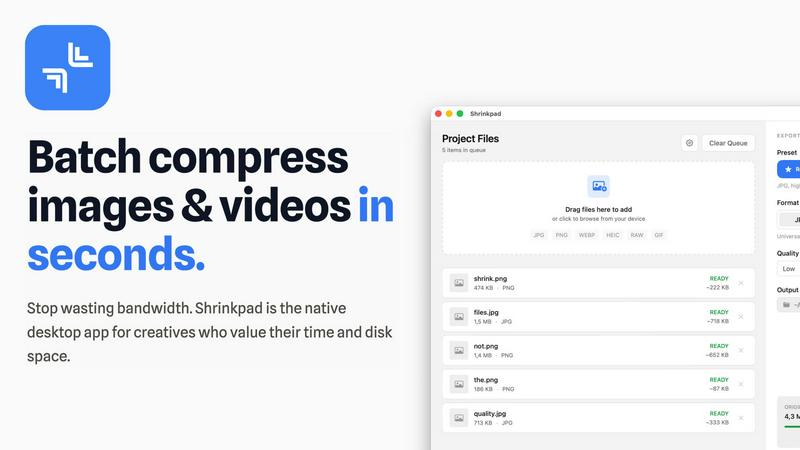
Shrinkpad is a native Mac app that batch compresses images and videos locally to save space and time.
Last updated: February 28, 2026
Visual Comparison
Blueberry

Shrinkpad
Feature Comparison
Blueberry
Unified AI-Native Workspace
Blueberry integrates a professional-grade code editor, a fully-featured terminal, and a live preview browser into one cohesive interface. This trinity of tools is designed to work in harmony, sharing state and context seamlessly. You can write code, run commands, and see the changes reflected instantly without ever leaving the application or managing multiple windows, creating a truly immersive development environment.
Full-Context AI via MCP
At the heart of Blueberry is its built-in MCP server, which grants connected AI models a live, comprehensive view of your workspace. The AI can see your current code files, real-time terminal output, the state of your preview browser, and data from pinned apps. This eliminates guesswork and manual context provisioning, allowing for accurate code explanations, debugging, and feature suggestions based on your exact project state.
Pinned Applications & Visual Context
Beyond core dev tools, Blueberry allows you to dock essential web apps like GitHub, Linear, Figma, or PostHog directly within your workspace. These pinned apps load with your project and share context with your AI. Furthermore, you can provide visual context by capturing screenshots or using an element selector directly from the preview browser, bridging the gap between code and visual design.
Multi-Device Live Preview
The integrated preview browser isn't just a simple window. It includes built-in views for desktop, tablet, and mobile screen sizes, allowing you to instantly see how your application will render for users on different devices. This ensures responsive design and user experience can be validated continuously during development without needing external tools or emulators.
Shrinkpad
Lightning-Fast Batch Processing
Shrinkpad is engineered for speed, leveraging multi-threaded compression optimized for Apple Silicon. You can drag and drop hundreds of files or entire folders, and the app will process them in a single, swift batch. This eliminates the need to compress files individually, turning a task that could take hours into one that completes in minutes, all while your Mac remains responsive.
Intelligent Quality Optimization
Stop guessing compression settings. Shrinkpad automatically analyzes the visual complexity of each image to apply the perfect compression ratio. This smart detection balances maximum file size reduction with quality preservation, effectively minimizing artifacts. For videos and specific needs, fine-grained manual controls are also available.
Comprehensive Format Support
The app is a universal media tool, supporting a vast array of over 50 formats. This includes standard web images (JPG, PNG, WEBP, AVIF), professional RAW camera files, Apple's HEIC format, and major video formats like MP4 and MOV. You can even process mixed batches of images and videos together seamlessly.
Privacy-First Local Processing
Every byte of compression happens locally on your Mac. Shrinkpad does not require an internet connection, and your files are never uploaded to a cloud server. This ensures complete confidentiality for your proprietary client work, personal photos, and unreleased projects, providing peace of mind that web-based tools cannot match.
Use Cases
Blueberry
Rapid Full-Stack Prototyping
Developers building new web applications can use Blueberry to swiftly iterate on both frontend and backend code. Write an API route in the editor, test it via curl in the terminal, and immediately see the frontend fetch and display the data in the live preview—all within a single, fluid workflow. The AI can assist across all these layers with full context.
AI-Powered Debugging & Refactoring
When encountering a bug or planning a refactor, you can leverage the AI's deep workspace awareness. Ask it questions like "why is this component not updating?" or "how can I simplify this state logic?" The AI can analyze the relevant code, review terminal errors, and even inspect the current browser DOM to provide precise, actionable answers.
Collaborative Design-Development Handoff
For teams using tools like Figma, designers can share links pinned within Blueberry. Developers can then reference the designs directly while coding components. Using the screenshot and element select features, they can ask the AI for help implementing specific UI elements, ensuring a faithful translation from design to code.
Context-Rich Onboarding & Exploration
New team members or developers exploring an unfamiliar codebase can use Blueberry to get up to speed quickly. They can ask the AI broad questions about the project structure or specific queries about how a particular feature works, and the AI can guide them through the relevant files, dependencies, and even running application state.
Shrinkpad
Optimizing Web and App Assets
Developers and web designers can drastically reduce application bundle sizes and improve website performance metrics like Largest Contentful Paint (LCP). By batch-compressing all interface images, icons, and promotional media, Shrinkpad helps create faster, more efficient digital products without sacrificing visual fidelity for the end-user.
Streamlining Photographer Workflows
Photographers managing large volumes of high-resolution images, including RAW files, can use Shrinkpad to prepare client galleries or create web-friendly versions of their portfolios. The batch processing and folder mode save immense time after a shoot, and the local processing keeps unpublished work secure.
Preparing Content for Social Media & Marketing
Content creators and marketing teams often need to compress videos and images for social platforms, email campaigns, or digital ads. Shrinkpad allows them to quickly downsize 4K videos and high-res graphics to manageable file sizes that maintain quality but upload quickly and don't consume excessive bandwidth for viewers.
Managing Digital Archives and Storage
Anyone needing to free up disk space on their Mac can use Shrinkpad to compress entire folders of old projects, photo libraries, or video archives. The folder mode automatically detects all media files, providing an estimated storage savings and allowing you to reclaim gigabytes with a single click.
Overview
About Blueberry
Blueberry is an AI-native product development platform for macOS, designed to fundamentally change how modern product builders work. It consolidates the essential tools of web development—a code editor, terminal, and live preview browser—into a single, focused workspace. This eliminates the constant, disruptive context-switching between disparate applications, allowing developers and builders to maintain deep focus and flow. Blueberry is built for the new era of AI-assisted development, where the assistant is not just an add-on but a core, integrated member of the team. Its key innovation is providing AI models like Claude, Gemini, or Codex with full, real-time context over your entire project through its built-in MCP (Model Context Protocol) server. This means your AI can see your open files, terminal output, browser state, and even pinned applications like Figma or Linear, enabling it to offer precise, context-aware assistance without the need for manual copy-pasting. The platform is crafted to help you ship web applications that delight, offering a seamless, unified environment from initial code to final preview across all device types. It is currently free during its beta period.
About Shrinkpad
Shrinkpad is a native macOS application built for the modern creative professional who values efficiency, privacy, and control. It solves a universal problem: bloated image and video files that consume precious disk space and slow down websites and applications. Unlike cloud-based tools, Shrinkpad performs all compression directly on your Mac, ensuring your sensitive creative assets never leave your device. This local processing guarantees unparalleled speed, especially on Apple Silicon, and complete privacy. The application intelligently handles batch processing of hundreds, even thousands, of files across over 50 formats—from common JPGs and PNGs to professional RAW photos and 4K videos. It automatically analyzes visual complexity to apply optimal compression, achieving up to 90% file size reduction while preserving critical visual quality. Designed for photographers, designers, content creators, and developers, Shrinkpad transforms a tedious, manual task into a seamless, one-click workflow, saving hours of busywork and reclaiming gigabytes of storage.
Frequently Asked Questions
Blueberry FAQ
What is MCP and how does Blueberry use it?
MCP stands for Model Context Protocol, a standard for providing AI models with access to tools and data. Blueberry has a built-in MCP server that acts as a bridge, giving AI models like Claude a live, read-only view of your entire workspace—your open files, terminal sessions, browser preview, and pinned apps. This allows the AI to understand your project's full context without manual copying and pasting.
Is Blueberry a full-featured code editor?
Yes. Blueberry includes a professional, real code editor with essential features like full syntax highlighting, multi-cursor support, find and replace, and Git integration. It is designed to be powerful enough for serious development work while being seamlessly integrated with the terminal and browser, forming a complete development environment.
Which AI models does Blueberry support?
Blueberry can connect to any AI model that supports the MCP standard. This includes popular models like Anthropic's Claude, Google's Gemini, and OpenAI's Codex, among others. You configure the connection to your preferred model, and Blueberry provides it with the rich context from your workspace.
Is Blueberry really free?
Yes, Blueberry is completely free during its beta period. The team is focused on refining the product with feedback from early users. There is no indication of future pricing within the provided content, allowing builders to explore and integrate the platform into their workflow at no cost.
Shrinkpad FAQ
Can I use Shrinkpad for free?
Yes, Shrinkpad offers a Free Starter tier that includes standard compression for common formats like JPG and PNG. It allows you to process up to 10 files per batch with a maximum file size of 1GB, providing a great way to test the core functionality before upgrading.
What file formats does Shrinkpad support?
Shrinkpad supports a wide range of over 50 image and video formats. This includes web standards (JPG, PNG, WEBP, AVIF), professional formats (RAW from various cameras, HEIC, TIFF), and video formats (MP4, MOV, and more). A full list is available on the website.
Does Shrinkpad support video compression?
Absolutely. Shrinkpad provides robust video compression capabilities. You can compress common video formats like MP4 and MOV, and it can be done in mixed batches alongside images. The app applies optimal settings to significantly reduce video file size while preserving perceptible quality.
Are my files uploaded to the cloud?
No. Privacy is a core principle of Shrinkpad. All processing is performed 100% locally on your Mac. Your files never leave your device, are not uploaded to any server, and no internet connection is required for compression, ensuring your assets remain completely private and secure.
Alternatives
Blueberry Alternatives
Blueberry is a macOS application designed for developers, consolidating the essential tools of an editor, terminal, and browser into a single, unified workspace. This category of integrated development environments (IDEs) or workspace tools aims to streamline workflow by reducing context switching between disparate windows. Users often explore alternatives for several practical reasons. These can include platform restrictions, as Blueberry is currently exclusive to macOS, leaving Windows and Linux users seeking comparable solutions. Others may look for different feature integrations, specific pricing models beyond a free beta, or a more established product with a longer development history. When evaluating alternatives, key considerations should be your primary operating system, the specific tools and AI models you need to integrate, and your preferred workflow. The core value lies in finding a solution that effectively minimizes window management overhead and seamlessly connects your coding, command-line, and preview environments without constant manual context sharing.
Shrinkpad Alternatives
Shrinkpad is a native macOS application for batch compression of images and videos, a tool in the media optimization category. Users often explore alternatives for various reasons, such as budget constraints, a need for cross-platform availability, or specific feature requirements not covered by a single solution. When evaluating other options, key considerations include the processing method—local versus cloud-based—for speed and privacy, the breadth of supported file formats, and the efficiency of batch handling. The ideal tool balances compression quality with workflow integration, ensuring it meets both technical and practical needs.