
xyOps
xyOps is a powerful workflow automation tool that streamlines job scheduling, monitoring, and alerting for your entire infrastructure.
Visit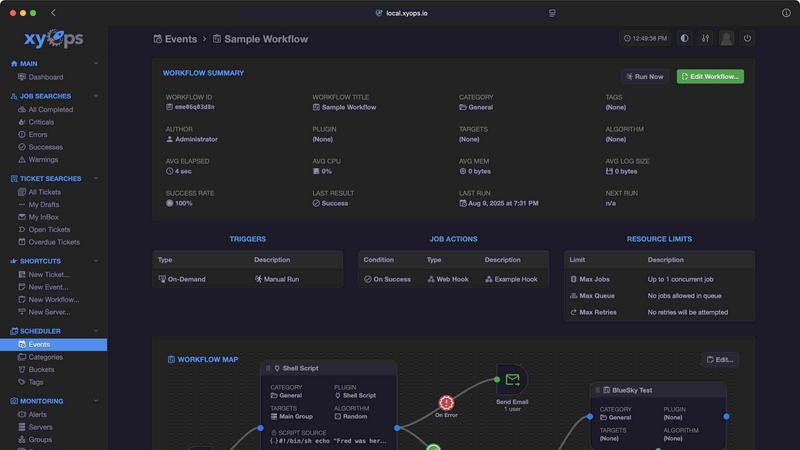
About xyOps
xyOps™ is an innovative, next-generation platform designed for job scheduling, workflow automation, server monitoring, alerting, and incident response. It seamlessly integrates these capabilities into one cohesive system, catering specifically to developers and operations teams. By providing a solution that empowers users to manage their automation stack without compromising on data, visibility, or freedom, xyOps stands out in a crowded market. Unlike many other tools that restrict access to features behind paywalls or send telemetry data to third parties, xyOps is built on an open and extensible framework that can run in any environment. This ensures that teams maintain full control over their workflows, allowing them to orchestrate their infrastructure efficiently and effectively.
Features of xyOps
Job Scheduling Reimagined
xyOps revolutionizes job scheduling by offering advanced features that go beyond traditional cron jobs. Users can schedule jobs across their entire infrastructure, track performance in real-time, and set alerts for key events, all from a single intuitive interface.
Visual Workflow Builder
The graphical workflow editor in xyOps allows users to visually create complex workflows. By connecting events, triggers, actions, and monitors, teams can build meaningful pipelines that streamline their operations and enhance productivity.
Active Job Tracking
xyOps enables real-time monitoring of jobs, allowing users to run multiple tasks in parallel while enforcing limits on resources like CPU and memory. This feature provides comprehensive progress updates and allows for custom actions based on job outcomes.
Integrated Ticketing System
The built-in ticketing system in xyOps automates incident response by linking alerts and failed jobs to ticket creation. This integration enhances communication and ensures that issues are addressed promptly, making it easier for teams to maintain operational efficiency.
Use Cases of xyOps
Automating Routine Tasks
Teams can leverage xyOps to automate repetitive tasks such as data backups, report generation, and system updates. This automation not only saves time but also reduces the risk of human error, allowing teams to focus on more strategic initiatives.
Monitoring Server Health
With xyOps, organizations can monitor the health of their servers and applications in real-time. Custom alerts can notify teams of potential issues before they escalate, ensuring high availability and performance for critical systems.
Streamlining Incident Response
In the event of an incident, xyOps can automatically generate tickets based on predefined rules. This capability allows teams to respond to issues swiftly, minimizing downtime and improving service reliability.
Enhancing Development Workflows
Developers can integrate xyOps into their CI/CD pipelines to streamline deployment processes. By automating tasks such as testing and deployment, teams can ensure faster and more reliable releases, ultimately enhancing the development lifecycle.
Frequently Asked Questions
What is xyOps?
xyOps is a comprehensive platform for job scheduling, workflow automation, server monitoring, alerting, and incident response, designed to help teams orchestrate their infrastructure efficiently.
How does xyOps handle job scheduling?
xyOps offers an advanced job scheduling system that allows users to schedule tasks across their infrastructure, track performance, and set alerts, all from a unified interface.
Can I customize alerts in xyOps?
Yes, xyOps provides smart alerts with full customization options and complex triggers, enabling teams to receive notifications tailored to their specific needs.
Is xyOps open source?
Absolutely. xyOps is 100% open source under the BSD 3-Clause license, ensuring maximum flexibility and freedom for users to modify and expand upon the platform as needed.
Similar to xyOps

DeskBot
DeskBot for Kalshi event contracts. $1 first month, then $19.99/mo. Trading can lose money. Not affiliated with Kalshi.

ERA AI
Voice AI agent for Windows 10/11: 8 specialist agents + 56 desktop tools do your PC work. One-time ₹1499 / $20.

Zeptap
Zeptap lets AI use your real iPhone like you do: open apps, read the screen, tap, swipe and type. Reply to DMs, post Stories, book rides, test apps.
9bot
WhatsApp group bot for moderation, automation and reports: welcomes, anti-spam, link filtering, scheduling, RSS, API and MCP.

imgtxtapp.laviolab.com
imgtxtapp.laviolab.com is a Telegram-based image-to-text converter that turns photos, screenshots, scanned documents into editable text

Novastart
Novastart brings apps and files onto an infinite canvas where people and AI agents can work together.

ReadyHermes
Your own hosted Hermes Agent in a minute: memory, self-learning skills, schedules, a real browser and 1,000+ app connections.