StatPecker
StatPecker transforms your data into secure, stunning visuals for quick insights and impactful storytelling.
Visit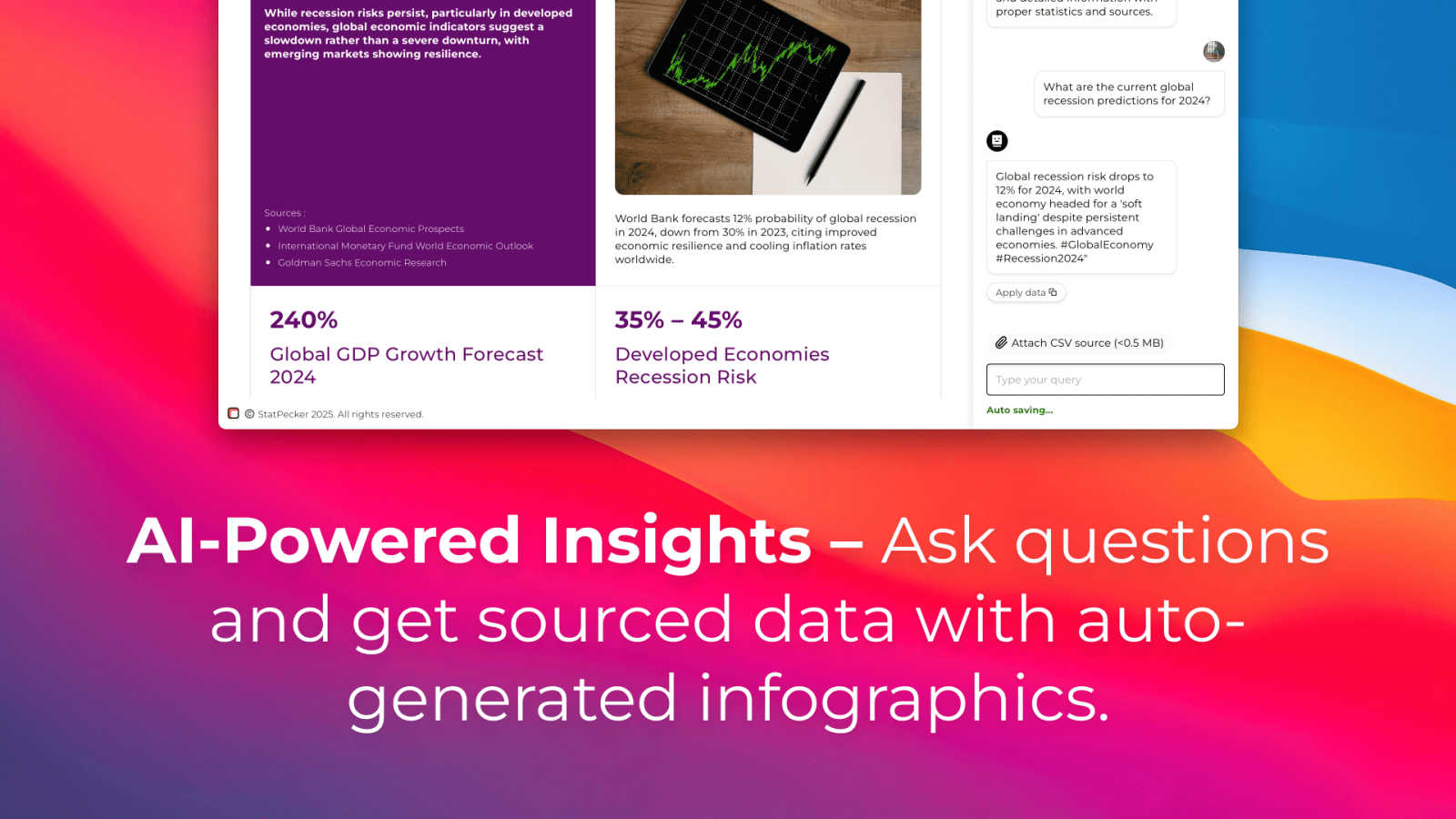
About StatPecker
StatPecker is an innovative AI-powered tool that transforms raw data into compelling visuals, targeting a wide audience including content creators, analysts, marketers, and educators. This platform automates the process of data storytelling, allowing users to generate impactful infographics without the burden of manual reporting or expensive design services. With StatPecker, users can quickly create visually engaging content in seconds, saving time and reducing costs while enhancing their presentations. The intuitive interface allows for easy CSV file uploads and the ability to ask insightful queries through AI, resulting in interactive visuals that can be embedded across various digital platforms. StatPecker democratizes data visualization, making it accessible to everyone, regardless of their technical proficiency, thereby empowering users to communicate insights effectively.
Features of StatPecker
Ask Your Query
StatPecker allows users to obtain instant insights by simply asking questions in natural language. This feature eliminates the need for complex tools and makes it easy for users to access validated sources of information, enhancing their ability to interpret data effectively.
Publish & Embed
With StatPecker, users can create interactive visuals that can be seamlessly integrated into blogs, articles, and websites. This feature ensures that users can share their data insights in a visually appealing format that captures the attention of their audience.
Upload & Analyze CSVs
Users can upload CSV files of up to 50MB and analyze them without the hassle of traditional spreadsheets. This feature simplifies the process of extracting key insights from data, enabling users to focus on storytelling instead of data management.
Download & Use Anywhere
StatPecker allows users to export their infographics as images, making them suitable for reports, presentations, and more. This feature ensures that users can utilize their visuals across various platforms and formats, providing versatility in data presentation.
Use Cases of StatPecker
Data-Driven Marketing
Marketers can leverage StatPecker to create compelling visuals that highlight campaign performance, customer demographics, and market trends. This helps in crafting data-driven strategies that resonate with stakeholders and drive decision-making.
Educational Presentations
Educators can use StatPecker to present complex data in an engaging manner. By transforming raw data into infographics, teachers can enhance their lectures, making learning more interactive and visually appealing for students.
Business Analytics
Analysts can utilize StatPecker to visualize sales performance, revenue breakdowns, and market comparisons. This empowers teams to make informed decisions based on clear and concise visual data representations.
Content Creation
Content creators can harness StatPecker to generate eye-catching visuals for articles, social media posts, and blogs. By embedding these visuals, they can enhance user engagement and provide valuable insights to their audiences.
Frequently Asked Questions
What types of files can I upload to StatPecker?
You can upload CSV files of up to 50MB to StatPecker for analysis. This allows you to extract valuable insights directly from your data without the need for spreadsheets.
How does StatPecker ensure data privacy?
StatPecker operates with a local SQL agent feature, meaning your data stays on your device during analysis. This ensures that your information remains private and secure.
Can I use StatPecker for free?
Yes, StatPecker offers a free tier that allows users to create unlimited projects and embeds, with a limit on AI queries and CSV uploads. This makes it accessible for users to start creating engaging visuals without any upfront costs.
What kind of support is available for users?
StatPecker provides support through various channels, including a comprehensive help section on their website and customer service for inquiries about features and functionalities. Users can also access community forums for shared experiences and tips.
Explore more in this category:
Similar to StatPecker

AIPetGen
AIPetGen turns a photo of your dog, cat, or other pet, or a written description, into a new picture or a short animation.

AdsTurbo
Turn winning ads and product links into new video ad variations with AI actors, then translate them into 35+ languages with lip sync.



LLMmonitor
LLMMonitor identifies how artificial intelligence models discuss your brand.

GenogramLab
GenogramLab is an AI-powered online genogram maker that turns family descriptions into editable diagrams, helping you visualize family structures and