
Sorry Hundred Times
Generate perfectly formatted apology texts repeated 100 to 10,000 times and copy them instantly to WhatsApp or iMessage.
Visit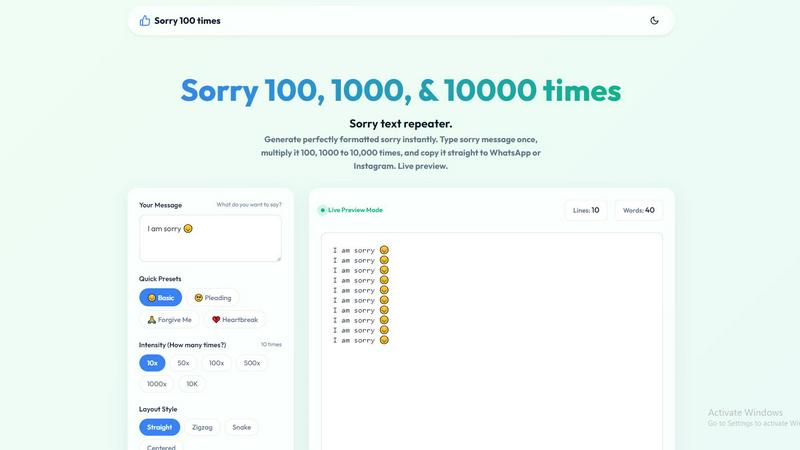
About Sorry Hundred Times
Sorry Hundred Times is a free, browser-based utility designed to generate repeated apology messages instantly. It solves a specific communication problem: sometimes, saying "sorry" once in a chat message feels inadequate, especially after a significant mistake or argument. This tool allows users to type a single apology message, multiply it by 100, 1,000, or even 10,000 times, and copy the entire block of text directly to platforms like WhatsApp, Instagram, or iMessage. The core value proposition is effort and impact. Instead of typing the same word over and over, users can demonstrate their sincerity by sending a massive, personalized wall of apologies. The tool is fully customizable. Users can enter their own message, including names and emojis, or choose from quick presets like "Pleading" or "Forgive Me." They can then select the exact number of repetitions, choose from four layout styles (Straight, Zigzag, Snake, Centered), and format the output with line numbers, separators, or a new line for each repetition. A live preview updates instantly as settings are changed, allowing users to see the final result before copying. The entire process runs locally in the user's browser, ensuring zero lag even when generating 10,000 lines. This product is for anyone who needs to apologize sincerely and dramatically in a digital conversation, whether for a casual slip-up or a major argument. It is also a companion tool to similar utilities like "I Love You 100 Times" and "Thank You 100 Times," forming a suite of emotional communication tools. The tool is completely free, requires no sign-up, and is optimized for instant use on any device with a modern browser.
Features of Sorry Hundred Times
Custom Message and Presets
Users are not limited to a single, generic phrase. They can type any custom apology message, such as "I am truly sorry for what I said," "Sorry Jaan," or "Maafi karo 🙏." The tool fully supports names, emojis, and any language. For users who want a faster start, there are four quick presets: Basic, Pleading, Forgive Me, and Heartbreak. Each preset provides a ready-made phrase that can be edited before generation. This flexibility ensures the apology feels personal and authentic, not robotic.
Flexible Repetition Count and Intensity
The tool offers a wide range of repetition counts, from 10 times up to 10,000 times, with quick-select buttons for 10x, 50x, 100x, 500x, 1000x, and 10K. Users can also type any custom number. This feature allows users to match the intensity of their apology to the severity of the situation. A casual slip-up might warrant 10 repetitions, while a major argument may require 1,000 or more. The suggested intensity levels (10x for casual, 100x for sincere, 1,000x for major) guide users in choosing the right impact.
Layout Styles and Formatting Options
To make the repeated message visually engaging and readable, the tool provides four distinct layout styles: Straight, Zigzag, Snake, and Centered. Each style changes the visual pattern of the text on screen. Additionally, users can toggle formatting options such as adding a new line for each repetition, showing line numbers (e.g., "1. Sorry"), and adding a separator (|) between each line. These options allow the user to control the structure and appearance of the final message, making it more likely to be read and noticed.
Instant Live Preview and One-Click Copy
All changes are reflected in a live preview mode that updates instantly as the user types or adjusts settings. The preview shows the exact number of lines and words in the generated message. Once the user is satisfied, a single "Copy Apology" button copies the entire block of text to the clipboard. The tool also includes a "Save .txt" button for downloading the message as a text file and a "Clear" button to reset the form. This streamlined workflow minimizes friction, allowing users to generate and send their apology in under thirty seconds.
Use Cases of Sorry Hundred Times
Mending a Major Argument
After a significant fight with a partner, a single "sorry" text can feel dismissive. Sending a 1,000 or 10,000 repetition apology shows a massive amount of effort and dedication. The user can personalize the message with their partner's name and a heartbreak emoji, select the "Snake" or "Centered" layout for a dramatic visual effect, and include line numbers to emphasize the sheer volume of the apology. This action communicates that the user is willing to go to great lengths to make amends.
Apologizing in a Group Chat
Making a mistake in a group chat on WhatsApp or Instagram can be awkward. A quick, lighthearted apology of 10 or 50 repetitions can diffuse the situation with a touch of humor. The user can choose the "Basic" preset, select a "Zigzag" layout for a playful look, and add a separator to keep the text organized. This approach shows self-awareness and a willingness to apologize without making the situation overly heavy, helping to quickly restore a positive group dynamic.
Demonstrating Sincere Regret for a Broken Promise
When someone fails to keep a promise, a standard apology may not rebuild trust. Sending a 100 or 500 repetition apology with the "Pleading" preset and the "Forgive Me" emoji can convey deep regret. The "Straight" layout with line numbers creates a serious, list-like format that feels more formal and sincere. This use case is effective for personal relationships where the user needs to show they understand the weight of their mistake.
Creating a Unique Digital Gesture
Beyond apologies, this tool can be used for creative or dramatic digital gestures. For example, someone might generate a 100-line apology with a specific message like "I was wrong, you were right" to make a point in a playful argument. The variety of layouts, emojis, and formatting options allows users to craft a unique, visually distinct message that stands out in a crowded chat feed. This turns a simple apology into a memorable communication event.
Frequently Asked Questions
Is Sorry Hundred Times really free to use?
Yes, Sorry Hundred Times is completely free. There are no hidden costs, subscription fees, or sign-up requirements. The entire tool runs locally in your web browser, meaning there are no server costs passed on to the user. You can generate and copy as many apology messages as you need without any limitations.
Can I use my own name and emojis in the message?
Absolutely. The tool is fully customizable. You can type any text you want into the "Your Message" box, including proper names, nicknames, and any emoji you can paste or type. For example, you can write "I am sorry, Sarah 🙏" or "Maafi karo, Jaan 😔" and the tool will repeat that exact phrase.
What is the maximum number of repetitions I can generate?
The tool allows you to generate up to 10,000 repetitions. There are quick-select buttons for 10, 50, 100, 500, 1000, and 10,000 times. You can also type any custom number between 1 and 10,000. The tool is optimized to generate 10,000 lines instantly without crashing, as it runs locally in your browser.
How do I copy the generated message to WhatsApp or Instagram?
Once you have generated your message, simply click the "Copy Apology" button. This will copy the entire block of text to your clipboard. Then, open your WhatsApp or Instagram chat, long-press the message input field, and select "Paste." If the copy button is not responding, you can manually select all the text in the preview box and use Ctrl+C (Windows) or Cmd+C (Mac) to copy it.
Explore more in this category:
Similar to Sorry Hundred Times

The Kiss
Turn two photos into a cinematic AI kissing video. Pick one of 13 kiss video templates; 30 free credits on sign-up.

trykissai
AI kiss generator: add a photo of each person, pick a kiss scene, and get a kiss photo or a 5–7 second clip. 30 free credits.

Pawaime
Pet portraits with you in them: upload one photo of you and one of your pet, pick a scene, get a realistic portrait. 2 free photos.

FaceRater
A free face rater with photo measurements, illustrated reports and personal AI hairstyle concepts.

AI Rap
AI rap generator that turns two portraits or one photo of two people into a short English duet rap video with original lyrics, vocals, and music.
DeskSprite
Your pet, living on your desktop — free to start AI desktop pets, generated from your photos

A2O LITE NEON AI
Upload two photos and get a 15-second AI video of those two people doing the A2O LITE NEON intro.

Baile Charme AI
Upload one photo and get a 10-second vertical AI video of you dancing the charme step in Rio.