
KPI Studio
KPI Studio transforms your data into stunning video animations in under 60 seconds, no design skills required.
Visit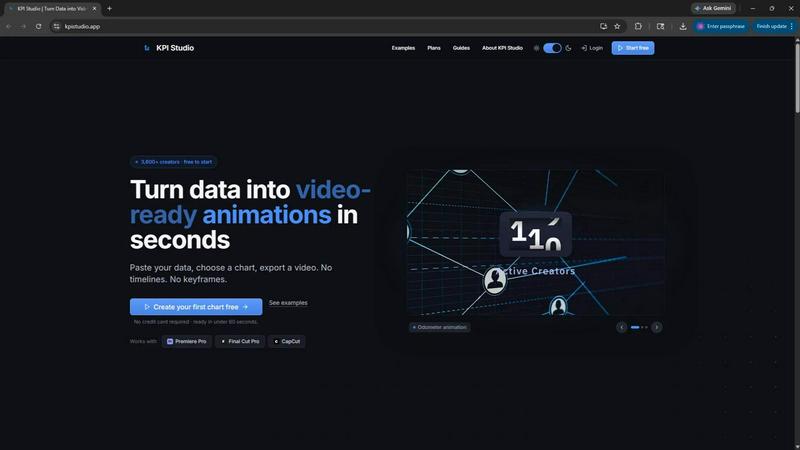
About KPI Studio
KPI Studio is an innovative solution designed specifically for data-driven video creators who require dynamic charts in their content but lack the time or expertise for extensive motion design. In today's fast-paced digital landscape, the traditional methods of integrating data visuals into videos often fall short, leaving creators with amateur-looking screenshots or cumbersome templates that lack flexibility. With KPI Studio, users can streamline their workflow by simply pasting their data, selecting a chart type, and exporting a fully animated visual in under 60 seconds. This process eliminates the need for complex software like After Effects or the slow turnaround times associated with freelancers. The tool supports advanced workflows with JSON export options, making it adaptable for custom editing pipelines. KPI Studio is tailored for creators who operate on tight publishing schedules, ensuring that when they need a chart, it is readily available and easy to integrate into their editing software.
Features of KPI Studio
Rapid Data Integration
With KPI Studio, users can paste their data directly into the platform, allowing for immediate customization and chart selection. This feature eliminates lengthy setup times and reduces the complexity of traditional motion design processes, enabling creators to focus on their content rather than the technicalities of design.
Instant Video-Ready Exports
KPI Studio offers video exports in multiple formats, including MP4, GIF, MOV, and PNG with transparency. This feature allows creators to drop their animated charts directly into popular editing software like Premiere Pro, Final Cut, and CapCut without any additional editing, ensuring a seamless workflow.
Customizable Chart Options
The platform provides a diverse array of chart types, from count-up animations to animated bar and line charts. This flexibility allows creators to tailor their visuals to fit specific narrative styles and audience engagement goals, enhancing the overall quality of their video content.
Advanced Workflow Capabilities
For users with more complex needs, KPI Studio supports JSON exports, enabling deeper editing and integration into custom pipelines. This feature is ideal for teams that require a more sophisticated approach to data visualization, making it easier to adapt charts for various projects and updates.
Use Cases of KPI Studio
YouTube Content Creation
Video creators on platforms like YouTube can utilize KPI Studio to quickly produce engaging data visuals that enhance their storytelling. By integrating animated charts, creators can effectively present statistics or growth metrics, boosting viewer retention and engagement.
Marketing Campaigns
Marketers can leverage KPI Studio to generate compelling visuals for presentations and social media campaigns. The ability to create and export animated KPIs swiftly allows marketers to adapt their content to real-time data changes, ensuring their messaging is always relevant.
E-Learning Materials
Educators and e-learning professionals can enhance their instructional videos with animated charts that clarify complex information. KPI Studio enables the quick transformation of raw data into engaging visuals, making learning more interactive and effective for students.
Corporate Reporting
Business professionals preparing reports or presentations can benefit from KPI Studio's ability to create polished, animated visuals from their data. This tool allows for the efficient production of high-quality charts that can be seamlessly integrated into corporate videos or slideshows.
Frequently Asked Questions
What types of charts can I create with KPI Studio?
KPI Studio offers a variety of animated chart types, including count-up numbers, bar charts, and line charts. This versatility allows creators to select the most effective visual representation for their data.
Is there a free version of KPI Studio?
Yes, KPI Studio offers a free plan that includes unlimited PNG exports and three free animated exports. This allows users to try out the tool without any financial commitment.
How quickly can I export my visuals?
Users can export fully animated visuals in under 60 seconds after pasting their data and customizing their chart. This rapid turnaround is a key feature designed to meet the demands of creators on tight deadlines.
Can I integrate KPI Studio with my existing workflows?
Absolutely. KPI Studio supports JSON exports, which allows for deeper customization and integration into various editing and data pipelines, making it a flexible tool for diverse creative projects.
Similar to KPI Studio

ViduAI
ViduAI creates consistent videos from text, images, references, and first or last frames with Vidu Q3.

Hailuo AI
Create high-quality Hailuo AI videos from text or images with guided prompts, camera controls, flexible settings, task tracking, and downloadable resu

Free Gemini Omni
Create, remix, and edit cinematic AI videos online with Free Gemini Omni using text, image, audio, and video prompts.

Motiofy
Motiofy is an AI creative workspace that helps creators and teams turn ideas into polished visual stories.
RunwayAI
Independent AI video generator for text and image workflows with practical controls and API access.

NeutrixFlow
AI tools directory with practical reviews, comparisons, and guides.
VidRush AI
AI-powered long video generator. Turn text, images, audio and video into long, production-ready AI videos.