
DrawPic
Precisely edit the text, numbers, or any region in an image. Everything outside your selection stays identical — no source file, no Photoshop.
Visit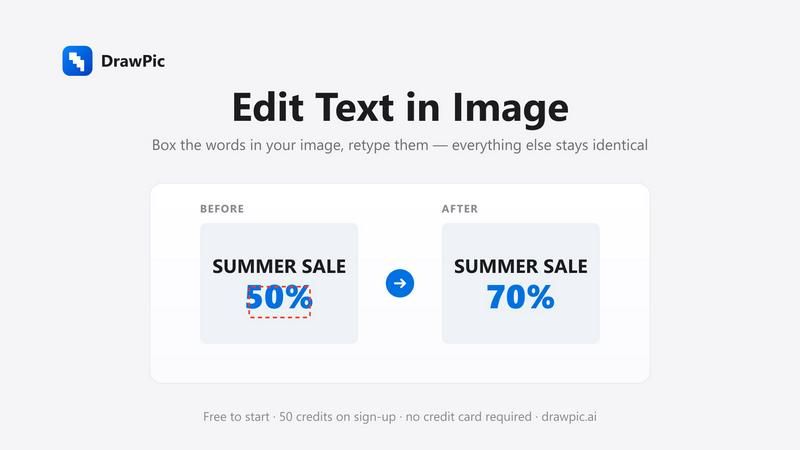
About DrawPic
DrawPic lets you edit a finished image without the source file. Select what you want changed — a typo in a poster, the price on a menu, a figure in a report chart — type the new content, and the AI regenerates only the selected region. The font, colors, background, and everything outside the edit stay pixel-identical, so you never lose the design you already approved.
Unlike chat-based tools (ChatGPT/Gemini) that regenerate the whole image and drift, DrawPic gives you precise control in one pass: no back-and-forth, no "keep the background" negotiations.
Tools include: Edit Text in Image, Edit Numbers in Image, AI Inpaint, Day-to-Dusk real estate photos, product photos, and 20+ style generators.
Pricing: free credits on signup, then pay-as-you-go credit packs from $1.49. No subscription. Credits never expire.
Explore more in this category:
Similar to DrawPic

AIVideoAgent
Turn text ideas or reference images into videos through conversation, with agent-assisted prompts and a choice of video models.

AI Rap
AI rap generator that turns two portraits or one photo of two people into a short English duet rap video with original lyrics, vocals, and music.
AI Sprite Generator
Create pixel-art game characters in the browser: generate a sprite, animate it, edit pixels, and export PNG or sprite sheets.
ImageAgent
Create and edit AI images through conversation, using text or reference images and refining results in chat.

CloneWebsite
Clone any webpage pixel-perfect, export HTML/CSS/ZIP or React/Vue components.

AppIconGenerator
Generate iOS and Android app icons from any image and export all platform sizes for free.

Happy Horse AI Video
Use HappyVideo as a Happy Horse AI style AI video generator for text-to-video, image-to-video, native audio, and multi-shot video creation.
Influence
Connect AI-assisted social post preparation with review & scheduling