
Fusedash vs Threat Watch
Side-by-side comparison to help you choose the right AI tool.

Fusedash turns raw data into clear dashboards and charts for instant team insights.
Last updated: March 4, 2026

Threat Watch
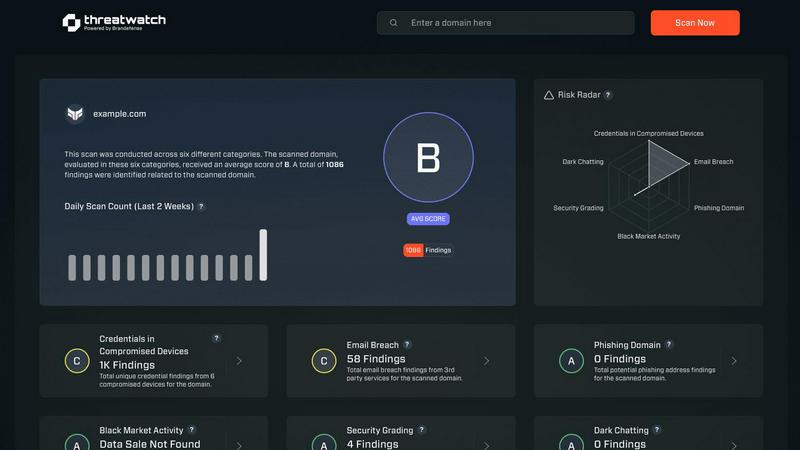
Quickly assess your cybersecurity health with Threat Watch for actionable insights on compromised accounts and devices.
Last updated: March 1, 2026
Visual Comparison
Fusedash

Threat Watch
Feature Comparison
Fusedash
Unified Visualization Workspace
Fusedash consolidates multiple data presentation formats into a single, cohesive environment. Instead of juggling separate tools for dashboards, charts, maps, and reports, teams can build all these views from the same connected dataset. This unified approach allows for seamless switching between interactive dashboards for monitoring, detailed charts for analysis, geographic maps for spatial context, and narrative storytelling reports for stakeholder communication, all while maintaining consistent data logic and definitions.
AI Chart Generator
This feature accelerates the initial step of data exploration by allowing users to generate clear, effective visuals from their data in minutes. By simply uploading a CSV or connecting an API, the AI assists in selecting the optimal chart type, applying relevant comparisons, and refining labels to ensure the visual accurately tells the data's story. These charts can be used as standalone assets for quick reports or seamlessly integrated into larger, more comprehensive dashboard views.
Consistent Metric Definitions
Fusedash addresses a fundamental pain point in data-driven organizations: metric inconsistency. Teams can define their core KPIs, dimensions, time comparisons, and segmentations once within the platform. These standardized definitions are then automatically applied and reused across every dashboard, chart, and report. This guarantees that everyone in the organization—from marketing to finance to the C-suite—is analyzing and making decisions based on the exact same calculations, building trust and eliminating debates over data accuracy.
Smart AI Chat for Data Exploration
Integrated directly into the workflow, the AI Chat function allows users to interact with their data using natural language. Users can ask plain-English questions about their datasets, request specific breakdowns, or seek suggestions for the most relevant metrics and visualizations. The AI interprets these queries and provides immediate answers, which can then be instantly transformed into a shareable, persistent view within a dashboard, dramatically speeding up the insight discovery process.
Threat Watch
Comprehensive External Attack Surface Analysis
Threat Watch provides an in-depth analysis of your organization's external attack surface. By continuously scanning for vulnerabilities and assessing potential threats, it helps identify weaknesses before they can be exploited by malicious actors.
Automated Threat Intelligence Gathering
The platform automates the collection of critical threat intelligence data, allowing security teams to focus on remediation efforts rather than manual data collection. This efficiency ensures that teams are always aware of the latest threats impacting their assets.
Real-Time Risk Assessment
With Threat Watch, organizations gain access to real-time risk assessments that highlight vulnerabilities and exposures as they occur. This feature enables proactive responses to emerging threats, ensuring that security measures are always up-to-date and effective.
User-Friendly Dashboard
The intuitive dashboard of Threat Watch simplifies data interpretation, presenting complex security information in an easily digestible format. Users can quickly assess their cyber health, track remediation progress, and make informed decisions based on clear visualizations.
Use Cases
Fusedash
Executive Reporting and Leadership Alignment
Leadership teams require a high-level, consistent view of company performance without getting lost in data discrepancies. Fusedash enables the creation of executive dashboards that combine key financial, operational, and marketing KPIs into a single, real-time interface. By using standardized metric definitions, it ensures that the numbers presented to the board are the same ones used by department heads, fostering strategic alignment and confident, data-backed decision-making at the top level.
Marketing Campaign Performance Monitoring
Marketing teams need to track campaign metrics across multiple channels in real-time. With Fusedash, they can connect various ad platform APIs and data sources to build a unified campaign dashboard. They can visualize ROI, conversion rates, and customer acquisition costs through interactive charts, segment performance by region using maps, and use storytelling reports to summarize weekly performance and insights for stakeholders, all from one connected dataset.
Operational and Logistics Oversight
Operations and logistics managers benefit from visualizing data geographically and temporally. Fusedash allows them to upload shipment data or connect to logistics APIs to create detailed maps showing delivery routes, warehouse inventory levels, or regional sales performance. They can monitor real-time dashboards for key operational metrics, drill down into specific time periods to diagnose delays, and create narrative reports that explain weekly operational challenges and successes.
Cross-Departmental Data Democratization
Organizations aiming to become truly data-driven need to empower non-technical teams with self-service analytics. Fusedash's intuitive interface and AI Chat feature allow teams in sales, HR, or customer success to ask direct questions of their data without writing SQL. They can generate their own charts, apply filters, and build simple dashboards to track their team-specific goals, reducing dependency on data analysts and speeding up the cycle from question to insight.
Threat Watch
Identifying Vulnerabilities in Real-Time
Organizations can utilize Threat Watch to continuously monitor their systems for vulnerabilities. This proactive approach allows security teams to address weaknesses as they arise, reducing the risk of data breaches.
Prioritizing Remediation Efforts
With its automated assessments, Threat Watch enables organizations to prioritize which vulnerabilities to address first based on their potential impact. This strategic focus on high-risk issues helps optimize resource allocation and enhance overall security.
Monitoring Dark Web Threats
Threat Watch allows organizations to monitor dark web content for any mention of compromised credentials or stolen data. This feature is crucial for taking preemptive action against potential breaches before they escalate.
Enhancing Incident Response Capabilities
By providing actionable insights and real-time data, Threat Watch enhances an organization's incident response capabilities. Security teams can quickly identify and respond to threats, minimizing damage and recovery time.
Overview
About Fusedash
Fusedash is an AI-powered data visualization platform designed to eliminate the friction and inconsistency of modern data reporting. It serves as a unified workspace where teams can transform their connected data—from CSVs, APIs, or databases—into clear, actionable insights. The platform consolidates the creation of decision-ready dashboards, interactive charts, detailed maps, and narrative reports, removing the need to rebuild the same logic across multiple, disconnected tools. Its core value proposition is delivering a single source of truth: you define your key metrics and KPIs once, and then reuse those consistent definitions across every view and report. This ensures alignment across the entire organization, from leadership to operations, so everyone is working from the same trusted numbers. Built for teams tired of manual reporting cycles and conflicting data stories, Fusedash empowers users to not only monitor real-time performance but also understand the 'why' behind the data through intuitive drill-downs. With integrated AI features like natural language data chat and smart visualization assistance, it makes data exploration and reporting faster and more accessible, turning raw data into a shared foundation for strategic alignment and decisive action.
About Threat Watch
Threat Watch is a cutting-edge cybersecurity intelligence platform meticulously crafted to deliver organizations a comprehensive overview of their digital security posture. Unlike traditional security tools that operate in silos, Threat Watch integrates and analyzes data from a wide array of sources, providing a unified view of your external attack surface. This platform continuously scans your assets, vulnerabilities, and exposures, correlating information to present a definitive picture of your cyber health in real-time. Tailored for security teams, IT managers, and business leaders, Threat Watch automates critical assessments and gathers threat intelligence efficiently. By identifying hidden risks and allowing for prioritization of remediation efforts based on actual impact, organizations can rapidly mitigate threats. Its core value lies in transforming complex security data into a single source of truth, enabling proactive defenses and informed decision-making, ultimately safeguarding your organization's reputation, data, and operational integrity.
Frequently Asked Questions
Fusedash FAQ
What types of data sources can I connect to Fusedash?
Fusedash is designed for flexibility in data ingestion. You can start by uploading static files like CSVs or Excel spreadsheets. For live, updating data, you can connect directly to various business application APIs, such as marketing platforms, CRM systems, or databases. The platform also allows you to combine multiple datasets—like your internal sales data with public demographic information—to create enriched, contextual views within a single workspace.
How does Fusedash ensure data consistency across reports?
Consistency is a foundational principle of Fusedash. The platform allows you to centrally define your key metrics, calculations, and dimensional segments (like "active user" or "QoQ growth"). Once these definitions are set, they become reusable building blocks. Every time you create a new dashboard, chart, or report, you select from these pre-defined metrics. This eliminates manual recalculations and ensures that a KPI on the executive dashboard is calculated identically to the same KPI on a team-level report.
Is the AI Chart Generator suitable for complex data analysis?
The AI Chart Generator is an excellent starting point for transforming raw data into clear, communicative visuals quickly. It excels at handling common chart types and comparisons to reveal initial trends and stories. For deeply complex, multi-layered statistical analysis, it serves as a powerful rapid prototyping tool. The generated charts can then be refined, combined with other data views, and integrated into comprehensive dashboards where further drill-down and advanced filtering can be performed for deeper analysis.
Can I share the dashboards and reports with external stakeholders?
Yes, Fusedash is built for collaboration and sharing insights. You can easily share the views you create—whether they are interactive dashboards, standalone charts, or narrative reports—with both internal team members and external stakeholders like clients or partners. Access can typically be controlled, allowing you to share read-only views or interactive dashboards with specific filters enabled, ensuring stakeholders see only the relevant data while interacting with the live insights.
Threat Watch FAQ
What types of organizations can benefit from Threat Watch?
Threat Watch is designed for a wide range of organizations, including small businesses, large enterprises, and government agencies. Any entity concerned about its cybersecurity posture can leverage the platform for enhanced protection.
How does Threat Watch ensure data security?
Threat Watch employs robust encryption protocols and adheres to industry best practices to secure data both in transit and at rest. This commitment ensures that sensitive information remains protected from unauthorized access.
Can Threat Watch integrate with existing security tools?
Yes, Threat Watch is designed to seamlessly integrate with a variety of existing security tools and systems. This compatibility allows organizations to enhance their current security infrastructure without significant overhauls.
Is training required to use Threat Watch?
While Threat Watch features a user-friendly interface, training sessions and resources are available to help users fully leverage the platform's capabilities. This ensures that organizations can maximize their investment in the tool effectively.
Alternatives
Fusedash Alternatives
Fusedash is an AI-powered data visualization and business intelligence platform. It helps teams unify their data to create consistent, decision-ready dashboards and reports, ensuring everyone works from a single source of truth. Users often explore alternatives for various reasons. These can include budget constraints, the need for specific integrations, different user-skill requirements, or a desire for more specialized analytical features. The search for the right tool is highly personal to a team's unique data stack and workflow. When evaluating options, consider your core needs. Key factors often include ease of use for your team's technical level, the ability to connect to your essential data sources, the robustness of collaboration features, and the total cost of ownership. The goal is to find a solution that turns data into a reliable asset for alignment and action.
Threat Watch Alternatives
Threat Watch is a comprehensive cybersecurity intelligence platform designed to provide organizations with a clear and actionable view of their digital security posture. As a tool that focuses on evaluating external attack surfaces, it enables users to continuously monitor their cybersecurity health through automated assessments and real-time data analysis. Users often seek alternatives to Threat Watch for various reasons, including pricing, specific feature sets, or compatibility with existing systems and workflows. When exploring alternatives, it's essential to consider factors such as the comprehensiveness of threat detection, ease of integration, usability, and the ability to provide actionable insights that align with your organization's unique security needs.