
Facejam vs Shrinkpad
Side-by-side comparison to help you choose the right AI tool.

Facejam
Create polished professional headshots from your selfies in minutes with AI.
Last updated: February 28, 2026

Shrinkpad
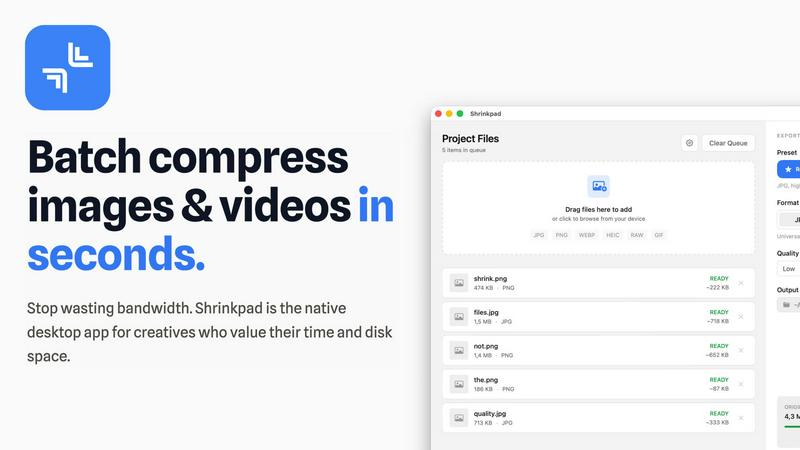
Shrinkpad is a native Mac app that batch compresses images and videos locally to save space and time.
Last updated: February 28, 2026
Visual Comparison
Facejam

Shrinkpad
Feature Comparison
Facejam
Curated Style Library
FaceJam offers a meticulously curated selection of over 100 professional photography styles, with new templates added daily. These aren't generic filters; they are industry-specific looks tailored for fields like real estate, law, consulting, and creative arts. This allows you to find a style that communicates the right professional message for your role, ensuring your headshot fits seamlessly into your industry's aesthetic, from corporate boardrooms to startup pitch decks.
Studio-Quality Realism
The AI is engineered to prioritize subtlety and authenticity. FaceJam specializes in generating headshots that look like they came from a professional photographer's studio, complete with expert lighting, flattering angles, and natural retouching. The technology works to avoid the common, overtly synthetic look of AI, delivering results that are polished and believable, so you can present your best self with confidence.
Rapid, Hassle-Free Generation
The entire process is designed for speed and simplicity. From upload to download, you can have a suite of professional headshots ready in minutes. There is no need for prompts, technical knowledge, or waiting for edits. This feature saves not just money but significant time, removing the need to schedule shoots, commute to a studio, or coordinate with a photographer and retoucher.
Privacy-First & Full Ownership
Your data and your results are protected. The photos you upload are used solely to train the AI model for your specific session and are never used to improve the public model or contribute to another user's photos. Most importantly, you retain full commercial license and complete ownership over all generated AI headshots, free to use them on LinkedIn, company websites, marketing materials, and beyond.
Shrinkpad
Lightning-Fast Batch Processing
Shrinkpad is engineered for speed, leveraging multi-threaded compression optimized for Apple Silicon. You can drag and drop hundreds of files or entire folders, and the app will process them in a single, swift batch. This eliminates the need to compress files individually, turning a task that could take hours into one that completes in minutes, all while your Mac remains responsive.
Intelligent Quality Optimization
Stop guessing compression settings. Shrinkpad automatically analyzes the visual complexity of each image to apply the perfect compression ratio. This smart detection balances maximum file size reduction with quality preservation, effectively minimizing artifacts. For videos and specific needs, fine-grained manual controls are also available.
Comprehensive Format Support
The app is a universal media tool, supporting a vast array of over 50 formats. This includes standard web images (JPG, PNG, WEBP, AVIF), professional RAW camera files, Apple's HEIC format, and major video formats like MP4 and MOV. You can even process mixed batches of images and videos together seamlessly.
Privacy-First Local Processing
Every byte of compression happens locally on your Mac. Shrinkpad does not require an internet connection, and your files are never uploaded to a cloud server. This ensures complete confidentiality for your proprietary client work, personal photos, and unreleased projects, providing peace of mind that web-based tools cannot match.
Use Cases
Facejam
LinkedIn & Professional Networking Profiles
Create the perfect, polished headshot for your LinkedIn profile, resume, or other job-seeking platforms. A high-quality photo significantly increases profile views and establishes immediate credibility. FaceJam provides a range of professional backgrounds and poses tailored to your industry, ensuring you make a strong first impression with recruiters, clients, and professional connections.
Corporate Team Branding
Equip an entire team or company with consistent, high-quality headshots for the company website, internal directory, or "About Us" page. This creates a cohesive and professional brand image at scale, without the logistical nightmare and high cost of organizing a traditional photoshoot for every employee. Styles can be unified to match corporate branding guidelines.
Personal Branding for Entrepreneurs & Coaches
Build a consistent and professional visual identity across all your personal branding touchpoints, including your personal website, social media profiles, speaker bios, and published articles. FaceJam allows you to generate multiple headshots in varied but complementary styles, providing a library of on-brand images for different platforms and campaigns.
Industry-Specific Professional Portraits
Obtain headshots that adhere to the unspoken dress codes and stylistic norms of your specific field. Whether you need the trustworthy warmth of a realtor, the authoritative sharpness of a lawyer, or the creative edge of a designer, FaceJam's tailored styles ensure your portrait aligns with client expectations and professional standards in your niche.
Shrinkpad
Optimizing Web and App Assets
Developers and web designers can drastically reduce application bundle sizes and improve website performance metrics like Largest Contentful Paint (LCP). By batch-compressing all interface images, icons, and promotional media, Shrinkpad helps create faster, more efficient digital products without sacrificing visual fidelity for the end-user.
Streamlining Photographer Workflows
Photographers managing large volumes of high-resolution images, including RAW files, can use Shrinkpad to prepare client galleries or create web-friendly versions of their portfolios. The batch processing and folder mode save immense time after a shoot, and the local processing keeps unpublished work secure.
Preparing Content for Social Media & Marketing
Content creators and marketing teams often need to compress videos and images for social platforms, email campaigns, or digital ads. Shrinkpad allows them to quickly downsize 4K videos and high-res graphics to manageable file sizes that maintain quality but upload quickly and don't consume excessive bandwidth for viewers.
Managing Digital Archives and Storage
Anyone needing to free up disk space on their Mac can use Shrinkpad to compress entire folders of old projects, photo libraries, or video archives. The folder mode automatically detects all media files, providing an estimated storage savings and allowing you to reclaim gigabytes with a single click.
Overview
About Facejam
FaceJam is a curated AI headshot generator designed for professionals who value quality, convenience, and authenticity. It transforms a handful of your everyday selfies into a gallery of studio-quality, professional portraits in minutes. The platform eliminates the traditional barriers to obtaining a great headshot: the high cost of a photographer, the time spent scheduling and commuting to a studio, and the awkwardness of a posed photoshoot. Instead, you simply upload photos, select from an extensive and ever-growing library of over 100 professionally designed styles, and generate your results. FaceJam is built for a discerning audience—realtors, consultants, founders, lawyers, creatives, and corporate teams—who need a polished, industry-appropriate image to build trust and authority online. Its core value proposition is delivering realistic, retouched-grade photographs that look authentically like you, without the obvious hallmarks of AI, all while ensuring your privacy and granting you full ownership of the final images.
About Shrinkpad
Shrinkpad is a native macOS application built for the modern creative professional who values efficiency, privacy, and control. It solves a universal problem: bloated image and video files that consume precious disk space and slow down websites and applications. Unlike cloud-based tools, Shrinkpad performs all compression directly on your Mac, ensuring your sensitive creative assets never leave your device. This local processing guarantees unparalleled speed, especially on Apple Silicon, and complete privacy. The application intelligently handles batch processing of hundreds, even thousands, of files across over 50 formats—from common JPGs and PNGs to professional RAW photos and 4K videos. It automatically analyzes visual complexity to apply optimal compression, achieving up to 90% file size reduction while preserving critical visual quality. Designed for photographers, designers, content creators, and developers, Shrinkpad transforms a tedious, manual task into a seamless, one-click workflow, saving hours of busywork and reclaiming gigabytes of storage.
Frequently Asked Questions
Facejam FAQ
How does your AI headshot generator work?
FaceJam operates in two simple steps. First, you upload a series of clear selfies from different angles. Second, you browse and select from our library of professional style templates. Our AI then uses your uploaded photos to understand your likeness and applies the chosen photographic style, generating a set of studio-quality headshots for you to download. No technical expertise or prompts are required.
What do you do with my uploaded photos?
Your uploaded photos are used exclusively to teach the AI what you look like for the purpose of generating your headshots in that single session. We do not use your photos to train or improve our general AI model, and they are never shared or used to create images for anyone else. Your privacy and data security are fundamental to our service.
How many good photos can I expect?
While results can vary, FaceJam guarantees at least one high-quality, usable image per generation pack. Users who follow the upload guidelines closely—providing clear, well-lit, varied selfies—often receive between 5 to 10 or more exceptional keeper photos. The quality of your input photos is the primary factor in the quantity of outstanding outputs.
Who owns my AI photos?
You own your AI-generated photos completely. FaceJam grants you a full commercial license, meaning you have the right to use the headshots for any personal or business purpose, including on commercial websites, marketing materials, social media, and corporate publications. They are yours to use in perpetuity.
Shrinkpad FAQ
Can I use Shrinkpad for free?
Yes, Shrinkpad offers a Free Starter tier that includes standard compression for common formats like JPG and PNG. It allows you to process up to 10 files per batch with a maximum file size of 1GB, providing a great way to test the core functionality before upgrading.
What file formats does Shrinkpad support?
Shrinkpad supports a wide range of over 50 image and video formats. This includes web standards (JPG, PNG, WEBP, AVIF), professional formats (RAW from various cameras, HEIC, TIFF), and video formats (MP4, MOV, and more). A full list is available on the website.
Does Shrinkpad support video compression?
Absolutely. Shrinkpad provides robust video compression capabilities. You can compress common video formats like MP4 and MOV, and it can be done in mixed batches alongside images. The app applies optimal settings to significantly reduce video file size while preserving perceptible quality.
Are my files uploaded to the cloud?
No. Privacy is a core principle of Shrinkpad. All processing is performed 100% locally on your Mac. Your files never leave your device, are not uploaded to any server, and no internet connection is required for compression, ensuring your assets remain completely private and secure.
Alternatives
Facejam Alternatives
Facejam is an AI-powered photo service that transforms ordinary selfies into professional, studio-quality headshots. It operates within the growing category of AI portrait and headshot generators, designed for professionals and individuals seeking a high-quality digital presence without the traditional photoshoot. Users often explore alternatives for various reasons, including budget constraints, the need for different artistic styles or customization levels, or a preference for a platform available on a specific device. Some may seek more control over the editing process or require a different pricing model, such as a one-time purchase versus a subscription. When evaluating other services, consider the realism and quality of the output, the range and relevance of style options, the overall cost and transparency of pricing, and the provider's commitment to data privacy and security. The best choice aligns with your specific professional needs and delivers consistent, authentic results.
Shrinkpad Alternatives
Shrinkpad is a native macOS application for batch compression of images and videos, a tool in the media optimization category. Users often explore alternatives for various reasons, such as budget constraints, a need for cross-platform availability, or specific feature requirements not covered by a single solution. When evaluating other options, key considerations include the processing method—local versus cloud-based—for speed and privacy, the breadth of supported file formats, and the efficiency of batch handling. The ideal tool balances compression quality with workflow integration, ensuring it meets both technical and practical needs.