
poseup vs RemoveTexts
Side-by-side comparison to help you choose the right AI tool.

poseup
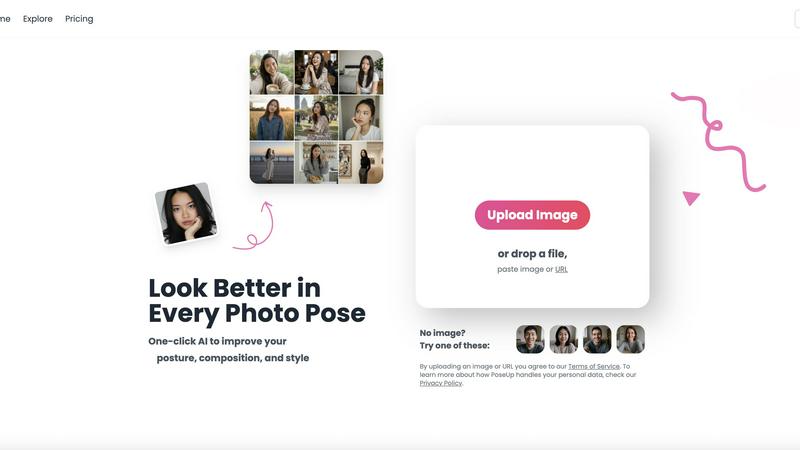
PoseUp enhances your photos with one-click AI, improving poses, posture, and composition for stunning results.
Last updated: March 2, 2026

RemoveTexts
RemoveTexts is an AI tool that instantly removes any text from images without needing Photoshop skills.
Last updated: March 11, 2026
Visual Comparison
poseup
RemoveTexts

Feature Comparison
poseup
AI Pose Enhancement
PoseUp's primary feature is its AI-driven pose enhancement technology, which automatically analyzes photos to correct poses and improve overall composition. This feature ensures that users can effortlessly enhance their images without needing any prior knowledge of photography.
One-Click Optimization
With PoseUp, users can transform their images with a single click. The platform streamlines the photo enhancement process, allowing users to obtain professional results quickly and efficiently, making it perfect for those short on time.
Diverse Support Formats
PoseUp supports various image formats, including JPG, PNG, WEBP, and HEIC, accommodating a wide range of user preferences. The platform can handle images up to 5MB in size, ensuring versatility for different types of photos.
Community and Support
PoseUp offers an engaging community experience through platforms like Discord, where users can connect, share tips, and gain inspiration. Additionally, customer support is readily available for any queries, enhancing the overall user experience.
RemoveTexts
Paint to Remove
This feature offers pinpoint control for selective editing. Users simply upload their image and use a digital brush to paint directly over the specific text they wish to erase. The AI then processes only the painted areas, intelligently reconstructing the background beneath. It's perfect for removing single watermarks, captions, or subtitles while leaving the rest of the image perfectly intact, providing a surgical level of precision.
Auto Remove All Text
For images cluttered with multiple text elements, this one-click solution delivers instant cleanup. The AI automatically detects and identifies every piece of text within the image—including watermarks, date stamps, and overlays—and removes them all simultaneously. It seamlessly reconstructs the entire background in one pass, saving significant time and effort for users dealing with busy screenshots or branded content.
Edit & Replace Text
Going beyond simple removal, this innovative feature allows users to alter existing text directly within an image. After the AI removes the original text, users can type new text to replace it. The technology then matches the font style, size, and color to the surrounding context, making the new text appear as if it was part of the original image. This is ideal for updating memes, modifying informational graphics, or localizing content.
Remove Objects
While specialized for text, RemoveTexts's AI is also capable of erasing a wide variety of unwanted visual elements. Users can brush over objects, people, logos, or blemishes, and the AI will remove them while flawlessly rebuilding the background. This extends the tool's utility from simple text cleanup to broader photo editing tasks, such as creating cleaner product photos or removing distractions from personal images.
Use Cases
poseup
Social Media Content Creation
Social media influencers and content creators can utilize PoseUp to enhance their images for platforms like Instagram, ensuring they present polished and professional-looking photos that attract followers and engagement.
Family Portraits
PoseUp is ideal for families looking to improve their group photos. It can correct awkward poses and enhance overall composition, resulting in cherished memories that everyone can be proud of.
Professional Headshots
For job seekers and professionals, PoseUp offers a quick solution for creating standout headshots. The AI technology optimizes posture and composition, ensuring users make a strong first impression in their professional profiles.
Fitness and Wellness Photography
Fitness enthusiasts and wellness coaches can benefit from PoseUp by enhancing their workout photos or transformation pictures. The tool helps in portraying confidence and strength, making their images more inspiring and impactful.
RemoveTexts
Cleaning Product Photos for E-Commerce
Online sellers can use RemoveTexts to quickly clean up product images by erasing promotional watermarks, price tags, or competitor logos from supplier photos. This creates a clean, professional catalog that enhances brand presentation and improves customer focus on the product itself, all without needing a graphic designer.
Preparing Professional Screenshots and Presentations
Professionals creating tutorials, reports, or presentations often need clean screenshots free of irrelevant UI text, browser tabs, or personal notifications. RemoveTexts allows them to brush over and erase these distracting elements, resulting in polished, publication-ready visuals that communicate information clearly and effectively.
Redacting Sensitive Information
Legal, real estate, or administrative professionals frequently need to share documents or images while protecting private data. RemoveTexts provides a quick and secure method to paint over and permanently erase sensitive text like names, addresses, or account numbers from images, ensuring confidentiality is maintained.
Revitalizing Old Photos and Memes
Individuals can use the tool to remove dated timestamps, photographer watermarks, or unwanted captions from old personal photos. Similarly, content creators can use the "Edit & Replace Text" feature to update viral memes or social media graphics with new text, keeping content fresh and engaging for their audience.
Overview
About poseup
PoseUp is an innovative AI-powered photo enhancement platform that revolutionizes the way we capture and present our images. Designed to transform ordinary snapshots into professional-quality portraits with just a single click, PoseUp addresses common frustrations such as awkward poses, poor posture, and suboptimal composition. The platform intelligently analyzes uploaded images to make automatic corrections, improving body positioning and optimizing visual appeal for a more flattering result. It caters to a diverse audience, including social media enthusiasts, content creators, photographers, and everyday individuals who desire to elevate their image quality. The core value proposition of PoseUp is its commitment to democratizing professional-grade photo enhancement, making advanced pose optimization accessible to everyone, regardless of their technical background or photography skills. With no need for expensive software or hours of manual editing, users can achieve stunning results effortlessly, ensuring they look their best in every photo.
About RemoveTexts
RemoveTexts is a sophisticated, AI-powered online tool designed to intelligently erase unwanted text and elements from any image in seconds. It eliminates the need for complex software like Photoshop, making professional-grade image editing accessible to everyone. The core technology leverages advanced deep learning inpainting models, similar to those pioneered by industry leaders, to analyze an image's context and seamlessly reconstruct the background after text removal. This ensures results are traceless, with the filled areas being virtually indistinguishable from the original. The platform serves a global audience of over 50,000 users, including creators, marketers, e-commerce sellers, and professionals who need to clean screenshots, remove watermarks, redact information, or simply declutter their visuals. Its primary value proposition is delivering fast, precise, and high-quality edits—with support for 4K output—without requiring any technical skills or design expertise.
Frequently Asked Questions
poseup FAQ
How does PoseUp enhance photos?
PoseUp uses advanced AI algorithms to analyze uploaded images, automatically correcting poses, optimizing body positioning, and improving overall composition for a visually appealing result.
Is PoseUp easy to use?
Yes, PoseUp is designed for ease of use. Users can simply upload their photos and click a button to apply enhancements, making it accessible for individuals without any photography skills.
What image formats does PoseUp support?
PoseUp supports multiple image formats, including JPG, PNG, WEBP, and HEIC, allowing users to upload photos from various devices and ensuring compatibility.
Can I get support if I encounter issues?
Absolutely! PoseUp provides customer support and has a community on Discord, where users can ask questions, share experiences, and receive assistance with any challenges they may face.
RemoveTexts FAQ
What image formats does RemoveTexts support?
RemoveTexts supports common web and digital image formats, including JPG, PNG, and WebP. You can upload images up to 10 MB in size. The processed image is available for download in a high-quality format without any added watermarks.
How does the AI remove text without leaving a trace?
The tool uses a state-of-the-art deep learning inpainting model. This AI analyzes the pixels surrounding the text you want to remove, understands the textures, patterns, and colors of the background, and then intelligently generates new pixels to fill the space. This results in seamless reconstruction that blends perfectly with the original image, leaving no visible artifacts or blurring.
Is RemoveTexts completely free to use?
Yes, RemoveTexts is a free online tool. You can upload an image, use features like "Paint to Remove" or "Auto Remove All Text," and download your edited image without any cost or subscription. The service is designed to be accessible for everyone.
Can I use RemoveTexts to remove logos or trademarks?
The primary and most effective function of RemoveTexts is for removing text and general objects. The website explicitly states that logo and trademark removal is not supported. For best results and to adhere to usage policies, the tool should be used for its intended purposes of text, watermark, and generic object removal.
Alternatives
poseup Alternatives
PoseUp is an innovative AI-powered platform designed to enhance photo poses and posture with just a single click. It falls under the category of image and photo enhancement tools, catering to a diverse audience including social media users, content creators, and photographers who seek to elevate their images effortlessly. Users often look for alternatives to PoseUp due to various reasons, such as pricing considerations, specific feature requirements, or compatibility with different platforms. When selecting an alternative, it’s essential to evaluate factors such as ease of use, the quality of enhancements, and the range of features offered to ensure the chosen tool meets individual needs.
RemoveTexts Alternatives
RemoveTexts is a specialized AI-powered image editing tool designed to quickly and intelligently remove text from any image. It falls into the category of automated photo cleanup and inpainting software, offering a streamlined alternative to complex programs like Photoshop. Users achieve clean results in seconds by simply uploading their image. People often explore alternatives to find a solution that better fits their specific needs. Common reasons include seeking different pricing models, requiring a feature not currently offered, or needing the tool to work on a specific platform or operating system. Some users may also look for a different balance between automated power and manual control. When evaluating other options, consider the core capabilities: the accuracy of the AI in detecting and removing text, the quality of the background reconstruction, and the overall speed. Also, assess the user interface for ease of use, the availability of complementary features like object removal, and whether the tool's output resolution and language support meet your project requirements.