
Never Drop vs Refbox
Side-by-side comparison to help you choose the right AI tool.

Never Drop
NeverDrop captures contacts and drafts personalized follow-ups instantly, ensuring you never lose a lead at events.
Last updated: February 28, 2026

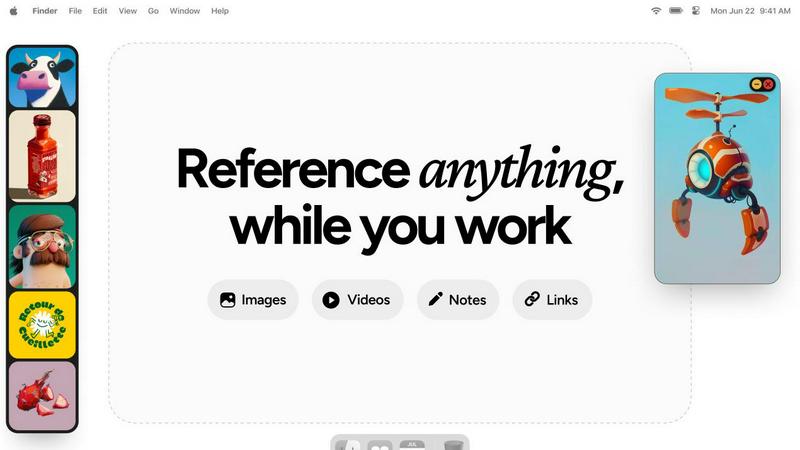
Refbox keeps your reference images and notes instantly visible above your workspace.
Last updated: February 28, 2026
Visual Comparison
Never Drop

Refbox
Feature Comparison
Never Drop
Instant Business Card Scanning
Never Drop allows users to scan any business card in seconds. Leveraging AI-powered Optical Character Recognition (OCR), the app extracts all essential contact details, including name, company, title, phone number, and email. This feature eliminates the hassle of manual entry, ensuring that users can capture leads without any tedious typing.
Automated Email Enrichment
The app automatically enriches contacts by finding verified work emails associated with the name and company on the business card. This feature is vital, as it eliminates the guesswork often involved in identifying the right email addresses, allowing sales teams to connect with leads more effectively.
AI-Driven Follow-Up Emails
Never Drop generates personalized follow-up emails based on the context and voice notes recorded during the lead capture process. This feature ensures that follow-ups are not generic but tailored to the specific conversation, enhancing the chances of a positive response and engagement from leads.
Team Collaboration Dashboard
Never Drop provides a comprehensive dashboard that allows sales teams to organize scans by event, reassign leads among team members, and track overall activity. This centralization ensures that all team members remain aligned, and no lead falls through the cracks, fostering collaboration and efficiency.
Refbox
Always-on-Top Floating Frames
Refbox’s signature feature allows you to pin any reference—images, videos, GIFs, or notes—in a resizable window that floats above all other applications. This ensures your inspiration is always visible while you sketch, design, or animate. You can minimize frames to access apps behind them or lock them in place to work directly over the reference, creating a truly integrated and non-disruptive workspace that keeps you in your creative zone.
Masonry Mode & Infinite Canvas
Organize all your visual references on a single, expansive canvas. Masonry Mode automatically arranges your pinned items in a clean, organized grid, allowing you to see your entire collection of inspiration at a glance. This infinite canvas is perfect for moodboarding and comparing multiple references side-by-side, providing a holistic view of your project’s direction without the clutter of multiple windows or tabs.
Advanced Media Handling & Tools
Refbox goes beyond simple image display with a curated set of powerful tools for deep creative work. Step through GIFs frame-by-frame for detailed animation reference, use the built-in color picker on any media to sample and copy hex codes, and crop images to focus on specific details. It also supports SVG files and can generate website screenshots from pasted URLs, making it a versatile hub for all reference types.
Intuitive Shortcuts & Workflow Optimizations
Designed for speed, Refbox puts full control at your fingertips. Quickly swap between floating references using arrow keys, change entire collections with a single click, or auto-hide your Refbox to reveal it only when needed. These thoughtful shortcuts and customizable behaviors minimize manual interaction, saving you hours over a project and allowing you to maintain an uninterrupted state of creative flow.
Use Cases
Never Drop
Trade Shows and Expos
At trade shows, time is of the essence. Never Drop allows sales teams to quickly scan business cards, capture conversation context, and send follow-ups before moving on to the next potential client. This immediate response increases the likelihood of conversion significantly.
Networking Events
During networking events, professionals often meet numerous contacts in a short period. Never Drop helps users efficiently gather and manage leads, ensuring that vital information is recorded and follow-ups are executed promptly, making it easier to maintain connections.
Conferences and Seminars
Conferences often present opportunities to engage with industry leaders and potential clients. With Never Drop, users can seamlessly capture leads and contextualize their conversations, ensuring impactful follow-ups that resonate with attendees.
Business Meetings and Dinners
In more intimate settings like business dinners, capturing leads can be challenging. Never Drop simplifies this process by allowing users to scan business cards and add personal notes quickly, ensuring that follow-ups reflect the nuances of each conversation, thereby fostering stronger relationships.
Refbox
Digital Illustration & Concept Art
Illustrators and concept artists can pin character sketches, environment photos, and color palettes in floating frames directly over their canvas in Photoshop or Procreate. This allows for constant visual comparison and inspiration, enabling accurate translation of references into original artwork without breaking concentration to search through files or browser tabs.
3D Modeling & Animation
For 3D artists and animators, Refbox is indispensable for viewing orthographic reference sheets, texture inspiration, or motion study videos while working in complex software like Blender or Maya. The ability to lock a frame and work behind it, or step through a GIF frame-by-frame, provides precise control for modeling proportions and animating movements with high accuracy.
UI/UX & Web Design
Designers can streamline their workflow by floating website screenshots, component libraries, and style guides next to their design tool (Figma, Sketch, Adobe XD). The color picker tool allows instant sampling from any reference, and notes can hold project-specific copy or checklist requirements, keeping all critical project assets visible and accessible throughout the design process.
Motion Graphics & Video Editing
Motion designers and video editors can use Refbox to keep storyboards, style frames, and reference videos pinned on-screen while working in After Effects or Premiere Pro. This ensures visual consistency and creative direction are always top of mind, facilitating faster decision-making and a more cohesive final product without constant context switching.
Overview
About Never Drop
Never Drop is an innovative lead-capture application tailored for sales teams navigating the fast-paced environment of trade shows, conferences, and networking events. This app simplifies the often cumbersome process of collecting and managing leads by enabling users to effortlessly scan business cards using their smartphones. Upon scanning, users can enrich the captured data with valuable context, such as voice notes or text detailing their conversations. This ensures that users retain crucial information about each lead, enhancing follow-up effectiveness. Utilizing advanced AI technology, Never Drop drafts personalized follow-up emails in under two minutes, significantly reducing the chances of losing leads. Seamless integration with popular CRMs like HubSpot allows for a streamlined sales pipeline, ensuring that leads are organized and actionable. With Never Drop, sales teams can transform every interaction into a potential closed deal.
About Refbox
Refbox is the definitive floating reference manager for creative professionals. It is designed to eliminate the disruptive cycle of alt-tabbing between folders, browsers, and your primary work application. By allowing you to pin images, GIFs, videos, and notes in resizable, always-on-top frames directly over your workspace, Refbox keeps your inspiration and critical references perpetually in view. This tool is essential for artists, designers, animators, and content creators across disciplines like 3D art, illustration, UI/UX, motion graphics, and photography, who require instant visual access to maintain a deep state of creative flow. Its core value proposition is a seamless, distraction-free workflow where references are available the moment you need them, without digging or searching. With intelligent features like Masonry Mode for organized canvas viewing, instant collection swapping, and a suite of precision tools for media interaction, Refbox transforms a cluttered, multi-window process into a streamlined and visually intuitive experience. It is built for professionals who cannot afford distractions, prioritizing focused creation over administrative friction.
Frequently Asked Questions
Never Drop FAQ
What is Never Drop?
Never Drop is a lead-capture app designed for sales teams at events. It enables users to scan business cards, add contextual notes, and generate personalized follow-up emails in under two minutes, all while enriching contact details and syncing with CRMs.
How does business card scanning work?
Users take a photo of any business card using the Never Drop mobile app. The app’s AI-powered OCR technology extracts key contact information such as name, company, title, phone number, and email, allowing for quick and efficient lead capture.
What types of events is Never Drop suitable for?
Never Drop is ideal for trade shows, conferences, networking events, meetups, and business dinners. It is designed to help users manage and follow up on leads efficiently across various professional settings.
Do I need the mobile app for full functionality?
Yes, the mobile app is essential for scanning business cards, recording context, and triggering follow-ups on the go. Additionally, the web dashboard facilitates team management, review of scans, and billing, providing a comprehensive solution for lead management.
Refbox FAQ
What types of files does Refbox support?
Refbox supports a wide range of media essential for creative work. You can directly pin images (JPG, PNG, SVG, etc.), video files, and GIFs. It also supports text notes with styling and checklist options. A unique feature is the ability to paste a website URL, and Refbox will automatically generate a screenshot for you to use as a visual reference.
How does Refbox help maintain focus?
Refbox is engineered to minimize workflow friction. By keeping references in always-on-top windows, it completely eliminates the disruptive need to switch applications or dig through folders. Features like auto-hide, keyboard shortcuts for swapping references, and the ability to minimize frames mean you interact with your references instantly, keeping you in a state of deep creative flow.
Can I organize my references into different projects?
Yes, Refbox allows you to create multiple, separate Collections. This lets you organize references by client, project, or theme. You can switch between these entire collections instantly with a single click, making it effortless to jump between different tasks while keeping all relevant references neatly organized and immediately accessible.
Is there a free trial or version available?
Refbox operates on a simple, one-time purchase model. This provides you with a lifetime license for the application, including all current features and future updates. This approach is favored by many professionals as it avoids ongoing subscription fees, offering long-term value and stability for your creative toolkit.
Alternatives
Never Drop Alternatives
Never Drop is a cutting-edge lead-capture app designed for sales teams in dynamic environments like trade shows and networking events. By allowing users to effortlessly scan business cards and enrich the captured data with personalized notes, it enhances the lead management process. As a productivity and management tool, it aims to streamline follow-ups, turning interactions into meaningful connections. Users often seek alternatives to Never Drop for various reasons, including pricing considerations, feature sets, or specific platform compatibility. When evaluating alternatives, it's essential to consider the ease of use, the ability to integrate with existing tools, and the overall effectiveness in enhancing lead management and follow-up processes. A suitable alternative should align with the unique needs of your sales strategy while ensuring that no valuable leads are overlooked.
Refbox Alternatives
Refbox is a specialized productivity tool designed to streamline creative workflows. It operates as a floating reference manager, allowing users to keep visual and textual inspiration pinned above their primary work applications. This eliminates disruptive window switching, making it a favorite among artists, designers, and digital creators. Users may seek alternatives for various reasons, including budget constraints, the need for different feature sets, or compatibility with other operating systems. Some may require more advanced organizational tools or prefer a solution integrated into a broader creative suite. Understanding your specific workflow needs is key to finding the right fit. When evaluating alternatives, consider core functionality like always-on-top windows, support for multiple media types, and organizational features. The ideal tool should feel intuitive and stay out of your way, enhancing focus rather than adding complexity to your creative process.