
Nabbed vs SupaSidebar
Side-by-side comparison to help you choose the right AI tool.

Nabbed is your career CRM that helps sales professionals manage their job search like a revenue pipeline.
Last updated: April 13, 2026

SupaSidebar
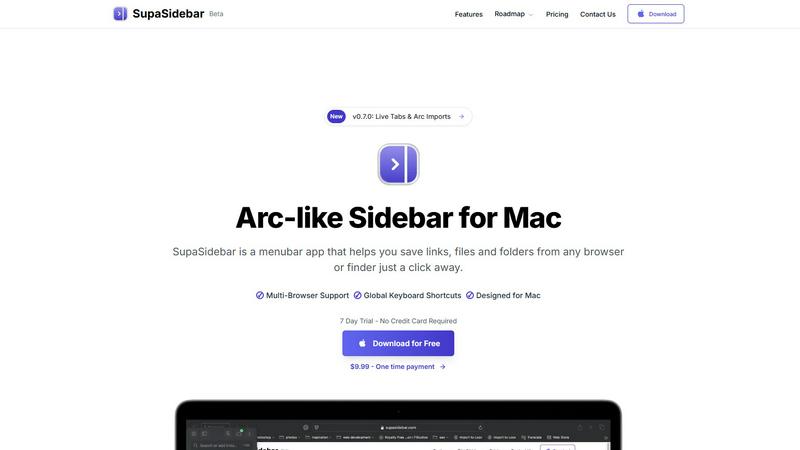
SupaSidebar simplifies your Mac experience by quickly saving and accessing links, files, and folders with ease.
Last updated: February 28, 2026
Visual Comparison
Nabbed

SupaSidebar
Feature Comparison
Nabbed
Dual Sales Pipelines
Nabbed provides two interconnected HubSpot-style Kanban boards: one for tracking job applications and another for managing your networking outreach. This allows you to drag-and-drop opportunities through stages like "Tracking," "Outreach," "Discovery," and "Closed Won." The system includes momentum tracking and velocity analytics, giving you a clear, visual overview of your entire search's health and progress, just as you would manage a critical sales pipeline.
AI Career Suite
This integrated suite features four powerful AI tools designed to accelerate your search. It generates tailored cover letters, optimizes your resume for specific job descriptions, provides personalized interview preparation with coaching, and crafts professional outreach emails. The AI is trained to write in your tone, producing high-quality, context-aware content in seconds, saving hours of manual work and increasing your application's impact.
Chrome Extension with ATS Autofill
The free browser extension is the workhorse of your search, operating seamlessly in the background. It allows you to one-click save jobs from any platform, autofill applications on over 60 ATS systems like Greenhouse and Workday, capture contacts directly from LinkedIn, and send tracked emails. This brings all the power of the Nabbed dashboard directly into your daily browsing, making application and follow-up effortless.
Company Intelligence & Hiring Signals
Nabbed automatically enriches every saved job and target company with real-time intelligence. This includes vital data like funding rounds, employee headcount, tech stack, Glassdoor ratings, and open positions. Crucially, it monitors for "hiring signals," alerting you when target companies are growing or posting new roles, giving you a competitive edge to act on opportunities before they are widely known.
SupaSidebar
Seamless Integration with Major Browsers
SupaSidebar is designed to work flawlessly with all major browsers, including Safari, Chrome, Firefox, Brave, and Arc. This compatibility allows users to easily save links and files from their preferred browsing environment, making it an essential tool for anyone who juggles multiple web applications.
Global Keyboard Shortcuts
The application features intuitive global keyboard shortcuts that allow users to save or copy URLs with just a few keystrokes. For instance, pressing CMD CTRL S saves a link, while CMD CTRL C copies the current website link directly to the sidebar. This streamlined functionality significantly reduces the time spent on repetitive tasks, boosting overall productivity.
Recent Items Tracking
SupaSidebar includes a handy Recents feature that tracks every website you've visited in the last 48 hours. This functionality ensures that you can quickly find your work without sorting through countless tabs, making it easier to resume tasks and maintain focus on your projects.
Customizable Spaces
With SupaSidebar, users can organize their saved items in unlimited spaces, allowing for a tailored experience that suits individual workflows. This feature is particularly beneficial for those who want to categorize links, files, or folders based on different projects, topics, or contexts, enhancing accessibility and organization.
Use Cases
Nabbed
Strategic Career Transition for Sales Leaders
A VP of Sales planning a move to a larger company or new industry can use Nabbed to systematically research and target "dream account" companies. They can map out key contacts within those organizations, track all interactions in the networking CRM, and receive alerts for leadership roles, enabling a strategic, relationship-driven transition rather than a scattered application spree.
Efficient High-Volume Application Management
A professional actively seeking a new role can manage a high volume of applications without losing track. They can save jobs from multiple boards into one unified pipeline, use AI to tailor each application quickly, autofill forms to save time, and track which recruiters have opened their follow-up emails, allowing for prioritized and informed follow-up actions.
Networking & Relationship Cultivation
A user leveraging their warm network for referrals can utilize Nabbed's full-contact CRM. They can log every coffee chat, phone call, and email exchange, set reminders for follow-ups, and track contacts through a dedicated six-stage networking pipeline. This ensures no connection is forgotten and every warm intro is pursued methodically.
Interview Preparation & Offer Negotiation
A candidate who has secured interviews can use the AI tools to simulate interview questions specific to the role and company. After receiving an offer, they can access salary benchmarking data and offer analysis tools within Nabbed to prepare for negotiation, ensuring they enter discussions with market-informed confidence and clarity.
SupaSidebar
For Researchers
Researchers can significantly benefit from SupaSidebar by saving and organizing academic articles, links, and resources related to their studies. The ability to quickly access recent sources streamlines the research process, making it easier to gather information and maintain focus on their work.
For Creative Professionals
Creative professionals, such as designers and writers, can use SupaSidebar to save inspiration, references, and tools that enhance their creative processes. The ability to pin favorite links at the top of the sidebar ensures that essential resources are always readily available, leading to a more efficient workflow.
For Multitaskers
Multitaskers will appreciate the seamless integration and fast search capabilities of SupaSidebar. The global keyboard shortcuts and the Recents feature allow users to navigate between tasks quickly and efficiently, ensuring they can switch contexts without losing productivity.
For Students
Students can leverage SupaSidebar to organize study materials, links to educational resources, and important files in a single, accessible location. The customizable spaces enable them to group resources by subject or project, making it easier to stay organized and focused during their studies.
Pricing Comparison
Nabbed
Nabbed offers a free tier with essential features to get started. Its premium plan, Core, is priced at $19 per month. The Core plan unlocks the platform's full power, including advanced ATS autofill, Gmail email tracking and analytics, AI-powered email templates, LinkedIn contact capture, and the ability to run multi-step outreach sequences. This pricing is designed to be accessible for serious professionals, positioning Nabbed as a high-value tool for managing a critical career investment.
SupaSidebar
SupaSidebar offers a variety of pricing plans to meet different user needs. The free version provides essential features, while the Pro version, priced at $19.99 monthly or $13.99 annually, includes unlimited spaces and priority support. Additionally, a one-time purchase option is available for $49.99, allowing users to own SupaSidebar forever. All plans come with a 14-day money-back guarantee and a student discount of 50% for eligible users. Use the code BETA30 for a 30% discount during the beta phase.
Overview
About Nabbed
Nabbed is the first CRM platform engineered specifically for sales and revenue professionals managing their careers. It transforms the chaotic, reactive job search into a strategic, data-driven process by applying the same methodologies used to manage a multi-million dollar sales pipeline. Built by a Chief Revenue Officer, Nabbed eliminates the fluff and provides the precision tools revenue operators need. The platform allows you to visually track job applications in a Kanban-style pipeline, build a powerful contact CRM with warm path mapping, and gain AI-powered company intelligence on demand. Its core value proposition is enabling you to target companies like accounts, track networking like deal intros, and trigger action on real hiring signals, ultimately helping you close your next role with efficiency and insight. With a powerful Chrome extension that autofills applications across 60+ ATS platforms and unique features like Gmail sync for interview detection, Nabbed is the essential system for any serious professional running their career like a business.
About SupaSidebar
SupaSidebar is a cutting-edge sidebar application tailored exclusively for Mac users, inspired by the user-friendly design of the Arc browser. This innovative tool serves as a powerful productivity enhancer, allowing users to effortlessly save, access, and organize their links, files, and folders from a beautifully crafted sidebar interface. With compatibility across all major browsers—such as Safari, Chrome, Firefox, Brave, and Arc—SupaSidebar provides a versatile solution for anyone who regularly navigates the web. The application features global keyboard shortcuts, enabling users to quickly capture or copy URLs, effectively eliminating the need for tedious manual entries. Whether you are a researcher, a creative professional, or a multitasker, SupaSidebar streamlines your workflow, ensuring that everything you need is just a click away, all while fostering a distraction-free environment that enhances focus and efficiency.
Frequently Asked Questions
Nabbed FAQ
How does Nabbed's email tracking work?
Nabbed's Chrome extension integrates with Gmail to place a secure, invisible tracking pixel in the emails you send to recruiters and contacts. When the email is opened, Nabbed notifies you in your dashboard. This provides real-time intent data, showing you who is engaging with your outreach before they even reply, a feature unique to Nabbed among career tools.
What is included in the free tier?
The free tier includes access to the core Nabbed dashboard for pipeline management, the ability to save jobs using the Chrome extension, and basic application autofill functionality. This allows you to organize your search visually and streamline applications without a financial commitment, providing significant value upfront.
How many job platforms does Nabbed search?
Nabbed aggregates job listings from over 11 major sources simultaneously, including Google Jobs, Indeed, LinkedIn, and Glassdoor. This unified search saves you from the inefficiency of checking multiple boards individually, ensuring you see a comprehensive view of relevant opportunities in one place.
Is my data secure with Nabbed?
Yes. Nabbed takes data security and privacy seriously. The platform employs industry-standard security measures to protect your personal and professional information. You can review their specific practices and policies, including their Cookie Policy and Privacy Policy, directly on their website for full transparency.
SupaSidebar FAQ
Is SupaSidebar a browser extension?
No, SupaSidebar is a standalone menubar application designed for Mac users. It integrates with various browsers but operates independently of them, providing a seamless user experience.
Which browsers does SupaSidebar work with?
SupaSidebar is compatible with all major browsers, including Safari, Chrome, Firefox, Brave, and Arc, allowing users to save links and files from their preferred browsing environment effortlessly.
What macOS version do I need?
SupaSidebar requires macOS 13 or later to function optimally. Make sure your system is updated to the latest version for the best experience.
Where is my data stored?
All data is securely stored locally on your Mac, ensuring that nothing leaves your device. This commitment to privacy means that your information remains confidential and protected.
Alternatives
Nabbed Alternatives
Nabbed is a specialized career management CRM designed for sales and revenue professionals actively navigating the job market. It combines job tracking, contact management, and AI-powered intelligence into a single platform to streamline the entire search process, from discovery to application. Users may explore alternatives for various reasons, such as budget constraints, a need for different feature sets, or platform compatibility beyond the core offering. Some may seek tools with a broader focus on general productivity or those that integrate more deeply with a specific ecosystem outside of a sales-centric workflow. When evaluating other options, consider your primary pain points. Key factors include the depth of job board aggregation, the sophistication of application autofill, the quality of company intelligence, and whether the tool offers dedicated features for interview preparation and offer negotiation that match your career stage.
SupaSidebar Alternatives
SupaSidebar is a specialized sidebar application designed for Mac users, aimed at enhancing productivity by providing a streamlined interface for saving and accessing links, files, and folders. It fits within the productivity and management category, catering to those who need to navigate their digital workspace efficiently. Users often seek alternatives due to various reasons such as pricing, specific feature sets, or compatibility with different platforms. Finding the right alternative involves considering factors like ease of use, integration with existing tools, and the ability to customize the experience to suit individual workflows. When exploring alternatives, it's essential to assess how well they align with your particular needs and preferences. Look for features that enhance productivity and organization, ensuring they offer functionalities similar to SupaSidebar, such as quick access to saved content and seamless integration with your preferred browsers. Additionally, consider user reviews and support options to make an informed decision that complements your work style.