
SupaSidebar
SupaSidebar simplifies your Mac experience by quickly saving and accessing links, files, and folders with ease.
Visit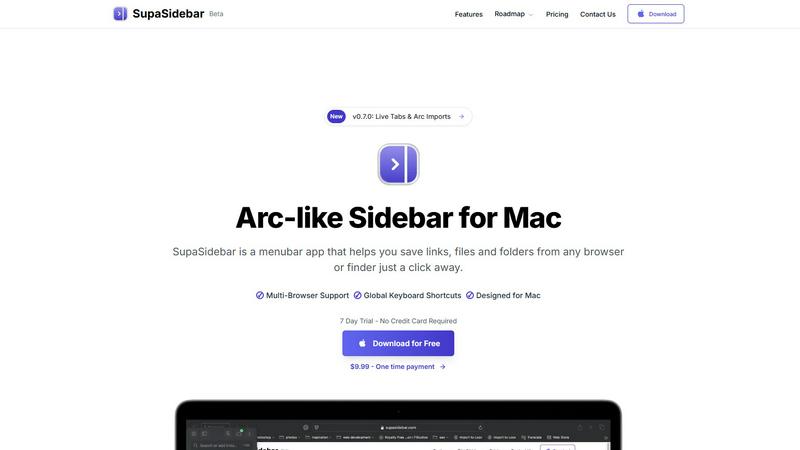
About SupaSidebar
SupaSidebar is a cutting-edge sidebar application tailored exclusively for Mac users, inspired by the user-friendly design of the Arc browser. This innovative tool serves as a powerful productivity enhancer, allowing users to effortlessly save, access, and organize their links, files, and folders from a beautifully crafted sidebar interface. With compatibility across all major browsers—such as Safari, Chrome, Firefox, Brave, and Arc—SupaSidebar provides a versatile solution for anyone who regularly navigates the web. The application features global keyboard shortcuts, enabling users to quickly capture or copy URLs, effectively eliminating the need for tedious manual entries. Whether you are a researcher, a creative professional, or a multitasker, SupaSidebar streamlines your workflow, ensuring that everything you need is just a click away, all while fostering a distraction-free environment that enhances focus and efficiency.
Features of SupaSidebar
Seamless Integration with Major Browsers
SupaSidebar is designed to work flawlessly with all major browsers, including Safari, Chrome, Firefox, Brave, and Arc. This compatibility allows users to easily save links and files from their preferred browsing environment, making it an essential tool for anyone who juggles multiple web applications.
Global Keyboard Shortcuts
The application features intuitive global keyboard shortcuts that allow users to save or copy URLs with just a few keystrokes. For instance, pressing CMD CTRL S saves a link, while CMD CTRL C copies the current website link directly to the sidebar. This streamlined functionality significantly reduces the time spent on repetitive tasks, boosting overall productivity.
Recent Items Tracking
SupaSidebar includes a handy Recents feature that tracks every website you've visited in the last 48 hours. This functionality ensures that you can quickly find your work without sorting through countless tabs, making it easier to resume tasks and maintain focus on your projects.
Customizable Spaces
With SupaSidebar, users can organize their saved items in unlimited spaces, allowing for a tailored experience that suits individual workflows. This feature is particularly beneficial for those who want to categorize links, files, or folders based on different projects, topics, or contexts, enhancing accessibility and organization.
Use Cases of SupaSidebar
For Researchers
Researchers can significantly benefit from SupaSidebar by saving and organizing academic articles, links, and resources related to their studies. The ability to quickly access recent sources streamlines the research process, making it easier to gather information and maintain focus on their work.
For Creative Professionals
Creative professionals, such as designers and writers, can use SupaSidebar to save inspiration, references, and tools that enhance their creative processes. The ability to pin favorite links at the top of the sidebar ensures that essential resources are always readily available, leading to a more efficient workflow.
For Multitaskers
Multitaskers will appreciate the seamless integration and fast search capabilities of SupaSidebar. The global keyboard shortcuts and the Recents feature allow users to navigate between tasks quickly and efficiently, ensuring they can switch contexts without losing productivity.
For Students
Students can leverage SupaSidebar to organize study materials, links to educational resources, and important files in a single, accessible location. The customizable spaces enable them to group resources by subject or project, making it easier to stay organized and focused during their studies.
Frequently Asked Questions
Is SupaSidebar a browser extension?
No, SupaSidebar is a standalone menubar application designed for Mac users. It integrates with various browsers but operates independently of them, providing a seamless user experience.
Which browsers does SupaSidebar work with?
SupaSidebar is compatible with all major browsers, including Safari, Chrome, Firefox, Brave, and Arc, allowing users to save links and files from their preferred browsing environment effortlessly.
What macOS version do I need?
SupaSidebar requires macOS 13 or later to function optimally. Make sure your system is updated to the latest version for the best experience.
Where is my data stored?
All data is securely stored locally on your Mac, ensuring that nothing leaves your device. This commitment to privacy means that your information remains confidential and protected.
Pricing of SupaSidebar
SupaSidebar offers a variety of pricing plans to meet different user needs. The free version provides essential features, while the Pro version, priced at $19.99 monthly or $13.99 annually, includes unlimited spaces and priority support. Additionally, a one-time purchase option is available for $49.99, allowing users to own SupaSidebar forever. All plans come with a 14-day money-back guarantee and a student discount of 50% for eligible users. Use the code BETA30 for a 30% discount during the beta phase.
Explore more in this category:
Similar to SupaSidebar

Panzoe
Panzoe is an all-in-one AI platform for personal productivity, business automation, AI assistants, content creation, and custom AI solutions.
Novastart
Novastart brings apps and files onto an infinite canvas where people and AI agents can work together.

AUTOMATER.ai
A tray helper for every AI coding tool: sessions, alerts and usage in one place

Kody Tools
Free collection of online developer utilities, code formatters, and digital converters designed to streamline your daily workflow.

Forms Plugin
The #1 Native Form Builder Plugin for Framer - No Code, No Embeds, No External Platforms.

HomeAnswerBook
Practical, independent guides to home repairs, maintenance, costs, troubleshooting, and everyday fixes.

BlazePDF
Highlight faster. Study in flow with custom shortcuts and a workflow built around you. Print smarter, or turn any page into a tiled poster.
