
Blueberry vs Mod
Side-by-side comparison to help you choose the right AI tool.

Blueberry
Blueberry is an AI-native Mac workspace that unites your editor, terminal, and browser for seamless product development.
Last updated: February 28, 2026

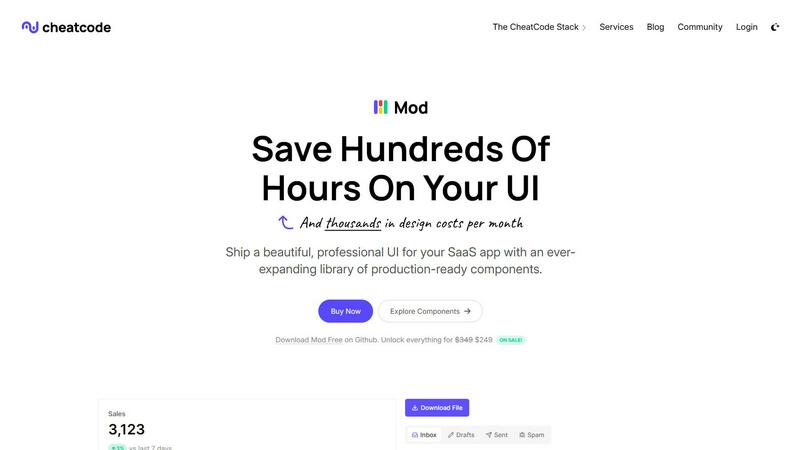
Mod is a CSS framework designed to accelerate SaaS app development with a rich library of UI components.
Visual Comparison
Blueberry

Mod
Feature Comparison
Blueberry
Unified AI-Native Workspace
Blueberry integrates a professional-grade code editor, a fully-featured terminal, and a live preview browser into one cohesive interface. This trinity of tools is designed to work in harmony, sharing state and context seamlessly. You can write code, run commands, and see the changes reflected instantly without ever leaving the application or managing multiple windows, creating a truly immersive development environment.
Full-Context AI via MCP
At the heart of Blueberry is its built-in MCP server, which grants connected AI models a live, comprehensive view of your workspace. The AI can see your current code files, real-time terminal output, the state of your preview browser, and data from pinned apps. This eliminates guesswork and manual context provisioning, allowing for accurate code explanations, debugging, and feature suggestions based on your exact project state.
Pinned Applications & Visual Context
Beyond core dev tools, Blueberry allows you to dock essential web apps like GitHub, Linear, Figma, or PostHog directly within your workspace. These pinned apps load with your project and share context with your AI. Furthermore, you can provide visual context by capturing screenshots or using an element selector directly from the preview browser, bridging the gap between code and visual design.
Multi-Device Live Preview
The integrated preview browser isn't just a simple window. It includes built-in views for desktop, tablet, and mobile screen sizes, allowing you to instantly see how your application will render for users on different devices. This ensures responsive design and user experience can be validated continuously during development without needing external tools or emulators.
Mod
Extensive Component Library
Mod boasts an impressive library of over 88 components that are ready to use, allowing developers to quickly build complex user interfaces without starting from scratch. This extensive library accelerates the development process and enhances productivity.
Customizable Themes
With two distinct themes available, Mod provides flexibility in design choices. Developers can easily switch between themes or customize them to suit their brand identity, ensuring a unique look and feel for each application.
Icon Collection
Mod includes a vast collection of more than 1,500 icons, making it easy to incorporate visually appealing elements into applications. This extensive icon library helps maintain a cohesive design language throughout the user interface.
Dark Mode Support
Recognizing the growing demand for dark mode, Mod offers built-in support for this feature. This allows developers to create applications that cater to user preferences, enhancing usability and accessibility, especially in low-light environments.
Use Cases
Blueberry
Rapid Full-Stack Prototyping
Developers building new web applications can use Blueberry to swiftly iterate on both frontend and backend code. Write an API route in the editor, test it via curl in the terminal, and immediately see the frontend fetch and display the data in the live preview—all within a single, fluid workflow. The AI can assist across all these layers with full context.
AI-Powered Debugging & Refactoring
When encountering a bug or planning a refactor, you can leverage the AI's deep workspace awareness. Ask it questions like "why is this component not updating?" or "how can I simplify this state logic?" The AI can analyze the relevant code, review terminal errors, and even inspect the current browser DOM to provide precise, actionable answers.
Collaborative Design-Development Handoff
For teams using tools like Figma, designers can share links pinned within Blueberry. Developers can then reference the designs directly while coding components. Using the screenshot and element select features, they can ask the AI for help implementing specific UI elements, ensuring a faithful translation from design to code.
Context-Rich Onboarding & Exploration
New team members or developers exploring an unfamiliar codebase can use Blueberry to get up to speed quickly. They can ask the AI broad questions about the project structure or specific queries about how a particular feature works, and the AI can guide them through the relevant files, dependencies, and even running application state.
Mod
Rapid Prototyping
Developers can leverage Mod’s extensive component library to rapidly prototype SaaS applications, allowing for quicker iterations and user feedback. This is particularly useful in fast-paced environments where time-to-market is critical.
Responsive Design Implementation
Mod's mobile-first design approach ensures that applications look great on any device. This is essential for SaaS solutions that require accessibility across different platforms, from desktops to smartphones.
Custom Branding Solutions
With customizable themes and a wide array of components, Mod enables businesses to create tailored branding for their SaaS applications. This ensures that the final product aligns with corporate identity and resonates with target audiences.
Team Collaboration
Mod is ideal for both solo developers and larger teams, facilitating collaboration by providing a consistent design framework. This helps in maintaining uniformity across various parts of a project, making it easier for teams to work together efficiently.
Overview
About Blueberry
Blueberry is an AI-native product development platform for macOS, designed to fundamentally change how modern product builders work. It consolidates the essential tools of web development—a code editor, terminal, and live preview browser—into a single, focused workspace. This eliminates the constant, disruptive context-switching between disparate applications, allowing developers and builders to maintain deep focus and flow. Blueberry is built for the new era of AI-assisted development, where the assistant is not just an add-on but a core, integrated member of the team. Its key innovation is providing AI models like Claude, Gemini, or Codex with full, real-time context over your entire project through its built-in MCP (Model Context Protocol) server. This means your AI can see your open files, terminal output, browser state, and even pinned applications like Figma or Linear, enabling it to offer precise, context-aware assistance without the need for manual copy-pasting. The platform is crafted to help you ship web applications that delight, offering a seamless, unified environment from initial code to final preview across all device types. It is currently free during its beta period.
About Mod
Mod is a cutting-edge CSS framework specifically designed for building sophisticated Software as a Service (SaaS) user interfaces. It integrates seamlessly into various development environments, making it highly versatile for developers of all levels. With over 88 components and more than 168 styles, Mod allows developers to create visually stunning applications without compromising on performance. Its framework-agnostic nature means it works effortlessly with popular platforms like Next.js, Nuxt, Vite, Svelte, Rails, and Django. Whether you're a solo developer or part of a larger team, Mod’s responsive, mobile-first design ensures your applications are not only functional but also aesthetically pleasing. The built-in support for dark mode and a library of over 1,500 icons further enhances user experience. Mod's simple pricing model and regular updates empower teams to streamline their development process, minimize design costs, and deliver polished SaaS applications efficiently.
Frequently Asked Questions
Blueberry FAQ
What is MCP and how does Blueberry use it?
MCP stands for Model Context Protocol, a standard for providing AI models with access to tools and data. Blueberry has a built-in MCP server that acts as a bridge, giving AI models like Claude a live, read-only view of your entire workspace—your open files, terminal sessions, browser preview, and pinned apps. This allows the AI to understand your project's full context without manual copying and pasting.
Is Blueberry a full-featured code editor?
Yes. Blueberry includes a professional, real code editor with essential features like full syntax highlighting, multi-cursor support, find and replace, and Git integration. It is designed to be powerful enough for serious development work while being seamlessly integrated with the terminal and browser, forming a complete development environment.
Which AI models does Blueberry support?
Blueberry can connect to any AI model that supports the MCP standard. This includes popular models like Anthropic's Claude, Google's Gemini, and OpenAI's Codex, among others. You configure the connection to your preferred model, and Blueberry provides it with the rich context from your workspace.
Is Blueberry really free?
Yes, Blueberry is completely free during its beta period. The team is focused on refining the product with feedback from early users. There is no indication of future pricing within the provided content, allowing builders to explore and integrate the platform into their workflow at no cost.
Mod FAQ
What platforms does Mod support?
Mod is framework-agnostic and supports a variety of platforms, including Next.js, Nuxt, Vite, Svelte, Rails, and Django, offering flexibility for developers.
How many components and styles are included in Mod?
Mod includes over 88 components and more than 168 styles, providing a comprehensive toolkit for building sophisticated user interfaces.
Is there support for dark mode in Mod?
Yes, Mod includes built-in support for dark mode, allowing developers to create applications that are visually appealing and user-friendly in low-light environments.
How often are updates released for Mod?
Mod offers yearly updates, ensuring that users have access to the latest features and improvements, allowing them to stay current with design trends and technological advancements.