
Dreamflow vs TemplateFox
Side-by-side comparison to help you choose the right AI tool.

Dreamflow
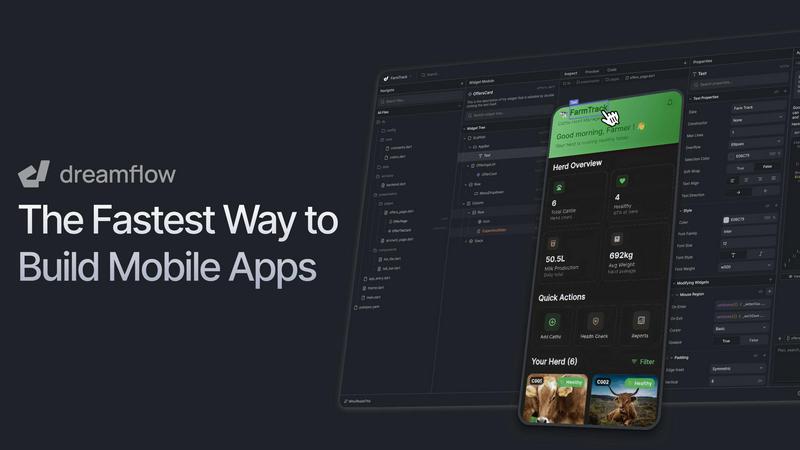
Dreamflow is a visual AI builder that syncs your prompts, canvas, and code for production apps.
Last updated: March 1, 2026

TemplateFox
Effortlessly design dynamic PDF templates and automate thousands of documents with TemplateFox using API or Zapier.
Last updated: February 28, 2026
Visual Comparison
Dreamflow
TemplateFox

Feature Comparison
Dreamflow
Tri-Surface Editing
Dreamflow's core innovation is its synchronized tri-surface environment. You can switch seamlessly between an AI agent you prompt in natural language, a visual drag-and-drop canvas, and a full Flutter code editor. Every change made on one surface is instantly reflected across the others, eliminating the disconnect between prototyping and development. This allows you to start with an AI-generated scaffold, visually fine-tune the UI, and then directly edit the underlying code, all within the same project.
AI-Powered, Context-Aware Generation
The platform features a smart, agentic AI that understands app development patterns and best practices. It goes beyond simple code generation by providing context-aware suggestions and scaffolding for entire features. You can describe functionality in plain English, and the AI will build it the right way, accelerating development while maintaining code quality and adherence to Flutter conventions.
Build for Any Screen & Instant Deployment
Powered by Flutter, Dreamflow enables you to build robust, responsive applications that adapt to every device size. Once your app is ready, you can deploy it with just a few clicks. The platform provides one-click deployment to the web and streamlined workflows for publishing to the Apple App Store and Google Play Store, handling much of the complex configuration for you.
Integrated Backend & Full-Stack Capabilities
Dreamflow comes with managed backend integrations out of the box, primarily with Firebase and Supabase. This allows you to build full-stack applications with real-time databases, authentication, and cloud functions from day one, without managing separate infrastructure. You can connect your visual UI components directly to your backend data, creating scalable production applications.
TemplateFox
Visual Template Editor
TemplateFox boasts a powerful visual, drag-and-drop template editor that allows users to design professional documents without writing any code. This feature enables users to easily customize layouts, insert images, and adjust styles, ensuring that every document meets their specific branding needs.
Dynamic Data Binding
With dynamic data binding, TemplateFox allows users to inject real-time data into their templates. This means that names, addresses, prices, and other essential details can be automatically updated within the document, streamlining the workflow and reducing manual data entry errors.
Automatic Table Management
The platform features tables that adapt to the volume of data provided. Whether the data set has 3 items or 300, the tables grow automatically and can span multiple pages as needed. This functionality ensures that the presentation remains professional, regardless of data size.
Built-in QR Codes and Barcodes
TemplateFox provides the ability to generate QR codes and barcodes on the fly directly from the data input. This feature supports various formats including Code128 and EAN-13, making it easy for users to create documents that are both functional and easy to scan.
Use Cases
Dreamflow
Rapid Prototyping & MVP Development
Founders and product managers can transform a concept into a working minimum viable product in a matter of hours. By describing the app idea to the AI agent and visually refining the output, teams can quickly create a tangible, interactive prototype to validate ideas with users or stakeholders before committing to extensive custom development.
Developer-Led App Acceleration
Professional developers and small engineering teams use Dreamflow to accelerate their workflow. They can leverage the AI to generate boilerplate code and standard UI components, then switch to the code editor to implement complex custom logic and business rules. This hybrid approach dramatically increases development speed without sacrificing code ownership or quality.
Cross-Platform App Creation
Businesses and entrepreneurs needing a presence on both iOS and Android, and often the web, find Dreamflow ideal. By building once with Flutter through Dreamflow's visual and AI tools, they can create a single codebase that deploys natively to all major platforms, ensuring consistency and reducing development time and cost.
Educational Projects & Learning Flutter
Aspiring developers and students learning mobile development can use Dreamflow to understand Flutter app structure. They can start visually, see how their design choices translate into code, and then experiment by editing that code directly. This provides a practical, hands-on learning environment that bridges the gap between visual design and programming.
TemplateFox
Invoice Generation
Businesses can use TemplateFox to automate the creation of invoices. By designing a professional template and linking it to their accounting software, they can generate invoices in seconds, improving cash flow management and client satisfaction.
Certificate Creation
Educational institutions and organizations can leverage TemplateFox to issue certificates of achievement. With customizable templates, they can design certificates that reflect their branding and automatically populate the recipient's information.
Packing Slips for E-commerce
E-commerce businesses can streamline their order fulfillment process by generating packing slips tailored to each order. This not only enhances the user experience but also ensures that every package is accompanied by accurate shipping documentation.
Asset Tracking with QR Codes
Companies can create QR code sheets for asset tracking purposes. By generating PDFs that include QR codes for each asset, they can facilitate easier inventory management and enhance operational efficiency.
Overview
About Dreamflow
Dreamflow is the definitive next-generation visual AI builder for creating production-ready mobile applications. It represents a paradigm shift by unifying three powerful development surfaces into one seamless platform: AI-driven prompting, a visual drag-and-drop canvas, and direct Flutter code editing. This integrated approach empowers developers, founders, and product teams to build mobile apps with unprecedented flexibility. You can start with a simple idea described in natural language, refine the user experience visually on an intuitive canvas, and dive directly into clean, exportable Flutter code whenever necessary. Unlike traditional no-code tools that often lock you into prototypes or abstracted environments, Dreamflow ensures all three surfaces are perfectly synchronized. This gives you the speed of AI-assisted generation, the intuitive control of visual design, and the ultimate confidence of owning scalable, publishable code. Built by the team behind FlutterFlow and trusted by over 2 million builders, Dreamflow is engineered to turn concepts into real, deployable applications for the App Store, Google Play Store, and web without compromise.
About TemplateFox
TemplateFox is a cutting-edge Software as a Service (SaaS) platform that simplifies the process of generating professional and dynamic PDF documents at scale. Designed for developers, indie hackers, and businesses alike, it serves as a dual solution comprising a visual drag-and-drop template editor and a high-speed API for on-demand PDF generation. The main value proposition of TemplateFox is its ability to automate document workflows without requiring users to have any expertise in HTML, CSS, or PDF libraries. Users can create visually appealing templates for various documents such as invoices, reports, and certificates, and seamlessly populate them with live data through straightforward API calls or no-code automation tools like Zapier. With generation times as quick as 1-3 seconds, flexible delivery options, and a free tier to get started, TemplateFox bridges the gap between design flexibility and developer-friendly automation, making it an essential tool for anyone needing reliable document generation.
Frequently Asked Questions
Dreamflow FAQ
How is Dreamflow different from traditional no-code platforms?
Unlike traditional no-code platforms that often lock you into their proprietary environment and output limited prototypes, Dreamflow provides full access to clean, standard Flutter code. Its tri-surface sync means you are never trapped; you can start with AI or visuals and always dive into the code to extend, customize, or export the entire project for independent development.
Can I export my app's source code?
Yes, full code export is a key feature, available on the Hobby plan and above. You can export your entire project as a standard Flutter codebase at any time. This allows you to run the app locally on simulators or real devices, integrate with any custom tooling, and maintain complete ownership and portability of your work.
What backend services does Dreamflow support?
Dreamflow offers managed backend integrations with Firebase and Supabase out of the box. These services handle essential full-stack capabilities like authentication, real-time databases, and cloud functions. The platform provides visual tools to connect your app's UI directly to these backend data sources seamlessly.
Who is Dreamflow best suited for?
Dreamflow is designed for a wide spectrum of builders. It is ideal for founders and product teams wanting to build MVPs rapidly, for professional developers seeking to accelerate their Flutter workflow, and for entrepreneurs needing to launch cross-platform apps without a large team. Its flexibility caters to both non-coders and experienced developers alike.
TemplateFox FAQ
How does TemplateFox handle document generation?
TemplateFox generates documents through a powerful API that processes template designs and live data input to create PDFs in as little as 1-3 seconds.
Is coding experience necessary to use TemplateFox?
No, TemplateFox is designed for users of all skill levels. Its visual template editor and no-code integrations make it accessible for those without technical backgrounds.
What types of documents can I create with TemplateFox?
You can create a wide variety of documents including invoices, reports, certificates, packing slips, and more, all tailored to your specific needs.
Is there a free version of TemplateFox available?
Yes, TemplateFox offers a free tier that allows users to generate up to 60 PDFs per month, enabling them to explore its features without any financial commitment.
Alternatives
Dreamflow Alternatives
Dreamflow is a visual AI builder for creating production-ready mobile applications. It uniquely integrates AI prompting, a visual canvas, and direct Flutter code editing into a synchronized workflow, allowing teams to build from concept to deployment without compromise. Users may explore alternatives for various reasons, including budget constraints, a need for different programming languages or frameworks, or a preference for a more traditional development environment. The choice often hinges on the specific balance between visual speed, code control, and the target platform. When evaluating options, consider the core workflow. Key factors include the depth of code access and ownership, the quality and scalability of the generated output, the learning curve, and whether the tool supports your desired deployment targets, such as native app stores or the web.
TemplateFox Alternatives
TemplateFox is an innovative SaaS platform that simplifies the generation of professional PDF documents through a visual drag-and-drop template editor and a robust API. It belongs to the productivity and management category, focusing on automating document workflows for developers, businesses, and indie hackers without requiring technical expertise. Users often seek alternatives due to factors such as pricing, specific feature requirements, or the need for compatibility with existing platforms and workflows. When looking for an alternative to TemplateFox, consider essential factors such as ease of use, scalability, pricing structures, and the ability to integrate with other tools or services. Evaluate the level of design flexibility offered and whether the solution can meet your unique document generation needs efficiently. A strong customer support system and user community may also enhance your experience with an alternative platform.