
Decode This Text vs Refbox
Side-by-side comparison to help you choose the right AI tool.

Decode This Text
Decode This Text gives you human-like clarity on confusing conversations in just 30 seconds.
Last updated: February 28, 2026

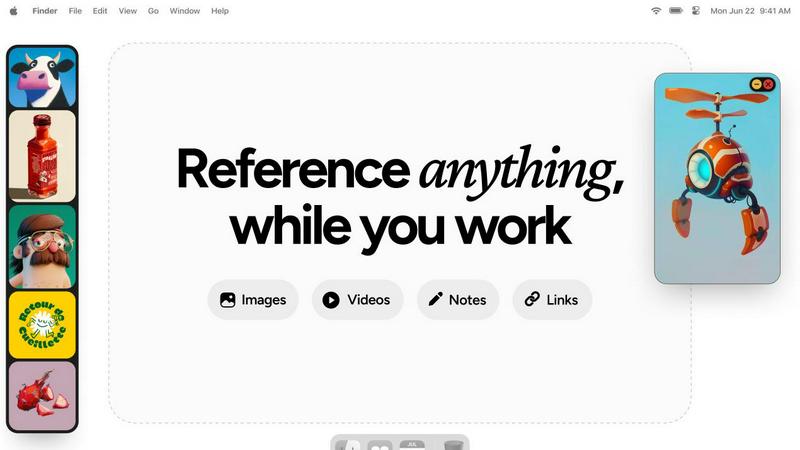
Refbox keeps your reference images and notes instantly visible above your workspace.
Last updated: February 28, 2026
Visual Comparison
Decode This Text

Refbox
Feature Comparison
Decode This Text
Screenshot Analysis
Simply upload a photo of your chat conversation. The tool reads and analyzes the entire text exchange for you, eliminating the need to manually type out messages. This seamless feature saves time and ensures you capture every detail, from timestamps to emojis, for a complete and accurate interpretation of the interaction.
Tone & Intent Breakdown
Go beyond the words to understand the emotional temperature of a message. This feature measures whether the sender is being friendly, cold, sarcastic, or genuinely interested. It provides clear metrics on tone, effort, and intent, helping you avoid misinterpretation and see the true sentiment behind phrases like "I'll let you know."
Pattern Detection
The AI detects subtle behavioral cues that are easy to miss. It identifies patterns such as someone only messaging late at night, consistently avoiding direct questions, or gradually shortening their replies. This insight reveals underlying habits and intentions, providing context that explains confusing shifts in communication.
Smart Response Builder
Stuck on how to reply? This feature provides you with three tailored response options—calm, direct, or firm—based on the analysis of the situation. It helps you craft a confident reply that aligns with your goals, whether you need to set a boundary, seek clarity, or keep the conversation flowing smoothly.
Refbox
Always-on-Top Floating Frames
Refbox’s signature feature allows you to pin any reference—images, videos, GIFs, or notes—in a resizable window that floats above all other applications. This ensures your inspiration is always visible while you sketch, design, or animate. You can minimize frames to access apps behind them or lock them in place to work directly over the reference, creating a truly integrated and non-disruptive workspace that keeps you in your creative zone.
Masonry Mode & Infinite Canvas
Organize all your visual references on a single, expansive canvas. Masonry Mode automatically arranges your pinned items in a clean, organized grid, allowing you to see your entire collection of inspiration at a glance. This infinite canvas is perfect for moodboarding and comparing multiple references side-by-side, providing a holistic view of your project’s direction without the clutter of multiple windows or tabs.
Advanced Media Handling & Tools
Refbox goes beyond simple image display with a curated set of powerful tools for deep creative work. Step through GIFs frame-by-frame for detailed animation reference, use the built-in color picker on any media to sample and copy hex codes, and crop images to focus on specific details. It also supports SVG files and can generate website screenshots from pasted URLs, making it a versatile hub for all reference types.
Intuitive Shortcuts & Workflow Optimizations
Designed for speed, Refbox puts full control at your fingertips. Quickly swap between floating references using arrow keys, change entire collections with a single click, or auto-hide your Refbox to reveal it only when needed. These thoughtful shortcuts and customizable behaviors minimize manual interaction, saving you hours over a project and allowing you to maintain an uninterrupted state of creative flow.
Use Cases
Decode This Text
Decoding Dating & Relationship Messages
Navigate the uncertainty of modern dating. Understand if a match is genuinely interested or fading away, interpret mixed signals after a great date, or decode the meaning behind sudden silence. Get clarity on intentions to decide your next move without endless anxiety or advice from friends.
Interpreting Professional Communication
Decipher ambiguous workplace messages with confidence. Understand if your boss's one-word email signifies anger, interpret the true meaning behind "we'll keep your resume on file," or learn how to say "no" professionally. Navigate office politics and communication with strategic insight.
Understanding Friends & Family Dynamics
Repair and maintain personal relationships. Figure out why a family group chat went silent after your message, understand a friend's distant tone, or interpret passive-aggressive comments. Gain an objective perspective to address issues without escalating conflict.
Preventing Regretful Messages
Act as a crucial buffer before you send an emotional text. Paste your drafted reply to get an analysis of how it might be perceived. This use case helps you avoid sending messages fueled by frustration or confusion that you might regret later, promoting more thoughtful communication.
Refbox
Digital Illustration & Concept Art
Illustrators and concept artists can pin character sketches, environment photos, and color palettes in floating frames directly over their canvas in Photoshop or Procreate. This allows for constant visual comparison and inspiration, enabling accurate translation of references into original artwork without breaking concentration to search through files or browser tabs.
3D Modeling & Animation
For 3D artists and animators, Refbox is indispensable for viewing orthographic reference sheets, texture inspiration, or motion study videos while working in complex software like Blender or Maya. The ability to lock a frame and work behind it, or step through a GIF frame-by-frame, provides precise control for modeling proportions and animating movements with high accuracy.
UI/UX & Web Design
Designers can streamline their workflow by floating website screenshots, component libraries, and style guides next to their design tool (Figma, Sketch, Adobe XD). The color picker tool allows instant sampling from any reference, and notes can hold project-specific copy or checklist requirements, keeping all critical project assets visible and accessible throughout the design process.
Motion Graphics & Video Editing
Motion designers and video editors can use Refbox to keep storyboards, style frames, and reference videos pinned on-screen while working in After Effects or Premiere Pro. This ensures visual consistency and creative direction are always top of mind, facilitating faster decision-making and a more cohesive final product without constant context switching.
Overview
About Decode This Text
In a world where digital communication is often ambiguous, Decode This Text provides the clarity you need. It is an innovative AI-powered tool designed to decipher the true meaning behind confusing messages. Whether you're puzzling over a vague text from a date, a cryptic email from your boss, or a silent group chat with friends, this tool cuts through the uncertainty. You simply paste the conversation, upload a screenshot, or describe the context. Within 30 seconds, you receive a comprehensive, human-like analysis that breaks down the underlying intentions, emotional tone, and hidden patterns in the exchange. More than just an analyzer, it empowers you with actionable advice, suggesting the best ways to respond with confidence. Built with privacy at its core—no human ever reads your texts—it’s the trusted, anonymous reality check for anyone looking to improve their relationships, enhance communication skills, and eliminate the stress of overthinking every word.
About Refbox
Refbox is the definitive floating reference manager for creative professionals. It is designed to eliminate the disruptive cycle of alt-tabbing between folders, browsers, and your primary work application. By allowing you to pin images, GIFs, videos, and notes in resizable, always-on-top frames directly over your workspace, Refbox keeps your inspiration and critical references perpetually in view. This tool is essential for artists, designers, animators, and content creators across disciplines like 3D art, illustration, UI/UX, motion graphics, and photography, who require instant visual access to maintain a deep state of creative flow. Its core value proposition is a seamless, distraction-free workflow where references are available the moment you need them, without digging or searching. With intelligent features like Masonry Mode for organized canvas viewing, instant collection swapping, and a suite of precision tools for media interaction, Refbox transforms a cluttered, multi-window process into a streamlined and visually intuitive experience. It is built for professionals who cannot afford distractions, prioritizing focused creation over administrative friction.
Frequently Asked Questions
Decode This Text FAQ
How does Decode This Text protect my privacy?
Your privacy is paramount. The analysis is performed entirely by AI algorithms. No human ever reads, reviews, or stores the text conversations or screenshots you submit. All interactions are 100% anonymous, ensuring your sensitive communications remain completely confidential.
What kind of input does the tool accept?
You can provide input in three flexible ways: by directly pasting the text of a conversation, by uploading a screenshot or photo of your chat, or by simply describing the situation and what was said. The AI is designed to work effectively with any of these formats to give you a clear analysis.
How accurate is the analysis?
The tool uses advanced natural language processing trained on vast datasets of human communication to identify tone, intent, and patterns. While it provides highly insightful and nuanced analysis that users describe as a "wise older sister," it is an AI guide. It's designed to offer a powerful external perspective to inform your decisions.
What do I get in the analysis report?
Your report includes a breakdown of the perceived emotional tone, the level of effort from the sender, and their likely intent. It also highlights any detected communication patterns and, most importantly, provides you with actionable, context-aware suggestions for how to craft an effective response.
Refbox FAQ
What types of files does Refbox support?
Refbox supports a wide range of media essential for creative work. You can directly pin images (JPG, PNG, SVG, etc.), video files, and GIFs. It also supports text notes with styling and checklist options. A unique feature is the ability to paste a website URL, and Refbox will automatically generate a screenshot for you to use as a visual reference.
How does Refbox help maintain focus?
Refbox is engineered to minimize workflow friction. By keeping references in always-on-top windows, it completely eliminates the disruptive need to switch applications or dig through folders. Features like auto-hide, keyboard shortcuts for swapping references, and the ability to minimize frames mean you interact with your references instantly, keeping you in a state of deep creative flow.
Can I organize my references into different projects?
Yes, Refbox allows you to create multiple, separate Collections. This lets you organize references by client, project, or theme. You can switch between these entire collections instantly with a single click, making it effortless to jump between different tasks while keeping all relevant references neatly organized and immediately accessible.
Is there a free trial or version available?
Refbox operates on a simple, one-time purchase model. This provides you with a lifetime license for the application, including all current features and future updates. This approach is favored by many professionals as it avoids ongoing subscription fees, offering long-term value and stability for your creative toolkit.
Alternatives
Decode This Text Alternatives
Decode This Text is a productivity tool designed to bring clarity to confusing communications. It analyzes text from emails, messages, or conversations to reveal underlying intentions, emotional tone, and suggested responses, helping users navigate ambiguous interactions with confidence. People often seek alternatives for various practical reasons. This could be due to budget constraints, a need for different features like integration with specific platforms, or simply a preference for a different user interface or analysis style. Exploring options ensures you find a tool that aligns perfectly with your workflow and communication challenges. When evaluating other tools, consider what matters most for your daily use. Look at the depth and nuance of the analysis provided, the speed of response, ease of use, and data privacy policies. The right alternative should not only decode text but also fit seamlessly into your life, enhancing understanding without adding complexity.
Refbox Alternatives
Refbox is a specialized productivity tool designed to streamline creative workflows. It operates as a floating reference manager, allowing users to keep visual and textual inspiration pinned above their primary work applications. This eliminates disruptive window switching, making it a favorite among artists, designers, and digital creators. Users may seek alternatives for various reasons, including budget constraints, the need for different feature sets, or compatibility with other operating systems. Some may require more advanced organizational tools or prefer a solution integrated into a broader creative suite. Understanding your specific workflow needs is key to finding the right fit. When evaluating alternatives, consider core functionality like always-on-top windows, support for multiple media types, and organizational features. The ideal tool should feel intuitive and stay out of your way, enhancing focus rather than adding complexity to your creative process.