
Daily vs FilexHost
Side-by-side comparison to help you choose the right AI tool.

Daily is a simple planner that clears your mind so you can focus on what matters.

FilexHost
FilexHost instantly creates a shareable link for any file you drag and drop.
Last updated: February 28, 2026
Visual Comparison
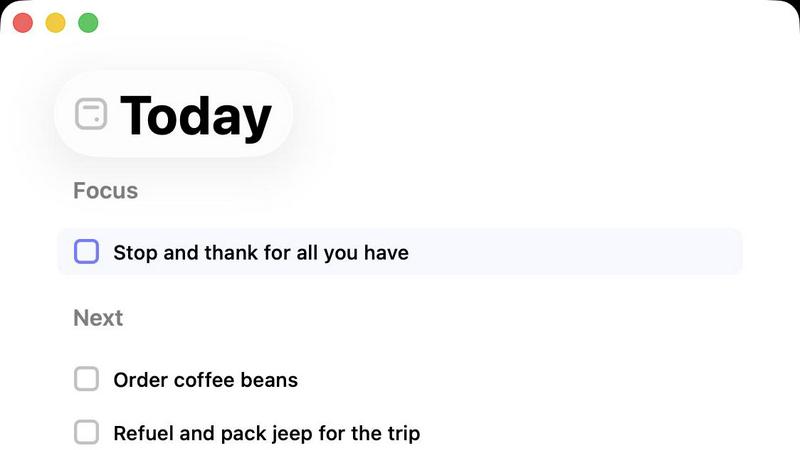
Daily
FilexHost

Feature Comparison
Daily
The Unstructured Brain Dump
Daily provides a dedicated, judgment-free space to capture every task, idea, and reminder the moment it enters your mind. You don't need to categorize, prioritize, or even make sense of items as you add them. This feature liberates you from the cognitive burden of holding everything in your head, allowing for a true mental offload. The simple act of writing it down creates immediate relief and is the foundational step toward later clarity.
The Intentional "Today" View
This is the heart of the Daily experience. Unlike cluttered task managers that show everything at once, the Today view displays only the items you have consciously chosen to focus on for this specific day. It creates a clean, calm interface that helps you avoid distraction and overwhelm. By limiting your visible field to a curated daily list, you can engage in deep work with a renewed sense of focus and purpose, free from the noise of future obligations.
Gentle Task Carry-Forward
Daily understands that plans change and energy fluctuates. Items not completed by the end of the day are not highlighted in red or marked as overdue. Instead, they are quietly and automatically carried forward to the next day's list. This non-punitive approach removes the shame and anxiety associated with an unfinished to-do list, allowing you to start each morning with a clean slate and the freedom to reassess what still holds importance.
Purposeful Simplicity & Letting Go
The entire application is built on a principle of minimalism. There are no complex tags, elaborate projects, or overwhelming settings. This deliberate design prevents the tool itself from becoming a source of complexity. Integrated into this simplicity is the ability to easily delete or "let go" of tasks that are no longer relevant. This feature empowers you to declutter your list mentally, reinforcing that it is a tool to serve you, not a master to obey.
FilexHost
Universal File Support & Smart Rendering
FilexHost accepts a vast array of file types, including PDFs, images (JPG, PNG, WEBP, HEIC, TIFF), audio/video (MP4, MP3), data files (XLSX, CSV, JSON), code, and ZIP archives. Its intelligent engine doesn't just store files; it presents them optimally. HTML/ZIP files render as live websites, spreadsheets become sortable in-browser tables, documents display in clean readers, and media files play with built-in lightweight players. This smart rendering ensures your content is experienced, not just downloaded.
Instant, Secure Subdomains
With zero configuration, every uploaded file or site instantly receives a permanent, secure subdomain (e.g., your-file.filex.host). Each link is automatically protected with free SSL encryption, ensuring all data transfer is secure. This feature removes the technical hurdles of setting up hosting, making it possible to go from a local file to a live, web-accessible URL in mere seconds, perfect for rapid sharing and testing.
Granular Sharing Controls
FilexHost provides powerful controls over how your content is accessed. You can set files to expire after a set duration (from 24 hours to forever) and add optional password protection for privacy. Furthermore, you can choose the view mode for recipients, deciding whether a file renders directly in the browser or presents a download page first, giving you flexibility based on the context of your share.
Simple Drag & Drop Workflow
The platform is built on ultimate simplicity. There is no command line, git, or complex configuration required. The entire process is based on an intuitive drag-and-drop interface. You upload your file, optionally set a title, description, expiry, and password, and immediately receive your shareable link. This streamlined workflow makes professional file hosting accessible to everyone, regardless of technical skill.
Use Cases
Daily
For the Overwhelmed Professional
Professionals juggling multiple projects, constant communication, and shifting priorities can use Daily as a mental airlock. They can quickly dump all incoming requests and ideas into Daily throughout the day, preventing important notes from getting lost in email or chat threads. Later, they can review the full list and deliberately select 3-5 critical tasks for the next day's Today view, creating a realistic and focused action plan that reduces anxiety and improves execution.
For the Creative with a Scattered Mind
Artists, writers, and thinkers often have bursts of ideas that can interrupt deep work. Daily serves as a reliable external notebook. They can instantly capture a creative thought or a logistical task without breaking their flow. During a planning session, they can sift through these captured notes, identify the one key creative action for the day, and place it in the Today view, protecting time for their most important work.
For Someone Building Better Habits
An individual looking to incorporate new routines or reduce mental clutter can use Daily to offload recurring personal tasks and nagging thoughts. By writing down everything from "schedule doctor appointment" to "water plants," they clear mental RAM. The Today view then helps them commit to a small, manageable set of personal admin tasks each day, building consistency without the pressure of a perfect, long-term streak.
For Post-Therapy or Mindfulness Practice
Following a therapy session or mindfulness exercise, individuals often have insights or action items to process. Daily offers a private, structured place to record these reflections and commitments. They can add items like "practice grounding technique when stressed" or "challenge negative thought pattern X." Reviewing the Today view each morning then serves as a gentle, supportive reminder of their personal growth intentions for the day.
FilexHost
Professional Client Deliverables
Freelancers, consultants, and agencies can use FilexHost to deliver reports, presentations, design mockups, or video proofs to clients. Instead of clogging inboxes with large attachments or using cumbersome cloud storage with permission barriers, you can send a single, clean link. The file renders beautifully in the client's browser, providing a polished, professional experience without requiring them to download software or create an account.
Developer Prototyping & Demos
Developers and designers can instantly host static websites, landing pages, project demos, or mock API endpoints (using JSON files). This is ideal for sharing work-in-progress with team members, testing responsive designs, or presenting portfolio projects. The instant subdomain and live rendering allow for quick feedback cycles without deploying to a production server.
Digital Product Distribution
Creators, educators, and small businesses can distribute digital products like e-books (PDF), audio files, video courses, software zip files, or asset packs. By using password protection and expiry settings, you can control access. Recipients get a direct, hassle-free download or viewing page, enhancing the customer experience compared to email attachments or convoluted download portals.
Friction-Free Media Sharing
For anyone needing to share photos, videos, or audio clips that are too large for email or messaging apps, FilexHost offers a perfect solution. Upload your media collection as a ZIP or individual files, and share the link. Recipients can view images in a gallery, play video/audio in-browser, or download what they need, all without uploading to a public social media platform.
Overview
About Daily
Daily is a thoughtfully designed digital companion for those who feel overwhelmed by the constant pressure to do more. It reimagines the traditional to-do list, transforming it from a source of stress into a sanctuary for clarity. The core philosophy of Daily is gentle support, not rigid productivity. It provides a quiet, structured space to unload the mental clutter of tasks, reminders, and fleeting thoughts without the immediate need to organize or prioritize them. This act of externalizing your mental load is the first step toward regaining focus. When you are ready, Daily helps you view your list with fresh eyes, encouraging you to consciously select only what truly matters for the day ahead. Its central "Today" view acts as a calming filter, showing only your chosen commitments and helping you return to a grounded state of focus. Unfinished items are not marked as failures; they are gently carried forward or can be let go without guilt. Built with intentional simplicity, Daily offers just enough structure to provide support, deliberately avoiding the complexity and pressure found in many productivity tools. It is for anyone seeking a kinder, more sustainable way to manage their day and move forward with purpose.
About FilexHost
FilexHost is a modern, frictionless platform for instant file hosting and sharing. It strips away the complexity traditionally associated with online file delivery, offering a universal solution for any file type—from documents and spreadsheets to media files and complete static websites. The core philosophy is a "Drop & Share" workflow: you upload a file, and FilexHost instantly generates a secure, shareable link. There are no servers to manage, no DNS to configure, and no requirement for recipients to log in or request access. This makes sharing effortless for the sender and seamless for the viewer.
The platform is designed for professionals, creators, and developers who value speed, presentation, and simplicity. It intelligently renders content, ensuring recipients see files as intended—HTML projects become live websites, spreadsheets turn into interactive tables, and media plays directly in the browser. Whether you're a freelancer sending client reports, a developer hosting a project demo, or a creator distributing digital assets, FilexHost prioritizes a beautiful, direct viewer experience over forcing downloads. It eliminates attachment limits and permission emails, providing a clean, professional alternative for getting files from you to anyone, anywhere.
Frequently Asked Questions
Daily FAQ
How is Daily different from other to-do apps?
Most productivity tools are built on a philosophy of efficiency, optimization, and doing more. Daily is built on a philosophy of clarity, calm, and intentional choice. It avoids complex features like nested sub-tasks, priority labels, and detailed scheduling that can create administrative overhead. Instead, it focuses on the two core actions: capturing everything without friction, and then mindfully choosing what to focus on today. The difference is in the feeling it creates: support instead of pressure.
What happens to tasks I don't complete?
Tasks you do not complete are not treated as failures. They are automatically and quietly moved to the next day's full list. When you next review your list, you will see them again and have a fresh opportunity to decide if they belong in your new Today view, if they should be postponed further, or if they can be let go entirely. This system is designed to reduce daily guilt and encourage realistic, re-evaluated planning.
Can I use Daily for long-term project planning?
Daily is intentionally not designed as a project management tool. It excels at daily and near-term task management and mental clarity. For complex, multi-step projects, you might capture the overarching project or next immediate action in Daily, but detailed planning would be better suited to a dedicated project management application. Daily works best as the calm, daily layer on top of your other systems.
Is my data private and secure?
While specific technical details require consultation with Daily's official privacy policy, the application's philosophy of being a personal, quiet space for your thoughts suggests a strong emphasis on user privacy. Typically, applications like this employ encryption for data in transit and at rest. For definitive information on data handling, storage, and security practices, you should refer to the privacy documentation provided by the Daily development team.
FilexHost FAQ
What is FilexHost?
FilexHost is an instant file hosting and sharing service. It allows you to upload any file type—documents, media, archives, or static websites—and immediately receive a secure, shareable web link. The platform focuses on simplicity and viewer experience, rendering files intelligently in the browser so recipients can view content directly without mandatory downloads.
Is it really free?
Yes, FilexHost offers a fully-featured Free Plan. This plan allows you to host up to 1,000 files, with a maximum file size of 25MB and total storage of 1GB. Files expire after 7 days. The free experience is supported by ads and includes a watermark. For permanent, ad-free hosting with larger limits and advanced features, the Pro Plan is available.
What file types are supported?
FilexHost supports a wide range of universal file types. This includes documents (PDF, TXT), data (XLSX, CSV, JSON), images (JPG, PNG, WEBP, HEIC, TIFF), media (MP4, MP3), code files, and ZIP archives. The platform's built-in viewers automatically render these files appropriately in the web browser for optimal viewing.
How do I update my hosted file or site?
To update a file or static site hosted on FilexHost, you simply need to upload the new version of the file. The platform will generate a new, unique link for the new upload. If you wish to keep the same URL, you would need to use the Pro Plan feature (when available) to manage and replace files under a consistent subdomain or custom domain.