
Cosy vs Perkoon
Side-by-side comparison to help you choose the right AI tool.

Cosy automates member onboarding and introductions in Slack, boosting engagement while saving you valuable time.
Last updated: February 28, 2026

Perkoon enables free, unlimited peer-to-peer file transfers with no signup, keeping your data private and secure.
Last updated: March 4, 2026
Visual Comparison
Cosy
Perkoon

Feature Comparison
Cosy
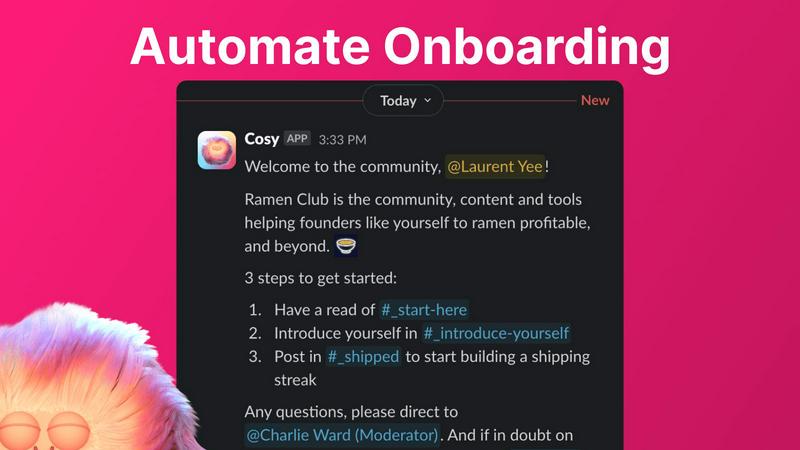
Automate Onboarding
Cosy allows users to create and automate up to 10 distinct onboarding welcome DM sequences, either from themselves, a team member, or the Cosy bot. This feature ensures that new community members receive a warm welcome immediately or at a scheduled time, fostering a sense of belonging from the outset. The messages are fully customizable, allowing for personal touches that include names and relevant links, thereby enhancing the onboarding experience.
Connect Your Members
This feature automatically introduces community members to each other through DMs, enhancing engagement and interaction within the community. Members can opt-in for regular introductions, set at customizable frequencies, allowing for serendipitous connections that may not happen organically. By ensuring that members are regularly introduced, Cosy creates a naturally engaging environment within the community.
Member Directory
Cosy provides a simple, searchable member directory directly within Slack, enabling members to create and customize their profiles. This directory allows for easy searching and filtering of members, helping to facilitate connections based on shared interests or expertise. The seamless integration means that members do not have to leave Slack to find and connect with others, making the community more accessible and interactive.
Content Highlights
With the ability to instantly surface the top 10 most engaging posts or identify unreplied messages, Cosy keeps the community informed and engaged. Users can utilize quick slash commands to access this information, ensuring that valuable content is not overlooked and that conversations remain active. This feature helps maintain a lively community atmosphere by bringing attention to popular discussions and encouraging participation.
Perkoon
Peer-to-Peer File Transfer
Perkoon’s flagship feature allows users to send files directly between browsers using P2P technology. This method eliminates size limits and the need for accounts, ensuring that transfers are not only fast but also completely private, as data never passes through central servers.
Encrypted Cloud Storage
For users needing to send files to offline recipients, Perkoon offers secure cloud storage that encrypts files on its servers. This paid feature guarantees that files are stored safely while still being accessible when the recipient comes online.
Built-in Automation Tools
Designed for the modern age of AI, Perkoon includes built-in tools that facilitate automation. This unique feature allows AI agents to interact directly with the service without needing to scrape data, thereby streamlining file transfers for users who rely on automation.
Simple Command-Line Interface
Perkoon offers a straightforward command-line interface (CLI) for advanced users and developers. This feature enhances accessibility and provides tech-savvy individuals with a powerful tool to manage file transfers efficiently and privately.
Use Cases
Cosy
Onboarding New Members
Community managers can utilize Cosy to automate the onboarding process for new members, ensuring they receive a warm welcome and essential information without the need for manual intervention. This not only saves time but also creates a positive first impression, encouraging new members to engage with the community.
Enhancing Member Connections
Cosy can help increase member engagement by facilitating regular introductions among community members. This is particularly useful for larger communities where individuals may not naturally interact. By introducing members on a scheduled basis, Cosy fosters connections that enhance the overall community experience.
Managing Community Content
Utilizing the content highlights feature, community managers can keep track of the most engaging content and ensure that important discussions are not missed. This allows managers to promote participation and maintain a dynamic conversation flow, ultimately strengthening community ties.
Building a Comprehensive Member Directory
By enabling the creation of a searchable member directory, Cosy helps community members find and connect with one another based on their profiles and interests. This enhances collaboration and networking opportunities, making it easier for members to seek assistance or share knowledge.
Perkoon
Personal File Sharing
Individuals can use Perkoon to share large files with friends or family without the hassle of sign-ups or size limits. The P2P service ensures that personal data remains private and secure during the transfer process.
Business Collaboration
Teams can leverage Perkoon for seamless collaboration by sharing large documents and resources without the constraints typically found in traditional file-sharing services. The encrypted cloud storage option ensures sensitive business data is protected.
Automated File Transfers
Developers and tech enthusiasts can integrate Perkoon’s API and automation tools into their applications, allowing for efficient file transfers without manual intervention. This enhances productivity and minimizes the risk of errors.
Offline File Delivery
For users needing to send files to recipients who are temporarily offline, Perkoon’s encrypted cloud storage serves as a reliable solution. Files can be securely stored until the recipient is ready to download them, ensuring no data is lost.
Overview
About Cosy
Cosy is an innovative tool designed specifically for Slack, transforming your workspace into a vibrant community hub. Tailored for community leaders and managers, Cosy simplifies and automates essential community management tasks, enabling users to focus on strategic growth rather than administrative duties. By offering features such as automated onboarding processes, member introductions, and content highlights, Cosy enhances member engagement and interaction effortlessly. The product is ideal for community managers who strive to foster connections among members while minimizing overwhelming manual efforts. With its Slack-native design, the tool allows community managers to create a dynamic environment where new members feel welcomed, existing members are connected, and the community thrives. From automating direct messages to providing a searchable member directory and moderation tools, Cosy ensures that community management is efficient and effective, saving valuable time every week. Organizations can leverage Cosy to maintain a vibrant and safe community, even during non-business hours, allowing them to sleep soundly knowing that their members are being engaged and connected.
About Perkoon
Perkoon is a revolutionary file transfer service that prioritizes simplicity and privacy, enabling users to send files effortlessly from one point to another. Designed for individuals who are frustrated by restrictive limits, mandatory account registrations, and services that commodify data, Perkoon offers a refreshing alternative. Its primary value proposition lies in its dual-method approach to file transfer: a completely free peer-to-peer (P2P) service and a secure cloud storage option for offline transfers. The P2P technology allows users to share files directly between browsers, eliminating size constraints and ensuring that data never touches a central server, thus maintaining privacy. For instances when the recipient is offline, Perkoon provides encrypted cloud storage as a paid feature, covering operational costs transparently. Emphasizing an AI-friendly framework, Perkoon incorporates built-in automation tools and a simple command-line interface, making it an ideal choice for both individuals and businesses looking for a robust, privacy-centric file transfer solution.
Frequently Asked Questions
Cosy FAQ
What platforms does Cosy integrate with?
Cosy is designed specifically for Slack, allowing users to leverage its features directly within their Slack workspace without needing additional tools or platforms.
How does the automated onboarding feature work?
The automated onboarding feature sends personalized welcome DMs to new members based on customizable sequences set by community managers. This ensures that new joiners receive timely introductions to the community.
Can I customize the member directory fields?
Yes, Cosy allows community managers to customize up to 10 fields in the member directory, enabling members to provide relevant information that can enhance networking and collaboration.
Is there a limit to the number of members I can onboard?
Cosy offers a free tier for up to 250 members, with a 30-day trial for unlimited members. This flexibility allows communities of various sizes to benefit from its features.
Perkoon FAQ
Is Perkoon really free?
Yes, Perkoon offers a free peer-to-peer service that allows users to send files without any size limits or account requirements. This service remains free because it incurs minimal operational costs.
How does the cloud storage feature work?
When you send files to someone who is offline, Perkoon temporarily stores those files in encrypted cloud storage. This is a paid feature designed to cover the costs of running the servers that support this service.
Can I use Perkoon on any browser?
Perkoon works seamlessly on Chrome, Edge, and Brave browsers, ensuring unlimited file transfers. However, users on Firefox and Safari may experience certain browser restrictions.
Does Perkoon scan my files?
No, Perkoon prioritizes user privacy. P2P transfers occur directly between browsers, meaning Perkoon has no access to your data. Cloud transfers are encrypted, ensuring your files remain confidential.
Alternatives
Cosy Alternatives
Cosy is a Slack-native tool designed to automate member onboarding and introductions, making it an essential asset for community managers. By streamlining community management tasks, Cosy enhances engagement while saving time, providing features that allow community leaders to focus on fostering connections and strategic growth. Users often seek alternatives for various reasons, including pricing structures, specific feature sets, or integration capabilities with other platforms. When searching for an alternative, it’s crucial to consider the specific needs of your community, such as automation capabilities, user-friendly interfaces, and customization options. Ensuring that the alternative aligns with your community's objectives and integrates well with existing workflows can significantly enhance member engagement and satisfaction.
Perkoon Alternatives
Perkoon is a file transfer service that falls under the productivity and management category. It offers a unique approach to file sharing by prioritizing simplicity and privacy, allowing users to send files directly between browsers without the need for accounts or size limitations. With its peer-to-peer technology, Perkoon ensures that data remains private and secure, making it an attractive option for those seeking straightforward solutions. Users often look for alternatives to Perkoon due to various reasons, such as differences in pricing models, specific features that may align better with their needs, or compatibility with different platforms. When searching for an alternative, it's essential to consider factors like ease of use, security measures, the availability of features that support automation, and the overall cost structure to ensure that the selected service meets individual requirements effectively.