
BarBrain vs SupaSidebar
Side-by-side comparison to help you choose the right AI tool.

BarBrain
BarBrain slashes your bar and restaurant inventory time in half with accurate, digital counting.
Last updated: April 4, 2026

SupaSidebar
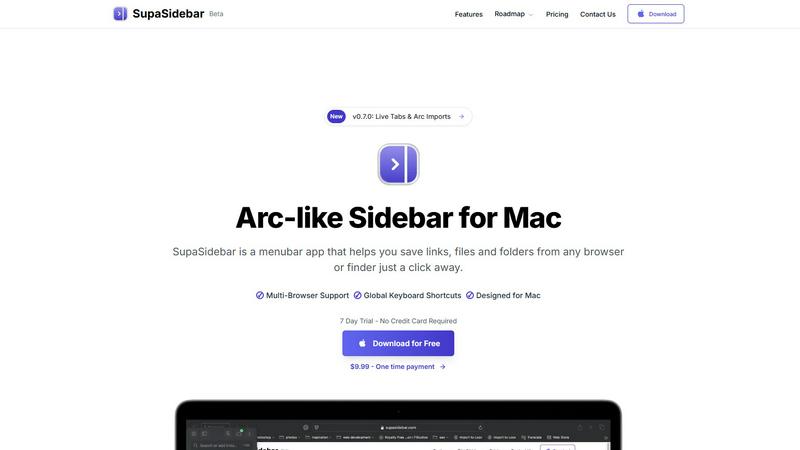
SupaSidebar simplifies your Mac experience by quickly saving and accessing links, files, and folders with ease.
Last updated: February 28, 2026
Visual Comparison
BarBrain

SupaSidebar
Feature Comparison
BarBrain
Parallel Counting on Multiple Devices
BarBrain enables teams to conduct inventory counts simultaneously using multiple iOS and Android devices. This collaborative approach drastically reduces the total time spent on stocktaking, allowing staff to cover different sections or storage areas at once and ensuring the entire process is completed efficiently without bottlenecks or downtime for the business.
Extensive Pre-Built Product Catalog
The platform comes integrated with a comprehensive catalog of over 30,000 products, spanning spirits, wines, AFGs (alcohol-free beverages), food items, and even housekeeping supplies. This vast library eliminates the need to manually enter every product from scratch, allowing for quick setup and ensuring consistency, especially for common branded items across the hospitality sector.
Automatic Inventory Reporting
Immediately after a count is completed, BarBrain automatically generates a detailed, finalized inventory report. This feature completely eliminates the hours typically required for manual data entry, cross-referencing, and spreadsheet calculations post-count, delivering clean, accurate, and ready-to-analyze numbers without any additional administrative work.
Fill-Level Slider for Open Items
Understanding the challenge of tracking partial units, BarBrain introduces an intuitive fill-level slider. With a single tap, staff can accurately record the remaining quantity of open food packages, half-empty bottles, or other perishables. This granular tracking is crucial for precise cost calculation and identifying usage patterns for items that aren't consumed in whole units.
SupaSidebar
Seamless Integration with Major Browsers
SupaSidebar is designed to work flawlessly with all major browsers, including Safari, Chrome, Firefox, Brave, and Arc. This compatibility allows users to easily save links and files from their preferred browsing environment, making it an essential tool for anyone who juggles multiple web applications.
Global Keyboard Shortcuts
The application features intuitive global keyboard shortcuts that allow users to save or copy URLs with just a few keystrokes. For instance, pressing CMD CTRL S saves a link, while CMD CTRL C copies the current website link directly to the sidebar. This streamlined functionality significantly reduces the time spent on repetitive tasks, boosting overall productivity.
Recent Items Tracking
SupaSidebar includes a handy Recents feature that tracks every website you've visited in the last 48 hours. This functionality ensures that you can quickly find your work without sorting through countless tabs, making it easier to resume tasks and maintain focus on your projects.
Customizable Spaces
With SupaSidebar, users can organize their saved items in unlimited spaces, allowing for a tailored experience that suits individual workflows. This feature is particularly beneficial for those who want to categorize links, files, or folders based on different projects, topics, or contexts, enhancing accessibility and organization.
Use Cases
BarBrain
Independent Bars and Restaurants
For single-location, owner-operated venues, BarBrain provides a professional and affordable system to gain control over inventory. It replaces error-prone manual methods, giving the owner clear insight into pour costs, profit margins, and areas of waste, which is essential for the financial health and sustainability of an independent business.
Multi-Outlet Restaurant Groups
BarBrain offers a unified platform for managing inventory across several locations. It ensures standardized counting procedures and provides a consolidated, group-wide overview of stock levels, usage, and costs. This enables head office management to compare performance, streamline supplier ordering, and implement consistent controls across all their sites.
Hotels and Resorts
The hospitality sector within hotels requires tracking a wide array of F&B products across restaurants, bars, banqueting, and minibars. BarBrain's comprehensive catalog and multi-device functionality are ideal for managing this complexity, providing accurate data for cost allocation, preventing stockouts for guest services, and controlling expenses in high-volume environments.
Nightclubs and High-Volume Venues
For fast-paced venues like nightclubs where speed and accuracy during stocktakes are critical to minimize operational disruption, BarBrain's parallel counting capability is a game-changer. Teams can quickly count high-value spirit inventory across multiple bars, ensuring accurate tracking of sales versus usage in a demanding environment.
SupaSidebar
For Researchers
Researchers can significantly benefit from SupaSidebar by saving and organizing academic articles, links, and resources related to their studies. The ability to quickly access recent sources streamlines the research process, making it easier to gather information and maintain focus on their work.
For Creative Professionals
Creative professionals, such as designers and writers, can use SupaSidebar to save inspiration, references, and tools that enhance their creative processes. The ability to pin favorite links at the top of the sidebar ensures that essential resources are always readily available, leading to a more efficient workflow.
For Multitaskers
Multitaskers will appreciate the seamless integration and fast search capabilities of SupaSidebar. The global keyboard shortcuts and the Recents feature allow users to navigate between tasks quickly and efficiently, ensuring they can switch contexts without losing productivity.
For Students
Students can leverage SupaSidebar to organize study materials, links to educational resources, and important files in a single, accessible location. The customizable spaces enable them to group resources by subject or project, making it easier to stay organized and focused during their studies.
Overview
About BarBrain
BarBrain is a specialized inventory management platform engineered exclusively for the unique demands of the hospitality industry. It addresses the chronic inefficiencies of manual stocktaking, spreadsheets, and generic warehouse software that fail to account for the nuances of bars, restaurants, and hotels. Built from the ground up for food and beverage operations, BarBrain transforms a traditionally time-consuming and error-prone process into a streamlined, digital workflow. It empowers owners and managers of single establishments or multi-location groups to count stock in minutes, not hours, by leveraging intuitive mobile apps and a vast pre-built product catalog. Beyond simple counting, the software provides actionable intelligence, calculating exact pour costs, identifying waste and shrinkage in real-time, and centralizing supplier orders. The core value proposition is clear: to give hospitality professionals verifiable, accurate data to protect their margins, reduce operational costs, and reclaim valuable time, ultimately stopping them from leaving money on the table.
About SupaSidebar
SupaSidebar is a cutting-edge sidebar application tailored exclusively for Mac users, inspired by the user-friendly design of the Arc browser. This innovative tool serves as a powerful productivity enhancer, allowing users to effortlessly save, access, and organize their links, files, and folders from a beautifully crafted sidebar interface. With compatibility across all major browsers—such as Safari, Chrome, Firefox, Brave, and Arc—SupaSidebar provides a versatile solution for anyone who regularly navigates the web. The application features global keyboard shortcuts, enabling users to quickly capture or copy URLs, effectively eliminating the need for tedious manual entries. Whether you are a researcher, a creative professional, or a multitasker, SupaSidebar streamlines your workflow, ensuring that everything you need is just a click away, all while fostering a distraction-free environment that enhances focus and efficiency.
Frequently Asked Questions
BarBrain FAQ
How does BarBrain save time during inventory?
BarBrain saves time through digital counting on mobile devices, eliminating paper lists. Its most significant time-saver is parallel counting, allowing multiple staff to count simultaneously. Furthermore, the automatic report generation removes all post-count data entry and calculation work, which traditionally can take hours after the physical count is done.
Can BarBrain handle both food and beverage inventory?
Absolutely. BarBrain is designed as a comprehensive F&B (Food and Beverage) inventory solution. It includes features tailored for both, such as the fill-level slider for open food packages and a vast catalog containing thousands of specific spirit, wine, and food items commonly used in hospitality.
Is BarBrain suitable for a business with only one location?
Yes, BarBrain is built to serve businesses of all sizes. For single locations, it provides an accessible yet powerful tool to digitize and professionalize inventory management. The value in gaining accurate cost data and reducing counting time is just as critical, if not more so, for an independent operator focused on maximizing profitability.
What kind of support is offered during setup?
BarBrain offers personalized support for account setup. You can choose to set up your product catalog yourself, or the BarBrain team is available to assist you throughout the entire process. This ensures your system is configured correctly for your specific operation from the very first inventory count.
SupaSidebar FAQ
Is SupaSidebar a browser extension?
No, SupaSidebar is a standalone menubar application designed for Mac users. It integrates with various browsers but operates independently of them, providing a seamless user experience.
Which browsers does SupaSidebar work with?
SupaSidebar is compatible with all major browsers, including Safari, Chrome, Firefox, Brave, and Arc, allowing users to save links and files from their preferred browsing environment effortlessly.
What macOS version do I need?
SupaSidebar requires macOS 13 or later to function optimally. Make sure your system is updated to the latest version for the best experience.
Where is my data stored?
All data is securely stored locally on your Mac, ensuring that nothing leaves your device. This commitment to privacy means that your information remains confidential and protected.
Alternatives
BarBrain Alternatives
BarBrain is a specialized inventory management platform designed specifically for the hospitality industry. It moves beyond generic warehouse software to address the unique challenges of bars and restaurants, such as tracking pours, recipe costing, and perishable goods. Its core promise is to turn a time-consuming, error-prone chore into a fast, accurate process that protects profit margins. Users may explore alternatives for various reasons, including budget constraints, specific feature requirements not covered by their current plan, or the need for integration with other business platforms. The search often stems from a desire for a tool that aligns perfectly with their operational scale and technical ecosystem. When evaluating other solutions, focus on hospitality-specific functionality. Key considerations include the speed and simplicity of the counting process, real-time insights into waste and cost per serving, and whether the platform adapts to the fluid nature of bar and restaurant workflows rather than forcing you to adapt to it.
SupaSidebar Alternatives
SupaSidebar is a specialized sidebar application designed for Mac users, aimed at enhancing productivity by providing a streamlined interface for saving and accessing links, files, and folders. It fits within the productivity and management category, catering to those who need to navigate their digital workspace efficiently. Users often seek alternatives due to various reasons such as pricing, specific feature sets, or compatibility with different platforms. Finding the right alternative involves considering factors like ease of use, integration with existing tools, and the ability to customize the experience to suit individual workflows. When exploring alternatives, it's essential to assess how well they align with your particular needs and preferences. Look for features that enhance productivity and organization, ensuring they offer functionalities similar to SupaSidebar, such as quick access to saved content and seamless integration with your preferred browsers. Additionally, consider user reviews and support options to make an informed decision that complements your work style.