
3DAIStudio vs OC Maker
Side-by-side comparison to help you choose the right AI tool.

3DAIStudio
3DAIStudio instantly creates professional 3D models from text or images with AI, no experience required.
Last updated: April 4, 2026

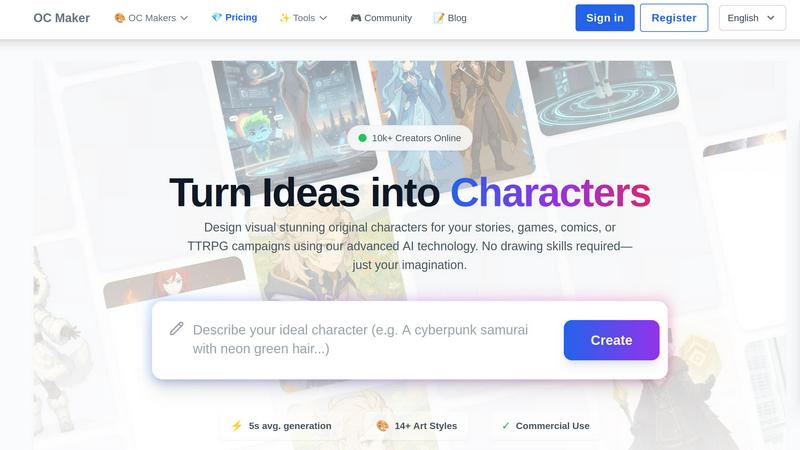
OC Maker instantly creates unique visual characters for any project using AI, no drawing skills required.
Last updated: March 1, 2026
Visual Comparison
3DAIStudio

OC Maker
Feature Comparison
3DAIStudio
Text to 3D
Describe your vision in words, and watch it materialize. This core feature interprets natural language prompts to generate complete, textured 3D models. Whether you need a "realistic fantasy orc warrior" or a "modern minimalist chair," the AI handles the complex modeling, sculpting, and initial texturing, delivering a usable asset in seconds without any manual 3D modeling required.
Image to 3D
Transform any 2D reference into a three-dimensional object. Simply upload a photograph, sketch, or digital illustration, and the AI analyzes the image to construct a detailed 3D model. This is ideal for prototyping real-world objects, bringing character concepts to life, or creating 3D versions of logos and artwork with incredible fidelity to the original source.
AI Texturing & Image Studio
Go beyond basic generation with a full suite of AI-powered creative tools. The AI Texturing feature allows you to generate and apply realistic PBR (Physically Based Rendering) materials to models using text prompts. The integrated Image Studio further expands possibilities, enabling text-to-image generation, image editing, and even AI video creation within the same ecosystem.
Quad-Remesh & Optimization Tools
Ensure your models are production-ready. The Quad-Remesh tool automatically optimizes mesh topology, creating clean, animation-friendly geometry and reducing polygon counts efficiently. This suite of tools prepares your AI-generated assets for professional use in game engines, 3D printing, or VR/AR applications, saving hours of manual retopology and cleanup.
OC Maker
Specialized AI Character Generators
OC Maker offers a curated selection of over 14 specialized AI generators, each trained to master a specific art style or universe. This goes beyond generic image creation, allowing users to generate characters that perfectly fit the aesthetic of fandoms like Anime, Genshin Impact, Sonic the Hedgehog, Cuphead, and more. The focused models understand stylistic nuances, from character proportions to color palettes, delivering authentic and consistent results tailored to your creative vision, whether for a fantasy novel or a fan game.
Creative Power Tools Suite
The platform extends far beyond static character generation with an integrated suite of professional AI editing tools. This suite includes AI Video for turning text and images into cinematic clips, AI Headshot for generating professional portraits, Face Swap for seamless photo and video edits, and Image to Prompt for reverse-engineering any image into a detailed prompt. These tools provide creators with a complete ecosystem to animate, refine, and perfect their OCs for any project requirement.
Character Consistency Across Styles
A standout feature for professional creators is the ability to maintain character consistency. Users can generate the same original character across multiple different art styles and thematic universes. This is invaluable for projects that require a character to appear in alternate styles, for cross-over content, or for visualizing how a design translates from anime to photorealism, ensuring a cohesive identity remains intact throughout varied visual explorations.
Rapid Generation & Commercial Use
OC Maker is built for efficiency and professional application. Characters are generated in an average of 5 seconds, enabling rapid iteration and concept exploration. Critically, the platform grants commercial use rights for generated content, allowing writers, indie developers, and other creators to confidently use the OCs and assets in commercial projects, games, books, and merchandise, removing legal barriers and adding significant value.
Use Cases
3DAIStudio
Game Development
Rapidly prototype and produce in-game assets, from characters and weapons to environmental props. Game developers and studios can accelerate content pipelines, generate unique assets for indie projects, and create vast libraries of 3D models to populate worlds, drastically reducing time from concept to playable prototype.
Film & Animation Pre-Visualization
Quickly generate 3D models for storyboarding, animatics, and pre-visualization. Directors and VFX artists can visualize scenes with placeholder or final-quality assets created from script descriptions or concept art, enabling faster iteration and more effective planning before committing to costly, time-intensive production modeling.
Product Design & Prototyping
Visualize product concepts in 3D instantly. Designers can upload sketches or use text prompts to generate realistic models of new inventions, furniture, or consumer goods. This allows for rapid iteration on form and design, creation of marketing materials, and preparation of models for 3D printing or client presentations.
Education & Content Creation
Democratize 3D creation for educators, students, and digital content creators. Teachers can create visual aids for complex subjects, while YouTubers, advertisers, and social media managers can generate custom 3D assets for videos, ads, and interactive content without needing a dedicated 3D artist or software expertise.
OC Maker
Tabletop Role-Playing Game (TTRPG) Campaigns
Game Masters and players can instantly visualize their custom characters, NPCs (Non-Player Characters), and major villains. By using specific fantasy or realistic generators, they can create a full party portrait, tokens for virtual tabletops, or concept art for campaign handouts, deeply immersing everyone in the game's world and bringing narrative descriptions to life without commissioning an artist.
Indie Game Development
Solo developers and small studios can rapidly prototype character designs, generate concept art for pitch decks, and create a diverse cast of characters for their games. The commercial license allows these AI-generated OCs to be used directly in production or as detailed references for 3D modelers, significantly accelerating pre-production and reducing initial art costs.
Writers and Authors
Authors crafting novels, comics, or web series can overcome the "blank page" by generating visual representations of their protagonists, antagonists, and supporting cast. This visual reference aids in maintaining consistent character descriptions, inspires new story directions, and provides compelling artwork for book covers, promotional materials, or serialized online content.
Fan Art and Fandom Content Creation
Enthusiasts within specific fandoms can create original characters that seamlessly exist within beloved universes like Genshin Impact, My Little Pony, or Jujutsu Kaisen. This allows for the creation of personalized fan fiction illustrations, custom character integrations for mods, or unique social media content that resonates deeply with niche community aesthetics.
Overview
About 3DAIStudio
3DAIStudio is an advanced AI-powered platform that fundamentally transforms the creation of 3D assets. It empowers users to generate high-quality, textured 3D models in seconds, either from a simple text description or by uploading a 2D image. This technology eliminates the traditional barriers of complex software and extensive manual labor, making professional-grade 3D creation accessible to everyone. The platform is designed for a broad spectrum of creatives and professionals, including game developers, film and VFX artists, product designers, architects, and marketing teams. Its core value proposition lies in its unprecedented speed and simplicity—turning concepts that once required days of modeling and texturing into a process that takes mere minutes. With a suite of integrated tools for texturing, mesh optimization, and more, 3DAIStudio delivers production-ready assets that are optimized for use in major engines like Unity and Unreal Engine, enabling users to accelerate their workflows and focus on innovation rather than asset creation.
About OC Maker
OC Maker is the premier AI-powered creative platform dedicated to transforming imaginative concepts into fully realized visual characters. It serves as a comprehensive character creation tool that democratizes professional character design, making it accessible to anyone regardless of artistic skill. By leveraging advanced AI technology, OC Maker bridges the critical gap between a mental image and a tangible visual asset in seconds. The platform specializes in generating unique, detailed Original Characters (OCs) from scratch based on user prompts, supporting over 14 distinct and nuanced art styles. This includes specialized models for popular fandoms like Anime, Genshin Impact, Sonic the Hedgehog, and photorealistic designs, ensuring outputs resonate with specific aesthetic universes. Beyond generation, OC Maker provides a suite of creative power tools for editing, animating, and perfecting creations. It is designed for a wide audience, including writers, artists, game developers, TTRPG enthusiasts, and hobbyists, empowering them to visualize compelling characters for stories, games, comics, or campaigns with unprecedented ease and speed.
Frequently Asked Questions
3DAIStudio FAQ
What 3D file formats can I export?
3DAIStudio is built for professional pipelines, offering exports in industry-standard formats. You can typically download your models in formats like OBJ, FBX, and GLB/GLTF, which are universally compatible with major 3D software, game engines (Unity, Unreal Engine), and web platforms like Three.js.
Do I need any 3D modeling experience to use it?
No prior 3D modeling experience is required. The platform is designed to be intuitive: you provide input via text or an image, and the AI handles the complex generation. This makes it perfect for beginners, while its advanced output and tools provide significant value for seasoned professionals looking to speed up their workflow.
How does the AI Texturing feature work?
The AI Texturing tool allows you to apply materials to your 3D models using text prompts. You can describe a material like "rusted iron," "polished marble," or "colorful graffiti," and the AI will generate corresponding PBR texture maps. You can also paint directly onto the model for custom details, offering powerful control over the final look.
Is the output suitable for commercial projects?
Yes, models generated with 3DAIStudio are designed to be production-ready and suitable for commercial use. The platform includes optimization tools like Quad-Remesh to ensure clean topology and manageable polygon counts, making the assets ready for animation, rendering, and implementation in commercial games, videos, and other professional applications.
OC Maker FAQ
What is OC Maker and who is it for?
OC Maker is an AI-powered platform designed to generate unique visual characters from text descriptions. It is built for a wide range of creators including writers, artists, game developers, TTRPG players, and hobbyists who need to visualize original characters but may lack traditional drawing skills or resources for custom commissions. Its specialized tools cater to both personal projects and professional commercial work.
Do I own the characters I create with OC Maker?
Yes, OC Maker grants commercial use rights for the characters you generate. This means you own the output images and are free to use them in personal and commercial projects, such as games, books, merchandise, and videos, without requiring additional permission or licensing, subject to the platform's terms of service.
How does the style-specific generation work?
OC Maker uses multiple AI models, each specially trained on a vast dataset of images from a particular art style or franchise (e.g., Anime, Sonic, Genshin Impact). When you select a specific generator like "Genshin OC Maker," the AI applies the learned artistic principles—like color schemes, line work, and anatomy specific to that style—to create a character that feels authentically part of that universe.
Can I edit or animate the characters after generating them?
Absolutely. OC Maker is more than a generator; it's a creative suite. After creating a character, you can use the integrated power tools to animate them with AI Video, swap faces with Face Swap, create professional headshots, or upscale the image quality. This allows for extensive editing and adaptation to fit your project's exact needs.
Alternatives
3DAIStudio Alternatives
3DAIStudio is an AI-powered content creation tool that specializes in generating high-quality 3D models from simple text prompts or uploaded images. It belongs to the rapidly evolving category of AI-assisted 3D asset generation, designed to accelerate workflows for digital creators. Users often explore alternatives for various practical reasons. These can include budget considerations, the need for different export formats or integration with specific software platforms, or a desire for specialized features like animation rigging or higher-resolution texture generation. The search for the right tool is a natural part of finding the perfect fit for a project's technical and creative requirements. When evaluating other options, key factors to consider are the quality and style of the generated 3D models, the speed of generation, the learning curve, and the overall value proposition. The ideal platform balances powerful AI capabilities with an intuitive interface, delivering professional-grade assets that integrate smoothly into your existing design or development pipeline.
OC Maker Alternatives
OC Maker is a specialized AI platform in the image and photo category, designed to generate and refine unique visual characters for creative projects. It transforms text descriptions into detailed character art across numerous styles, serving as a dedicated tool for writers, game developers, and hobbyists. Users often explore alternatives for various reasons, including budget considerations, a need for different feature sets like broader image generation, or a preference for other platforms and user experiences. The search for the right tool is highly personal and project-dependent. When evaluating other options, consider the core need: is it for highly stylized character creation, general-purpose AI art, or a specific workflow integration? Key factors include the quality and specialization of output, the available editing tools, pricing transparency, and the overall ease of use for your skill level.