
TaleHug AI Story Generator for Kids
Turn a child's voice, drawing, or idea into a beautifully illustrated AI storybook for safe, quality co-reading.
Visit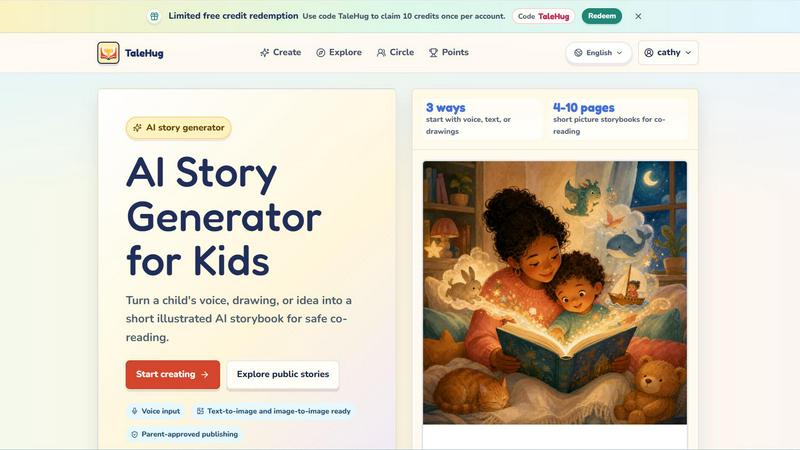
About TaleHug AI Story Generator for Kids
TaleHug is a thoughtfully designed AI-powered storytelling platform created specifically for children. It transforms a child’s voice, drawing, or simple idea into a short, illustrated AI storybook that is safe for co-reading between parents and kids. The platform prioritizes kid-friendly interaction and vibrant, colorful illustrations to make the process of story creation engaging and accessible for young minds. TaleHug is built for preschool and kindergarten-aged children, typically ages 3 to 6, and focuses on producing short picture storybooks ranging from 4 to 10 pages. The core value proposition is to nurture a child's imagination and creativity while ensuring a secure, parent-guided environment. Every story draft starts as private by default, and any public or circle sharing requires explicit adult approval. The platform avoids collecting personal data like full names, school names, or addresses, and uses only safe display names. TaleHug is more than just a story generator; it is a curated creative space where families can explore storytelling together, with quality and safety placed firmly above quantity or viral reach.
Features of TaleHug AI Story Generator for Kids
Three Creative Ways to Start
TaleHug offers three distinct entry points for young creators: voice input, text, or uploaded drawings. A child can simply speak their idea aloud, type a few words, or take a picture of their own drawing to begin. This flexibility ensures that children of varying literacy levels and creative preferences can all participate. The platform then uses AI to interpret the input and generate a coherent story and matching illustrations, making the process feel magical yet intuitive.
Text-to-Image and Image-to-Image Ready
The platform is equipped with advanced AI capabilities that support both text-to-image and image-to-image generation. When a child types a story idea, the AI creates corresponding illustrations. Alternatively, if a child uploads their own drawing, the AI can transform it into a polished, colorful page within the storybook. This feature bridges the gap between a child's raw creativity and a finished, visually appealing product, encouraging them to see their own art as the foundation for a professional-looking book.
Parent-Approved Publishing with Safety Defaults
Safety is a foundational feature of TaleHug. All story drafts begin as private. Before a story can be shared to a user's Circle or made public, an adult must review and approve the content. The platform also eliminates public comments in the MVP, uses only safe display names instead of real child names, and prohibits the collection of school names, addresses, or contact details. The public gallery features only pre-approved example stories, creating a curated and secure environment for young creators.
Short, Co-Readable Picture Storybooks
Every story generated by TaleHug is designed to be a short picture storybook of 4 to 10 pages, perfect for co-reading between a parent and child. The length is intentional, matching the attention span of preschool and kindergarten children. Each page features a strong, single image paired with one short sentence, making it easy for young readers to follow along. The stored prompts for each page also allow for easy regeneration, so families can refine the story together without starting from scratch.
Use Cases of TaleHug AI Story Generator for Kids
Bedtime Story Creation
Parents can use TaleHug to create personalized bedtime stories in minutes. A child can describe a dreamy scenario, like "a moon rabbit going to sleep," and the platform will generate a gentle, winding-down story with soft, calming illustrations. This turns the nightly routine into an interactive and creative bonding experience, where the child feels ownership over the story being read to them.
Classroom Social Storytelling
Teachers in preschool and kindergarten settings can use TaleHug to create social stories that address classroom dynamics. For example, a teacher can generate a story about "sharing the red truck" to help children understand the concept of taking turns. The visual and narrative format makes abstract social lessons concrete and engaging for young learners, while the private draft feature ensures the story is only shared within the class.
Encouraging Reluctant Writers
For children who are hesitant to write or express themselves, TaleHug offers a low-pressure entry point. By allowing them to start with a drawing or a spoken idea, the platform removes the barrier of spelling or sentence construction. Seeing their own scribble turned into a colorful story page can build confidence and spark a genuine interest in storytelling and literacy.
Therapeutic Storytelling for Emotions
Parents and therapists can use TaleHug to help children navigate big feelings. A prompt like "a tiny dragon helps a child ask for help" or a story about "feelings under the sea" can be generated to open a conversation about emotions. The child can then read the story with an adult, using the characters and narrative as a safe way to discuss their own experiences with bravery, sadness, or friendship.
Frequently Asked Questions
How does TaleHug ensure my child's safety and privacy?
TaleHug is designed with privacy as a default. All story drafts are private by default. Before any story can be shared to a Circle or made public, a parent or guardian must explicitly approve it. The platform does not allow public comments in the MVP, uses only safe display names instead of real child names, and does not collect school names, addresses, or other personal contact details. The public gallery only displays pre-approved example stories.
What is the age range for TaleHug?
TaleHug is specifically designed for preschool and kindergarten-aged children, typically between the ages of 3 and 6. The storybooks generated are short, ranging from 4 to 10 pages, with one sentence per page and a strong accompanying image. This format is ideal for co-reading with an adult and matches the attention span and literacy level of young children.
Can my child start from their own drawing?
Yes, absolutely. TaleHug supports image-to-image generation. A child can upload a drawing they have created, and the AI will use it as a basis to generate a polished, illustrated page for their storybook. This feature is designed to honor and elevate a child's own creativity, making them feel like a true author and illustrator of their work.
How do I get started with TaleHug?
You can get started by visiting the TaleHug website. New users can redeem a code to receive limited free credits. Use the code "TaleHug" to claim 10 credits once per account. After that, you can choose to start a story by using voice input, typing an idea, or uploading a drawing. The platform will guide you through generating pages and deciding on the story's visibility (private, circle, or public with adult approval).
Explore more in this category:
Similar to TaleHug AI Story Generator for Kids

Bloom
An adaptive AI tutor that turns topics or your materials into courses, lessons, and answers tailored to how you learn.
Screen Issues
Free Online Screen Test Tool - Instantly diagnose dead pixels, lines, color issues, and flickering. Multiple test modes, no download needed.

PDF to Excel
ReadyData is an online PDF to Excel converter powered by AI.

imgtxtapp.laviolab.com
imgtxtapp.laviolab.com is a Telegram-based image-to-text converter that turns photos, screenshots, scanned documents into editable text

Verla AI
AI academic assistant for writing, research, presentations, and coding

Aptitude Test Prep
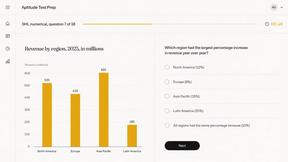
Free timed practice for real employer aptitude tests