
PixUnblur
PixUnblur uses AI to sharpen blurry photos and restore natural detail and clarity in seconds.
Visit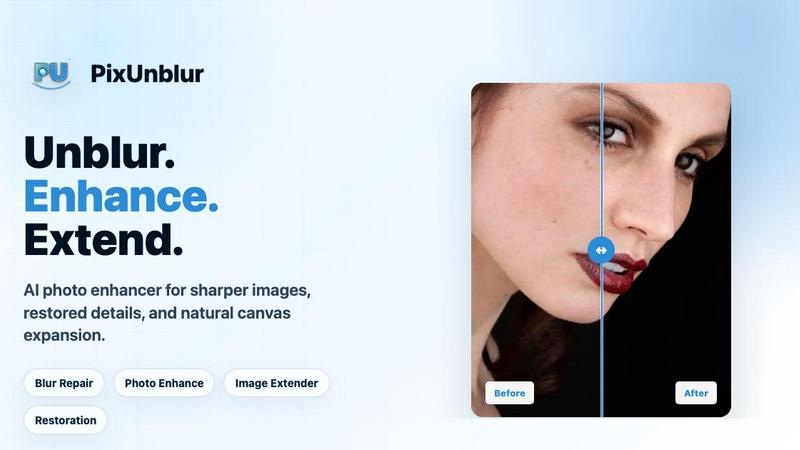
About PixUnblur
PixUnblur is an AI-powered photo enhancer and sharpener designed to restore clarity to blurry images, transforming low-quality shots into detailed, crisp pictures suitable for both digital and print use. This tool addresses the common frustration of capturing or receiving photos that are soft, out of focus, or degraded by compression, offering a sophisticated yet accessible solution for anyone who values image quality. PixUnblur leverages advanced artificial intelligence to analyze and correct various types of blur, including camera shake, missed focus, compression artifacts, and low-resolution softness. The core value proposition lies in its ability to recover fine details and textures without introducing the harsh, unnatural artifacts typical of traditional sharpening methods. It preserves the original subject, framing, colors, and natural feel of the photo, ensuring that the enhanced image remains authentic. PixUnblur is designed for a broad audience, including photographers seeking to salvage soft portraits, designers needing clear product images, and everyday users who want to improve snapshots for social media or personal archives. With a user-friendly interface available on web and mobile platforms, it supports batch processing for efficiency, making it a practical tool for both individual and high-volume workflows. The service offers a free tier for new users to test its capabilities, with subscription plans that unlock higher resolution outputs and greater processing capacity.
Features of PixUnblur
AI-Powered Blur Analysis and Restoration
The core engine of PixUnblur uses advanced AI to analyze blurred areas, subject edges, and noise patterns within an image. It intelligently distinguishes between different types of blur, such as motion blur from camera shake, defocus blur from missed focus, and softness from low resolution or compression. The AI then applies targeted sharpening, denoising, and detail recovery to restore clarity while preserving a natural look. This process eliminates the need for manual adjustments, delivering professional-quality results in seconds.
Noise Reduction and Texture Recovery
PixUnblur effectively minimizes image noise, particularly in low-light and night shots, while simultaneously recovering fine textures like hair, fabric weave, and skin pores. The algorithm reduces grain and strengthens key edges without creating a plastic or overly smooth appearance. This dual capability ensures that the final image is both cleaner and more lifelike, restoring the subtle details that make a photo feel authentic and high-resolution.
High-Resolution Output for Print and Digital Use
The tool is engineered to generate high-quality results that are suitable for both digital sharing and professional printing. By enhancing resolution and detail, PixUnblur ensures that repaired images meet the standards for product catalogs, portfolio prints, and large-format displays. The output maintains clarity and sharpness, avoiding the pixelation or softness that often plagues upscaled or heavily compressed images, making it a reliable solution for demanding visual applications.
Intuitive Batch Processing and Workflow
PixUnblur streamlines the enhancement process with an intuitive interface that supports batch processing on both web and mobile platforms. Users can upload multiple blurry images at once and have the AI repair them in a single operation, saving significant time for projects involving numerous photos. The workflow is designed for efficiency, from drag-and-drop upload to one-click repair and instant download, making it accessible for users with varying levels of technical expertise.
Use Cases of PixUnblur
Fixing Soft Portraits and Headshots
PixUnblur excels at restoring clarity to soft portraits, bringing back clearer eyes, hair, and facial contours that may have been lost due to camera shake, slight misfocus, or social media compression. This use case is ideal for profile photos, professional headshots, and personal pages where a polished appearance is crucial. The AI preserves skin texture and natural lighting, avoiding the plastic look of over-sharpening, while enhancing the subject's features for a more engaging and professional image.
Repairing Low-Light and Night Photography
Night, indoor, and party photos often suffer from a combination of softness, noise, and lost shadow detail. PixUnblur addresses these issues by reducing grain, strengthening key edges, and recovering details in darker areas without altering the original mood of the scene. This makes it perfect for restoring memories from dimly lit events, concerts, or evening gatherings, turning previously unusable shots into clear, shareable images that retain their atmospheric quality.
Enhancing Travel and Landscape Photography
Travel photos of mountains, coastlines, cityscapes, and other outdoor scenes can be disappointing when missed focus or low-light conditions result in soft, hazy details. PixUnblur clarifies distant elements, reduces gray haze, and sharpens textures in foliage, architecture, and water, making landscapes appear more vibrant and detailed. This use case is valuable for creating high-quality albums, blog posts, and social media content that accurately captures the beauty of a travel experience.
Clarifying Product Images for E-Commerce
For e-commerce businesses and product photographers, clear images are essential for building trust and driving sales. PixUnblur clarifies product edges, material textures, and small details like stitching or logos, while reducing the blur caused by camera movement or compression. This results in more trustworthy and appealing product listings on online marketplaces, catalogs, and detail shots, helping customers see exactly what they are purchasing and reducing the likelihood of returns.
Frequently Asked Questions
What is AI blur repair and how does it work?
AI blur repair is a process where an artificial intelligence system analyzes a blurry image to identify specific types of degradation, such as out-of-focus areas, camera shake, compression noise, and low-resolution detail. The AI then applies a combination of clarity restoration, denoising, and detail recovery algorithms to sharpen the image and make it clearer. PixUnblur performs this analysis automatically, requiring no manual input from the user, and delivers a natural-looking result that preserves the original photo's character.
What kinds of blurry photos can PixUnblur fix?
PixUnblur is designed to fix a wide range of blur issues, including soft portraits from missed focus or camera shake, noisy low-light and night shots, blurry travel landscapes with hazy details, and compressed product images with lost texture. It can also improve everyday photos that have become soft due to motion blur or social media compression. The tool is most effective on images where some detail is still present, as it works to enhance and sharpen existing information rather than creating it from nothing.
How long does it take to make a blurry photo clear?
The processing time for PixUnblur is typically very fast, often taking only a few seconds to analyze and repair a single image. The exact duration can vary depending on the image size, the complexity of the blur, and the server load. The tool is designed for quick turnaround, allowing users to upload a blurry photo and download a clear version almost immediately, making it suitable for both individual use and batch processing of multiple images.
Will AI blur repair change the original photo's colors or composition?
No, PixUnblur is designed to preserve the original photo's subject, framing, colors, and overall natural feel. The repair process focuses specifically on improving clarity and readability by sharpening edges, reducing noise, and recovering texture. It does not alter the composition, color balance, or artistic intent of the image. The goal is to make the photo clearer and more usable while keeping it true to the original capture.
Pricing of PixUnblur
PixUnblur offers a tiered subscription model to accommodate different user needs, from casual users to high-volume professionals. New users can start with free credits to test the service before committing to a paid plan.
Basic - $9.9 / month
This plan is designed for light uncropping and daily social media assets. It includes 2400 yearly credits, which allows for up to 240 images to be processed. Features include batch processing, no watermark on outputs, a commercial license, and email support.
Creator - $24.9 / month
Targeted at creators and small teams, this plan offers 6600 yearly credits for up to 660 images. It includes all Basic features plus priority support, making it suitable for more frequent use and faster assistance.
Master - $49.9 / month
Intended for high-volume batch production, the Master plan provides 14400 yearly credits for up to 1440 images. It includes all features from the Creator plan with priority support, ensuring reliable performance for demanding workflows.
Similar to PixUnblur

Bloom
An adaptive AI tutor that turns topics or your materials into courses, lessons, and answers tailored to how you learn.

Agent Pets
Your Claude Code & Codex sessions as pets in Chrome. Approve, deny and reply to your coding agents from any tab.

Zeptap
Zeptap lets AI use your real iPhone like you do: open apps, read the screen, tap, swipe and type. Reply to DMs, post Stories, book rides, test apps.

PDF to Excel
ReadyData is an online PDF to Excel converter powered by AI.

Verla AI
AI academic assistant for writing, research, presentations, and coding

screenRIG
Signage and kiosk infrastructure for AI agents. Your agent publishes images, video, streams, web pages and apps to screens via one plugin.screenRIG is

Novastart
Novastart brings apps and files onto an infinite canvas where people and AI agents can work together.