Notesnchat
Notesnchat combines smart reminders, notes, tasks, and communication into one secure, seamlessly synced app.
Visit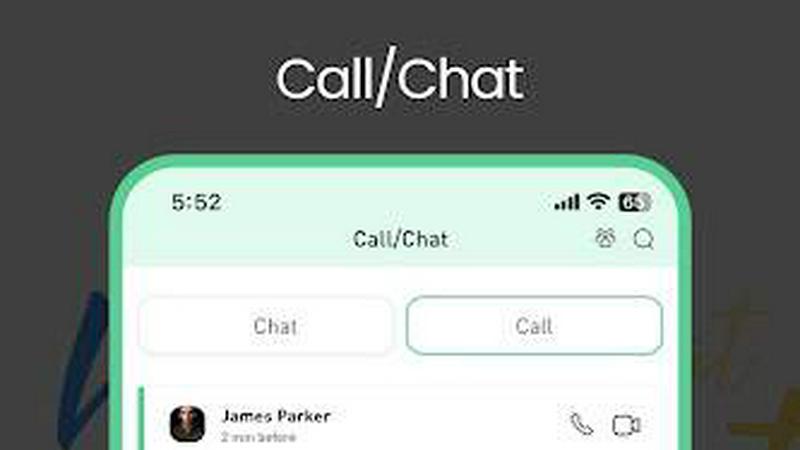
About Notesnchat
Notesnchat is a communal multitasking application designed for growing companies, personal organization, and family coordination. It combines note-taking, task management, reminders, communication, and document scanning into one secure, privacy-focused platform available on iPhone, Android, and the web. The product was created to restore user confidence in organizational sharing applications by introducing robust privacy and security measures. Notesnchat operates through its own private servers as an independent provider, ensuring that user information and thoughts remain secure whether shared with others or kept for personal use. The application offers free calling, video, and chat services alongside a dedicated browsing page, task and calendar reminders, notes, and folders. Each feature includes an independent ghost lock-protected option and individual live comments for added control. Notesnchat serves everyday productivity seekers, students, learners, and professionals who need to capture ideas, organize thoughts, and communicate seamlessly without friction. The platform offers a lite version with full access supported by ads, while core subscription-based features operate ad-free with 256-bit encryption for all users. Once registered, the system automatically recognizes other registered users, creating a connected and secure workspace where everything syncs seamlessly across devices.
Features of Notesnchat
Ghost Lock (Privacy Protection)
Protect your sensitive notes, tasks, and personal information with an advanced privacy lock feature that functions independently for each item. Ghost Lock allows you to secure specific notes, folders, or task lists behind an additional layer of authentication, ensuring that even if someone gains access to your device, your most private content remains protected. This feature gives you granular control over who can view what, making it ideal for shared devices or collaborative environments where some information needs to remain confidential. The independent lock system means you can protect individual items without locking your entire workspace.
File Scan
Transform physical documents into clear, shareable digital files instantly using your device's camera. The File Scan feature captures high-quality scans of receipts, contracts, notes, business cards, and any other paper documents, automatically cropping and enhancing the image for optimal readability. Scanned files are stored securely within the app and can be organized into folders, attached to notes, or shared directly with other users. This eliminates the need for separate scanning apps and keeps all your important documents accessible alongside your tasks and communications in one unified workspace.
Smart Organization
Automatically organize your notes, tasks, and chats using intelligent sorting and categorization that adapts to your workflow. Smart Organization analyzes your content and activity patterns to group related items together, making it easier to find what you need when you need it. The system learns from how you tag, prioritize, and interact with your content, gradually improving its organizational suggestions over time. This feature reduces the manual effort required to maintain a tidy workspace, allowing you to focus on productivity rather than administration. Your content is automatically arranged by date, project, priority, or custom categories that you define.
Smart Reminders
Receive timely, context-aware reminders for tasks, notes, and important events that help you stay on track without overwhelming notifications. Smart Reminders go beyond simple date-based alerts by considering your typical schedule, task priority, and completion history to suggest optimal reminder times. You can set recurring reminders for daily habits, one-time alerts for deadlines, or location-based reminders that trigger when you arrive at or leave a specific place. The system integrates with your task lists and calendar, ensuring that nothing falls through the cracks and that you are always aware of what needs your attention next.
Use Cases of Notesnchat
Managing Personal Productivity and Daily Tasks
Individuals can use Notesnchat to organize their entire daily life, from morning routines to evening reflections. Create task lists for groceries, home maintenance, and personal goals while setting smart reminders that keep you accountable. Capture quick notes during the day using rich formatting, voice recordings, or images, and protect sensitive entries like passwords or journal entries with Ghost Lock. The all-in-one nature of the app means you no longer need separate tools for notes, reminders, and task management, streamlining your personal productivity into one secure, synchronized workspace accessible from any device.
Coordinating Family Schedules and Communication
Families can leverage Notesnchat to share grocery lists, chore assignments, event planning, and important documents in a private, controlled environment. Parents can create shared task lists for children, set reminders for school events and appointments, and communicate through in-app chat without relying on public messaging platforms. The ghost lock feature allows each family member to maintain private notes while participating in shared folders and tasks. Automatic user recognition means once family members register, they can instantly connect and collaborate, making coordination seamless and reducing the chaos of managing multiple separate apps for family logistics.
Streamlining Small Team Collaboration
Growing companies and small teams can use Notesnchat as a central hub for project management, internal communication, and document sharing. Team members can assign tasks, track progress with smart reminders, and discuss work in real-time through in-app chat and calling features. The secure file scan and storage capabilities allow teams to digitize and share contracts, receipts, and other important documents without external tools. With 256-bit encryption and independent server hosting, sensitive business information remains protected. The platform reduces the need for multiple subscriptions to separate project management, communication, and note-taking tools.
Enhancing Student Study and Organization
Students can revolutionize their academic workflow by capturing lecture notes with rich text, images, and audio recordings, then organizing them by subject or course using smart organization features. Create task lists for assignments, exams, and study sessions with reminders that align with academic calendars. Scan handouts, textbook pages, and handwritten notes directly into digital files that are searchable and shareable with study groups. The in-app chat allows for collaborative discussions on projects without switching platforms. Ghost Lock provides security for sensitive academic information or personal reflections, while seamless syncing ensures study materials are available across phone, tablet, and computer.
Frequently Asked Questions
Is Notesnchat really free to use?
Yes, Notesnchat offers a free lite version that provides full access to all features, supported by ads to fund this free-to-use service. This means you can use note-taking, task management, chat, calling, file scanning, and all other features without paying a subscription. The core subscription-based features operate with no ads and involve data sharing among subscribers. Additionally, all users benefit from 256-bit encryption for their data. If you choose to upgrade, you can enjoy an ad-free experience with the same comprehensive feature set.
How does Notesnchat protect my privacy and data security?
Notesnchat is built with privacy and security as foundational principles. The application operates through its own private servers as an independent provider, meaning your data is not stored on third-party infrastructure. All user information is protected with 256-bit encryption, ensuring that your notes, files, reminders, and chat information remain secure. The ghost lock feature provides additional granular control over who can access specific items. You remain in control of shared content, and the system is designed with a security-first approach to protect your personal information from unauthorized access.
Can I use Notesnchat on multiple devices?
Yes, Notesnchat seamlessly syncs across all platforms including iPhone, Android, and the web. This means you can start a task on your phone during your commute, edit notes on your tablet at home, and review your schedule on your computer at work. Everything updates in real-time, ensuring you always have access to the most current version of your notes, tasks, reminders, and communications. The sync feature is designed to be reliable and fast, so you never miss an important update or lose progress on your work.
Who can I communicate with using Notesnchat's chat and calling features?
Once you register for Notesnchat, the system automatically recognizes other registered users, allowing you to communicate seamlessly with anyone in the Notesnchat community. You can make free voice calls, video calls, and send instant messages directly within the app without switching to other platforms. This is particularly useful for families, teams, and organizations where multiple members use the app. The communication features are designed with the same security standards as the rest of the platform, providing a safer and more controlled environment for your conversations compared to public messaging apps.
Similar to Notesnchat

sakuttoAI
A free suite of online tools for everyday tasks like PDF compression, image conversion, text diff and CSV to Excel.
BlazePhoenix
On-chain DEX aggregator: the swap route is computed inside the transaction that executes it. No API key, no signup.