
MeetingMind
MeetingMind automatically records, transcribes, and summarizes your Zoom meetings so you never miss a detail again.
Visit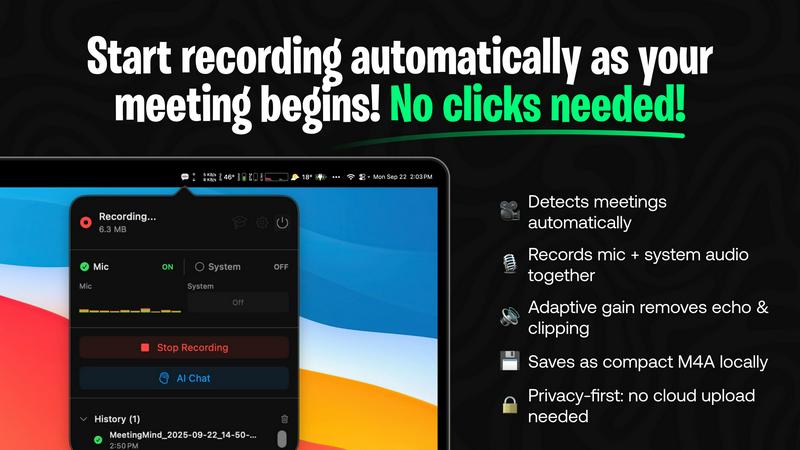
About MeetingMind
MeetingMind is a cutting-edge meeting assistant tailored for professionals seeking to enhance their meeting efficiency and information management. This innovative software utilizes advanced on-device AI technology to automatically detect Zoom meetings, capturing both microphone and system audio without requiring any manual input. With real-time, speaker-attributed transcripts, MeetingMind allows users to maintain active participation in discussions while ensuring that all critical details are recorded and easily accessible later. Particularly beneficial for busy executives, project managers, and remote teams, MeetingMind prioritizes user privacy by processing all data locally on the user's Mac, guaranteeing that sensitive information remains secure. With features such as live transcription, actionable insights, and markdown export, MeetingMind revolutionizes the way professionals capture, manage, and retrieve meeting information, making it an indispensable tool for anyone looking to optimize their productivity.
Features of MeetingMind
Automatic Detection
MeetingMind automatically detects Zoom meetings, eliminating the need for any manual clicks or setup. As soon as a meeting begins, the software seamlessly starts recording, allowing users to focus entirely on the conversation without worrying about missing any important information.
Records Everything
This feature ensures that both microphone and system audio are recorded simultaneously, providing a comprehensive capture of the meeting's dialogue. With adaptive gain technology, MeetingMind adjusts recording levels to ensure clarity, making it easier to follow along during playback.
AI Assistant
Users can choose their preferred AI assistant for generating summaries and insights. MeetingMind offers local processing via Ollama or cloud-based solutions like OpenRouter, providing flexibility in how users want to leverage AI for actionable takeaways from their meetings.
Markdown Export
After each meeting, MeetingMind generates AI-powered summaries and transcripts that can be exported as neatly formatted markdown files. This feature simplifies information sharing and helps users organize their notes efficiently, making retrieval of important details quick and easy.
Use Cases of MeetingMind
Busy Executives
For executives who often juggle multiple meetings, MeetingMind ensures that they never miss critical points. The automatic recording and transcription allow them to focus on high-level discussions while having access to detailed notes afterward.
Project Managers
Project managers can use MeetingMind to capture project updates and team discussions effortlessly. The software provides actionable insights, helping them track progress and assignments without the need for extensive manual note-taking.
Remote Teams
In a remote work environment, maintaining effective communication can be challenging. MeetingMind facilitates clear documentation of virtual meetings, enabling remote teams to stay aligned and informed about ongoing projects and decisions.
Academic Researchers
Researchers can benefit from MeetingMind by recording interviews and discussions with colleagues or participants. The ability to transcribe dialogues and export notes in markdown format aids in organizing research data and preparing reports efficiently.
Frequently Asked Questions
How does MeetingMind ensure privacy?
MeetingMind employs a privacy-first architecture by processing all data locally on your Mac. This means that your meeting recordings and transcriptions never leave your device, ensuring that sensitive information remains secure.
Can I use MeetingMind for meetings other than Zoom?
Currently, MeetingMind is designed specifically for Zoom meetings. However, the developers are exploring options to expand compatibility with other video conferencing platforms in the future.
What happens if I exceed the daily recording limit?
MeetingMind offers a free version that allows for 60 minutes of recording per day. If you need more time, you can upgrade to the unlimited version with a one-time purchase, giving you access to unlimited recording without any daily restrictions.
Is there a mobile version of MeetingMind?
As of now, MeetingMind is exclusively available for macOS. The development team is considering future versions for other operating systems and mobile devices, but no official announcements have been made yet.
Explore more in this category:
Similar to MeetingMind

Panzoe
Panzoe is an all-in-one AI platform for personal productivity, business automation, AI assistants, content creation, and custom AI solutions.
Verla AI
AI academic assistant for writing, research, presentations, and coding
screenRIG
Signage and kiosk infrastructure for AI agents. Your agent publishes images, video, streams, web pages and apps to screens via one plugin.screenRIG is
Novastart
Novastart brings apps and files onto an infinite canvas where people and AI agents can work together.
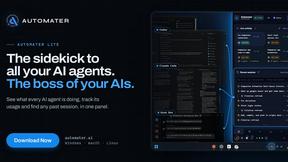
AUTOMATER.ai
A tray helper for every AI coding tool: sessions, alerts and usage in one place
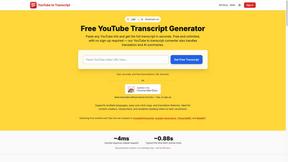
GetYouTubeTranscript
Free YouTube transcripts on the web, a Chrome extension, and an API + MCP server so AI assistants can read YouTube.

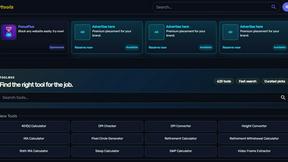
Kody Tools
Free collection of online developer utilities, code formatters, and digital converters designed to streamline your daily workflow.