
Browser Notes
Browser Notes keeps your notes, boards, and mind maps local in your browser with no signup or cloud required.
Visit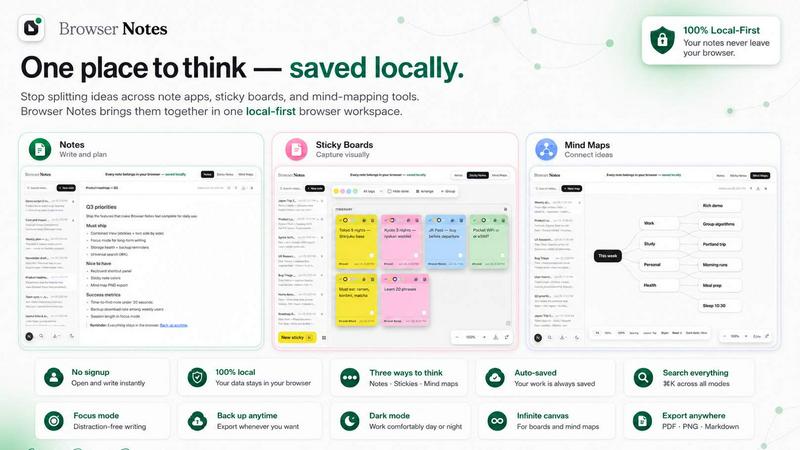
About Browser Notes
Browser Notes is a deliberate alternative to the scattered ecosystem of writing apps, sticky boards, and mind-mapping tools that fragment your thinking. It consolidates notes, sticky notes, and mind maps into one unified workspace that lives entirely inside your browser. The core philosophy is simple: your private ideas should not be pushed to the cloud by default. Browser Notes is built for individuals who value privacy, simplicity, and ownership over their digital thoughts. It requires no account creation, performs no user tracking, and enforces no forced synchronization. Everything you create is stored locally in your browser, making the tool fully functional offline. You retain complete control over your data, with the ability to back up and restore your entire workspace at any time. This product is designed for knowledge workers, students, creatives, and anyone who needs a reliable, private space to capture ideas without the overhead of complex software or the anxiety of data being mined or locked behind a subscription. Browser Notes offers three distinct ways to think: structured markdown notes for writing, a free-form canvas for sticky notes, and a radial layout for mind maps. You can choose the tool that fits your current task or start from a template for immediate productivity. The interface is curated and selective, focusing on quality over quantity of features. It is available as a Chrome Extension, placing your thinking tools directly in your browser tab, ready whenever inspiration strikes.
Features of Browser Notes
Local-First Storage with No Account Required
Browser Notes stores all your data directly in your browser using local storage. There is no requirement to create an account, log in, or provide any personal information. This approach eliminates data privacy concerns associated with cloud services. Your notes, sticky boards, and mind maps are never sent to an external server. You work entirely offline if you choose, and your data remains yours. This feature is ideal for users who want a zero-friction setup and complete ownership of their intellectual property.
Three Distinct Thinking Tools
Instead of offering a single note-taking method, Browser Notes provides three specialized tools to match your thinking style. You can write and format detailed documents using the Markdown Notes tool, which supports standard markdown syntax for rich text creation. The Sticky Notes tool provides a free-form canvas where you can place and arrange virtual sticky notes for brainstorming and visual organization. The Mind Maps tool allows you to branch ideas from a central node, creating radial diagrams that help explore connections and hierarchies. You can switch between these tools seamlessly within the same workspace.
Complete Offline Functionality and Data Backup
Browser Notes is designed to work without an internet connection. All features, including creating, editing, and organizing notes, sticky notes, and mind maps, are available offline. This ensures you can capture ideas anywhere, regardless of network availability. Furthermore, you have the power to back up your entire workspace to a file on your computer. You can restore your data from a backup file at any time, providing a safety net against accidental data loss or when switching browsers. This puts you in full control of your data's persistence.
Keyboard Shortcuts and Search
For efficiency, Browser Notes includes a comprehensive set of keyboard shortcuts. You can access a full list of shortcuts by pressing Ctrl+/ (or Cmd+/ on Mac). The primary shortcut, Ctrl+K (or Cmd+K), opens a search function that allows you to quickly find and navigate to any note, sticky note, or mind map within your workspace. This feature is designed for users who manage a growing collection of ideas and need a fast, keyboard-driven way to access their content without clicking through multiple menus.
Use Cases of Browser Notes
Capturing Quick Ideas and Meeting Notes
When you are in a meeting or browsing online and a thought strikes, you can instantly open a new markdown note in Browser Notes. Without the friction of logging in or navigating a complex app, you can type your ideas, format them with headings and bullet points, and save them locally. This is perfect for professionals who need a reliable, private scratchpad that is always just a click away in their browser toolbar.
Brainstorming and Visual Planning
For creative projects, the Sticky Notes canvas becomes a digital whiteboard. You can brainstorm features for a new product, plan the layout of a website, or organize tasks for a personal project. The free-form nature of the canvas allows you to move ideas around, group them, and see the big picture. This use case benefits designers, project managers, and anyone who thinks better with spatial organization rather than linear text.
Mapping Complex Topics and Study Notes
Students and researchers can use the Mind Maps tool to break down complex subjects. Starting with a central concept like a historical event or a scientific theory, you can branch out into subtopics, key figures, and supporting evidence. This radial structure helps visualize relationships and hierarchies, making it easier to understand and recall information. It is a powerful alternative to linear outlines for learning and knowledge synthesis.
Private Journaling and Personal Knowledge Management
Individuals who want to keep a personal journal, track habits, or build a personal knowledge base can use Browser Notes as a private, offline repository. Because no data is sent to the cloud, sensitive reflections or personal notes remain entirely on your machine. You can organize your entries using markdown notes, back up your journal regularly, and have peace of mind that your private thoughts are not being analyzed or stored by a third party.
Frequently Asked Questions
Do I need to create an account to use Browser Notes?
No, you do not need to create an account. Browser Notes is designed to be used immediately without any sign-up process. All your data is stored locally in your browser, so there is no need for user authentication or cloud-based profiles. This is a core feature of the product, ensuring your privacy and providing a frictionless start.
Where is my data stored and is it secure?
Your data is stored entirely in your browser's local storage. It is not sent to any external server or cloud service. This means the security of your data is tied to the security of your own computer and browser. You are in complete control. Browser Notes does not track your usage or collect any personal information. For added security, you can regularly back up your data to a file on your computer.
Can I use Browser Notes without an internet connection?
Yes, Browser Notes works fully offline. Once the Chrome Extension is installed, all features including creating, editing, and organizing notes, sticky notes, and mind maps are available without an internet connection. This makes it a reliable tool for use on airplanes, in remote areas, or in any situation where connectivity is limited or unavailable.
How do I back up or restore my data?
You can back up your entire workspace by using the backup feature within the extension. This will download a file containing all your notes, sticky notes, and mind maps to your computer. To restore your data, you can use the "Import backup" option and select that file. This allows you to transfer your workspace to a different browser or recover your data after clearing your browser cache.
Pricing of Browser Notes
Browser Notes is available as a free Chrome Extension. There are no pricing tiers, subscription plans, or paid features. The product is offered completely free of charge, with no account required and no hidden costs.
Explore more in this category:
Similar to Browser Notes

Panzoe
Panzoe is an all-in-one AI platform for personal productivity, business automation, AI assistants, content creation, and custom AI solutions.
Novastart
Novastart brings apps and files onto an infinite canvas where people and AI agents can work together.

AUTOMATER.ai
A tray helper for every AI coding tool: sessions, alerts and usage in one place
Kody Tools
Free collection of online developer utilities, code formatters, and digital converters designed to streamline your daily workflow.
Forms Plugin
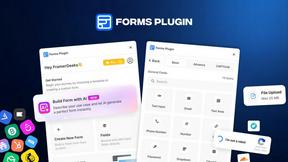
The #1 Native Form Builder Plugin for Framer - No Code, No Embeds, No External Platforms.

HomeAnswerBook
Practical, independent guides to home repairs, maintenance, costs, troubleshooting, and everyday fixes.
BlazePDF
Highlight faster. Study in flow with custom shortcuts and a workflow built around you. Print smarter, or turn any page into a tiled poster.
