
AssetCenter
AssetCenter provides a unified timeline to track every asset from acquisition to retirement with complete team visibility.
Visit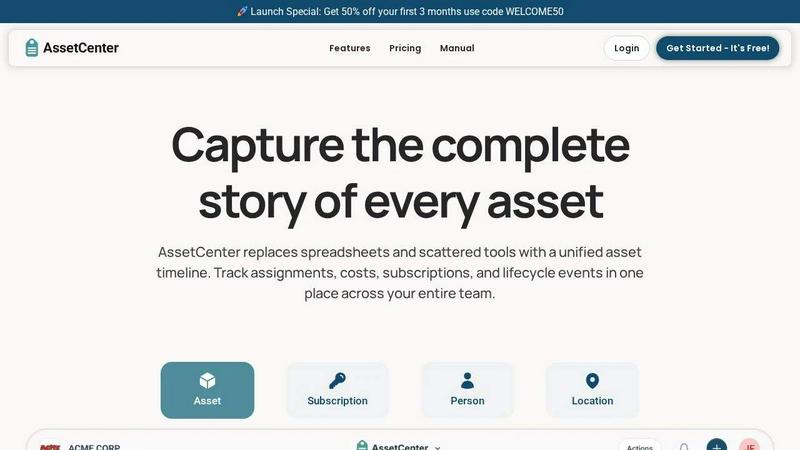
About AssetCenter
AssetCenter is a modern asset management platform engineered to provide organizations with complete visibility and control over every physical and digital asset through a unified timeline. Instead of scattering data across spreadsheets, emails, and disparate systems, AssetCenter consolidates every event from acquisition to end-of-life into one clear, chronological view. This creates a single source of truth that is easy to understand, audit, and act upon. The platform is built for flexibility, supporting any industry with fully customizable categories and fields. Teams can model real-world workflows without rigid constraints, tracking assets assigned to people, locations, or departments. Every change is automatically recorded, ensuring full accountability and traceability. AssetCenter is designed for organizations of all sizes, from small teams to large enterprises, across industries such as healthcare, construction, education, government, nonprofit, IT, agriculture, manufacturing, and entertainment. Its intuitive interface and powerful tracking capabilities help teams reduce inefficiencies, make smarter decisions, and stay organized. The platform goes beyond basic asset tracking by including built-in lifecycle management, depreciation insights, subscription tracking, and comprehensive event logging. Whether you need to manage vehicles, machinery, software licenses, or office equipment, AssetCenter adapts to your specific needs without requiring complex custom development. The platform also offers a generous free trial with 25 assets, no time limit, and no credit card required, allowing teams to fully evaluate its capabilities before committing. With AssetCenter, organizations stop guessing and start tracking, bringing all assets, subscriptions, and costs into one system built for total visibility.
Features of AssetCenter
Unified Timeline for All Events
Every asset, subscription, person, and location has its own dedicated timeline, providing a complete historical record of all events at a glance. From acquisition and assignment to maintenance and decommission, every action is captured chronologically. This eliminates the need to search through multiple systems or spreadsheets to understand an asset's history. The timeline includes pre-built event types such as acquisition, assignment, quick notes, todos, events (maintenance, repairs, vandalism, oil changes, firmware updates, factory resets), and decommission. Users can also create custom events to match their organization's specific workflows, ensuring nothing is missed.
Customizable Categories and Fields
AssetCenter breaks free from rigid templates by allowing teams to create unlimited, industry-specific asset categories. Whether you are tracking vehicles, machinery, software licenses, or office equipment, you can organize assets and subscriptions exactly how your business needs. Custom fields can be added to capture any relevant data, from serial numbers and warranty information to custom attributes unique to your industry. This flexibility ensures that AssetCenter adapts to your existing workflows rather than forcing you to change how you operate. Categories can be easily added or adjusted as your organization grows and evolves.
Comprehensive Lifecycle Tracking
From acquisition to retirement, AssetCenter captures every stage of an asset's life. The platform includes pre-built events for the three main stages: Acquisition (record purchase, cost, vendor), Lifecycle (assignments, maintenance, notes, todos, events), and Decommission (record retirement, resale). Each stage is fully customizable, allowing you to define the exact events and data points that matter to your organization. Built-in depreciation insights help teams understand the financial value of assets over time, supporting smarter budgeting and replacement planning. This complete lifecycle visibility ensures that no asset falls through the cracks.
Dashboard and Organizational Visibility
The main dashboard brings everything together into one comprehensive view. Teams can track total costs, stay ahead of expirations, and identify end-of-life assets without jumping between pages. The dashboard shows recent activity across all resources, providing a real-time snapshot of your entire organization's asset health. This centralized visibility enables proactive decision-making, such as scheduling maintenance before a breakdown occurs or planning replacements before assets become obsolete. The dashboard also helps identify underutilized assets, reducing waste and improving return on investment.
Use Cases of AssetCenter
IT Asset Management
IT teams can use AssetCenter to track all hardware and software assets, including laptops, servers, monitors, software licenses, and subscriptions. The unified timeline captures every assignment, repair, and software update, ensuring full accountability. Custom categories can differentiate between different types of IT equipment, and the dashboard provides visibility into warranty expirations and software license renewals. This prevents costly compliance issues and ensures that all technology assets are properly managed throughout their lifecycle.
Healthcare Equipment Tracking
Hospitals and clinics can manage medical devices, diagnostic equipment, and patient monitoring systems with AssetCenter. The platform's event logging feature is ideal for recording maintenance, calibrations, and repairs, which are critical for regulatory compliance and patient safety. Custom fields can capture serial numbers, certification dates, and location assignments. The timeline provides a complete history of each device, simplifying audits and ensuring that all equipment is functioning correctly and accounted for.
Construction and Heavy Equipment Management
Construction companies can track heavy machinery, tools, vehicles, and safety equipment across multiple job sites. AssetCenter's assignment feature allows equipment to be checked out to specific workers or locations, with every transfer automatically recorded. The lifecycle tracking helps schedule preventive maintenance, reducing downtime and extending equipment life. Custom categories can differentiate between different types of machinery, and the dashboard provides a real-time view of equipment location and status across all active projects.
Educational Institution Asset Management
Schools and universities can manage everything from classroom technology and laboratory equipment to library resources and office furniture. AssetCenter's bulk import templates make it easy to load existing inventory quickly. Custom categories can be created for different departments or building locations. The timeline tracks assignments to students, faculty, or departments, ensuring accountability for valuable resources. The dashboard helps administrators monitor asset utilization and plan budgets for replacements and upgrades.
Frequently Asked Questions
How does the free trial work and what are its limitations?
AssetCenter offers a generous free trial that includes 25 assets with no time limit and no credit card required. This gives you full access to the entire platform, including all features like unified timelines, custom categories, bulk import, and the dashboard. You can evaluate the software at your own pace without any pressure to upgrade. If you need to track more than 25 assets, you can upgrade to a paid plan at any time. There is no automatic billing, and you can cancel anytime.
Can I import my existing asset data into AssetCenter?
Yes, AssetCenter provides bulk import Excel templates to help you quickly load all your assets, subscriptions, people, and locations into the system. Simply visit the bulk import page, download the templates, fill them in with your existing data, and upload the completed file. This process allows you to get up and running in minutes, even if you have hundreds or thousands of assets. The import process is designed to be straightforward and error-resistant.
What types of events can I track on the timeline?
AssetCenter includes pre-built events for every stage of an asset's lifecycle. For acquisition, you can record purchase details, cost, and vendor information. During the lifecycle stage, you can log assignments, quick notes, todos, and specific events like maintenance, repairs, vandalism, oil changes, firmware updates, and factory resets. For decommission, you can record retirement and resale. Importantly, all of these events are fully customizable, and you can create your own event types to match your organization's unique workflows.
Is AssetCenter suitable for my industry if I don't work in IT?
Absolutely. AssetCenter is designed for any industry, including healthcare, construction, education, government, nonprofit, agriculture, manufacturing, and entertainment. The platform's strength lies in its customizability. You can create asset categories that match your specific industry needs, whether you are tracking medical devices, construction vehicles, farm equipment, or office furniture. The flexible event system and custom fields allow you to model your real-world workflows without rigid constraints.
Explore more in this category:
Similar to AssetCenter

Panzoe
Panzoe is an all-in-one AI platform for personal productivity, business automation, AI assistants, content creation, and custom AI solutions.
Novastart
Novastart brings apps and files onto an infinite canvas where people and AI agents can work together.
AUTOMATER.ai
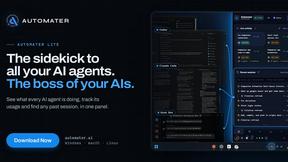
A tray helper for every AI coding tool: sessions, alerts and usage in one place
Glimbench
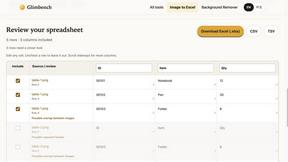
Remove backgrounds, convert table screenshots to Excel, and batch-convert HEIC to JPG. Free, no sign-up.
AI Email Filter
AI Email Filter sorts incoming mail into folders using plain-language prompts you write. Works with any IMAP mailbox; bring your own LLM if you want.
Kody Tools
Free collection of online developer utilities, code formatters, and digital converters designed to streamline your daily workflow.
Forms Plugin
The #1 Native Form Builder Plugin for Framer - No Code, No Embeds, No External Platforms.

HomeAnswerBook
Practical, independent guides to home repairs, maintenance, costs, troubleshooting, and everyday fixes.