
SVG to 3D vs URL to Any
Side-by-side comparison to help you choose the right AI tool.
SVG to 3D
Instantly convert your SVG files into professional, web-ready 3D models.
Last updated: February 28, 2026
URL to Any
URL to Any instantly converts any webpage into Markdown, PDF, images, and more with a single click.
Last updated: March 1, 2026
Visual Comparison
SVG to 3D
URL to Any
Feature Comparison
SVG to 3D
Instant Browser-Based Conversion
Experience the fastest SVG to 3D conversion available online. Our optimized algorithms process your files in seconds, not minutes, entirely within your web browser. Simply upload your SVG and watch as a detailed 3D model is generated instantly, with no software installation or lengthy waits required. This immediate feedback loop allows for rapid iteration and experimentation.
Advanced 3D Parameter Controls
Move far beyond basic extrusion. Our tool provides granular control over your model's properties. Precisely adjust the overall thickness, design complex custom bevels for rounded edges, and manipulate the model's scale and rotation. Every change is reflected in the real-time 3D preview, enabling you to craft the exact look and feel you desire before exporting.
Professional PBR Material System
Apply high-quality, physically-based rendering (PBR) materials to give your models realistic surfaces. Choose from a library of presets or customize properties like metalness and roughness. This advanced material system, typically found in professional 3D suites, allows you to create stunning, visually rich assets that stand out in any digital scene or presentation.
Developer-Optimized Export Formats
Export your creations in the formats you need for your workflow. We specialize in generating clean, lightweight, and web-optimized GLB/GLTF files that work seamlessly with Three.js, React Three Fiber, and Babylon.js. Additionally, export to OBJ or 3D-print-ready STL files with geometry that is intentionally clean and non-manifold error-free for reliable use in slicers and other applications.
URL to Any
Multi-Format Conversion Engine
At the heart of URL to Any is its robust conversion engine that supports over ten distinct output formats. With just a few clicks, users can transform a live webpage into a clean PDF for archiving, structured Markdown for documentation, an image snapshot for presentations, or pure text for easy copying. This versatility ensures that regardless of your specific need—whether for development, content creation, or personal reference—the tool provides a direct and efficient path from URL to usable content without compromising on formatting quality.
Advanced Content Extraction Tools
Beyond basic conversion, URL to Any offers specialized extraction tools for technical and analytical tasks. Users can pull clean HTML from a page's source, convert content into structured JSON or XML for data processing, or extract all meta tags and headings for SEO analysis. The platform also includes utilities for encoding/decoding text in multiple formats and extracting every URL from a site into a handy list. These features cater to developers, digital marketers, and analysts who require precise data from the web.
AI-Powered Summarization
Leveraging advanced AI technology, URL to Any includes an intelligent summarizer that can instantly condense lengthy webpage articles, reports, or blog posts into concise summaries. This feature is invaluable for researchers, students, and professionals who need to quickly grasp the core ideas of online content without reading through entire pages, dramatically accelerating the information-gathering and review process.
Instant QR Code & File Generation
The tool simplifies sharing and accessibility by allowing users to generate QR codes from any URL with a single click, perfect for marketing materials or presentations. Furthermore, its integrated processing can convert text-based web content into an MP3 audio file, effectively turning articles into podcasts for on-the-go listening. This combination of utility features makes information more portable and accessible across different mediums and use cases.
Use Cases
SVG to 3D
Creating Interactive 3D Web Assets
Easily transform SVG logos, icons, and UI elements into engaging 3D models for the web. The tool's perfect SVG to GLB pipeline delivers assets that are ready to be integrated into interactive websites and experiences using popular JavaScript frameworks. This allows developers and designers to add depth and modern flair to digital projects without deep 3D expertise.
Preparing Designs for 3D Printing
Bridge the gap between digital design and physical creation. Convert vector art, logos, or custom shapes into ready-to-print 3D models. The clean STL export ensures your design is properly formatted for any slicer software, enabling hobbyists and professionals to bring their 2D concepts into the physical world without needing complex CAD modeling skills.
Enhancing UI/UX and Presentation Mockups
UI/UX designers can quickly add a new dimension to their mockups and client presentations. By converting Figma or Illustrator SVG exports into 3D models, you can demonstrate interactive components, logos, or interface elements with realistic lighting and depth. This creates more impactful, impressive presentations that effectively communicate design vision.
Rapid 3D Asset Prototyping
Speed up the early stages of any 3D project. Whether for game development, motion graphics, or architectural visualization, use SVG to 3D to quickly block out shapes, create simple 3D typography, or generate base models from vector drawings. It's an ideal tool for fast prototyping and concept development before refining models in more advanced software.
URL to Any
Content Creation and Documentation
Bloggers, writers, and technical documentarians can use URL to Any to quickly capture research, quotes, or references from web pages. Converting a source article into clean Markdown or text allows for easy integration into notes, drafts, or documentation systems without messy formatting issues, streamlining the research and writing pipeline while properly attributing sources.
Web Development and Design
Developers and designers frequently need to analyze website structure, extract specific code snippets, or capture design layouts. Converting a URL to HTML provides clean code for study, while generating an image of the page offers a perfect visual reference for mockups or client presentations, facilitating more efficient design replication and debugging.
Academic Research and Study
Students and academics can save online journals, articles, and resources as well-formatted PDFs for offline reading and annotation. The AI summarizer helps in quickly reviewing literature, and extracting pure text is ideal for highlighting key points or importing citations into research papers, making the tool a powerful ally for efficient study sessions.
Digital Marketing and SEO Analysis
SEO specialists and digital marketers can leverage the meta tag and heading extractors to audit competitors' websites and analyze on-page SEO elements. The ability to export this data to CSV allows for easy comparison and reporting. Additionally, creating QR codes from campaign landing pages is a quick way to bridge offline and online marketing efforts.
Overview
About SVG to 3D
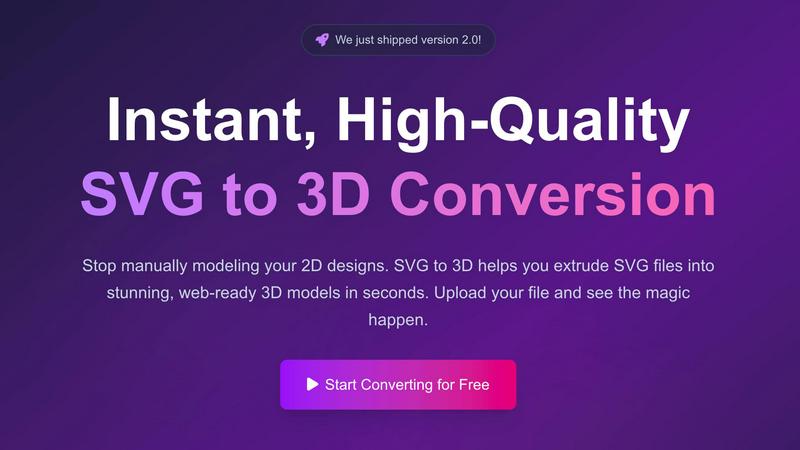
SVG to 3D is a specialized, browser-based tool designed to solve a singular, common frustration: the cumbersome process of converting 2D vector graphics into usable 3D models. It eliminates the need to launch complex, resource-intensive 3D modeling software like Blender or Cinema 4D for simple tasks such as extruding a logo, icon, or design element. The tool provides a fast, streamlined, and intuitive pathway from a flat SVG file to a fully-realized 3D asset, catering specifically to professionals who value speed and quality.
The primary value proposition lies in its instant, high-quality conversion and deep, browser-based control. Users can upload an SVG and within seconds have a 3D model they can fine-tune—adjusting extrusion thickness, adding sophisticated bevels, and applying realistic PBR materials—all with a live preview. It excels at producing clean, optimized geometry suitable for two key outputs: web-ready GLB/GLTF files for interactive experiences in frameworks like Three.js and React Three Fiber, and 3D-print-ready STL files for physical fabrication. Built with a privacy-first approach, processing often happens locally in your browser, ensuring your designs remain secure. Ultimately, SVG to 3D is the essential bridge for developers, web designers, UI/UX professionals, and 3D printing enthusiasts looking to add a third dimension to their work without the traditional learning curve or overhead.
About URL to Any
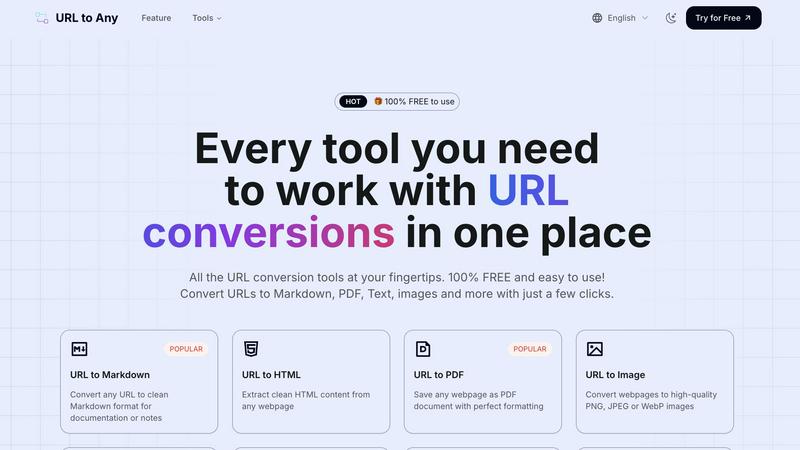
URL to Any is a comprehensive, free-to-use web content conversion platform designed to streamline the process of capturing and transforming online information. It serves as an essential toolkit for content creators, developers, researchers, and anyone who regularly works with web-based content. The core value proposition is its powerful simplicity: a single, accessible interface that instantly converts any webpage into a wide array of practical formats, including Markdown, PDF, HTML, images, and structured data like JSON and XML. By eliminating the need for complex software, manual copying, or user registration, URL to Any bridges the gap between dynamic online resources and the static formats required for editing, archiving, sharing, and analysis. It empowers users to save time, enhance productivity, and integrate web content seamlessly into their digital workflows, all while maintaining a strong commitment to user privacy with secure, cloud-based processing that does not store personal data.
Frequently Asked Questions
SVG to 3D FAQ
What file formats can I export my 3D model to?
SVG to 3D supports exporting your converted models in multiple industry-standard formats. You can download your creation as a GLB or GLTF file, which is optimal for web use and real-time applications. For broader 3D software compatibility, OBJ export is available. For 3D printing, you can export directly as an STL file, ready for your slicer software.
Is my data secure and private when I use this tool?
Yes, privacy and security are fundamental to our tool. Whenever possible, the entire conversion process is handled locally within your web browser. This means your SVG files and the resulting 3D models are never uploaded to our servers, ensuring your proprietary designs and work remain completely confidential on your own machine.
Do I need to install any software to use SVG to 3D?
No installation is required. SVG to 3D is a fully web-based application that runs directly in your modern browser (like Chrome, Firefox, or Edge). You can access it instantly from any device with an internet connection, making it incredibly convenient and accessible without consuming disk space with software downloads.
What are the limitations on the SVG files I can upload?
The primary limitation is file size, with a maximum upload size of 5 MB per SVG file. The tool supports standard SVG elements including paths, shapes, and strokes. For best results, ensure your SVG file is well-formed and uses solid shapes for extrusion, as overly complex or open paths may not convert as intended.
URL to Any FAQ
Is URL to Any really free to use?
Yes, URL to Any is completely free to use. Every tool and feature on the platform is available at no cost, with no hidden fees, subscription plans, or required user registration. You can start converting URLs immediately without any limitations on usage.
How does URL to Any handle my privacy and data?
Your privacy is a top priority. URL to Any processes all conversions securely in the cloud. Crucially, the submitted URLs and the resulting converted content are not stored on their servers after the processing is complete. Your data remains private and is not used for any other purpose.
What formats can I convert a URL into?
URL to Any supports a wide range of formats to suit various needs. Popular options include Markdown, PDF, PNG/JPEG/WebP images, plain text, HTML, JSON, and XML. You can also generate QR codes, extract all links from a page, and even convert text content to MP3 audio files.
Do I need to install any software to use it?
No installation is required. URL to Any is a fully web-based platform that runs in your browser. However, for added convenience, a browser extension is available to allow for even quicker access to the conversion tools directly from your browser's toolbar while you browse.
Alternatives
SVG to 3D Alternatives
SVG to 3D is a specialized AI-powered tool designed to streamline the conversion of 2D vector graphics into usable 3D models. It belongs to a growing category of web-based design and development utilities that prioritize speed and accessibility over complex, feature-heavy software. Users often seek alternatives for various reasons, including budget constraints, the need for different export formats, or a requirement for more advanced modeling capabilities not covered by a focused tool. When evaluating other options, it's crucial to consider your primary use case. Key factors include the supported 3D file formats for your pipeline, the level of customization for extrusions and materials, and whether the platform is web-based or requires software installation. The ideal alternative should match your specific workflow, whether for web development, 3D printing, or rapid prototyping. ---
FAQ_SEPARATOR---
[
{"question": "What is SVG to 3D?", "answer": "SVG to 3D is a tool that quickly converts 2D SVG vector graphics into high-quality 3D models, streamlining a process that typically requires complex 3D software."},
{"question": "Who is SVG to 3D for?", "answer": "It is built for web developers, designers, and 3D printing enthusiasts who need a fast, browser-based solution to create 3D assets from 2D designs."},
{"question": "What are the main features of SVG to 3D?", "answer": "Key features include one-click GLB export for web projects, 3D-print ready STL files, and in-browser controls for fine-tuning thickness, bevels, and PBR materials."},
{"question": "Why choose SVG to 3D?", "answer": "Choose SVG to 3D for its speed and simplicity, specifically for turning logos or icons into web-ready 3D models or printable files without opening heavyweight 3D software."}
]
URL to Any Alternatives
URL to Any is a streamlined web content conversion tool, part of the broader AI Assistants category. It allows users to effortlessly transform any webpage into formats like Markdown, PDF, or images directly from a URL, all without registration or cost. Users often seek alternatives for various reasons. Some may require advanced features like batch processing or API access, while others might need integration with specific platforms or workflows. Pricing models, such as subscription tiers for higher usage limits, can also drive the search for different solutions. When evaluating other tools, consider your core needs. Key factors include the range of supported output formats, processing speed, data privacy policies, and whether the tool operates as a one-time purchase, a freemium service, or a completely free utility like URL to Any. The ideal choice balances functionality with simplicity for your specific use case.