
Right Suite vs Sketch To
Side-by-side comparison to help you choose the right AI tool.

Right Suite
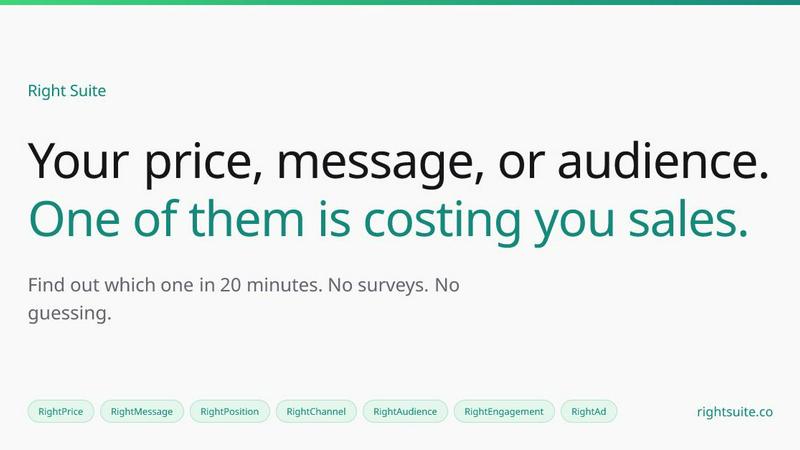
Right Suite validates your go-to-market strategy with simulated buyers in twenty minutes, eliminating guesswork.
Last updated: April 13, 2026
Sketch To
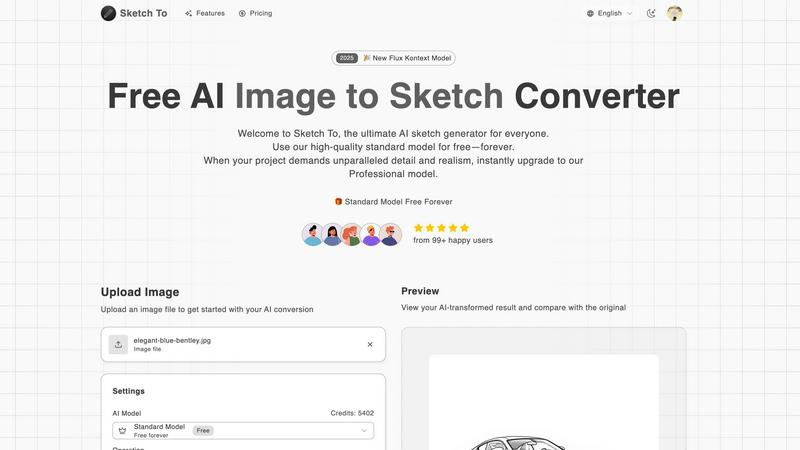
Sketch To effortlessly transforms your images into stunning sketches with advanced AI technology for every creator.
Last updated: March 1, 2026
Visual Comparison
Right Suite
Sketch To
Feature Comparison
Right Suite
RightAudience
RightAudience identifies your most viable customer segment by running your product offer past 50+ detailed buyer archetypes. It ranks these segments by purchase intent, showing you exactly which group is most likely to convert. This prevents the common pitfall of targeting an exciting but unprofitable audience, saving you from months of demos that never close and directing your sales efforts toward the highest-potential pipeline from day one.
RightPrice
RightPrice tests multiple price points against your target audience to determine the optimal pricing strategy. It reveals not just what buyers are willing to pay, but also identifies if you are leaving money on the table by being underpriced or creating friction by being overpriced. This data ensures your pricing maximizes perceived value and conversion rates, directly impacting your revenue and sustainability.
RightMessaging
RightMessaging analyzes your core value propositions, hero copy, and email sequences to predict what will truly resonate. It tests different angles and phrases against simulated buyers to show which messages will land, drive engagement, and ultimately compel action. This takes the guesswork out of crafting your narrative, ensuring your communication clearly articulates why buyers should choose you.
RightAd
RightAd validates your advertising creative before you spend a dollar on campaigns. It evaluates ad concepts, visuals, and copy to predict which combinations will "stop the scroll" and generate clicks. This feature allows you to refine your ad strategy based on simulated engagement data, dramatically improving your click-through rates and lowering customer acquisition costs from the very first campaign.
Sketch To
Image to Sketch Conversion
Sketch To provides an advanced AI-powered feature that converts photos into beautiful pencil sketches. This functionality is ideal for artists and designers who wish to add an artistic touch to their photographs, enabling effortless creativity.
Sketch to Image AI
With the Pro model, Sketch To allows users to transform their sketches into stunningly realistic images. This feature delivers exceptional detail and accuracy, catering to professional artists looking to elevate their work.
Trial Credits Model
New users can take advantage of trial credits available with the standard model. This feature allows hobbyists and casual creators to explore the tool's capabilities without any financial commitment, making it accessible for everyone.
Instant Processing
Sketch To's powerful cloud-based AI processing engine ensures that conversions are completed in seconds. This instant processing capability allows users to quickly generate and download their creations, streamlining the artistic workflow.
Use Cases
Right Suite
Validating a New Product Launch
Before investing heavily in development and marketing for a new product, founders can use Right Suite to test its core assumptions. They can validate the target audience, optimal price point, and key messaging simultaneously. This ensures the product is launched with a strategy already proven to resonate, significantly de-risking the launch and improving time-to-market success.
Refining an Existing GTM Strategy
Teams with stagnant growth or high customer acquisition costs can use the platform to diagnose weaknesses. By testing different audience segments, messaging angles, or pricing tiers, they can pinpoint what is killing their conversion rates. This allows for precise, data-informed iterations to their strategy, revitalizing campaigns and improving overall marketing ROI.
Agency Client Strategy Development
Marketing and growth agencies can leverage Right Suite to build compelling, evidence-based strategies for their clients. By validating audience targeting, positioning, and channel selection upfront, agencies can present strategies backed by simulated data, building greater client trust and demonstrating a higher likelihood of campaign success before execution begins.
Preventing Pipeline Waste for Sales Teams
Sales leaders can use RightAudience and RightPositioning to ensure their outbound efforts are focused on the most promising segments. By identifying which buyer profiles have the highest purchase intent, they can tailor their outreach and prioritize leads that are statistically more likely to close, making the sales team more efficient and effective.
Sketch To
Social Media Content Creation
Social media influencers and marketers can utilize Sketch To to create eye-catching content. By transforming photos into unique sketches or converting sketches back to photorealistic images, users can enhance their visual storytelling and engagement with audiences.
Educational Projects
Students and educators can leverage the capabilities of Sketch To for school projects. Whether creating artistic representations of historical figures or visually interpreting scientific concepts, the tool makes learning more engaging and visually appealing.
Personal Artistic Exploration
Hobbyists can explore their artistic side through Sketch To. The tool allows individuals to experiment with different styles and techniques in a user-friendly environment, encouraging self-expression and creativity.
Professional Artistic Development
Professional artists can benefit from Sketch To by utilizing the Pro model for client projects. The ability to produce high-quality, realistic images from sketches enhances their portfolio and enables them to deliver exceptional results to clients.
Overview
About Right Suite
Right Suite is a go-to-market validation platform designed to eliminate the costly guesswork from launching products. It provides founders, early-stage startups, and agencies with a simulated testing ground for every critical component of their GTM strategy. Instead of using the live market—and burning precious pipeline or ad spend—as a testing ground, users can run fast, data-backed simulations against a library of 100+ modeled buyer archetypes. In about 20 minutes, the platform delivers clear answers to fundamental questions: Who is most likely to buy? What price will they pay? Which message will resonate? The product is structured as a suite of focused tools—RightAudience, RightPositioning, RightPrice, RightChannel, RightEngagement, RightAd, and RightMessaging—each targeting a specific strategic pillar. This modular approach allows teams to start where they're stuck, validate decisions with confidence, and prioritize the highest-signal strategy before a full-scale launch. By shifting from assumptions to evidence, Right Suite helps reduce the overwhelming risk of GTM failure, empowering teams to launch with precision and clarity.
About Sketch To
Sketch To is an innovative AI tool designed to transform the art creation experience by enabling users to convert images into stunning sketches and vice versa. This powerful platform caters to artists, designers, and hobbyists, providing a seamless way to visualize creative ideas. With its advanced AI technology and user-friendly interface, Sketch To empowers users to bring their artistic visions to life, whether for social media content, school projects, or personal artistic endeavors. The dual functionality allows for effortless transitions between photorealistic images and artistic sketches, significantly expanding creative possibilities. Additionally, with a free standard model available, new users can explore Sketch To without financial commitment, making it a valuable resource for both casual creators and professionals seeking to enhance their artistic toolkit. The platform is designed to accommodate a range of creative needs, offering both standard and professional models to suit every user's requirements.
Frequently Asked Questions
Right Suite FAQ
How does Right Suite simulate buyers?
Right Suite uses a sophisticated library of over 100 modeled buyer archetypes, built from aggregated market data and behavioral patterns. These models simulate the decision-making processes, biases, and preferences of real-world buyers across different industries and roles. When you run a test, your offer is evaluated against these archetypes to generate predictive data on engagement and conversion.
What is a credit and how many do I need?
A credit is the unit used to run analyses within Right Suite. Each GTM test (e.g., testing a price point, validating an audience segment) costs between 1 to 3 credits, depending on the complexity of the analysis. The Starter plan includes 15 credits per month, which is typically enough to validate 5-10 key GTM decisions as you build your strategy.
Who is Right Suite designed for?
Right Suite is primarily designed for early-stage startup founders, product launch teams, and marketing agencies. It is ideal for anyone who needs to validate critical go-to-market assumptions quickly and affordably before committing significant resources. It helps those who cannot afford to use the live market as their first and most expensive testing ground.
Can I use the tools independently?
Yes, the suite is modular. You can use RightAudience, RightPrice, RightMessaging, or any other tool independently based on your immediate need. Your subscription credits are pooled and can be used across any of the products, allowing you to mix and match tests to address specific strategic questions as they arise.
Sketch To FAQ
How does the image to sketch conversion work?
The image to sketch conversion uses advanced AI algorithms that analyze the uploaded image and transform it into a beautifully rendered sketch. Users can choose from various artistic styles for customization.
Is there a limit to the file size I can upload?
Yes, the maximum file size for uploads is 5MB. This size limit ensures optimal processing speed and quality for your images and sketches.
Can I use Sketch To for commercial projects?
Yes, users can upgrade to the Pro model for commercial use, which provides superior detail and realism suitable for professional projects and client work.
What types of sketches can I create with Sketch To?
Sketch To offers a variety of sketch styles, including pencil sketches, charcoal sketches, comic sketches, and more. Users can select their preferred style during the conversion process for tailored results.
Alternatives
Right Suite Alternatives
Right Suite is a go-to-market validation platform that helps founders test critical assumptions about their pricing, messaging, and audience before launch. It falls into the categories of AI-assisted marketing and software, designed to de-risk product introductions with simulated buyer feedback. Users may explore alternatives for various reasons, such as budget constraints, a need for different feature integrations, or a preference for a different user experience. Some may seek more specialized tools for a single aspect of GTM, like deep-dive pricing analytics, while others might want a broader all-in-one marketing suite. When evaluating alternatives, consider the core problem you need to solve. Key factors include the tool's ability to generate actionable, data-backed insights quickly, its flexibility to test different GTM hypotheses, and the overall cost relative to the value it provides in reducing costly market missteps.
Sketch To Alternatives
Sketch To is an innovative AI tool designed to transform images into stunning sketches and vice versa, catering to creators of all levels. This platform sits within the AI Assistants category, leveraging advanced technology to enhance artistic expression. Users often seek alternatives to Sketch To due to various factors, including pricing structures, feature sets, or compatibility with specific platforms. A thorough evaluation of these alternatives should focus on ease of use, the quality of conversions offered, and any unique features that align with the user’s creative goals. When searching for an alternative, it's essential to consider the tool's capabilities in both sketching and photorealistic rendering, as well as the availability of free trial options. Additionally, users should assess whether the alternative provides instant processing and if it can accommodate personal projects versus professional-grade work. An ideal choice will balance functionality with accessibility, ensuring that it meets the diverse needs of its audience while fostering creativity.