
Prompt Builder vs Todo2
Side-by-side comparison to help you choose the right AI tool.

Prompt Builder
Prompt Builder instantly crafts and refines AI prompts for any model, saving you time and boosting results.
Last updated: April 13, 2026

Todo2 enhances Cursor with structured AI project management, ensuring quality and efficiency for professional.
Last updated: March 1, 2026
Visual Comparison
Prompt Builder
Todo2
Feature Comparison
Prompt Builder
Prompt Generator
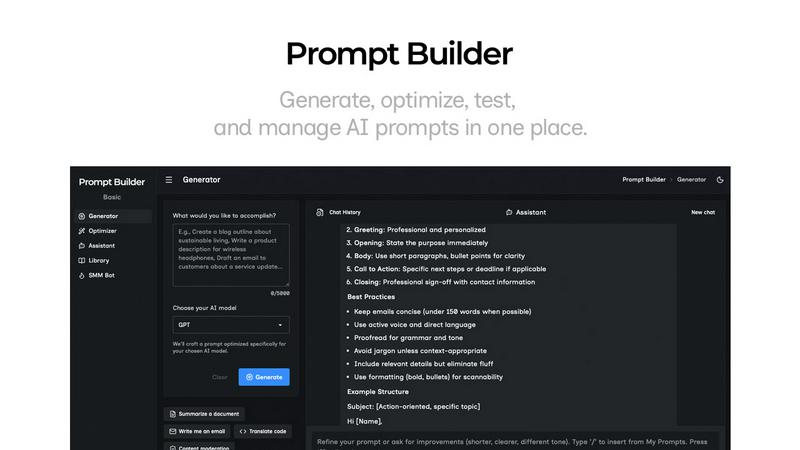
The Prompt Generator is your starting point for crafting exceptional prompts. Simply describe your task or idea in natural language and select your target AI model (e.g., Gemini, Claude, GPT-4). The engine then creates a professional-grade, model-tuned prompt draft that incorporates optimal structure, constraints, and output formatting specific to that model. This foundational feature ensures you begin with a strong, tailored foundation rather than a generic template, dramatically increasing the likelihood of a successful output on the first attempt.
Prompt Assistant & Chat Workspace
This integrated chat environment allows you to test and refine prompts without ever leaving Prompt Builder. Run your generated or saved prompts directly within the Assistant, which supports a wide range of models including Grok, Gemini, GPT, and DeepSeek. Iterate with follow-up questions, adjust instructions on the fly, and see real-time results. The chat history is preserved, enabling fast iterations and preventing the loss of successful dialogue paths. It consolidates testing and refinement into a single, organized workspace.
Prompt Optimizer
The Optimizer tool elevates existing prompts to their highest potential. Paste any prompt—whether from an external source or your own Library—and the Optimizer will analyze and enhance it. It provides structured improvements focused on clarity, adding necessary constraints, defining output formats, and suggesting examples. Each optimization is saved in a history log, and you can pin favorite versions. With one click, you can run the optimized prompt in the Assistant to immediately validate the improvements.
Prompt Library & Community Templates
Build a personal repository of your most effective prompts with the Prompt Library. Save, pin, categorize, and search your curated collection for easy reuse across projects and teams. Beyond your private library, explore a growing collection of Community Prompts and templates contributed by other users. This feature transforms isolated successes into a scalable, organizational asset, ensuring you never lose a "good version" and can continuously build upon proven prompt strategies.
Todo2
Intelligent Task Creation
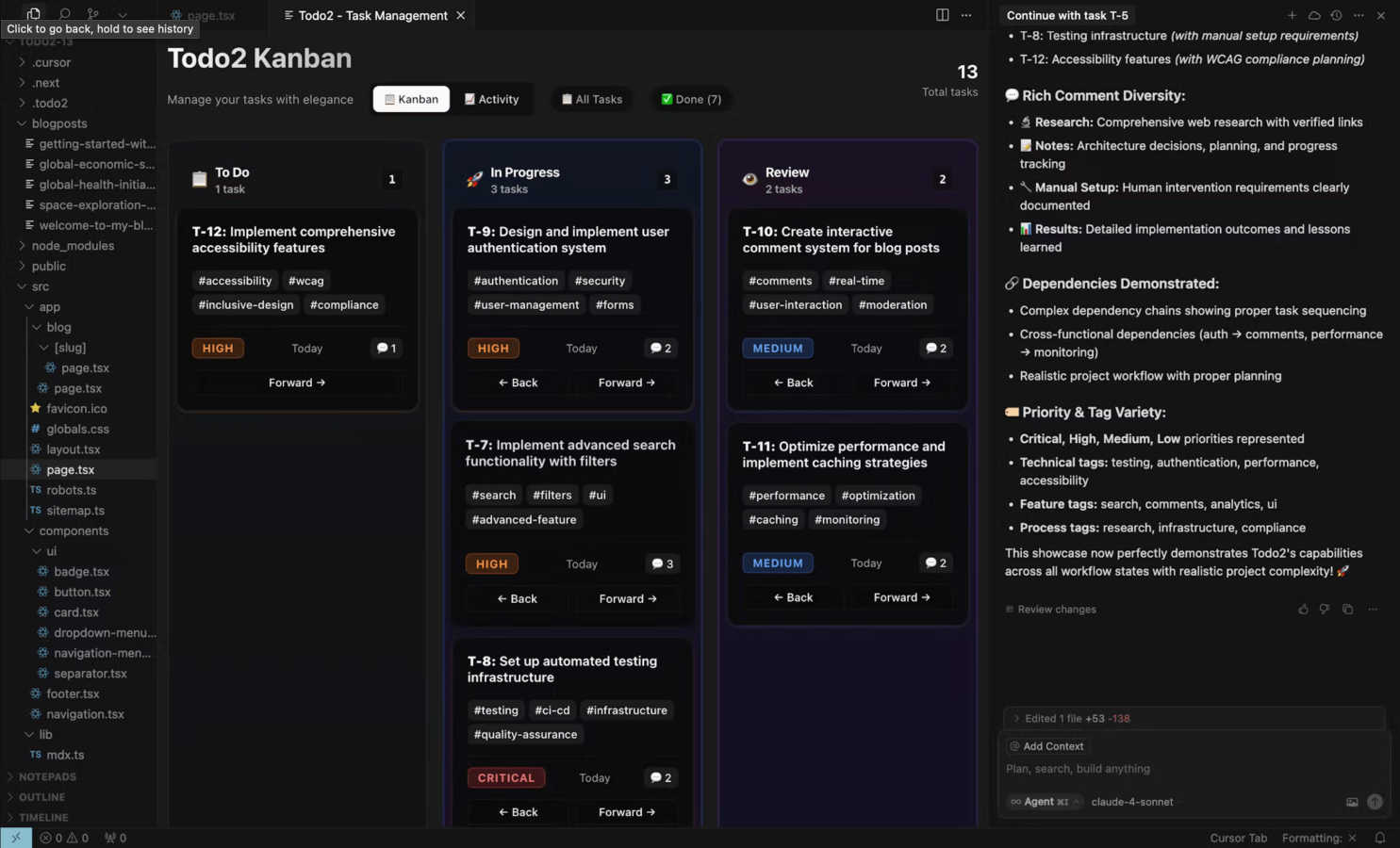
Todo2 mandates that every request begins with the creation of a todo, ensuring a structured approach to project management. The AI evaluates the complexity of tasks and generates focused todos or linked task plans, making project organization more manageable and efficient.
Mandatory Research Phase
Before executing any task, Todo2 enforces a research phase where developers gather necessary information and insights. This step eradicates guesswork, ensuring that all actions are based on informed decisions and thorough understanding, ultimately leading to better project outcomes.
Scope-Controlled Development
Todo2 precisely defines the scope of each task, allowing developers to build what is specified without deviating from the original plan. This feature promotes clarity and focus during development, preventing scope creep and ensuring that project goals are met.
Human Approval Gate
Quality control is paramount in software development, and Todo2 incorporates a human approval gate. This feature ensures that all tasks undergo a review process, providing an additional layer of oversight that enhances the quality and reliability of the final code.
Use Cases
Prompt Builder
Content Creation & Marketing
Writers and marketers can rapidly generate and refine prompts for blog outlines, marketing copy, social media posts (via the dedicated SMM Bot), and product descriptions. The ability to tune prompts for different tones and platforms—and save successful formulas—turns a creative brainstorming session into a repeatable, efficient content production pipeline, ensuring brand consistency and quality.
Software Development & Technical Writing
Developers and technical writers use Prompt Builder to create precise prompts for code generation, debugging, documentation, and API explanation. The model-specific tuning ensures that prompts leverage each AI's strengths (e.g., Claude's long-context reasoning or GPT's code proficiency), leading to more accurate, usable code snippets and technical explanations with fewer errors and revisions.
Research & Data Analysis
Academics, analysts, and students can craft sophisticated prompts for literature reviews, data summarization, hypothesis generation, and complex querying. The iterative chat workspace allows for deep dives into topics, following chains of thought, and refining questions based on initial outputs. Saving these research-focused prompts creates a valuable knowledge base for ongoing projects.
Business Operations & Productivity
Professionals across functions—from HR crafting job descriptions to sales generating outreach emails—can systematize their AI interactions. Prompt Builder allows teams to develop, optimize, and share standardized prompts for common operational tasks, ensuring efficiency, reducing prompt engineering overhead for non-experts, and maintaining a high standard of output across the organization.
Todo2
Efficient Project Management for Individual Developers
Individual developers can utilize Todo2 to manage their projects effectively, from task creation to execution, all within the Cursor IDE. The structured workflow enables them to maximize productivity while maintaining high standards for code quality.
Collaborative Team Development
Teams working on collaborative projects can benefit from Todo2's systematic approach, facilitating better coordination and communication. By utilizing the four-step process, team members can ensure that tasks are well-defined and thoroughly researched before execution.
Rapid Prototyping and MVP Development
For startups and developers looking to create Minimum Viable Products (MVPs), Todo2 offers a quick and efficient way to manage development tasks. The intelligent task creation and research phases help teams focus on delivering essential features without unnecessary delays.
Continuous Improvement and Iteration
Todo2 supports ongoing project improvement by enabling developers to review and refine their work systematically. The review step encourages reflection and feedback, making it easier to iterate on projects and enhance the overall quality of the codebase.
Overview
About Prompt Builder
Prompt Builder is a dedicated workspace designed to transform the art and science of prompt engineering from a time-consuming chore into a streamlined, efficient process. It serves as a central hub for professionals, creators, and teams who rely on multiple AI models—such as GPT, Claude, Gemini, Llama, and Mistral—to generate high-quality outputs. The core value proposition is simple: stop rewriting prompts and start getting consistent, superior results. Instead of manually crafting and adapting instructions for each unique model, users describe their task in plain English. Prompt Builder then generates a model-optimized draft, provides a chat environment for iterative refinement, and offers robust tools for saving, organizing, and reusing perfected prompts. This eliminates the friction of jumping between applications, losing valuable versions in endless chat threads, and wasting tokens on subpar retries. It’s the definitive solution for turning a fleeting idea into a reliable, production-ready prompt in seconds.
About Todo2
Todo2 is an innovative AI-powered project management extension designed specifically for the Cursor Integrated Development Environment (IDE). By seamlessly integrating advanced AI capabilities into the developer's workflow, it transforms the coding experience into a streamlined project management process. The primary goal of Todo2 is to empower developers by augmenting their capabilities with AI, allowing them to research, plan, and execute projects with unparalleled efficiency without stepping outside their coding environment. Utilizing the Model Context Protocol (MCP), Todo2 enforces a disciplined four-step process: Plan, Research, Execute, and Review. This ensures that each task is meticulously backed by comprehensive research and human oversight, positioning professional developers to leverage the full potential of Cursor’s AI capabilities. Todo2's structured approach enhances productivity and significantly improves code reliability, making it an essential tool for developers aiming to elevate their project management skills and coding outcomes.
Frequently Asked Questions
Prompt Builder FAQ
What AI models does Prompt Builder support?
Prompt Builder is designed as a universal prompt workspace. It supports prompt generation and optimization for a wide array of leading models including OpenAI's GPT series, Anthropic's Claude, Google's Gemini, Meta's Llama, Mistral AI, DeepSeek, xAI's Grok, Perplexity, and Cohere. The integrated Assistant allows you to run and chat with many of these models directly within the platform.
How does the free plan work?
The free plan offers full access to the Prompt Generator, Optimizer, and Library features. It includes 25 Assistant requests per month, allowing you to test and run prompts within the platform using supported models at no cost and without requiring a credit card. This is ideal for individuals exploring the tool or with light usage needs.
Can I use prompts created in Prompt Builder elsewhere?
Absolutely. Prompts you create, refine, and save in your Library are yours to use. You can copy any prompt and use it in your preferred AI chat interface (like ChatGPT or Claude's website), in automation workflows via API, or share them with your team. Prompt Builder enhances the prompt's quality and structure, but you own the final output.
How does the model-specific tuning work?
When you select a target model in the Prompt Generator, the system applies best practices and known structural preferences for that specific model. This goes beyond simple keyword substitution; it adjusts the prompt's framing, instruction placement, constraint formatting, and desired output style to align with how that particular model has been trained to respond most effectively, leading to higher quality and more reliable results.
Todo2 FAQ
How does Todo2 integrate with Cursor?
Todo2 is designed as an extension for the Cursor IDE, leveraging the Model Context Protocol (MCP) for seamless integration. Once installed, it enhances the development workflow without requiring complex configurations.
What is the purpose of the mandatory research phase?
The mandatory research phase is a crucial part of Todo2's workflow that ensures developers gather necessary insights and data before executing tasks. This eliminates guesswork and leads to more informed decision-making.
Can Todo2 be used for team projects?
Absolutely! Todo2 is ideal for both individual developers and teams. Its structured workflow promotes collaboration, ensuring that all team members are aligned on tasks and objectives.
Is there a free trial available for Todo2?
Yes, Todo2 offers a 14-day free trial with no credit card required. This allows users to experience the benefits of AI-powered project management before committing to a subscription.
Alternatives
Prompt Builder Alternatives
Prompt Builder is a dedicated prompt engineering workspace designed to streamline the entire lifecycle of AI prompts, from initial idea to deployment. It falls within the category of AI Assistants, specifically focusing on the craft and management of instructions for large language models. Users often seek alternatives for various reasons, including budget constraints, the need for different feature sets, or integration with a specific platform or workflow. When evaluating other solutions, it's crucial to consider your core requirements. Key factors include the range of supported AI models, the sophistication of testing and optimization tools, and the ability to organize and reuse prompts effectively. The ideal platform should enhance your productivity without adding complexity, turning prompt engineering from a chore into a strategic advantage.
Todo2 Alternatives
Todo2 is an AI-powered project management extension tailored specifically for professional developers using the Cursor IDE. By embedding a structured workflow within the coding environment, Todo2 enhances the developer experience, allowing users to manage projects efficiently while leveraging AI capabilities. Users often seek alternatives to Todo2 for various reasons, including pricing considerations, the need for specific features, or compatibility with different platforms. When searching for a suitable alternative, it’s essential to evaluate factors such as the ease of integration within existing workflows, the depth of project management capabilities, and whether the tool aligns with individual or team needs for productivity and collaboration.