
AI Formatter vs PlagiarismRemover.AI
Side-by-side comparison to help you choose the right AI tool.
AI Formatter transforms raw text into polished documents using 1000+ professional templates, all for free.
Last updated: March 1, 2026

PlagiarismRemover.AI
PlagiarismRemover.AI instantly rewrites any text into original, undetectable content while preserving your formatting.
Last updated: February 28, 2026
Visual Comparison
AI Formatter
PlagiarismRemover.AI
Feature Comparison
AI Formatter
One-Click Formatting
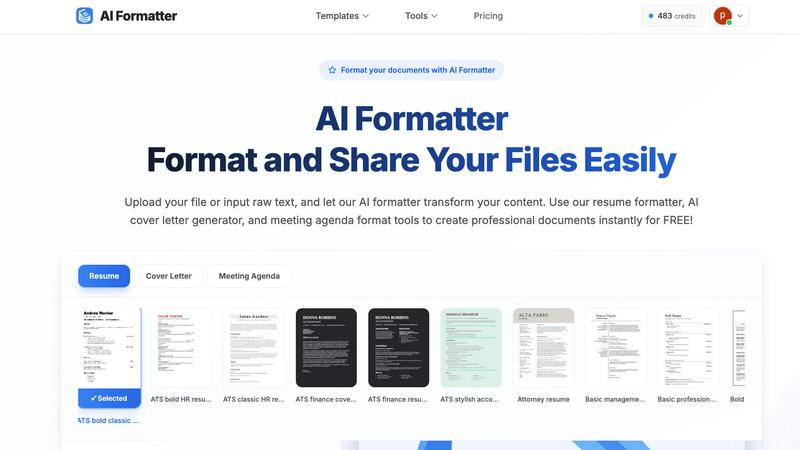
With just one click, users can upload a document or input raw text, allowing the AI formatter to instantly transform content into a polished format. This feature supports multiple file formats, including PDF, DOC, DOCX, and TXT, up to a maximum size of 10MB, enhancing user convenience.
ATS-Optimized Templates
AI Formatter provides an extensive library of over 162 professional templates specifically designed to pass ATS screenings. Users can choose from a variety of resume formats, cover letter designs, and meeting agenda layouts that are not only visually appealing but also functionally effective.
Real-Time Editing
After the AI processes a document, users can review and make adjustments using an intuitive editor. This feature enables customization of content while maintaining the professional look, allowing users to ensure that their documents are tailored to their specific needs.
Multi-Format Download Options
Once the document has been formatted and edited, users can download their creations in a variety of formats, including Word and PDF. This flexibility ensures that users can easily share or submit their documents according to their requirements.
PlagiarismRemover.AI
Multi-Mode Rewriting Engine
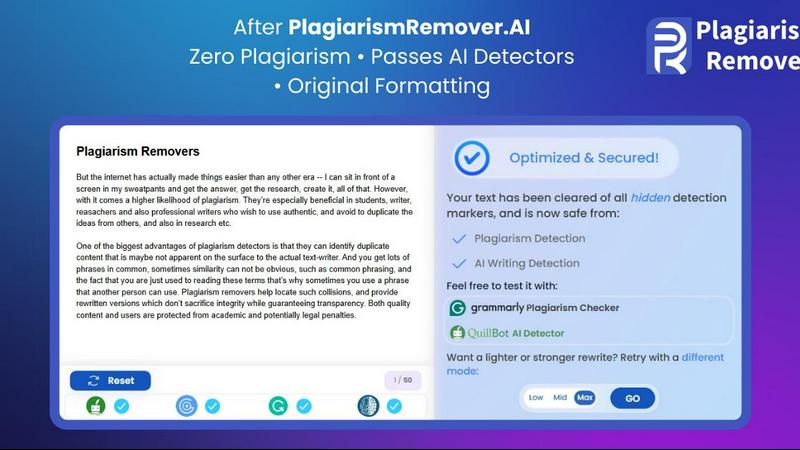
Choose from three distinct modes—Low, Mid, and Max—to control the depth of paraphrasing. The Low mode maintains your original tone and structure closely, while the Max mode provides the strongest rewrite for maximum originality. This granular control allows you to tailor the output to your specific needs, whether you're lightly polishing a draft or requiring a comprehensive overhaul to ensure uniqueness.
Format and Structure Preservation
Unlike many text processors that strip away formatting, PlagiarismRemover.AI is designed to keep your original document's layout, headings, bullet points, and spacing completely intact. This feature saves significant time and effort, allowing you to focus on content originality without the hassle of manually reformatting your entire document after processing.
AI and Plagiarism Detection Evasion
The platform is specifically engineered to produce content that avoids flags from both standard plagiarism checkers and advanced AI detection systems like GPT detectors. This ensures your rewritten work is perceived as genuinely original and human-written, which is paramount for academic integrity and professional authenticity in today's digitally-scrutinized environment.
Instant, Hassle-Free Processing
The tool requires no registration for its free version and operates on a straightforward paste-and-click principle. With no steep learning curve or complex setup, users can instantly process text and receive a clean, plagiarism-free version within seconds, making it one of the most accessible and efficient solutions available online.
Use Cases
AI Formatter
Job Seekers
Individuals looking for new employment opportunities can leverage AI Formatter to create ATS-compatible resumes and compelling cover letters that stand out in competitive job markets. By utilizing the platform, they can greatly enhance their chances of getting noticed by recruiters.
Business Professionals
Companies aiming to standardize their documentation can use AI Formatter to create professional meeting agendas and invoices. This ensures uniformity across all their professional materials, helping to maintain a consistent brand image.
Students and Graduates
Recent graduates or students entering the job market can utilize AI Formatter to craft polished resumes and cover letters that effectively showcase their skills and experiences, making them more appealing to potential employers.
Freelancers
Freelancers can benefit from AI Formatter by producing polished invoices and proposals that reflect professionalism. This not only enhances their credibility but also helps in securing more clients through well-formatted documentation.
PlagiarismRemover.AI
Academic Assignment Preparation
Students can use the tool to ensure their essays, research papers, and literature reviews are free from unintentional plagiarism. By processing sourced material or their own drafts, they can produce original work that upholds academic standards, avoids serious penalties, and reflects their true understanding of the subject matter.
Professional Report and Article Writing
Content marketers, bloggers, and professionals drafting white papers or industry reports can refine their content to ensure it is unique and publication-ready. The tool helps repurpose information from various sources into original narratives suitable for websites, client deliverables, or internal communications without copyright concerns.
Research and Thesis Development
Academics and postgraduate researchers can utilize the tool to paraphrase literature reviews, methodology descriptions, or cited work, helping to integrate existing knowledge into their thesis while maintaining a strong, original voice and avoiding self-plagiarism from their prior publications.
Content Localization and Repurposing
Writers and creators looking to adapt existing content for different regions, platforms, or audiences can use the tool to effectively rewrite the core material. This preserves the central message and factual accuracy while creating a fresh, unique version tailored to a new context or format.
Overview
About AI Formatter
AI Formatter is a cutting-edge, cloud-based document intelligence platform meticulously crafted to streamline the often arduous process of document formatting. Designed to cater to a diverse audience, it transforms raw, unstructured text and various uploaded files into polished, professional documents in mere seconds. The core strength of AI Formatter lies in its advanced AI engine, which not only enhances the aesthetic appeal of documents but also intelligently structures content for optimal effectiveness, especially for Applicant Tracking Systems (ATS). With a proven ATS pass rate exceeding 95%, job seekers gain a significant edge in their career pursuits. Whether you are an individual navigating a career transition or a business striving for standardized professional documentation, AI Formatter is your go-to solution. It boasts over 100 industry-specific templates for resumes, cover letters, meeting agendas, and invoices, ensuring every user can achieve a consistent and high-quality standard in their documentation. The platform seamlessly combines automation with user control through a real-time editing feature, making the creation of professional-grade documents both accessible and efficient.
About PlagiarismRemover.AI
PlagiarismRemover.AI is a sophisticated, AI-powered platform engineered for a singular, critical purpose: to transform plagiarized text into original, high-quality content. It serves students, academics, researchers, and professionals who need to ensure the integrity of their work without compromising on the core message or stylistic integrity of their writing. The tool goes beyond simple synonym replacement, intelligently rewriting content to pass both traditional plagiarism detection software and modern AI content analyzers. This dual-layer protection is essential for maintaining credibility in academic submissions and professional publications. A key differentiator is its commitment to preserving the original document's formatting and structural flow, allowing users to refine essays, reports, and articles without manual reconstruction. With an intuitive, no-setup interface and a robust free version for everyday tasks, PlagiarismRemover.AI delivers a reliable, accessible solution for producing authentic content with confidence and ease.
Frequently Asked Questions
AI Formatter FAQ
How does AI Formatter ensure ATS compatibility?
AI Formatter utilizes templates that are specifically designed to meet ATS requirements, ensuring that the formatting and structure of documents are optimized for automated screening systems.
What file formats does AI Formatter support?
AI Formatter supports a variety of file formats, including PDF, DOC, DOCX, and TXT, allowing users to upload existing documents or input raw text directly into the system.
Can I customize my documents after formatting?
Yes, AI Formatter includes a real-time editing feature that allows users to customize and edit their documents after the AI formatting process, ensuring that the final product meets their specific needs.
Is there a cost associated with using AI Formatter?
AI Formatter offers its services for free, allowing users to create professional documents without any financial commitment. However, please check the website for any updates or changes regarding pricing.
PlagiarismRemover.AI FAQ
How does PlagiarismRemover.AI ensure content is not detected by AI checkers?
PlagiarismRemover.AI employs advanced algorithms that go beyond simple word substitution. It focuses on restructuring sentences, altering phrasing patterns, and generating new contextual flow that mirrors human writing styles. This sophisticated approach helps the output bypass AI detection tools that look for robotic or formulaic language patterns commonly generated by standard paraphrasing tools.
Is the free version sufficient for regular use?
Yes, the free version of PlagiarismRemover.AI is designed to handle everyday plagiarism removal tasks effectively. It provides access to the core rewriting modes with a generous word limit per session, making it suitable for students and professionals working on standard-length documents, blog posts, or assignments without immediate need for premium features.
What happens to the formatting of my original document?
Your document's original formatting is meticulously preserved. This includes paragraph breaks, headings, bulleted or numbered lists, italics, and bold text. The AI processes the textual content for originality while leaving the structural and stylistic markup completely unchanged, so your document remains ready for immediate submission or publication.
What are the benefits of creating an account?
Creating a free account unlocks enhanced capabilities, including higher word limits per process, faster processing speeds, and access to more advanced features within the rewriting modes. An account provides a more powerful and efficient experience for users who frequently work with longer or more complex documents.
Alternatives
AI Formatter Alternatives
AI Formatter is a cloud-based document intelligence platform that specializes in transforming raw text into professionally formatted documents using an advanced AI engine. This tool falls under the category of productivity and management, streamlining the document creation process for both individuals and businesses. Users often seek alternatives to AI Formatter for various reasons, including pricing, specific feature sets, or compatibility with different platforms. When searching for alternatives, it is essential to consider factors such as template variety, user-friendliness, and the ability to maintain document structure and formatting integrity. Ultimately, the ideal alternative should provide a seamless user experience and a robust set of features that align with individual needs, ensuring that users can create high-quality documents efficiently. It’s also crucial to assess the extent of customization options and the support for various document types, especially for those who require industry-specific templates or enhanced compatibility with tools like Applicant Tracking Systems.
PlagiarismRemover.AI Alternatives
PlagiarismRemover.AI is a specialized AI tool in the content rewriting and plagiarism removal category. It is designed to help users transform existing text into original content, ensuring it passes both plagiarism and AI detection checks while maintaining the core message and document structure. Users often explore alternatives for various practical reasons. These can include budget considerations, the need for different feature sets like integration with other platforms, or simply a desire to compare the quality and output of different tools before committing to one. When evaluating other options, it’s wise to consider several key factors. Look for tools that offer a balance of output quality, ease of use, and reliable results. The ideal alternative should provide clear value, whether through superior rewriting intelligence, more flexible pricing, or better support for your specific workflow needs.