
MemberYOYO vs TemplateFox
Side-by-side comparison to help you choose the right AI tool.

MemberYOYO
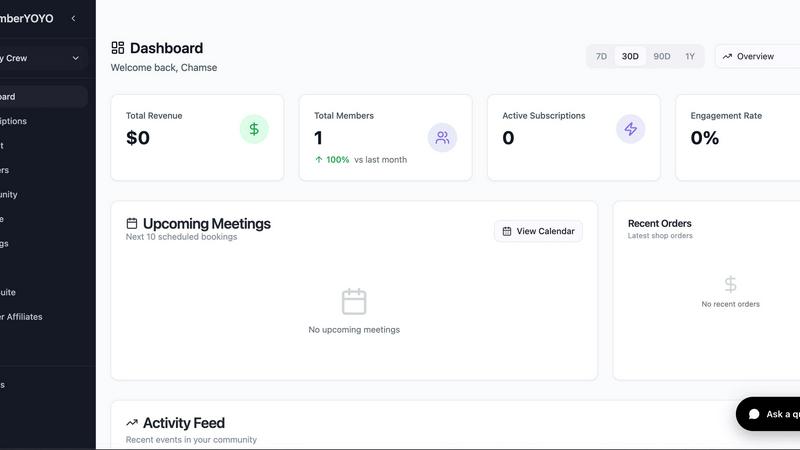
MemberYOYO simplifies building and monetizing your membership business with seamless management tools and user-friendly.
Last updated: February 28, 2026

TemplateFox
Effortlessly design dynamic PDF templates and automate thousands of documents with TemplateFox using API or Zapier.
Last updated: February 28, 2026
Visual Comparison
MemberYOYO
TemplateFox

Feature Comparison
MemberYOYO
Comprehensive Course Creation
MemberYOYO empowers users to create and sell online courses with ease. The platform includes features for progress tracking, allowing both creators and students to monitor learning milestones and achievements seamlessly.
Community Engagement Tools
With dedicated channels and direct messaging, MemberYOYO fosters vibrant communities. Users can engage their audience through discussions and collaborations, enhancing the overall experience and connection among members.
Integrated Booking System
The platform's integrated booking system simplifies scheduling for one-on-one consultations. It works effortlessly with Zoom and Google Meet, ensuring that both users and their clients can manage appointments without hassle.
Automated Email Broadcasting
MemberYOYO includes automated email broadcasting capabilities that keep users connected with their audience. This feature allows for efficient communication, updates, and marketing outreach without any additional effort.
TemplateFox
Visual Template Editor
TemplateFox boasts a powerful visual, drag-and-drop template editor that allows users to design professional documents without writing any code. This feature enables users to easily customize layouts, insert images, and adjust styles, ensuring that every document meets their specific branding needs.
Dynamic Data Binding
With dynamic data binding, TemplateFox allows users to inject real-time data into their templates. This means that names, addresses, prices, and other essential details can be automatically updated within the document, streamlining the workflow and reducing manual data entry errors.
Automatic Table Management
The platform features tables that adapt to the volume of data provided. Whether the data set has 3 items or 300, the tables grow automatically and can span multiple pages as needed. This functionality ensures that the presentation remains professional, regardless of data size.
Built-in QR Codes and Barcodes
TemplateFox provides the ability to generate QR codes and barcodes on the fly directly from the data input. This feature supports various formats including Code128 and EAN-13, making it easy for users to create documents that are both functional and easy to scan.
Use Cases
MemberYOYO
Launching an Online Course
An educator can use MemberYOYO to create an online course, allowing students to enroll, track their progress, and interact through community channels. This streamlines the entire learning experience in one platform.
Building a Coaching Community
A coach can leverage MemberYOYO to build a community around their coaching practice. With features like direct messaging and dedicated channels, they can foster support among clients while managing bookings seamlessly.
Hosting Virtual Workshops
Event organizers can utilize MemberYOYO to host virtual workshops. They can create an event page, manage registrations, and conduct live sessions through integrated video conferencing tools.
Engaging Audience Through Newsletters
Content creators can use the automated email broadcasting feature to send out newsletters, updates, or promotional offers to their audience, ensuring they remain engaged and informed about new content or services.
TemplateFox
Invoice Generation
Businesses can use TemplateFox to automate the creation of invoices. By designing a professional template and linking it to their accounting software, they can generate invoices in seconds, improving cash flow management and client satisfaction.
Certificate Creation
Educational institutions and organizations can leverage TemplateFox to issue certificates of achievement. With customizable templates, they can design certificates that reflect their branding and automatically populate the recipient's information.
Packing Slips for E-commerce
E-commerce businesses can streamline their order fulfillment process by generating packing slips tailored to each order. This not only enhances the user experience but also ensures that every package is accompanied by accurate shipping documentation.
Asset Tracking with QR Codes
Companies can create QR code sheets for asset tracking purposes. By generating PDFs that include QR codes for each asset, they can facilitate easier inventory management and enhance operational efficiency.
Overview
About MemberYOYO
MemberYOYO is an all-in-one membership platform tailored for creators, coaches, and community builders aiming to optimize their operational workflow and deepen audience engagement. It consolidates various functionalities into a single, user-friendly platform, eliminating the complications and costs associated with juggling multiple tools. Users can effortlessly create and sell online courses, complete with progress tracking, and cultivate vibrant communities through dedicated channels and direct messaging features. Additionally, MemberYOYO simplifies booking for one-on-one consultations, seamlessly integrating with popular video conferencing tools like Zoom and Google Meet. The platform also automates email broadcasting and streamlines payment processing through Stripe, without imposing any platform fees. Users can get started for free, with no credit card required, enabling them to launch a fully branded membership portal in just minutes. As your community grows and your needs evolve, MemberYOYO allows for easy scaling of features, making it an ideal solution for ambitious creators.
About TemplateFox
TemplateFox is a cutting-edge Software as a Service (SaaS) platform that simplifies the process of generating professional and dynamic PDF documents at scale. Designed for developers, indie hackers, and businesses alike, it serves as a dual solution comprising a visual drag-and-drop template editor and a high-speed API for on-demand PDF generation. The main value proposition of TemplateFox is its ability to automate document workflows without requiring users to have any expertise in HTML, CSS, or PDF libraries. Users can create visually appealing templates for various documents such as invoices, reports, and certificates, and seamlessly populate them with live data through straightforward API calls or no-code automation tools like Zapier. With generation times as quick as 1-3 seconds, flexible delivery options, and a free tier to get started, TemplateFox bridges the gap between design flexibility and developer-friendly automation, making it an essential tool for anyone needing reliable document generation.
Frequently Asked Questions
MemberYOYO FAQ
What types of creators can benefit from using MemberYOYO?
MemberYOYO is designed for a wide range of creators, including educators, coaches, community builders, and anyone looking to monetize their expertise or foster a community.
Is there a free trial available?
Yes, MemberYOYO offers a free start option with no credit card required, allowing users to explore the platform and its features without any financial commitment.
How does the payment processing work?
MemberYOYO integrates with Stripe for payment processing, allowing users to accept payments easily and securely without incurring additional platform fees.
Can I scale my features as my audience grows?
Absolutely! MemberYOYO is built to scale with your business. As your audience and needs grow, you can effortlessly upgrade your features to enhance your offerings and streamline operations.
TemplateFox FAQ
How does TemplateFox handle document generation?
TemplateFox generates documents through a powerful API that processes template designs and live data input to create PDFs in as little as 1-3 seconds.
Is coding experience necessary to use TemplateFox?
No, TemplateFox is designed for users of all skill levels. Its visual template editor and no-code integrations make it accessible for those without technical backgrounds.
What types of documents can I create with TemplateFox?
You can create a wide variety of documents including invoices, reports, certificates, packing slips, and more, all tailored to your specific needs.
Is there a free version of TemplateFox available?
Yes, TemplateFox offers a free tier that allows users to generate up to 60 PDFs per month, enabling them to explore its features without any financial commitment.
Alternatives
MemberYOYO Alternatives
MemberYOYO is an all-in-one membership platform designed for creators, coaches, and community builders, allowing them to build, manage, and monetize their memberships seamlessly. This comprehensive solution combines various functionalities, such as online courses, community engagement, and booking systems, into one user-friendly dashboard. Users often seek alternatives to MemberYOYO due to factors like pricing, specific feature requirements, or compatibility with their existing workflows. When exploring alternatives, it's essential to consider the ease of use, scalability, and the specific features that align with your business model and growth goals. --- [{"question": "What is MemberYOYO?", "answer": "MemberYOYO is a comprehensive membership platform that enables users to build, manage, and monetize their membership businesses effectively."},{"question": "Who is MemberYOYO for?", "answer": "MemberYOYO is designed for creators, coaches, and community builders looking to streamline their operations and enhance audience engagement."},{"question": "Is MemberYOYO free?", "answer": "MemberYOYO offers a free start with no credit card required, allowing users to launch a fully branded membership portal quickly."},{"question": "What are the main features of MemberYOYO?", "answer": "The main features include membership management, course creation, community engagement tools, booking systems, and automated email marketing."}]
TemplateFox Alternatives
TemplateFox is an innovative SaaS platform that simplifies the generation of professional PDF documents through a visual drag-and-drop template editor and a robust API. It belongs to the productivity and management category, focusing on automating document workflows for developers, businesses, and indie hackers without requiring technical expertise. Users often seek alternatives due to factors such as pricing, specific feature requirements, or the need for compatibility with existing platforms and workflows. When looking for an alternative to TemplateFox, consider essential factors such as ease of use, scalability, pricing structures, and the ability to integrate with other tools or services. Evaluate the level of design flexibility offered and whether the solution can meet your unique document generation needs efficiently. A strong customer support system and user community may also enhance your experience with an alternative platform.