
invoice Sonic vs Receipt Generator
Side-by-side comparison to help you choose the right AI tool.

Create professional invoices instantly for free with no signup required.
Last updated: February 28, 2026

Receipt Generator
Create realistic custom receipts instantly with 400+ free templates for legitimate business and personal use.
Last updated: April 4, 2026
Visual Comparison
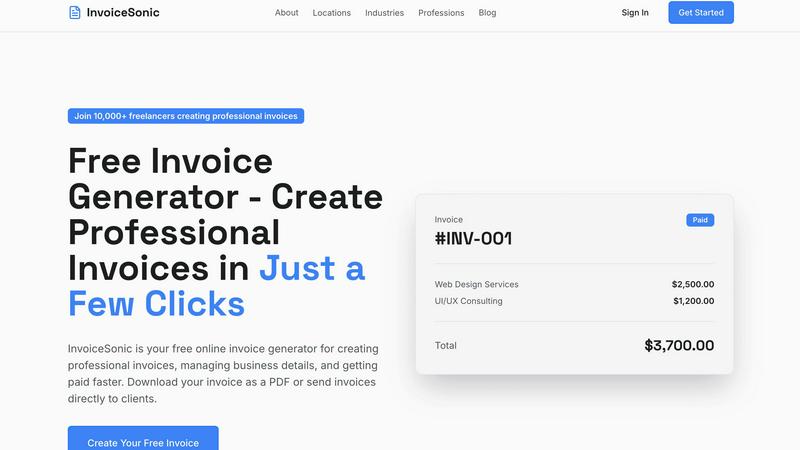
invoice Sonic
Receipt Generator

Feature Comparison
invoice Sonic
Instant, No-Signup Invoice Generation
Create a complete, professional invoice in under a minute without any account creation. Simply enter your business and client details, add line items, and download your PDF. This feature eliminates all barriers to entry, providing immediate value and respecting the user's time, which is essential for busy freelancers and entrepreneurs who need to bill quickly.
Curated Professional Template Library
Access a carefully selected collection of clean, modern invoice templates designed for clarity and impact. Each template adheres to professional standards, ensuring your invoices include all necessary fields like invoice numbers, due dates, and payment terms. This removes the burden of design and formatting, guaranteeing a polished result every time, regardless of your industry or profession.
Automated Calculations & Tax Support
The platform automatically calculates subtotals, taxes (like GST), and final totals as you add items, quantities, and prices. This eliminates manual math errors, ensures accuracy, and saves significant time. You can easily apply taxes and set payment terms, allowing you to focus on your work while InvoiceSonic handles the precise financial details.
Brand Customization with Logo Integration
Personalize your invoices by adding your business logo and permanently saving your company details. This feature allows you to build a consistent brand identity across all client communications. A customized invoice reinforces professionalism and brand recognition, helping your business stand out and build trust with every bill you send.
Receipt Generator
400+ Store-Specific Templates
Choose from a vast, curated collection of over 400 professionally designed templates that accurately replicate receipts from popular supermarkets, pharmacies, restaurants, and retail stores. Each template includes authentic thermal-style fonts, correct store headers, and proper formatting for items, taxes, and totals, providing a perfect starting point for a realistic receipt in just one click.
AI-Powered "Place in Scene"
This groundbreaking feature uses advanced AI to generate photorealistic images of your digital receipt placed on any real-world surface. Simply upload your receipt and select a scene—like a wooden desk, kitchen counter, wallet, or crumpled in a pocket—to create a convincing image that looks like a physically printed and photographed receipt, all without ever needing a printer.
Full Customization & Drag-and-Drop Editor
Exercise complete control over every detail of your receipt. The intuitive drag-and-drop editor allows you to add, remove, and rearrange blocks for headers, line items, totals, barcodes, and QR codes. Customize store information, item names, prices, taxes, discounts, payment methods, and even stylistic elements like fonts and spacing to match your exact specifications.
Instant High-Resolution Export
Generate and download your finished receipt instantly as a high-resolution PNG or PDF file. The process is designed for speed and efficiency, with no lag, waiting queues, or mandatory account creation on the free tier. Pro users enjoy unlimited, watermark-free downloads, ensuring professional-grade documents are ready for use in seconds.
Use Cases
invoice Sonic
Freelancers & Independent Contractors
Ideal for freelancers who need to bill multiple clients for project-based or hourly work. They can quickly generate professional invoices after project completion, apply their logo for brand consistency, and send PDFs instantly. The speed and lack of subscription fees make it a perfect, cost-effective tool for managing variable income streams without administrative overhead.
Small Business Owners & Startups
Small businesses and startups operating with lean budgets can use InvoiceSonic to establish a professional billing process from day one. They can create standardized invoices for recurring services, manage different client accounts, and present a credible image to customers without investing in expensive accounting software, allowing them to allocate resources to core business growth.
Service-Based Professionals
Consultants, coaches, designers, and other service providers can efficiently invoice for their expertise. The platform supports detailed line-item descriptions for services rendered, making it easy to break down project phases or hourly work. The professional format clearly communicates value to the client, facilitating clearer communication and faster payment.
Sending Quotes & Proforma Invoices
Professionals can utilize the platform to create and send proforma invoices or detailed quotes to potential clients before starting work. This provides a clear, formal outline of proposed services, costs, and terms, setting professional expectations upfront and helping to secure new projects with a polished proposal document.
Receipt Generator
Expense Reporting & Business Documentation
Freelancers and small business owners can quickly generate professional receipts for expense reports, client invoicing, and tax documentation. Customize receipts to reflect actual purchases or create clean, organized records for bookkeeping purposes, saving time and ensuring paperwork is always accurate and presentable.
Content Creation & Social Media Proof
Content creators, influencers, and marketers can produce realistic receipt visuals for tutorials, haul videos, budgeting content, and product reviews. The AI "Place in Scene" feature is perfect for creating engaging, authentic-looking photos for Instagram, TikTok, or blogs that require visual proof of purchase or spending narratives.
Mockups & Visual Design Projects
Graphic designers and UI/UX professionals can use Receipt Generator to create realistic receipt mockups for websites, mobile apps, and advertising materials. The ability to customize every detail and place the receipt in a contextual scene allows for the creation of highly authentic prototypes and marketing assets.
Reselling & Inventory Management
Online resellers and small shop owners can generate proof of purchase for items, create organized records for inventory tracking, or provide customers with customized receipts. The wide range of store templates allows for accurate replication of receipts from various sources, which is invaluable for authentication and sales documentation.
Overview
About invoice Sonic
InvoiceSonic is a curated, web-based platform designed to transform the invoicing process from a tedious administrative task into a seamless, professional experience. It serves as an immediate solution for freelancers, startups, and small business owners who need to create polished invoices without the friction of signups, subscriptions, or complex software. The core philosophy is quality-over-quantity, offering a focused toolset that prioritizes elegance, speed, and professionalism. Users can generate, preview, and download fully formatted invoices in seconds, completely free for essential needs. By moving beyond clunky spreadsheets and outdated systems, InvoiceSonic provides a selection of clean, modern templates that ensure every bill reflects a high standard of business credibility. It automates critical calculations for totals and taxes, supports brand customization with logos, and facilitates instant PDF generation. This approach empowers independent professionals to get paid faster and present their business with confidence, making professional billing accessible from the very first invoice.
About Receipt Generator
Receipt Generator is the definitive online tool for creating authentic, high-quality digital receipts. It transforms the tedious process of receipt creation into a seamless, professional experience. The platform offers an extensive library of over 400 store-specific templates, meticulously designed to match the exact layout, fonts, and formatting of major retailers like Walmart, Target, Starbucks, CVS, and Best Buy. Users have complete control to customize every element—from line items and prices to dates, payment methods, and store details—before downloading a pixel-perfect, high-resolution file in seconds. What truly distinguishes Receipt Generator is its pioneering AI "Place in Scene" feature, which generates photorealistic images of your receipt placed on any surface imaginable, eliminating the need for physical printing. Designed for legitimate business, creative, and personal use, it serves a global community of small business owners, freelancers, content creators, and resellers who require reliable, fast, and visually convincing receipt documentation without compromise.
Frequently Asked Questions
invoice Sonic FAQ
Is InvoiceSonic really free to use?
Yes, InvoiceSonic offers a completely free tier that allows users to create and download professional invoices without any signup or credit card required. This free plan is designed to cover essential invoicing needs, providing immediate access to core features like template selection, automatic calculations, and PDF generation.
What file format are the invoices downloaded in?
Invoices are generated and downloaded instantly as high-quality PDF files. The PDF format is universally accepted, ensures formatting remains intact across all devices, and provides a professional, non-editable document that is ideal for emailing directly to clients or for your own records.
Can I add my company logo and details to the invoices?
Absolutely. InvoiceSonic allows you to fully customize your invoices by uploading your business logo and saving your company details, address, and contact information. Once saved, these details can be automatically applied to all future invoices, maintaining consistent and professional branding.
How many invoices can I create for free?
InvoiceSonic provides a generous free allowance, permitting users to create up to five invoices per month at no cost. This is typically sufficient for many freelancers and small businesses to manage their core billing needs without any financial commitment or subscription pressure.
Receipt Generator FAQ
Is Receipt Generator free to use?
Yes, Receipt Generator offers a free tier that allows you to create and download receipts with a watermark. This is perfect for testing the tool and for casual use. To remove the watermark, access unlimited downloads, and use AI credits for the "Place in Scene" feature, you can upgrade to a paid Pro plan.
What is the "Place in Scene" AI feature?
"Place in Scene" is an AI-powered tool that takes your digital receipt and generates a photorealistic image of it placed on a real-world surface. You can choose from scenes like a desk, table, wallet, or pocket. It digitally "prints" and photographs your receipt, creating a highly realistic image perfect for content creation and mockups without any physical printing.
Can I customize every part of the receipt?
Absolutely. Receipt Generator provides full customization capabilities. You can edit all text, including store names, addresses, item lists, prices, taxes, dates, and payment methods. The drag-and-drop editor also lets you add or remove elements like barcodes, QR codes, and dividers, and adjust styling for a completely tailored result.
Are the receipts generated legally valid for returns or taxes?
No. Receipt Generator is designed for legitimate business, creative, and personal use such as mockups, expense reporting, and content creation. The receipts produced are not intended and should not be used for fraudulent purposes like attempting returns, claiming false expenses, or deceiving tax authorities. Always refer to the platform's Terms of Service for acceptable use.
Alternatives
invoice Sonic Alternatives
InvoiceSonic is a streamlined, web-based invoice generator in the productivity and management category, designed for freelancers and small businesses. It prioritizes immediate, professional invoicing without signups, offering a free tier for essential needs. Users often explore alternatives to find a solution that better fits their evolving requirements. This search may be driven by the need for more advanced features, a higher monthly invoice volume, integration with other business platforms, or a different pricing structure beyond a freemium model. When evaluating other options, consider the balance between core invoicing functionality and advanced capabilities. Key factors include the transparency and scalability of pricing, the quality and customizability of templates, the availability of features like client portals or automated reminders, and the overall ease of use that aligns with your business workflow.
Receipt Generator Alternatives
Receipt Generator is a specialized productivity tool for creating custom, professional receipts. It falls into the category of digital receipt and document creation software, designed to help users quickly generate proof-of-purchase documents for a variety of personal and professional scenarios. Users often explore alternatives for several reasons. They might be seeking different pricing models, such as a one-time purchase versus a subscription. Others may require specific features like bulk generation, advanced customization, or integration with other business platforms. The need for a mobile app versus a web-based tool also drives the search for different solutions. When evaluating an alternative, consider the core value it provides. Key factors include the quality and realism of the receipt templates, the depth of customization available for items and store details, and the final output format. Also assess any unique features, such as AI-enhanced capabilities, and ensure the tool's ease of use aligns with your technical comfort and workflow requirements.